
Getting Started with Agentic AI
You can access Agentic AI through the Microsoft Teams Bot and the web-based chat interface. Users with the Self Service role can use either option to interact with Agentic AI and connect with a Live Agent when needed.
Users with their role defined in the DefaultAgenticAIUserRole global constant or users with Self Service role (if the global constant is not defined) can interact with Agentic AI and connect with a Live Agent when needed. For more information about DefaultAgenticAIUserRole, refer to List of Global Constants.
To get started, checkout the following topics to begin your Agentic AI journey:
- Configure Global Settings
- Configure Agent Settings
- Interact with Agentic AI
- Analytics
Create Agentic AI Teams Bot
To use Agentic AI through Microsoft Teams, integrate Neurons for ITSM with Microsoft Teams Bot and create a custom Teams app. For more information, refer to Create the Agentic AI Bot.
Configure Global Settings
Refer to Configuration of Agentic AI.
Configure Agent Settings
Refer to Configuration of Agentic AI.
Interact with Agentic AI
You can interact with Agentic AI either through Microsoft Teams Bot or WebChat feature.
- Microsoft Teams app
To interact with Agentic AI through Microsoft Teams, integrate Neurons for ITSM with Microsoft Teams Bot and create a custom Teams app. For more information, refer to.
- WebChat
WebChat is a web-based chat interface that allows eligible users to interact with Agentic AI directly from Neurons for ITSM, without requiring Microsoft Teams.
- WebChat feature is available in Neurons for ITSM version 2026.3.1.0 or later.
- WebChat is available only to users in UI v2.
- To enable WebChat, set the IntelligentWebChatIntegrationEnabled global constant to True.
- To use WebChat, enable the EnableAIChatFeature feature flag. Reach out to your Ivanti Account Manager to enable this feature flag.
- Webchat is available for users of Self Service role specified in the global constant DefaultAgenticAIUserRole.
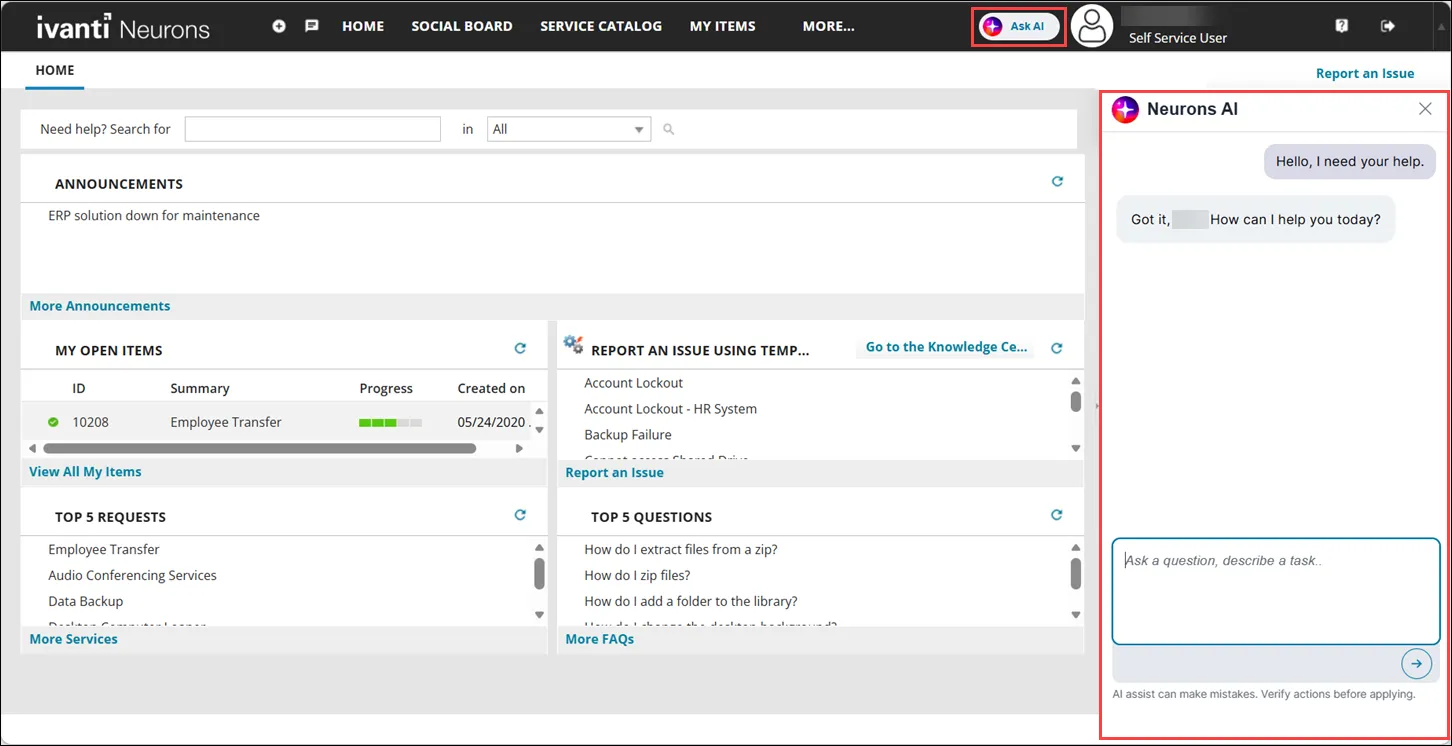
To open the web-based chat, click Ask AI. The chat pane opens and you can start a conversation with Agentic AI.
Analytics
Use the Analytics feature to monitor the performance and usage of Agentic AI. Global Analytics provides a consolidated view of performance metrics across all AI agents, while agent-specific analytics provides detailed metrics and usage statistics for individual agents.
For a consolidated view of performance metrics across all AI agents, refer to Analytics.
For the performance metrics of individual agents, refer to Knowledge base agent, Incident creation agent, Service request agent, and Q&A agent.