
Working with Webhooks
Role: Administrator
Minimum Version: Ivanti Neurons for ITSM 2023.4.
About Webhooks
Webhooks process incoming messages triggered by events initiated in third-party tools and sent to an ITSM endpoint. Incoming message data must be valid JSON or XML.
This is a new centralized webhook feature that can ultimately support multiple webhooks, endpoints, and authentication methods. Each webhook can be assigned to an Action via a variable that allows the automatic parsing of the data received. This diagram shows the high-level process:
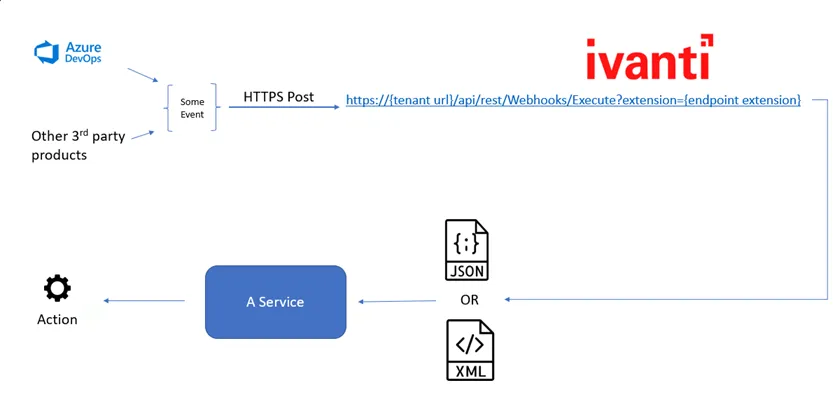
Webhooks Processing
Incoming webhooks are processed by the ITSM REST API, which:
- Validates the webhook and URL.
- Validates that the format type declared in an incoming message header matches the body format. If they do not match, the request is rejected.
- Validates that an incoming message does not exceed the webhook limit specified for your system.
- Provides a response code to the sender.
For more information, see Webhooks Logging.
Parsing JSON or XML Data
Webhooks use JSON and XML Modifiers configured for Actions to parse, change, and use data between an external tool and ITSM. For JSON, incoming data must be a valid JSON object.
This parsing process uses the Update Variables or Stored Values type of Action as the method to convert valid JSON or XML strings into data that ITSM can consume. It creates a variable that declares a data type of JSON, XML, or XML Collection and holds valid string data of the selected data type.
Webhooks Authentication
For this release, the Webhooks feature can only support api-key authentication, but this will be expanded in future releases.
Normally, the type of authentication you set for your webhook endpoint depends on the third-party tool from which events are initiated. For example, Amazon Simple Notification Services (SNS) uses basic authentication for webhooks. Other tools, such as Jira Software, use no authentication.