
Working with the Call Log
About the Call Log
The call log is a separate module for logging service calls about IT or other operational or infrastructure issues, and is accessed from the Call Log workspace. This workspace is available to administrators, Call Log Support Desk Analysts, Call Log Support Desk Managers, and Call Log Self Service users.
The call log allows both employees and support services to log a case about issues or outages. This module is not connected to and does not update the data in the Incident and Service Request modules.
About Call Log Dashboards and Roles
Call log dashboards and roles are used when you implement the Call Log module. There are two dashboards specific to the call log that can be accessed by Call Log Support Desk Analysts and Call Log Support Desk Managers. For more information about these dashboards, see Call Log Default Dashboards.
The call log roles must be assigned to users in order to grant access to create a support ticket or view ticket metrics.
- Support Desk Analyst for Call Log: For support desk personnel. Has access to the Call Log Support Agent dashboard.
- Support Desk Manager for Call Log: For support desk managers. Has access the Call Log Support Manager dashboard.
- Self Service with Call Log: Assigned to employees who may need to create a support ticket using the call log in the Self-Service Portal.
Creating a Call Log
You must have one of the roles listed in About Call Log Dashboards and Roles before you can access the call log.
- Log in to the Service Desk Console as a Call Log Support Desk Manager or Call Log Support Desk Analyst.
- From the top header bar, select Call Log to open the workspace.
- Click New HEAT Call Log.
- Enter information into the fields and tabs. Mandatory fields are marked with an asterisk. Not all options are available to all users.
The Call Log tab contains the following fields:
Form Parts Name | Description |
|---|---|
Customer Type | Choose from company, department, or employee. |
Call # | Automatically entered by the application. |
Employee ID | Enter information to narrow choices or search for employee name. The Contact Name, Phone Number, Email, and Customer ID fields are automatically populated. |
Department | Automatically entered from the info in the Employee ID field. You can also enter a department name. |
Facility | Enter information. |
Call Description | Free-form text field to enter a description of the issue |
Call Type | Select how the issue was received by the support desk. The choices affect the information available under Category and Priority. |
Category | Select from the available choices. The selection may affect the choices under Priority. |
Priority | Choices change based on selection for category. |
Solution Description | For support desk to enter the solution for the issue. |
Cause | Select a cause type from the list. |
Owner | Lists the name of the person who was assigned the ticket. |
Source | Select the source of the ticket from the choices. |
Attachments | Allows you to attach data or image files. |
Assets | Allows you to link to the affected asset. |
Closed on 1st Contact? | Specifies if the a solution was immediately provided to the caller. |
Suspend | Allows a Call Log Service Desk Agnalyst to suspend the clock for the ticket. For example, when waiting for the delivery of a part or other item such as software, or access to the machine. |
- The Assignment tab allows you to create a new assignment or new task by clicking New Assignment.
- The Journal tab allows you to enter notes or send an email about the issue by clicking Journal.
Call Log Support Desk Analysts and Call Log Support Desk Managers can change the default owner of a call. Normally, the person entering the call data is the default owner.
Call Log Support Desk Managers can also reopen a closed call.
Making Changes to the Call Log Workspace and Related Tabs
You can change the choices available to the Call Log workspace and show or hide tabs by editing the interface. For example:
- You can hide the Suspend button for Call Log Self Service users in the forms view.
- Administrators can change or set different escalation schedules from the Configuration Console.
Resolving Call Log Loading Error
In ITSM version 2026.2, sometimes the following error occurs while rendering the Call Log page.
Call log page loading error
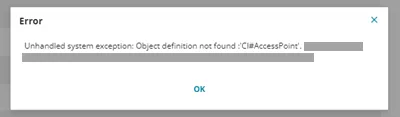
To resolve this issue there is a workaround:
- Navigate to Build > Business Objects in the Configuration console and search for HEAT Call Log.
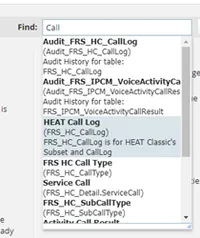
- Select Forms > FRS_HC_CallLog.CallLogForm.
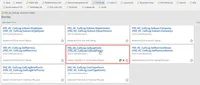
- Select Assets > Flex settings.
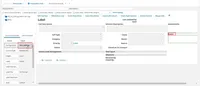
- The Flex Settings form is shown. Change anything in this form and click Save.
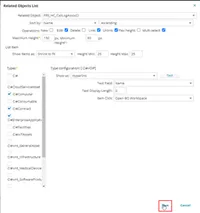
- Click Save in the FRS_HC_CallLog.CallLogForm.
The error is resolved and the Call Log page renders accurately.