
Working with Workflow Instances
If a business object is part of a workflow (usually involving the approval process or a status progression), then a workflow appears under the Workflow Instance tab of a record or in the Workflow Instance workspace.
Viewing a Workflow Instance
- Log into the Service Desk Console.
- Open a workspace.
- Open a record.
- Select the Workflow Instance tab. Any workflows associated with the record are listed.
- Open a workflow item from the list or highlight one and click Go To. The system displays the Edit Workflow Instance window.
Edit Workflow Instance Window
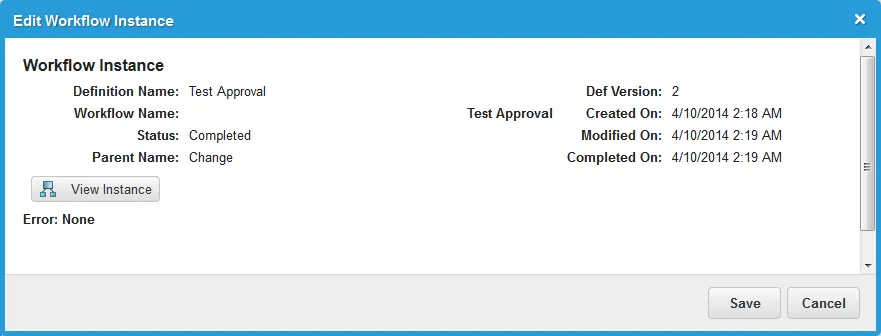
- Click View Instance. The workflow appears in a new window.
About Adding a Workflow Instance
Workflow instances are created in two ways:
- Automatically, according to the workflows and business rules set up by the administrator.
- By rerunning a workflow. See Rerunning a Workflow.
Modifying a Workflow Instance
- Log into the Service Desk Console.
- Open a workspace.
- Open a record.
- Click the Workflow Instance tab. Any workflows associated with the record are listed.
- Double-click a workflow item from the list or highlight one and click Go To. The system displays the Edit Workflow Instance window.
- Modify the workflow as needed. See Using Workflows for more information.
About Deleting a Workflow Instance
You cannot delete workflow instances from within a record. You can, however, cancel or stop the workflow. See Example: Canceling a Workflow that is Awaiting Approval.
Rerunning a Workflow
About Rerunning a Workflow
Workflows usually run when a trigger condition is met. However, there can be times when a workflow does not run as expected, due to various reasons. For example, the workflow engine could be stuck or not running, there could be a content conflict that causes unreachable conditions, or a process might have skipped a business rule. In prior releases, when this happened, you could not rerun the workflow because the trigger condition had passed.
Make sure that you understand the impact of rerunning a workflow. When you rerun a workflow, you are rerunning it again irrespective of the previous success or failure status of the workflow instance. Rerunning the workflow does not undo the previous workflow execution.
Use this feature with caution, as you cannot stop it and it cannot be undone.
If the workflow has already run as expected, and you rerun it, you may not get correct results because the conditions associated with the workflow may not be correct anymore.
Rerunning the workflow can duplicate data or cause other problems.
Rerunning a Workflow from a Workspace
This is equivalent to running the Execute Workflow quick action. See Execute Workflow Action. You can also create a triggered action that uses the Execute Workflow quick action, to run the workflow on an event.
To rerun a workflow from a workspace, follow these steps:
- Log into the Service Desk Console.
- Open any workspace.
- From the Action Menu drop-down list, click View Workflow.
The item might be listed under a specific category, such as Form Actions in this example. If View Workflow does not appear under the Action Menu, then it has not been set up for this workspace.
The system displays the View workflow definition and instance dialog box.
View Workflow Definition and Instance Dialog Box
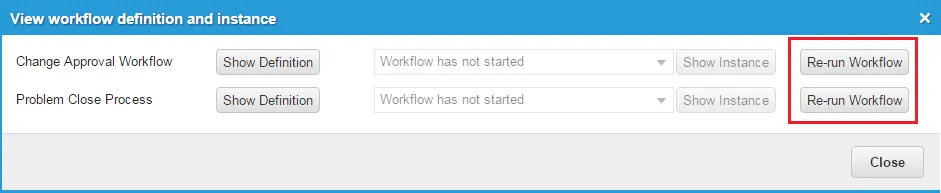
- Click Re-run Workflow to rerun the workflow. The system displays a cautionary message.
Rerun Workflow Cautionary Message
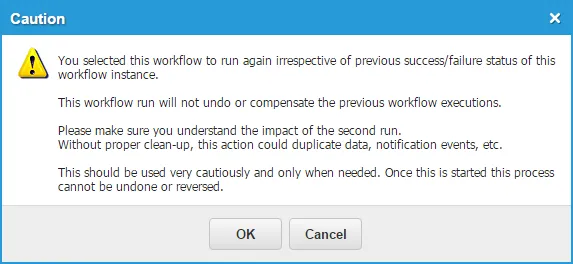
- Click OK to proceed.
Rerunning a Workflow from the Workflow Instance Workspace
You can rerun a workflow only if the status is set to completed, failed, or aborted.
To rerun a workflow from the Workflow Instance workspace, follow these steps:
- Log into the Service Desk Console.
- Open the Workflow Instance workspace.
Workflow Instance Workspace
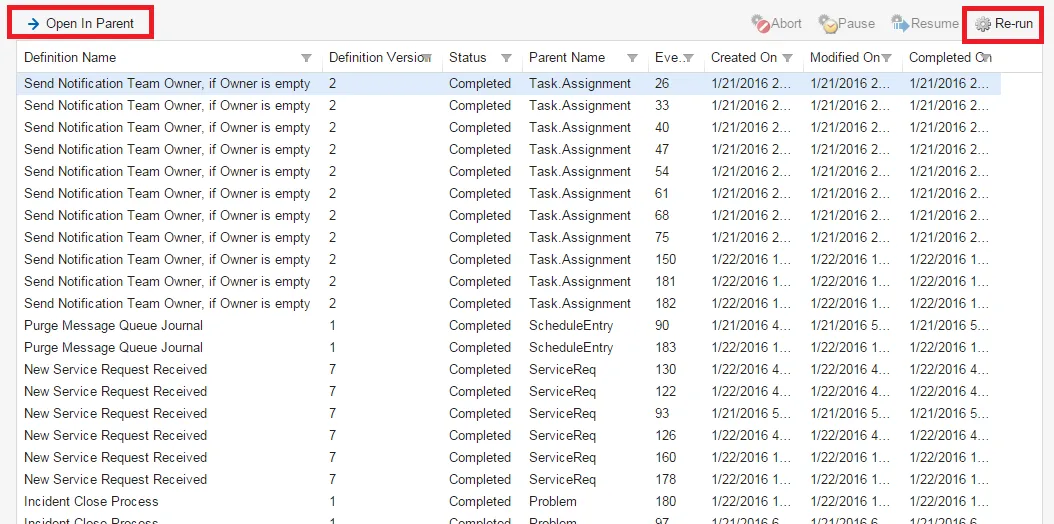
- Highlight one or more items.
- Click Re-run from the top menu. The system displays a cautionary message.
- Click Yes to rerun the workflow.
- To verify that the workflow reran correctly, open the item in its parent by clicking Open In Parent from the Workflow Instance workspace. The system opens the item in its parent workspace.
- Click the Workflow Instance tab and view the dates and times associated with the workflows.
Aborting, Pausing, and Resuming a Workflow Instance
You can abort, pause, and resume a workflow instance if it is in the waiting state. Abort a workflow instance to stop it completely. Pause a workflow instance if you need to fix or investigate the business object, and then resume it when you are finished.
- Log into the Service Desk Console.
- Do one of the following:
- Open the Workflow Instance workspace.
- Go to a workspace, open a record, and click the Workflow Instance tab.
- Find a workflow instance that has a status of waiting.
- Do one of the following:
- To abort the workflow instance, click Abort.
- To pause a workflow instance that is running, click Pause.
- To resume a paused workflow instance, click Resume.