
Service request agent
Minimum Version: Ivanti Neurons for ITSM 2026.1
The Service request agent understands what the user needs and automatically submits the correct service request, making service delivery faster and easier.
To enable and configure the Service request agent, do the following:
- Log in to Neurons for ITSM as an Administrator.
- Open the Configuration console and select AI Configuration Hub > Agentic AI > Agent Settings.
- Enable the Service request agent using the toggle button.
- Click Configure to further configure the agent.
- Under Messaging and interaction, configure the following settings:
- Successful creation: Enter a success message that agent displays following the successful creation of a Service request. You can add and to the message, which displays the service request ID and link to the record.
- Allow transfer to live agent: Enable the toggle button to transfer the interaction to your Service Desk Human Agent in case the Agentic AI bot cannot solve the user's request.
Along with this toggle, you must also enable the Allow transfer to live agent toggle in Global Settings > Escalation Handling.
- Under Service request handling > Default service request template, set the default Service request template from the dropdown.
In response to a user's query, the agent presents the top three matching templates along with the default template you configured to the user. For example, a user requesting a loaner laptop.
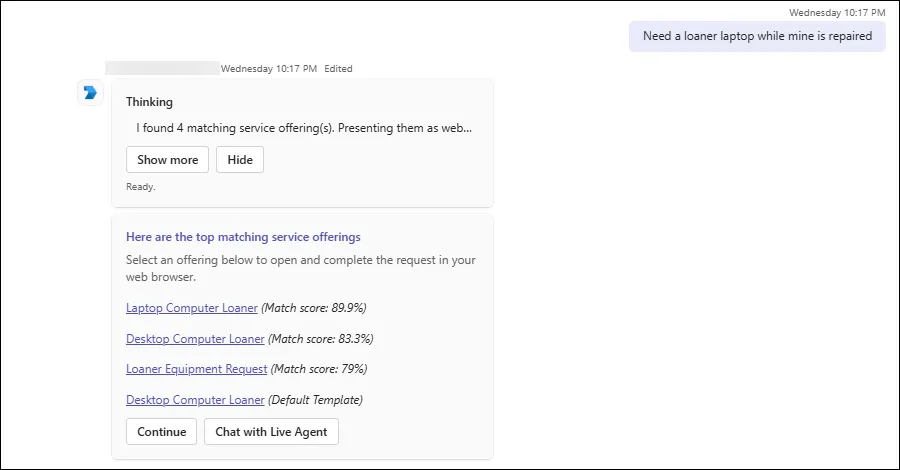
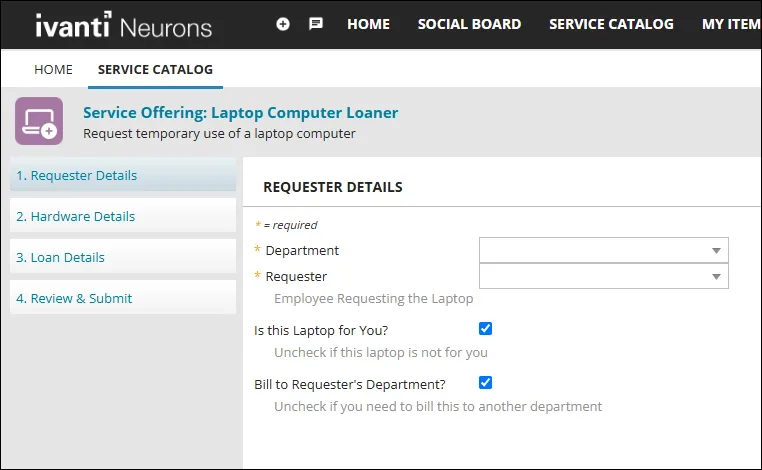
Once the user clicks a link, the service request template opens in a web browser for further completion, and the Continue action button becomes available for further interaction.
Clicking Continue enables the following interactive action buttons:
- Yes I'm all set: Indicates that you are satisfied with the suggested service request and have successfully opened the service request form.
- No, start a new query: Starts a new session if you are not satisfied with the resolution.
- Chat with a live agent: Transfers the session to a live agent.
If the user clicks Continue without selecting a form, all form hyperlinks become disabled (grayed out). As a result, the user cannot go back and select a form.
- Under Advanced settings > Service request description, define the scope of the Service request agent by detailing the types of Service request queries the agent can handle. You can also provide some example queries related to Service requests to help the agent better understand the context. When users ask queries other than those defined here, the agent considers them out of context and replies to users accordingly.
Modifying the intent description might result in unpredictable agent behavior. We recommend that only users with experience in LLM prompt engineering make these changes.
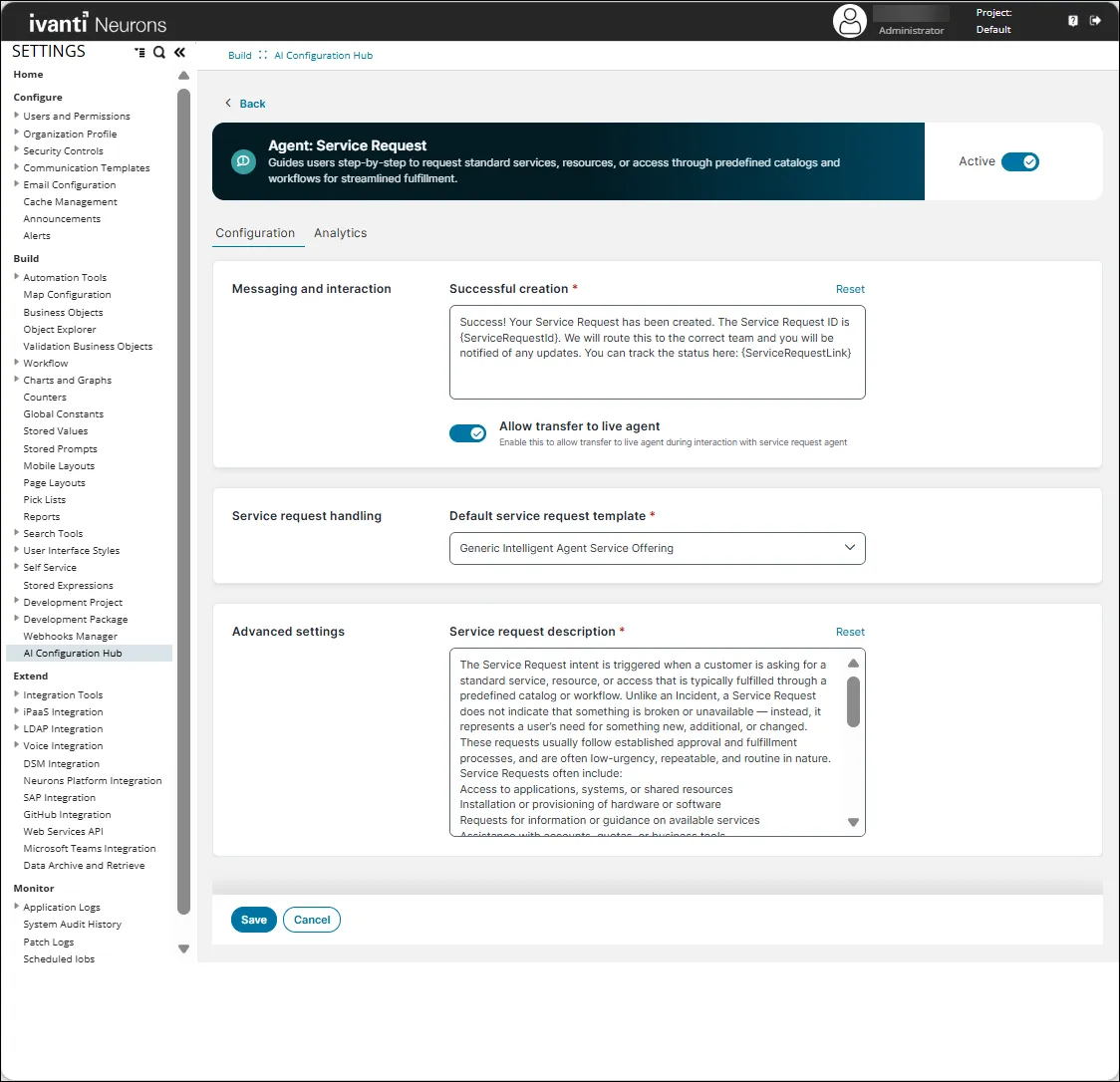
Fields marked with an asterisk (*) are mandatory.
Analytics
To view the performance metrics and usage statistics for your Service request agent, open the Configuration console and select AI Configuration Hub > Agentic AI > Agent Settings > Service request agent > Configure > Analytics.
The Analytics page provides the performance of the Service request agent. It helps you monitor the following metrics:
- Number of SR Agent Interactions: The total number of interactions initiated with the Service request agent.
- Number of SR Interactions transferred to Live Agents: The number of service request interactions that were successfully transferred to a live agent.
- SR Live Agent Transfer Rate: The percentage of service request interactions that resulted in a successful transfer to a live agent.
- Number of SR Deeplinks Opened via SR Agent: The total number of Service request agent conversations in which the user opened a Service Request form through the deeplink provided by the agent.
- SR Deeplink Engagement Rate: The percentage of Service request agent conversations in which the user opened an SR deeplink.
- Number of Conversations with No SR Deeplink Opened: The number of Service request agent conversations in which no Service Request deeplink was opened. This can occur if the user did not open the deeplink, the session ended before completion, or the deeplink could not be opened.
The Time Range filter allows users to specify the period for which analytics data is displayed. Metrics on the Analytics page are updated based on the selected time range.
Limitations
- WebChat conversation summary not sent to Live Agent: During Live Agent Transfer in WebChat, a conversation summary should be sent to the Live Agent at the beginning of the session. This functionality is currently not working.
- No guidance after Live Agent Transfer: At the end of a Live Agent Transfer session, users are not informed about what to do next. However, when the session ends, the Agentic AI is reset and users should initiate a new prompt, even if no live agent was available.
- Only IT-related requests are supported: The Agentic AI handles only IT‑related issues. Other Line of Business (LoB) queries, such as HR, Facilities, and other non‑IT requests are not supported.
- Service requests cannot be submitted in Microsoft Teams: Users cannot complete or submit service requests within Microsoft Teams. The agent provides a link to the matching template, which users must complete and submit through the Ivanti Self Service portal in a web browser.
Example: When a user requests a new laptop, the agent provides a link to the New Laptop Request form. The user must open the form in a browser, enter the required details, and submit the request.
- Conversation details are not prefilled: Information provided during the conversation is not transferred to the service request form. Users must re-enter the information in the Ivanti Self Service portal.
Example: A user enters, “I need a laptop with 16 GB RAM for new hire John Smith, starting Monday.” The RAM, employee name, and start date are not prefilled in the form.
- Request confirmation is not displayed in Microsoft Teams: After a user submits the request through the portal, the agent does not display the service request number or status in the Microsoft Teams conversation.
- Opening a template does not continue the conversation: Opening a template link does not automatically advance the conversation. After opening the link, the user must return to the card and select Continue.