
About Creating a Configuration Item
- Log in to the Service Desk.
- Open the CI workspace. A list of configuration items appears.
Sample Configuration Item List
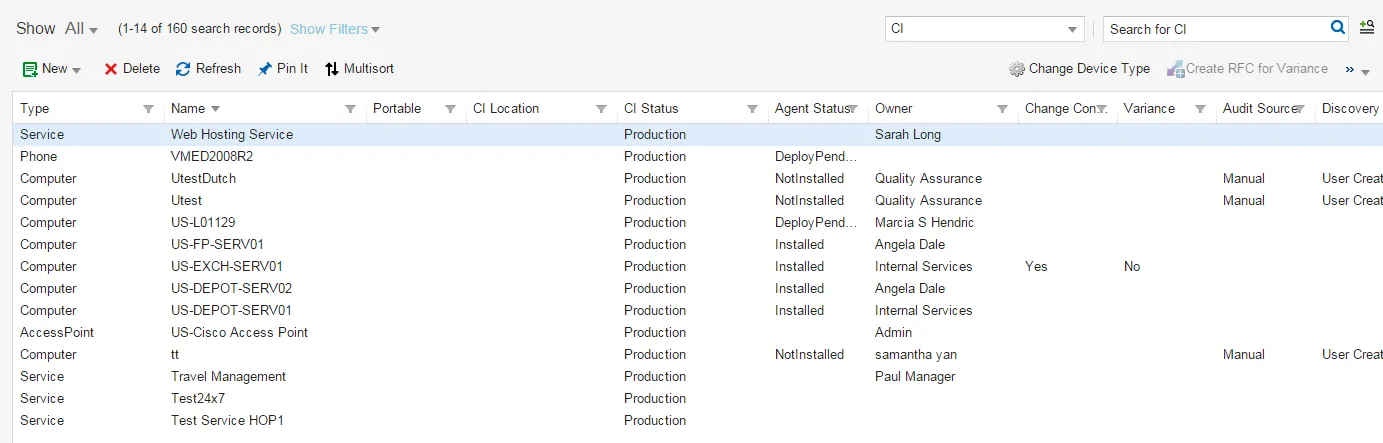
- Choose a template from the New drop-down list. For example, select New Printer. Each template has different fields and tabs. Neurons for ITSM provides many out-of-the-box templates for different configuration item types. In addition to the common attributes that are required across all configuration item types, these configuration item templates accommodate configuration item details of varying complexity.
A blank form appears with the following tabs. Not all configuration item types use all tabs. For example, a configuration item record for a switch will contain the CI Switch Map Tree tab, whereas a record for a printer will not.
- Agent Tasks
- Attachment
- Audit History : See Accessing the Audit History.
- Availability Log
- Background Services
- Baseline Comparison: See About the Configuration Baseline.
- Change: Lists the changes linked to this configuration item. See Creating a Change RequestCreating a Change Request
- Change Lockout: See Viewing a Change Lockout Period and Change WindowCreating a Change Request
- Change Window: See Viewing a Change Lockout Period and Change WindowCreating a Change Request
- CI Access Point Map Tree
- CI Cluster Map Tree
- CI Computer Map Tree
- CI Database Map Tree
- CI Enterprise Application Map Tree
- CI Firewall Map Tree
- CI Generator Map Tree
- CI Hub Map Tree
- CI Middleware Map Tree
- CI Mobile Device Map Tree
- CI Peripheral Device Map Tree
- CI Printer Map Tree
- CI Productivity App Map Tree
- CI Rack Map Tree
- CI Router Map Tree
- CI SAN Map Tree
- CI Scanner Map Tree
- CI Service Map Tree
- CI Switch Map Tree
- CI UPS Map Tree
- CI Video Conference Map Tree
- CI VOIP Map Tree
- Cost Allocation
- Cost History
- Cost Item: See Working with Cost Items.
- Custom Data
- Details: Continue to the next step.
- DSM Managed Installation
- DSM Task
- Event:
- Extension Histogram
- File Instances
- Guest
- Hardware
- Hardware Changes
- Host
- Incident: Lists the incidents linked to this configuration item. See Managing Incidents.
- Inventory Settings
- Map Tree
- Network
- Network Adapter
- Outage Log
- Patches
- Problem: Lists the problems linked to this configuration item. See Working with Problems.
- Release: Lists the releases linked to this configuration item. See Creating a Release Request.
- SAN
- Scanned Data
- Software
- Software Changes
- Voice Properties
- Enter information into the fields on the Details tab. These fields are common to all templates.
Field | Description |
|---|---|
Status | The default values are: Planned: Draft state; prior to the design state. Design: Work in progress; service is being designed. Transition: Design phase complete; preparing to update the status to production. Production: Service is in use. Retired: Service is no longer in use. See About Retiring a Configuration Item below. |
Name | A unique name for the configuration item. |
CI Version | The version of the configuration item. |
Owner | The owner. Select an owner from the drop-down list. The default owner is the user creating the record. |
Description | A detailed description. |
CI Map | Shows the CI map. |
- Click Save.
The configuration item module has many templates, but listed here are three commonly used examples.
Configuration Item Template: New Printer
New Printer Form
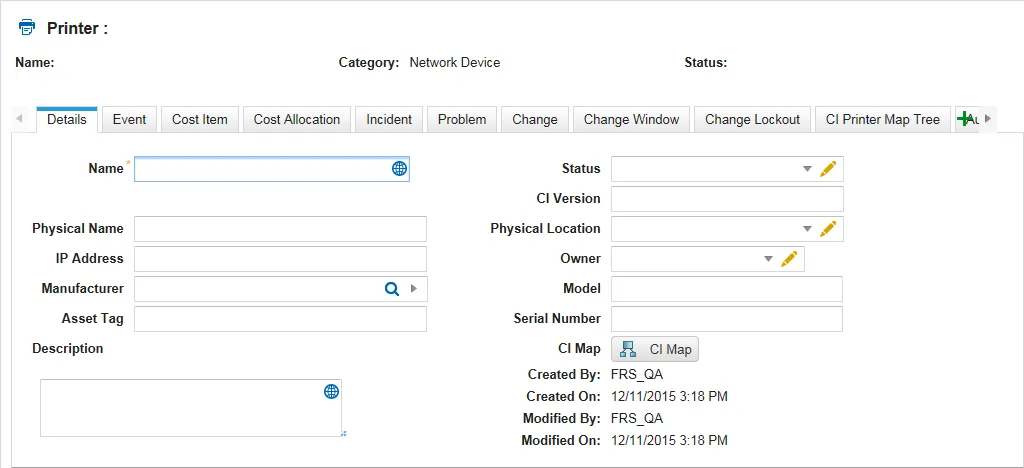
Field | Description |
|---|---|
Physical Name | The physical name of the printer, such as HP Laser Printer. |
IP Address | The IP address, such as 162.198.10.10. |
Manufacturer | The name of the manufacturer, such as Hewlett-Packard or Dell. |
Asset Tag | The asset tag number. |
Physical Location | The physical location. |
Model | The model number. |
Serial Number | The serial number. |
Configuration Item Template: New Router
New Router Form
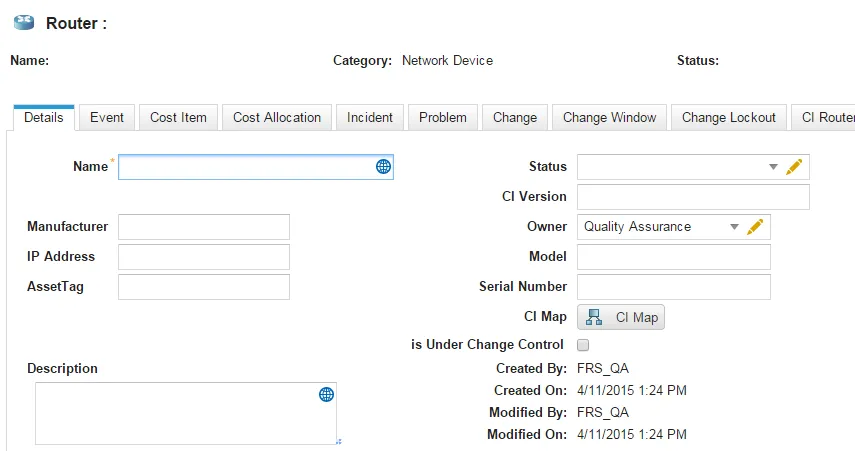
Field | Description |
|---|---|
Manufacturer | The name of the manufacturer, such as Hewlett-Packard or Dell. |
IP Address | The IP address, such as 162.198.10.10 |
Asset Tag | The asset tag number. |
Model | The model number. |
Serial Number | The serial number. |
Is Under Change Control | Specifies if the router is under change control. |
Configuration Item Template: New Server
New Server Form
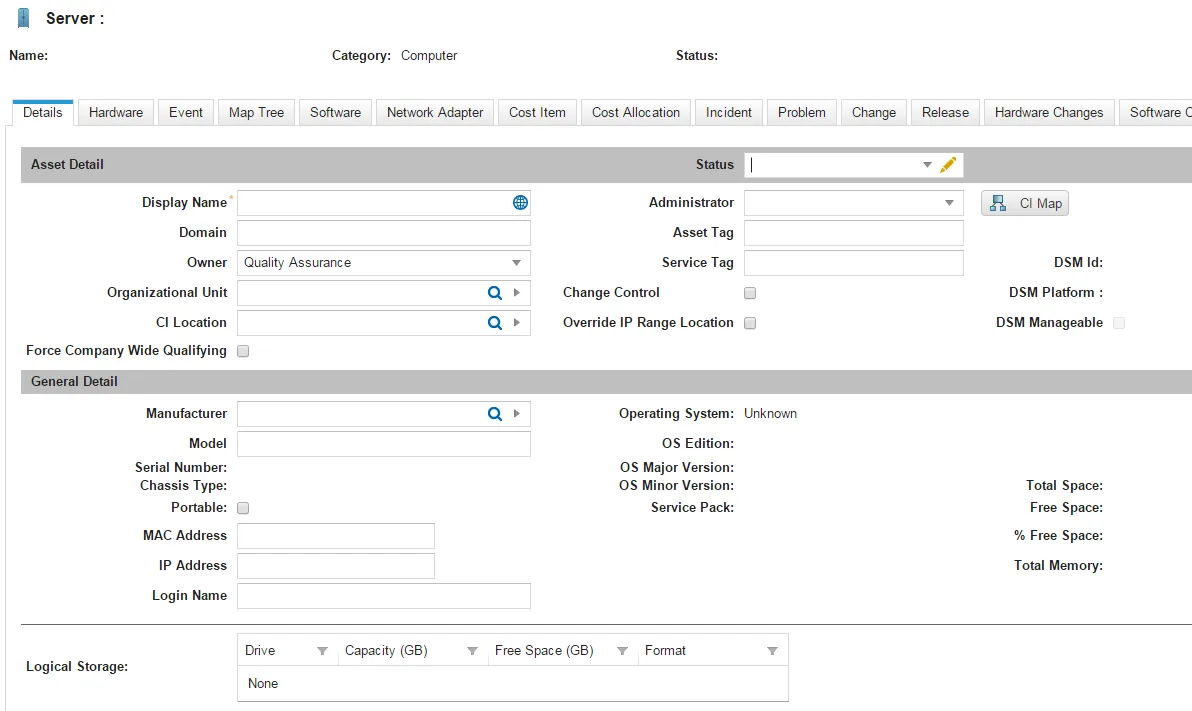
Field | Description |
|---|---|
Domain | The domain name. |
Organizational Unit | The organizational unit. |
Force Company Wide Qualifying | Forces the server to qualify company-wide. |
Administrator | The administrator. |
Asset Tag | The asset tag number. |
Service Tag | The service tag number |
Change Control | Uses change control. |
Override IP Range Location | Overrides the IP range location. |
Manufacturer | The name of the manufacturer, such as Hewlett-Packard or Dell. |
Model | The model number. |
Serial Number | The serial number. |
Chassis Type | This field is automatically generated by the application. |
Portable | Specifies if the unit is portable. |
MAC Address | The MAC address. |
IP Address | The IP address, such as 162.198.10.10 |
Login Name | The user name needed to access the router. |
Operating System OS Edition OS Major Version OS Minor Version Service Pack | These fields are automatically generated by the application through Ivanti DSM. |
Total Space Free Space % Free Space Total Memory Logical Storage | These fields are automatically generated by the system through Ivanti DSM. |
The following is a list of the templates provided for creating a new configuration item record:
- Access Point
- Batch Job
- Cluster
- Computer
- Contract
- Database
- Document
- Enterprise Application
- ESX
- FAX
- Firewall
- Generator
- Hub
- Middleware
- Mobile Device
- Monitor
- Peripheral Device
- Phone
- Printer
- Productivity App
- Rack
- Router
- SAN
- Scanner
- Server
- Service
- Switch
- System
- Unknown Device
- UPS
- Video Conference
- Virtual Server
- Virtual Workstation
- VOIP
- Workstation
If an incident reports a configuration item failure, you can search for that configuration item and link it to the incident record.
However, if you need to create a new configuration item (including service) that is associated with the incident you can also do so from the incident record. The configuration item is linked to the incident after you create it. You can also view the configuration items that the customer currently owns.
Linking helps problem management to identify which items may be potential problems.
- Log in to the Service Desk.
- Open the Incident workspace.
- Open an incident.
- Click the CI tab.
- Click New and select a configuration item from the drop-down list.
- Enter information only into the required fields. Required information is indicated by a red asterisk (*).
- Click Save. Discovery services populate most of the fields after scanning and auditing the item.
The configuration item is linked to the incident and appears in the CI tab of the incident record.
About Retiring a Configuration Item
When a configuration item is decommissioned or disposed, set the configuration item status to retired and attach any supporting documentation.
Deleting a Configuration Item
Deleting a CI (Configuration Item) removes all its linked objects. After you delete a CI, any associated records such as incidents or service requests become orphaned. You cannot restore a CI after deletion.
- Log in to the Service Desk.
- Open the CI workspace.
- Select the configuration item to delete.
- Click Delete from the toolbar