
Working with Service Level Targets
About Service Level Targets
A service level target is a key element of a service level agreement between you as a service provider and an end user customer. Service level targets measure your performance as a service provider and are designed to avoid disputes between the two parties based on misunderstanding.
Service level targets are linked to service level packages, service level agreements, underpinning contracts, and request offerings. For example, you can have general targets linked to a service level package (such as a promise to respond to an email within 24 hours), but have specific targets linked to a request offering (such as a promise to send a new phone within 5 days).
Neurons for ITSM provides the following targets:
- Delivery target: Primarily used for service requests. The delivery target defines how soon you can deliver the service request. The system uses these results to evaluate the compliance of both the service request delivery target and the overall service level agreement target.
- Response target: Primarily used for incidents. The response target defines how soon you can respond to an incident. The system uses this information to evaluate the compliance of both the incident response target and the overall service level agreement target.
- Resolution target: Primarily used for incidents. The resolution target defines how soon you can resolve an issue. The system uses these results to evaluate the compliance of the incident resolution target and the overall service level agreement target. Delivery targets, response targets, and resolution targets have two components:
- Duration target: Measured in days, hours, and minutes. The target time for an incident or request to be assigned to a Service Desk Analyst for resolution.
- Compliance target: A running percentage of the times that the target duration was not exceeded. Separate compliance targets exist for the response target and for the overall service level agreement target.
- Overall compliance: This target aggregates the compliance information from service level targets for all incidents and service requests that fall under the service level agreement.
- If the aggregated data for all service level targets results in a percentage that meets the overall service level agreement compliance target, the service level agreement is in compliance.
- If the aggregated data for all service level targets results in a percentage below the overall service level agreement compliance target, the service level agreement is out of compliance.
- You specify the overall compliance target when you create a service level package, and a service level agreement inherits the target when a customer subscribes to the service level package and the system creates the service level agreement.
Example: Service Level Targets
This example is based on two incidents and one service request, which were all submitted by a single organization and are all covered under the same service level agreement.
Sample Service Level Target
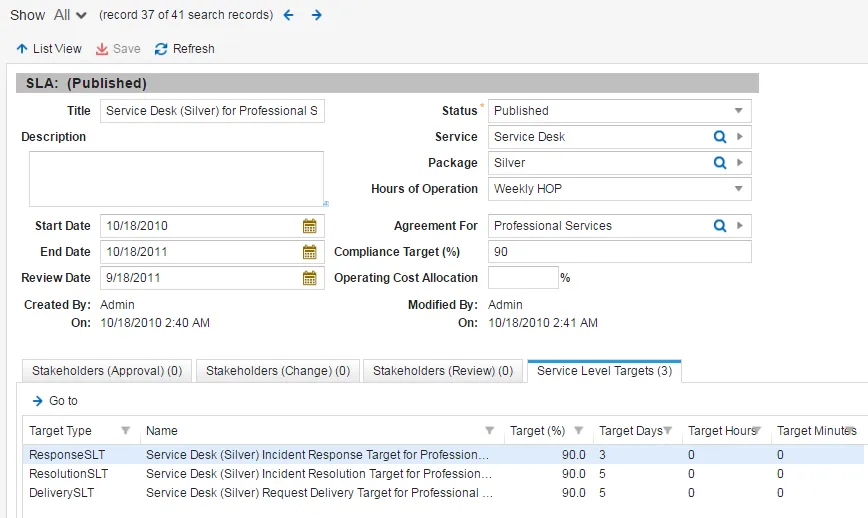
- The incidents have a response duration target of three days and a response compliance target of 95%. This means that if the service provider responds to both of these incidents in three days or less, they meet the response duration target. If they meet the response duration target at least 90% of the time, they meet the response compliance target and the incident response service level target is considered to be in compliance.
- The incidents have a resolution duration target of five days and a resolution compliance target of 90%. This means that if the service provider resolves both of these incidents in five days or less, they meet the resolution duration target. If they meet the resolution duration target at least 90% of the time, they meet the resolution compliance target and the incident resolution service level target is considered to be in compliance.
- The service request has a delivery duration target of five days. This means that if the service provider can deliver the service request in five days or less, they meet the delivery duration target. If they meet the delivery duration target at least 90% of the time, they meet the compliance target and the service request delivery service level target is considered to be in compliance.
The service level agreement has an overall compliance target that is inherited from the service level package. This target is evaluated using all met and not met data from the duration targets.
The system does not use percentages from individual compliance calculations in the service level targets to evaluate the overall service level agreement compliance target. The system only uses the met/not-met data from the duration targets.
About Business Rule Triggers
When you create a new service level package, the system triggers the business rule called NewServicePackageCreation. This business rule runs the CreatePackageSLTs quick action which automatically creates the following service level target records:
- Service request delivery service level target
- Incident response service level target
- Incident resolution service level target
Each service level package can have only one setting for each type of service level target.
To change the default values used for the auto-creation of service level targets, you must change the global values shown in the following table. Refer to Working with Global Constants.
Global Value Names | | |
|---|---|---|
Service Request Delivery Service Level Target | Incident Response Service Level Target | Incident Resolution Service Level Target |
SLTDeliveryComplianceTarget | SLTResponseComplianceTarget | SLTResolutionComplianceTarget |
SLTDeliveryTargetDurationHrs | SLTResponseTargetDurationHrs | SLTResolutionTargetDurationHrs |
SLTDeliveryTargetDurationMin | SLTDeliveryTargetDurationMin | SLTResolutionTargetDurationMin |
Viewing Service Level Targets
- Log in to the application as a service owner.
- Open the Service Level Target workspace. The system displays a list of service level targets.
- Open a service level target to view its details.
Defining Delivery Targets
- Log in to the application as a service owner.
- Open the Service Request workspace.
- Open a service.
- Click the Service Agreements tab. The system displays a list of service agreements.
- Highlight the service agreement to define the delivery target for and click Go to.
Do not double-click the service agreement to open it, as this only displays part of the information associated with it. You must click Go to to see all of the information associated with the service agreement.
- On the bottom, under the Service Level Targets tab, double-click the DeliverySLT entry to open the Edit Incident Delivery Target dialog box.
- Enter information into the fields.
Field | Description |
|---|---|
Name | Automatically populated based on the service and service level package. Cannot be modified. |
Hours of Operation | Automatically populated based on the hours of operation setting for the service level package. You can also choose the hours of operation from the drop-down list. |
Description | Optional. A brief description. |
Compliance Target (%) | This field is automatically populated base on the business rules for the service package object. You can also enter the percentage of completion that is required to fulfill the target. |
If a request offering is already linked to the service or the service level package, the system overrides the target values with the delivery targets specified for the request offering.
- Click Save.
Defining Response Targets
If there is no incident response target, the system uses the default escalation schedule for incident response. If you define the incident response target here, these values override the defined escalation schedule.
- Log in to the application as a service owner.
- Open the Service Request workspace.
- Open a service.
- Click the Service Agreements tab. The system displays a list of service agreements.
- Highlight the service agreement to define the delivery target for and click Go to.
Do not double-click the service agreement to open it, as this only displays part of the information associated with it. You must click Go to to see all of the information associated with the service agreement.
- On the bottom, under the Service Level Targets tab, double-click the ResponseSLT entry to open the Edit Incident Response Target dialog box.
- Enter information into the fields. Refer to Defining Delivery Targets.
- Click Save.
Defining Resolution Targets
If there is no incident resolution target, the system uses the default escalation schedule for incident resolution. If you define the incident resolution target here, these values override the defined escalation schedule.
- Log in to the application as a service owner.
- Open the Service Request workspace.
- Open a service.
- Click the Service Agreements tab. The system displays a list of service agreements.
- Highlight the service agreement to define the delivery target for and click Go to.
Do not double-click the service agreement to open it, as this only displays part of the information associated with it. You must click Go to to see all of the information associated with the service agreement.
- On the bottom, under the Service Level Targets tab, double-click the ResolutionSLT entry to open the Edit Incident Resolution Target dialog box.
- Enter information into the fields. Refer to Defining Delivery Targets.
- Click Save.
Defining Overall Compliance Targets
The overall compliance target is defined within a service level package.
- Log in to the application as a service owner.
- Open the Service Package workspace. The system displays a list of services.
- Open a service.
- In the Compliance Target field, enter the acceptable compliance (from 1 to 100).
- Click Save.
If the actual target compliance rate falls below the overall compliance target, the system escalates the issue. Refer to Working with Escalations.
Defining Target Override Conditions
You can create a target override (also called a target variant or target condition) for a response target or resolution target. For example, you might want to create a target override for priority 1 incidents that is different than the default response target that is used if the incident is priority 2, 3, 4, or 5.
- Log in to the application as a service owner.
- Open the Service Level Target workspace. The system displays a list of service level targets.
- Open a service level target to view its details.
- Under the Target Override Conditions tab, click New. The system displays the New Target Condition dialog box.
- Enter information:
Field | Description |
|---|---|
Criteria Field | Criteria. The default field is priority. |
Criteria Value | A number. |
Delivery Target | The number of days, hours, and minutes for this condition. |
- Click Save to close the dialog box.
- Click Save.