
Linking Configuration Items to Other Business Objects
Incidents, problems, changes, and releases can be created or linked from the Configuration Management workspace. If the configuration item record was created from an incident, problem, change, or release, then the record appears under the corresponding tab.
Creating an Incident, Problem, Change, or Release Record
You can create a new business object record within the CI workspace, automatically linking it to the configuration item.
- Log in to the application as a Configuration Manager.
- Open the CI workspace.
- Open the configuration item you for which to create the record. The details page appears.
- Select the corresponding tab (Incident, Problem, Change, or Release), then click New object or click the drop-down list to select one of the templates. The New object form appears. When using a template, some fields contain default values. See Using Default Business Object Templates for more information on each template.
Choose the Appropriate Tab within a Configuration Item Record
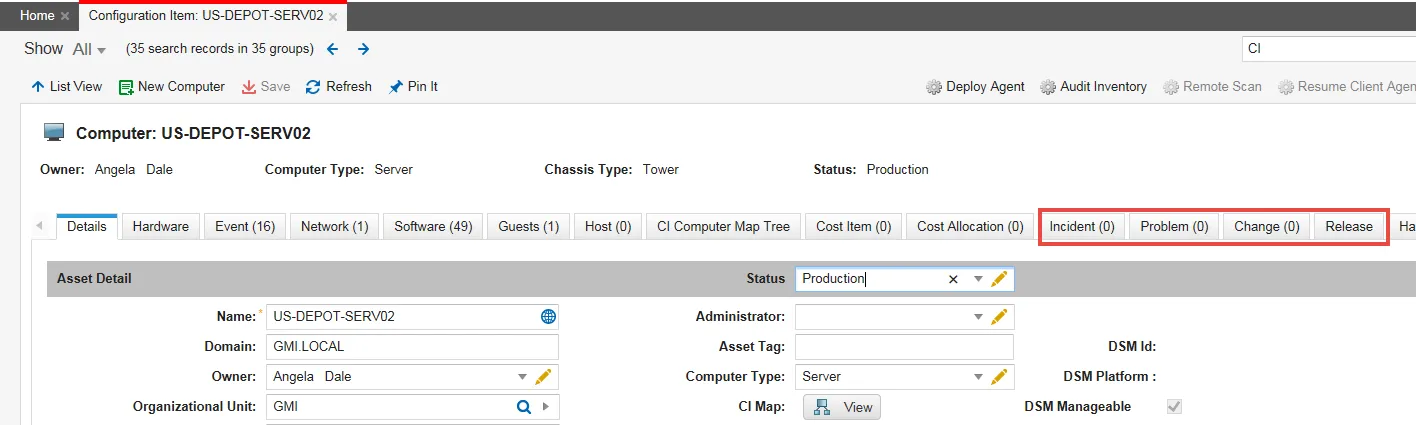
- Enter information into the fields. See Managing Incidents, Creating a Change Request, Working with Problems, or Creating a Release Request for more information on the fields.
- Click Save to save your changes to the business object record. Click Save.
- The new record appears under the corresponding tab.
- The new record appears in the corresponding workspace.
- Change Managers can see and edit configuration item records linked to change records.
- Problem Managers can see and edit configuration item records linked to problem records.
- Release Managers can see and edit configuration item records linked to release records.
Linking to an Incident, Problem, Change, or Release Record
You can link an existing business object record to a configuration item within the CI workspace.
- Log in to the application as a Configuration Manager.
- Open the CI workspace.
- Open a configuration item. The details page appears.
- Select the corresponding tab (incident, problem, change, or release).
- Click Link
 . A list of object records appears.
- Select the record to link, then click Select. The linked record appears in the list.
- Click Save.
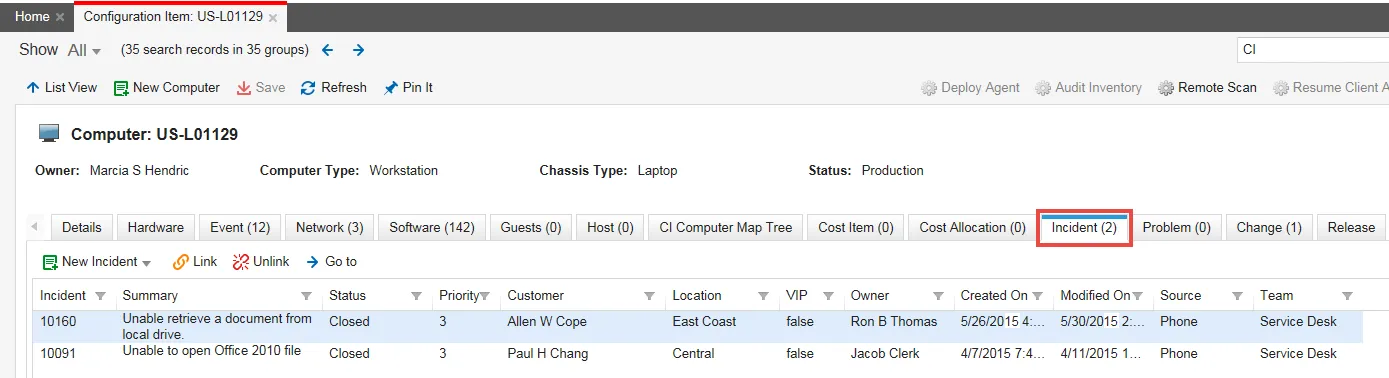
The number of linked records appears in the tab name.
Sample Configuration Item Showing One Linked Incident Record
Unlinking from a Business Object Record
- Log in to the application as a Configuration Manager.
- Open the CI workspace.
- Open a configuration item. The details page appears.
- Select the record from the corresponding tab.
- Click Unlink
 .
.
The record no longer appears on the list.
Viewing Linked Record Details
You can view the linked record within the corresponding workspace and modify the data. For example, you can update the status of a change record.
- Log in to the application as a Configuration Manager.
- Open the CI workspace.
- Open a configuration item. The details page appears.
- Select the corresponding tab (incident, problem, change, or release).
- Select the record to view from the list, then click Go To.
The corresponding workspace opens showing the record details.