
Ivanti Neurons for ITSM and Neurons Integration - Best Practices
Intended Audience: Administrators
This topic lists out the Ivanti Neurons for ITSM and Ivanti Neurons integration steps, some common issues faced during the integration, and troubleshooting details.
Import Discovered Data from Ivanti Neurons
You can take advantage of the Ivanti Neurons device discovery capabilities in ITSM by importing a package from Ivanti Marketplace. This enables you to restore existing devices in the Ivanti Neurons for ITSM CI/Hardware Assets workspace from Ivanti Neurons. Also, newly discovered Ivanti Neurons devices get synced to the Ivanti Neurons for ITSM CI > Hardware Assets workspace.
Applicable only for cloud customers. Device data can be imported from Ivanti Neurons only during the synchronization process.
For Ivanti Neurons Device Sync
- New and existing Neurons for ITSM customers can apply the CMDB package (that is less than 1 MB) from Ivanti Marketplace for enabling the Ivanti Neurons device sync.
- New and existing customers who are using Neurons for ITSM version 2020.3 or later can apply the Ivanti Neurons Integration package from the Ivanti Marketplace for enabling the Ivanti Neurons device sync.
For Complete Asset Management Capabilities
New and existing Neurons for ITSM customers can apply the AMC (Asset Management Cloud) package from Ivanti Marketplace.
Ivanti Neurons to Neurons for ITSM Integration - Device Sync Only
- Download the package (CMDB or the AMC) from Ivanti Marketplace.
- Validate and apply the package if there are no errors on the Neurons for ITSM 2020.3 upgraded tenant.
Ivanti Neurons to Neurons for ITSM Integration – Device Sync only.
- Log in to Ivanti Neurons for ITSM as Administrator.
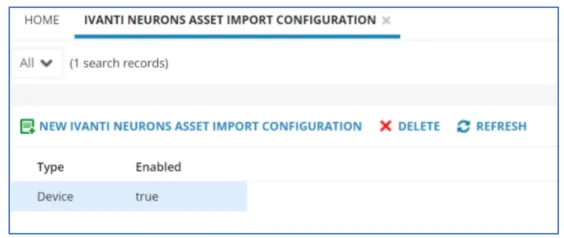
- Open the Ivanti Neurons Asset Import Configuration workspace.
- Enable the device type in the Ivanti Neurons Asset Import Configuration workspace.
Ivanti Neurons Asset Import Configuration
- Open the Asset Processor Configuration workspace.
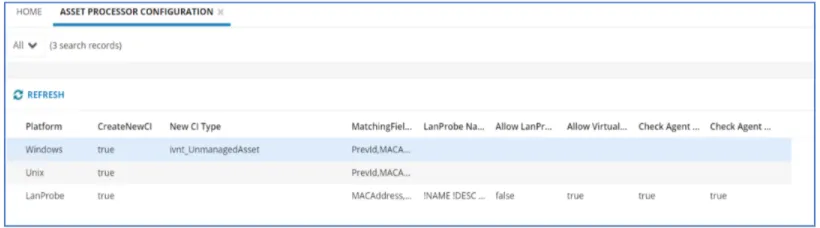
- Ensure that the below configurations are enabled in the Asset Processor Configuration workspace.
Asset Processor Configuration
- Log in to Ivanti Neurons for ITSM as Asset Administrator.
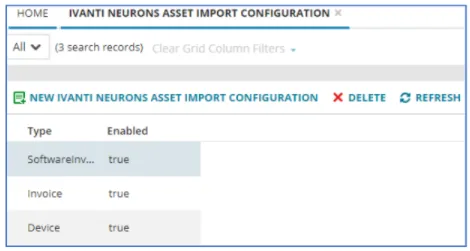
- Open the Ivanti Neurons Asset Import Configuration workspace.
- Enable the Device, Invoice, Software Inventory type in Ivanti Neurons Asset Import Configuration workspace.
Ivanti Neurons Asset Import Configuration
- Open the Asset Processor Configuration workspace.
- Ensure that the below configurations are enabled in the Asset Processor Configuration workspace.
Asset Processor Configuration
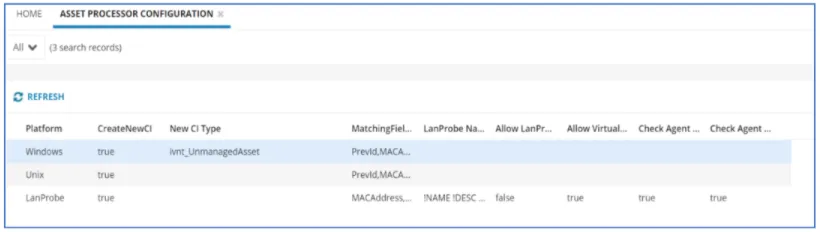
- New CI Type will be set to ivnt_UnmanagedAsset for Windows by default. You can update the New CI Type to the required type such as Computer, Database, Contract so on.
- After configuring Ivanti Neurons to Neurons for ITSM Integration, the devices should start syncing in Neurons for ITSM based on the scheduled connectors.
- Log in to Ivanti Neurons for ITSM as an Administrator.
- Open the CI workspace.
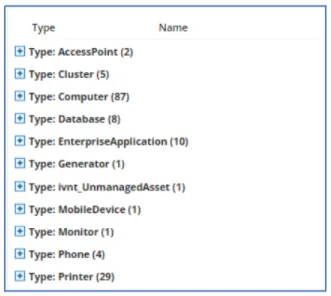
- Ensure the newly imported devices are listed under the CI workspace.
Imported Devices
- Open the Message Queue Journal workspace.
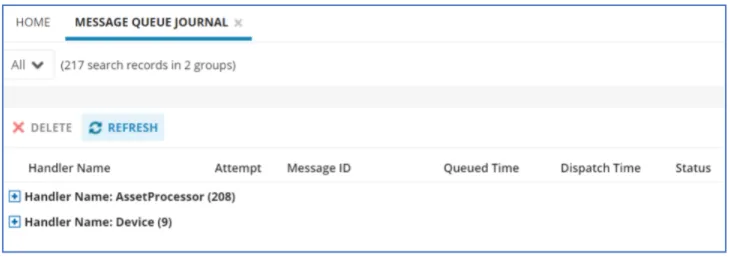
- Review the Message Queue Journal workspace for the incoming device messages processed from the Ivanti Neurons.
Message Queue Journal
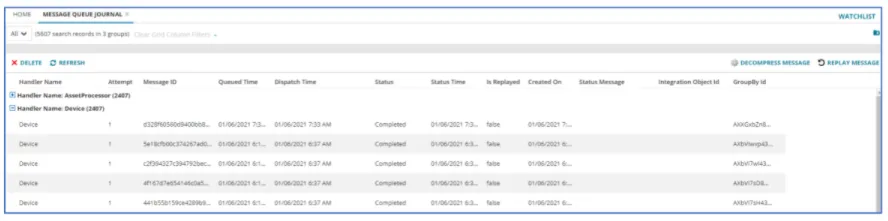
- Run the Decompress Message Quick Action for a selected message in the Message Queue Journal workspace to view the discovered device details.
Device Details
- Log in to Ivanti Neurons for ITSM as Asset Administrator.
- Open the Hardware Assets workspace.
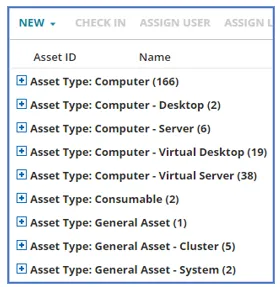
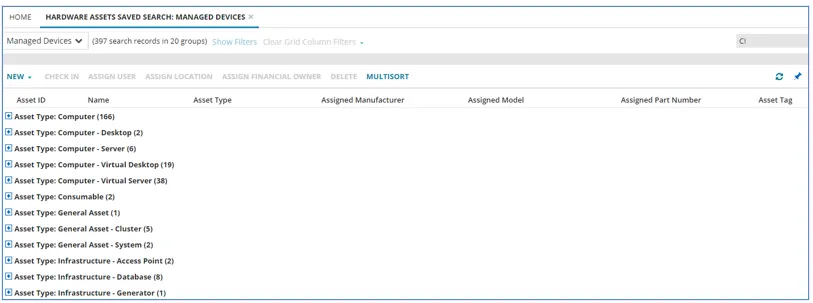
- Ensure the newly imported devices are listed under Hardware Assets workspace.
Imported Devices
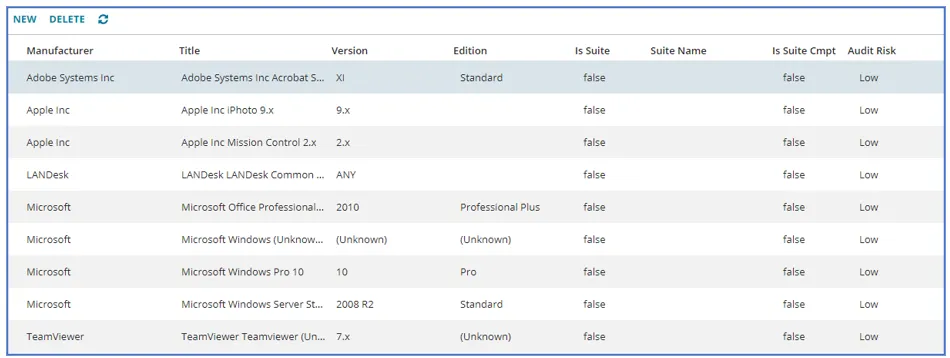
- Ensure the newly imported list of software is listed under the Software Assets workspace.
Imported Software
- Open the Message Queue Journal workspace.
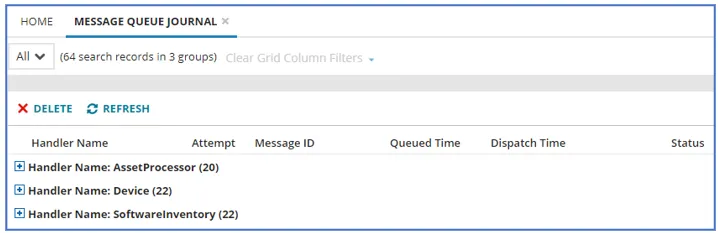
- Review the Message Queue Journal workspace for the incoming device, software messages processed from the Ivanti Neurons.
Message Queue Journal
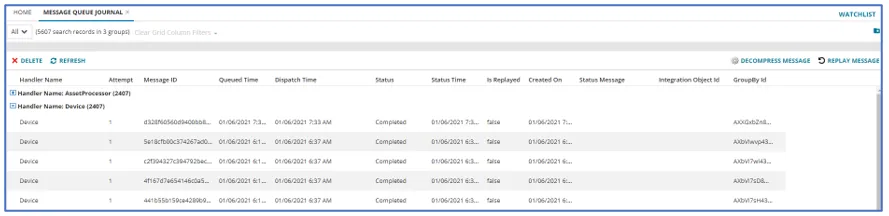
- Run the Decompress Message Quick Action for a selected message in the Message Queue Journal workspace to view the discovered device details.
Device Details
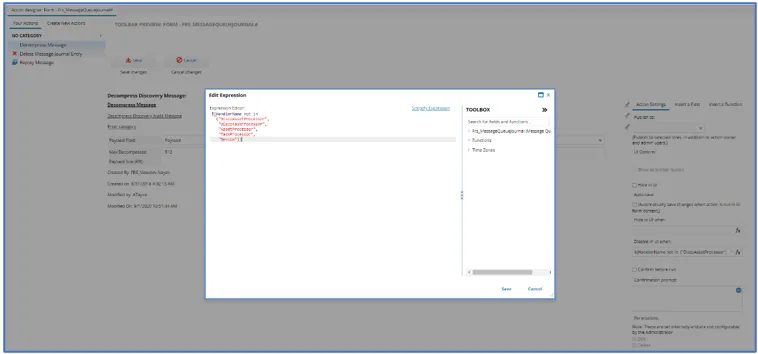
By default, the Decompress Message Quick Action will be disabled for a device message. To enable the Decompress Message Quick Action of the Message Queue Journal business object, follow these steps:
- Open the Configuration console > Build > Automation Tools > Quick Actions.
- Click Frs_MessageQueueJournal from the Action Manager list.
- Click the Quick Action tab.
- On the left side panel, click Decompress Message.
- Click Edit to open the Edit Expression window.
- Add Device type in the Quick Action expression field Disable in UI as shown below.
Edit Expression
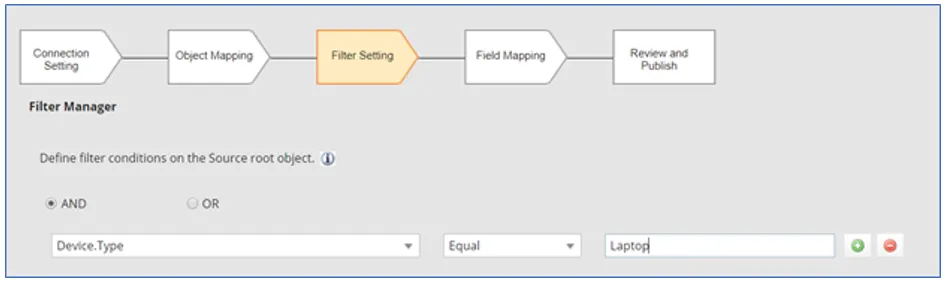
The Filter Manager in IN connector (Ivanti Neurons Connector- Device) enables filtering inflow of device types based on the filter criteria. For instance, you can select to import Asset Type only of Laptop by creating the filter value as Laptop.
Filter Manager
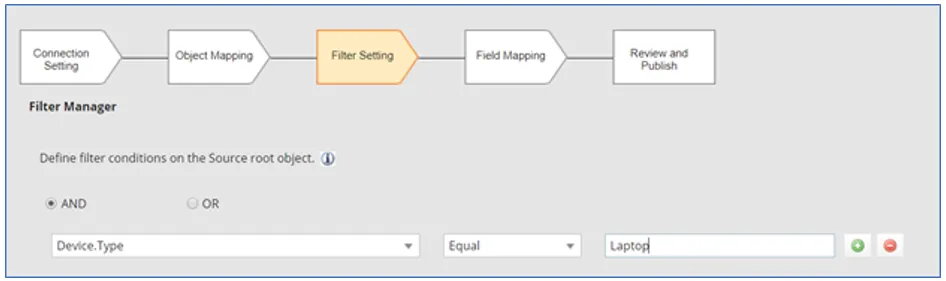
- The filter settings made during import remain saved for further import.
- Based on the filter settings, only those messages which are relevant to the mapping will be processed by the Ivanti Neurons for ITSM tenant and rest of the messages will be discarded.
- To filter out null parameters, use the NotEqual operator instead of NoContain. For example, when filtering a device that does not have serial number to sync from Neurons.
- The filter settings work only for a single value filter in each row. If the field selected in the left panel of the mapping results in multiple values, then those filters will not work. You are advised to use the filter settings accordingly.
For example, if you choose Device.BIOS.BIOSSettings in the root table, all the properties related to Device.BIOS.BIOSSettings will be displayed on the Filter settings page.

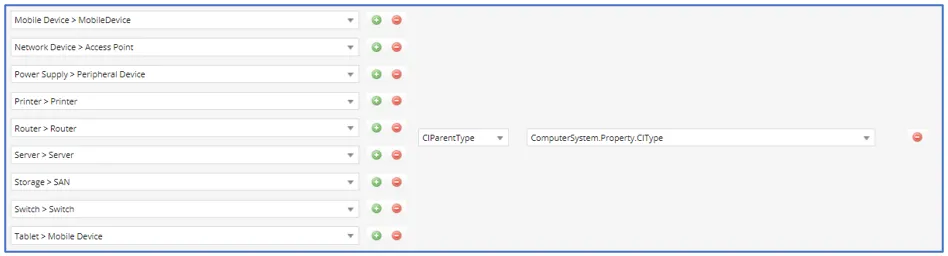
When you set the filter settings as shown in the image below, then the filter will not work.

<Portable > Computer> = <CIParentType> = <ComputerSystem.Property.CIType>
The asset imported from the IN connector having Device.Type > Portable has mapped to the parent type Computer in Neurons for ITSM. Hence, the device is imported under the category “Computer.”
<Laptop > Computer> = <CIParentType> = <ComputerSystem.Property.CIType>
If the required mapping does not exist for Laptop as shown in the image below, then the device type Laptop will be moved to the default setting in the Asset Processor Configuration workspace.
You can now edit the IN Connector mapping and export it as a metadata package and import on other Ivanti Neurons for ITSM tenants on demand. The exported connector will include the default Table selection, Filter option, and Field Mapping changes.
This functionality is intended to help the Asset Administrator have a controlled import in STG/UAT, verify the imported asset, and update the mapping before importing all the assets in a PRD landscape.
- This feature is applicable only for an Update scenario; a package exported from here will not create a new connection if the connector does not exist.
- Post import of the package, you are advised to review the changes once before you start syncing the devices.
- Clone and delete actions for Ivanti Neurons Connector – Device are disabled or removed.
Ivanti Neurons Connector – Device – Only Device Sync
Ivanti Neurons Connector – Device & Invoice – Asset Management Capabilities
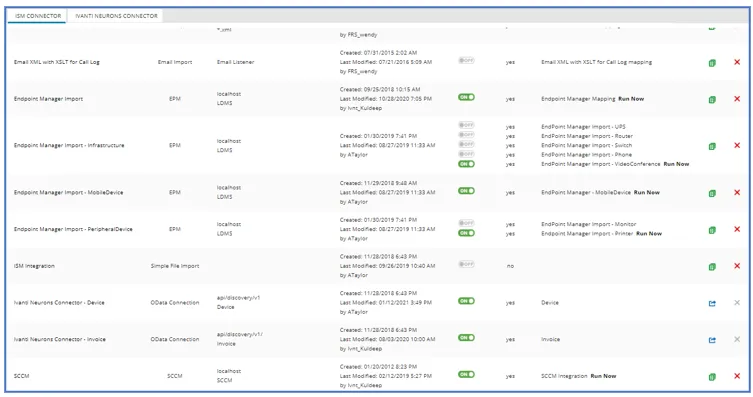
You can import non-computer type devices to Neurons for ITSM. For instance, a Printer received from Ivanti Neurons can be imported as a Printer in the Ivanti Neurons for ITSM tenant.
The Ivanti Neurons Connector - Device Schedule page is no longer an application of Ivanti Neurons connectors.
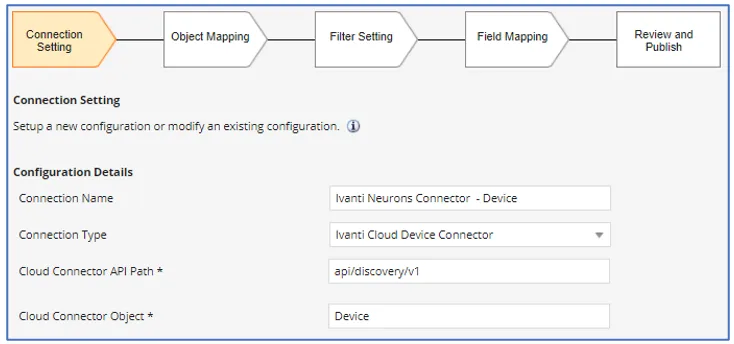
The publish option on the Ivanti Neurons Connector – Device page is disabled. This page is no longer applicable.
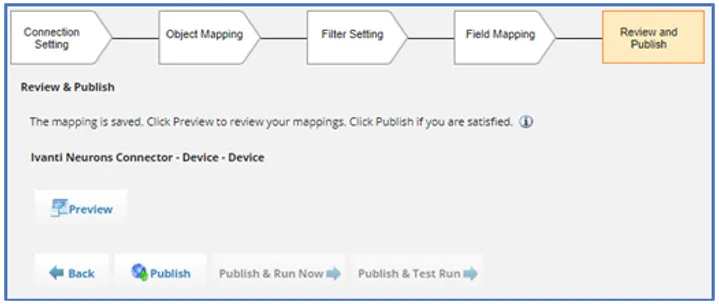
Any filter and mapping changes made require you to save the changes using the Publish action, and it is the only action required before synching the devices from Ivanti Neurons.
The schedule part is applicable only on Ivanti Neurons connectors, as the device messages are directly processed from Ivanti Neurons Discovery.
The Neurons for ITSM to Ivanti Neuron Data center level one time configuration is required to make sure that discovered devices messages are read by the ITSM integration service. This is usually done by the CloudOps team and does not require any change unless its mandated.
Uno Landscape
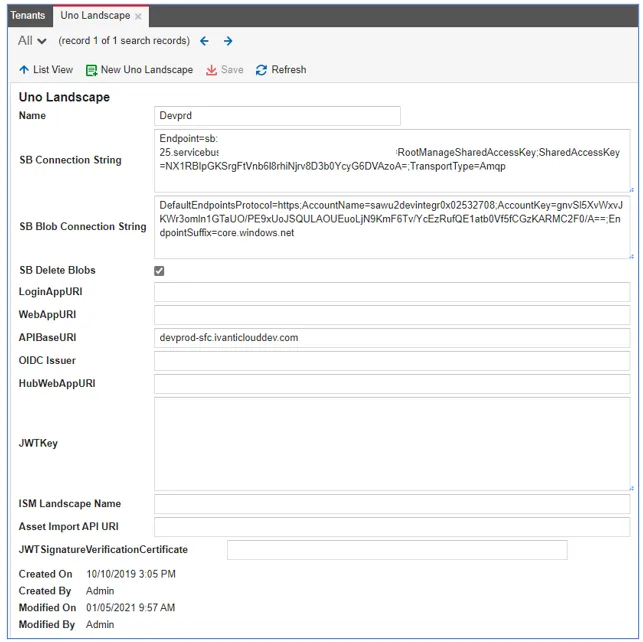
- You need to contact Ivanti Support to set up the connection between Neurons and Neurons for ITSM.
- When you set the Neurons connector synchronization frequency, set it to synchronize weekly instead of daily. Daily synchronization sends a high volume of asset messages to the Ivanti Asset Manager for Neurons Discovery, and the increased volume degrades performance.
For more information on scheduling the Neurons Discovery to Neurons for ITSM data sync by API, refer to the Scheduling API Data Sync from Ivanti Neurons for Discovery to Ivanti Neurons for ITSM.
You can install and configure the required connector and schedule it to run. For more information, refer to Connectors .
Connector Page
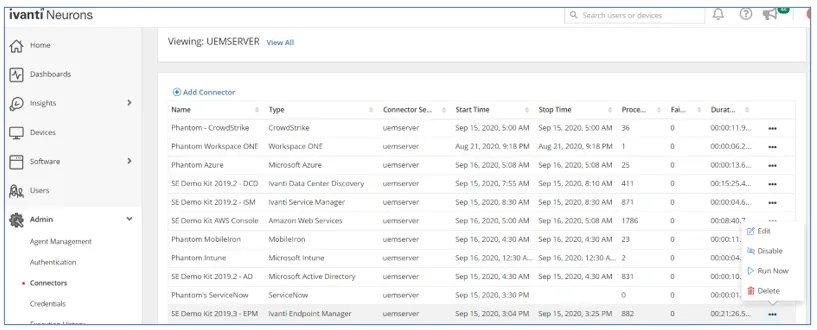
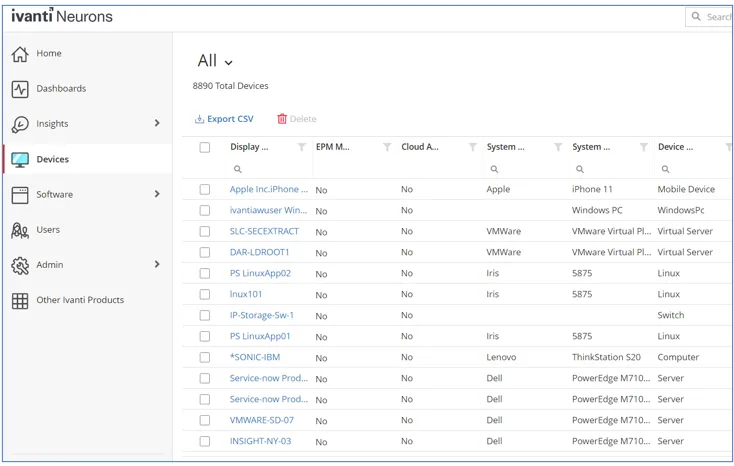
Post configuration in Ivanti Neurons, the Run Now button allows you to run the connector on-demand. The discovered devices will appear in Devices page.
Device Page
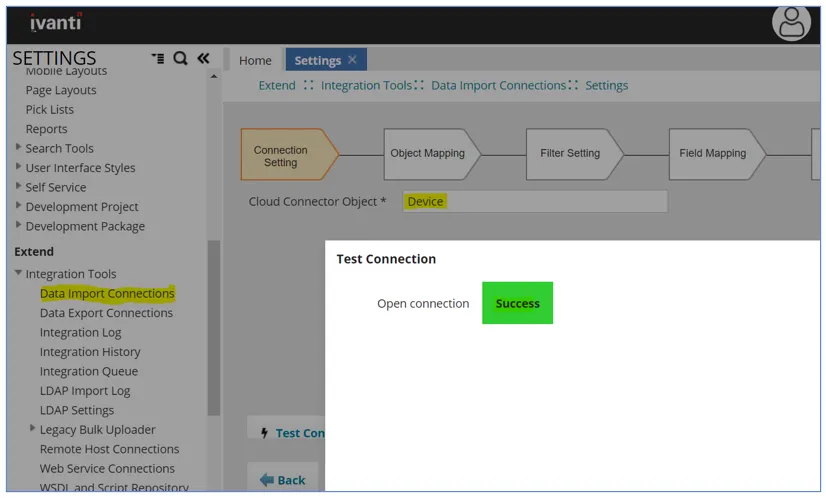
You can confirm if the newly created Ivanti Neurons Connector – Device Test connection has succeeded. This step is very important and without Test Connection success, devices will not sync with Neurons for ITSM.
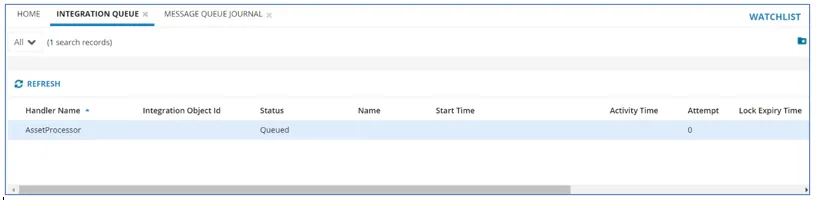
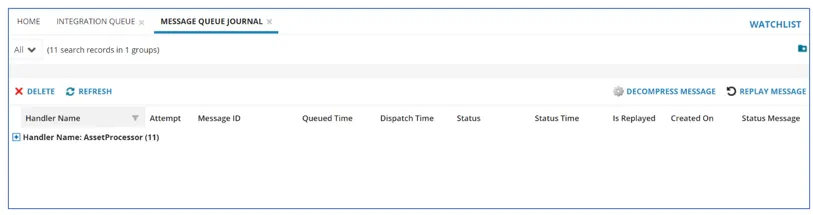
The discovered device information from Ivanti Neurons is read by the Neurons for ITSM integration service, which can be viewed in the Integration Queue workspace. Once messages are read, processing of the messages is done by the message queue service, which can be viewed in the Message Queue Journal workspace.
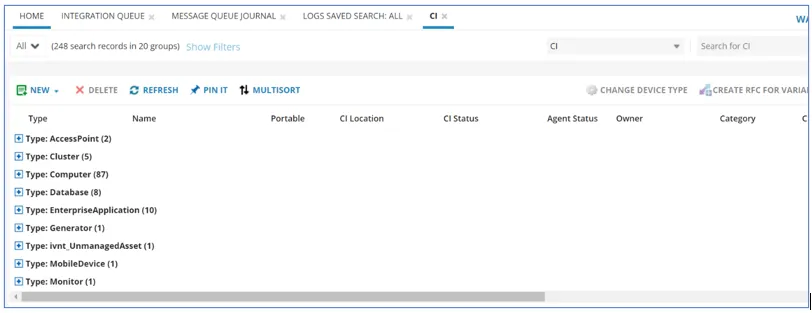
You can manage the devices which are created as part of Ivanti Neurons discovery, along with existing devices, in the CI workspace.
If the Test Connection fails, it is likely a configuration issue. Raise a Service Request to CloudOps to rectify.
Integration Queue
Message Queue Journal
CI Page
Hardware Assets
Ivanti Neurons messages processing history data is not populated in Integration History workspace.
FAQs
a. Identify the current version of Neurons for ITSM application. You can check in the Aspects workpace in the Neurons for ITSM application or Patch logs in admin UI can help to find out the latest content package applied.
Ivanti Neurons for ITSM Version – Marketplace drop#
- 201813 - Drop#13
- 201902 - Drop#15
- 201903 - Drop#16
- 201904 - Drop#17
- 201905 - Drop#18
- 201906 - Drop#19
- 202001 - Drop#20
- 202002 - Drop#21
- 202003 - Drop#22
- 202004 - drop#23
b. Apply the right AMC package & apply.
c. Configure the post asset management configuration – Asset Processor Configuration and Ivanti Neurons Asset import Configuration.
d. Initiate a Service request for CloudOPS teams for Ivanti Neurons to Neurons for ITSM configuration.
e. Post configuration the device should starts synching from Ivanti Neurons to Neurons for ITSM tenant.
The device sync depends on few factors such as:
- Inflow of device messages from Ivanti Neurons to Neurons for ITSM.
- Rate at which Neurons for ITSM can read the device messages from Ivanti Neurons. Currently we are facing some technical challenges in terms of device processing rate and creating/updating asset in real time.
The solution is to raise a service ticket to Support, the support team will analyze and take necessary actions.
The MessageQueueJournal workspace will display the latest received device message along with software messages. One can make out the device processed vs the device processing failed. The dashboard will be added to have details on how many device messages received, how many failed etc.
This feature is not available. The messages are read in FIFO order and hence the more recent scan device message takes longer time to sync in Neurons for ITSM.
There is no common dashboard to view in Neurons for ITSM application. However, the following Azure dashboards are being used for debugging purpose:
Currently this can be viewed only from Config DB. The only way to know is to raise SR for CloudOps.
These buttons are made disabled as their functionalities are not required. The data is directly read by integration service from Ivanti Neurons service bus.
If any change done in OData connector one has to perform publish action to save the change. Else connector might get disabled.
The missing devices in Neurons for ITSM side post sync up from Ivanti Neurons could be due to the following reasons:
- The device message has not reached Neurons for ITSM.
- The device message has reached to Neurons for ITSM but not processed successfully due to missing information.
In any of the cases, we need to look at the issue individual basis. Please reach out support for assistance.
It is not recommended to configure single Neurons tenant to multiple Neurons for ITSM tenant at a time as it can create data inconsistency in Neurons for ITSM. One can always change the configuration from STG to UAT or PRD at any time by raising SR with CloudOPs.
Yes, one can export the OData connectors (Ivanti Neurons Connector – Device & Ivanti Neurons Connector – Invoice) from one Neurons for ITSM tenant to another tenant. Please make sure you have taken back up before importing can would overwrite the customer mapping. Also export and import should be on same version of Neurons for ITSM application to have consistent default mappings.
Yes, but its recommended to enable only one OData connector at a time.
Yes, but enable only one active mapping by name Device at a time and turn off other mapping.
No limit for both the parameters, however its better to retain the default values.
- 2020.2 - Device will be moved to ivnt_UnmanagedAsset
- 2020.3 - Device will honor the Asset Processor Configuration
- 2020.4 - Device will override the mapping details based on Asset Processor checkbox.
We can remove SubType fully but one mapping is mandatory for ParentType.
No, we are not updating AssetType as subtype if mapping does not exist.
The OData connector does not trigger based on Neurons for ITSM scheduler it always works based on the discovered devices available in Ivanti Neurons. As soon as device messages are available in Ivanti Neurons Service bus, Neurons for ITSM Integration service starts reading them in FIFO order.
Device will honor the Asset Processor Configuration
Yes.
Yes, Possible.
No.
No. Only constant value field can be set for Mapping Fields like PrevId, SerialNumber etc ….
Troubleshooting
Resolution:
When you schedule the data sync, ensure that the max size is no greater than 500. For more information, refer to Scheduling API Data Sync from Ivanti Neurons for Discovery to Ivanti Neurons for ITSM.
Resolution:
Verify that the download is no greater than 20 MB. Sync packages that are larger than 20 MB will cause the preview to fail. For more information, refer to Scheduling API Data Sync from Ivanti Neurons for Discovery to Ivanti Neurons for ITSM.
Resolution:
- Create CI extended BO ivnt_UnmanagedAsset
- Add forms by AM.UnmanagedAsset.Brief
- Open and select Layout of CI (relevant) > Open in Grid view > Add the ivnt_UnmanagedAsset with newly created form.
- Open Layout of the CI BO and select Layout of CI (relevant) > Open in Form view > Add the ivnt_UnmanagedAsset with newly created form.
Resolution:
Can be observed by multiple reasons and some of the primary reasons could be:
- Check Ivanti Neurons Connector - Device Test Connection.
- Missing OData Connection information like API path Object.
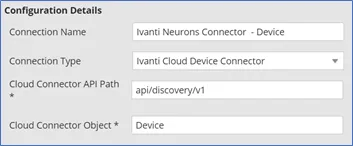
- More than one OData Connections defined: This can happen if customer has already created an OData Connector ford Device import manually before importing the Neurons for ITSM CMDB Turnkey package form Marketplace.
At a time only one OData Connector can be active for connection name Device.
- Ivanti Neurons Connector-Device type is disabled in Connector page. It’s advised to create the default naming as Device if your using multiple mappings.
Resolution:
- Enable the Asset Processor Configuration Missing Create CI checkbox.
- Mandatory fields for creating CI missing, eg: Hostname, CIType etc.
- Duplicate of Serial Number, Asset Tag, CI Component etc.
- Connector Test Connection failure.
Resolution:
- If the Ivanti Neurons does not have Device Type such devices will honor the Asset Processor Configuration.
- If Connector doesn't have the mapping details for Device Type which present in Neurons such devices will honor the Asset Processor Configuration.
Resolution:
Review the mapping details in the connector.
Resolution:
Run the following command in selected devices' console in the Neurons page:
Start-Process -WorkingDirectory "C:\Program Files\Ivanti\Ivanti Cloud Agent\UNO.INVENTORY.ENGINE64" -FilePath "C:\Program Files\Ivanti\Ivanti Cloud Agent\UNO.INVENTORY.ENGINE64\Inventory.Engine.exe"
The below command can list scanned items on the console itself:
Get-ChildItem -Path "C:\Program Files\Ivanti\Ivanti Cloud Agent\UNO.INVENTORY.ENGINE64"
Resolution:
Possible reason could be the same agent has been installed on multiple Neurons tenants. Uninstall one of the agents, and other should start working.
- Ivanti Neurons Discovery Device Data:
customEvents
| extend itemType = iif(itemType == 'customEvent',itemType,"")
| extend customEvent_name = iif(itemType == 'customEvent',name,'')
| where itemType == 'customEvent'
| where customEvent_name == 'Discovery.InventoryEventHandler.InventoryEventReceived'
| summarize count() by tostring(customDimensions.TenantId)
| where customDimensions_TenantId == "UNO_TenantID"
- Ivanti Neurons Discovery Software Data:
customEvents
| extend itemType = iif(itemType == 'customEvent',itemType,"")
| extend customEvent_name = iif(itemType == 'customEvent',name,'')
| where itemType == 'customEvent'
| where customEvent_name == 'Discovery.InventoryEventV2Handler.InventoryEventReceived'
| summarize count() by tostring(customDimensions.TenantId)
| where customDimensions_TenantId == " UNO_TenantID "
- Sync Service Device Processed:
customEvents
| extend itemType = iif(itemType == 'customEvent',itemType,"")
| extend customEvent_name = iif(itemType == 'customEvent',name,'')
| where itemType == 'customEvent'
| where customEvent_name == 'SyncApp.InventoryEventHandler.InventoryEventProcessed'
| summarize count() by tostring(customDimensions.TenantId)
| where customDimensions_TenantId == " UNO_TenantID "
- Sync Service Software Processed:
customEvents
| extend itemType = iif(itemType == 'customEvent',itemType,"")
| extend customEvent_name = iif(itemType == 'customEvent',name,'')
| where itemType == 'customEvent'
| where customEvent_name == 'SyncApp.InventoryEventV2Handler.InventoryEventReceived'
| summarize count() by tostring(customDimensions.TenantId)
| where customDimensions_TenantId == " UNO_TenantID "
References
Ivanti Neurons community article: Ivanti Neurons: Troubleshooting The Neurons Connector Utility
Ivanti Neurons online help: Setting up connectors