
Installing the Master Incident Package
The Master Incident feature comes as a package. There are two package files:
- Master Incident 2015.2.MetadataPatch: For core changes such as fields, relationships, business rules, quick actions, saved searched, and dashboard parts.
- Master Incident 2015.2 UI Update.MetadataPatch: For user interface changes such as forms and layouts.
The Master Incident 2015.2 UI Update.MetadataPatch file adds additional incident forms and layouts that are designed specifically for the master incident feature. You must be on Neurons for ITSM Release 2013.1 or later and have the FRS_Composite-Contract_Contact business object in your system.
Do not install the Master Incident 2015.2 UI Update.MetadataPatch file if:
- You are using Neurons for ITSM Release 2012 or earlier.
- Do not have the FRS_Composite-Contract_Contact business object in your system.
- You want to retain your existing incident forms and layouts.
If you do not install this file but you want to update the incident forms and layouts, refer to Updating the Incident Header Form, Updating the Incident Details Form, Updating the Incident Resolution Form, and Updating the Incident Layout.
Follow these steps to install and configure the master incident feature:
Installing the Master Incident Package
- Download the package and save it to a convenient location.
- From the Configuration console, click Build > HEAT Development Package > Package.
- Click Import Package.
- Select Validate and apply if no errors.
- Click Browse..., find the package that you downloaded, and click Open.
Updating the Role Definitions
Follow these steps to give access to the Master Incident feature to certain user roles.
- From the Configuration console, click Configure > Users and Permissions > Roles and Permissions.
- Select a role. For example, Administrator.
- Click the Top Level Tabs tab.
- Click Incident.
- For the Layout field, select IncidentLayout.ServiceDesk.
- Click Save.
Updating the Service Desk Manager Dashboard
If you have the Master Incident feature enabled for Service Desk Managers, update the Service Desk Manager dashboard to include a dashboard part for master incident resolution. The dashboard part is included in the master incident patch files.
- From the Configuration console, click Build > Charts and Graphs > Dashboards.
- Next to Service Desk Manager, click the edit
 icon.
icon.
- Under Dashboard Objects, expand the Charts section.
- Drag the chart part called Incident Resolution by Master Incident Comparison to the right side. We recommend putting it on the right of the chart part called Top 5 Services with Active Incidents.
- In the header of the Incident Resolution by Master Incident Comparison chart part, click the edit icon.
- From the Last drop-down list, select 5.
- From the days drop-down list, select Years.
Master Incident Chart Part
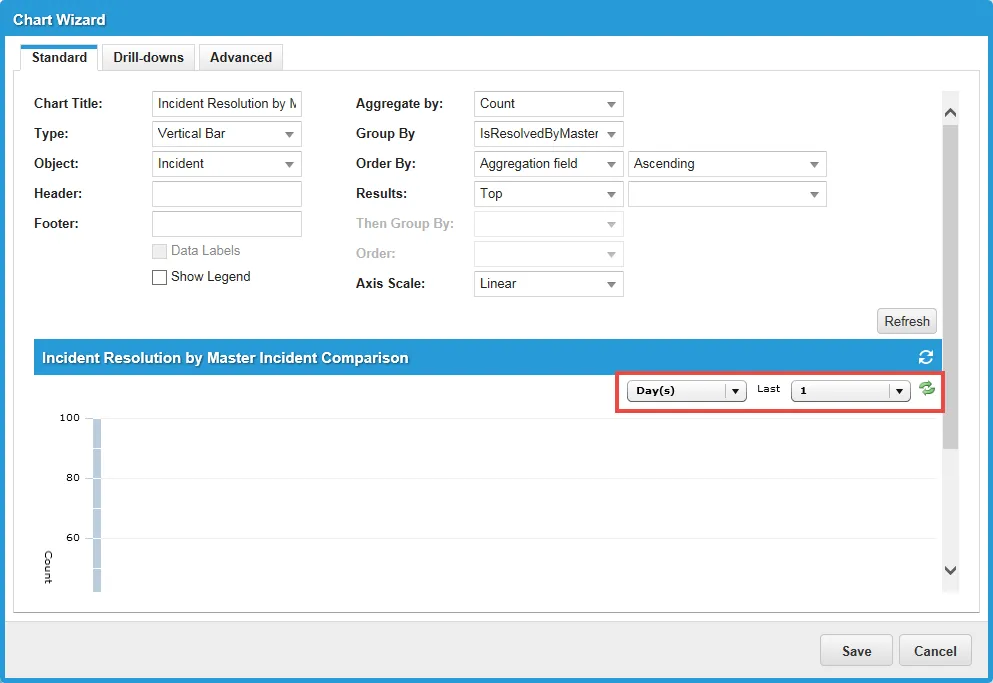
- Click the refresh
 icon to see data for the new date range.
- Click Save to close the chart.
- Click Save to save the dashboard.
Updating the Incident Header Form
- From the Configuration console, click Build > Business Objects.
- Open the Incident business object.
- Click the Forms tab.
- Click IncidentHeader to open the incident header form.
- Update the Incident label by doing the following:
a. In the form area on the right, click the Label field that correlates to the master incident.
Updating the Incident Header Form
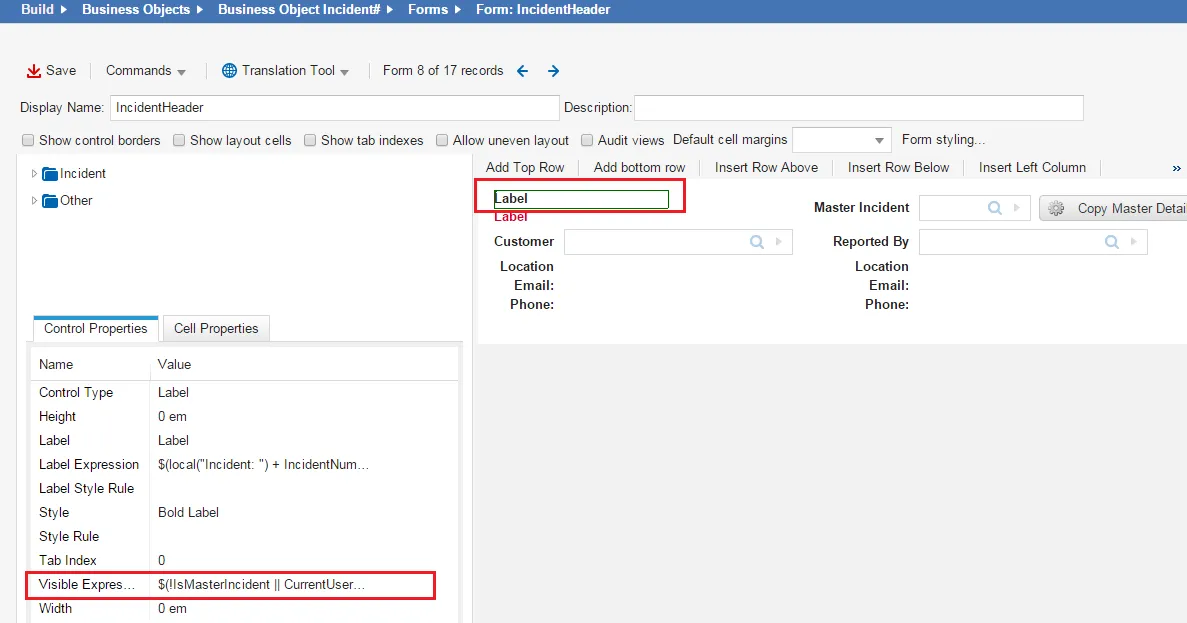
b. On the left, under the Control Properties tab, for the Visible Expression field, click the icon to open the Expression Editor.

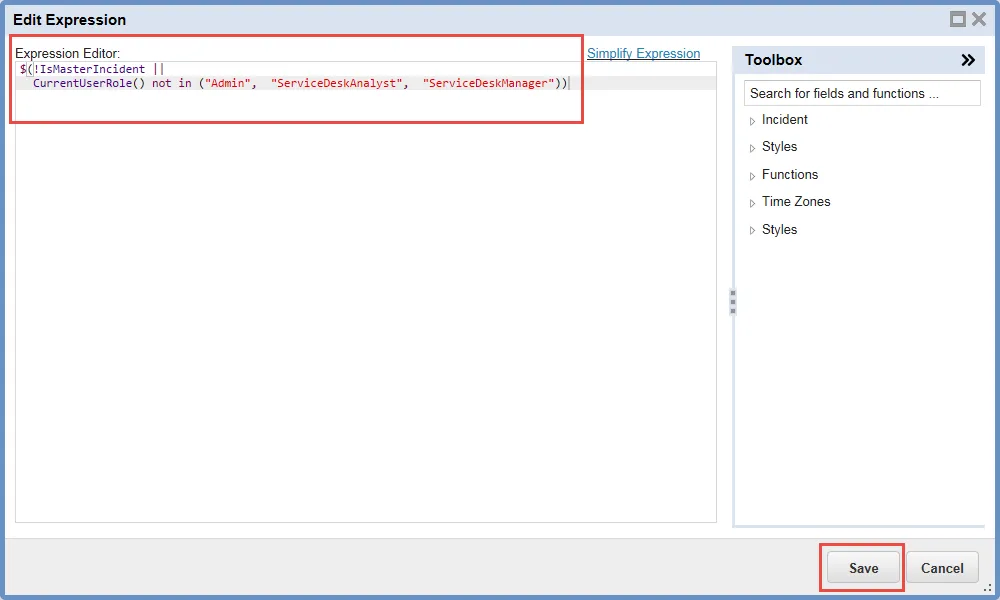
c. Enter $(!IsMasterIncident ||CurrentUserRole() not in ("Admin", "ServiceDeskAnalyst", "ServiceDeskManager")) and then click Save.
Expression Editor
- Add a Master Incident label by doing the following:
a. In the top left panel, expand Other and select Label.
b. Drag Label onto the form into the same cell as the existing Label fields.
c. While the new Label field is highlighted, on the left, under the Control Properties tab, for the Label Expression field, click the icon to open the Expression Editor.
d. Enter $(local("Master Incident: ") + IncidentNumber + " (" + local(Status) + ")") and click Save.
e. For the Style field, select RedLabel from the drop-down list.
f. For the Visible Expression field, click the icon to open the Expression Editor.
g. Enter $(IsMasterIncident && CurrentUserRole() in ("Admin", "ServiceDeskAnalyst", "ServiceDeskManager") and click Save.
- Add a Master Incident Link field by doing the following:
a. In the top left panel, expand Incident > Fields and select MasterIncidentLink.
b. Highlight the Reported By cell and click Insert Row Above.
c. Drag MasterIncidentLink onto the form into the cell above the cell called Reported By.
d. While the MasterIncidentLink cell is highlighted, on the left, under the Control Properties tab, for the Display Field field, enter [Incident]IncidentNumber.
e. For the Label field, enter Master Incident.
f. For the Visible Expression field, click the icon to open the Expression Editor.
g. Enter $(if CurrentUserRole() in ("Admin", "ServiceDeskAnalyst", "ServiceDeskManager") && IsMasterIncident ||Status == "Closed" && IsNull(MasterIncidentLink_RecID) then false else true) and then click Save.
h. For the Width field, enter 4.
- Add a Copy Master Detail button by doing the following:
a. In the top left panel, expand Other and select Command Button.
b. Drag Command Button onto the form into the same cell as the Master Incident Link field.
c. While the Button control is highlighted, on the left, under the Control Properties tab, for the Action field, click the icon to open the Action Editor.
d. Under Master Incident, choose Copy Master Detail and then click OK.
e. For the Label field, enter Copy Master Detail.
f. For the Visible Expression field, click the icon to open the Expression Editor.
g. Enter $(if CurrentUserRole() not in ("Admin", "ServiceDeskAnalyst", "ServiceDeskManager") || IsNull(MasterIncidentLink_RecID) == true || IsMasterIncident ||Status == "Closed" then false else true) and then click Save.
h. In the Width field, enter 5.
- Add an Update Related Incidents (Service, Category, and Status) checkbox by doing the following:
a. In the top left panel, expand Incident > Fields and select IsRelatedIncidentUpdate.
b. Drag IsRelatedIncidentUpdate onto the form into the cell next to the Copy Master Detail button.
c. While the IsRelatedIncidentUpdate cell is highlighted, on the left, under the Control Properties tab, for the Label Pos field, select On the right from the drop-down list.
d. In the Label field, enter Update Related Incidents (Service, Category, and Status).
e. In the Visible Expression field, click the icon to open the Expression Editor.
f. Enter $(if CurrentUserRole() in ("Admin", "ServiceDeskAnalyst", "ServiceDeskManager") && IsMasterIncident && Status != "Resolved" && Status != "Closed" then true else false) and then click Save.
g. In the Height field, enter 1.
- Click Save.
Updating the Incident Details Form
- From the Configuration console, click Build > Business Objects.
- Open the Incident business object.
- Click the Forms tab.
- Click IncidentDetails.ServiceDesk to open the incident details form for the Service Desk.
- Add a Declare Master Incident button by doing the following:
a. In the top left panel, expand Other and select Command Button.
b. Drag Command Button onto the form into the same cell as the Impact field.
c. While the Button control is highlighted, on the left, under the Control Properties tab, for the Action field, click the icon to open the Action Editor.
d. Under Master Incident, choose Declare Master Incident and click OK.
e. For the Disabled Expression field, enter $(Status == "Closed").
f. For the Image field, enter badge-metal.png.
g. For the Label field, enter Declare Master Incident.
h. For the Visible Expression field, click the icon to open the Expression Editor.
i. Enter $(if CurrentUserRole() in ("Admin", "ServiceDeskAnalyst", "ServiceDeskManager") && Impact == "High" && !IsMasterIncident && IsNull(MasterIncidentLink_RecID) then true else false) and then click Save.
j. For the Width field, enter 12.
- Click Save.
Updating the Incident Resolution Form
- From the Configuration console, click Build > Business Objects.
- Open the Incident business object.
- Click the Forms tab.
- Click IncidentDetails.ServiceDesk.Resolution to open the incident resolution details form for the Service Desk.
- Add an Update Related Incidents Resolution checkbox by doing the following:
a. In the top left panel, expand Incident > Fields and select IsRelatedIncidentResolutionUpdate.
b. Drag IsRelatedIncidentResolutionUpdate onto the form into the cell next to the Resolution cell.
c. While the IsRelatedIncidentResolutionUpdate cell is highlighted, on the left, under the Control Properties tab, for the Label Pos field, select On the right from the drop-down list.
d. For the Label field, enter Update Related Incident Resolution.
e. For the Visible Expression field, click the icon to open the Expression Editor.
f. Enter $(if CurrentUserRole() in ("Admin", "ServiceDeskAnalyst", "ServiceDeskManager") && IsMasterIncident && (!IsNull(Resolution) || Resolution == "") && Status == "Resolved" then true else false) and then click Save.
g. For the Width field, enter 18.
- Click Save.
Updating the Incident Layout
- From the Configuration console, click Build > Business Objects.
- Open the Incident business object.
- Click the Layouts tab.
- Click IncidentLayout.ServiceDesk to open the layout.
- Under the Views in this layout section, click formView.
- Ensure that you are not in the Try our new look! view. If you see a link on the top right that says Switch to old view, click it.
- Near the bottom of the page, click Add Child Panel.
- Set the display name by doing the following:
a. Under the Display Name header, click <Not Set>.
b. Enter Related Incidents.
- Assign a relationship by doing the following:
a. Under the Object header, click <Not Set>.
b. In the FormView Child Panel Relationship Editor dialog box, select Use only direct relationship to child object(s).
c. For Direct Relationship, click not set.
d. Select IncidentAssocChildIncident from the drop-down list.
e. Click Save.
- Set the list name by doing the following:
a. Under the List header, click <Not Set>.
b. Select Incident from the drop-down list.
- Set the form by doing the following:
a. Under the Form(s) header, click <Not Set>.
b. In the Form Selection dialog box, click <Not Set>.
c. Select IncidentDetails.ServiceDesk from the drop-down list.
d. Click OK.
- Set a hidden expression by doing the following:
a. Under the Hidden Expression header, click <Not Set>.
b. In the Expression Editor, enter $(if IsMasterIncident == true then false else true).
c. Click Save.
- Set the link button filter by doing the following:
a. Under the Link Button Filter header, click <Not Set>.
b. In the Expression Editor, enter $(if [OtherObject]IsMasterIncident == true || [OtherObject]Status == "Closed" then false else true).
c. Click Save.
- Check the checkbox under the Show Count in Title header.
- Click Save.