
About Creating a Custom Problem Status
3 min
You can create a custom status for a problem, and determine the order of transition for the custom state.
Problem Status Transitions
By default, a problem is constrained by the different states in its lifecycle. For example, when a problem is in the logged state, the next state is investigation. From investigation, it can be set to identified. (See Problem State Transitions Reference for a list of the problem states.)
Problem Lifecycle
Adding a Custom State to the List of Problem States
Follow these steps to add a custom state to the list of problem states that is available in Neurons for ITSM:
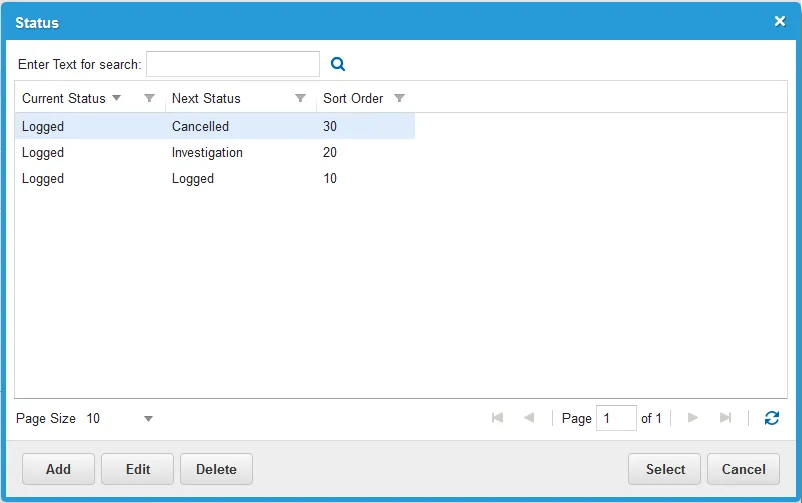
- From the problem record, click Edit in the Status field. The Status window appears.
- Click Add. The New Problem Status Workflow window appears.
New Problem Status Workflow
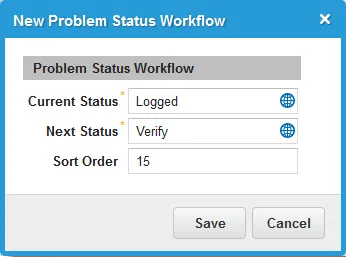
- Enter information into the fields.
Field | Description |
|---|---|
Current Status | The current status. Probably logged. |
Next Status | The name of the new status. |
Sort Order | The number of the order the current status should be. |
- Click Save.
- Choose the new status to add it to your problem.
- Click Save. All new problems now have the new status available from the drop-down list.