
Default Task State Transitions Reference
The administrator can create additional statuses to meet the business needs of your organization.
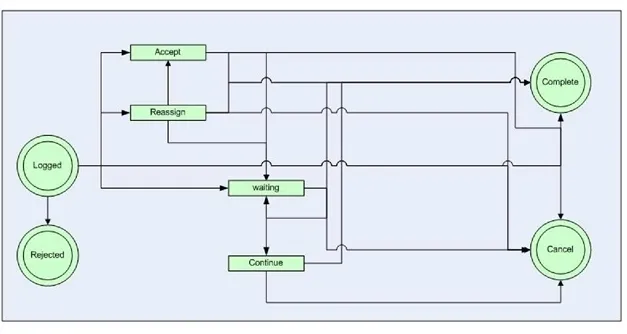
Default State Transitions for Tasks
State | Description |
|---|---|
Accept | The user has accepted the task and takes ownership. |
Cancel | The task has been canceled and is no longer valid. |
Complete | The task has been successfully finished. |
Continue | The task is moved out of the waiting status and the clock continues running. The system automatically assigns the task to the user who clicked Continue. |
Logged | The task has been added to the log file. |
Reassign | The task has been forwarded to a new owner. |
Rejected | The task has been refused by the owner and is no longer valid. |
Waiting | The owner has placed the task on hold, waiting for further action or information. The clock is placed on hold. |