
Using the Change Calendar
1 min
Major and significant changes can affect a large number of users in an organization. Organizations lose thousands of dollars and hours of work when employees are not notified or aware of impending changes that affect them. The Neurons for ITSM change calendar provides greater visibility of impending changes in the organization.
The change calendar automatically picks up all scheduled changes and presents the information in a graphical view. The change calendar can be viewed by all the roles in Neurons for ITSM.
- Log in to the Service Desk and open the Change Calendar workspace.
- In the Service Desk menu, select More and then Change Calendar.
- Service Desk displays the default Change Calendar.
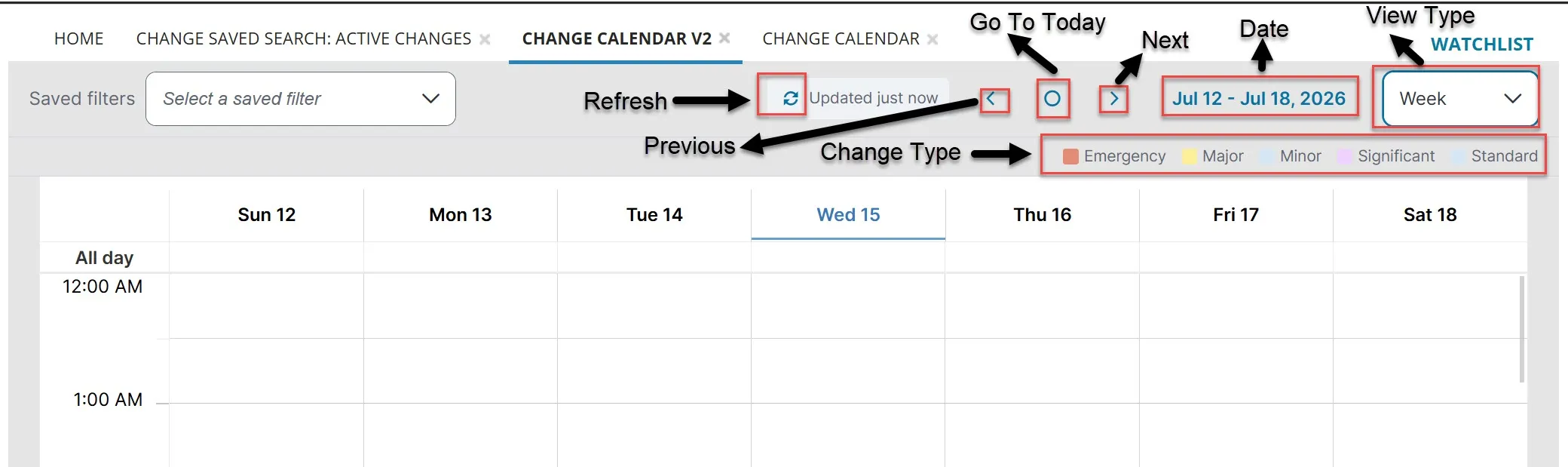
- Click a date to view details for a specific day.
- Hover your mouse over a specific change request to view its information.
- Double-click the change link on the calendar to go to the change record and view details about the change request. Dates and type updates made to the change record are reflected in the Change Calendar. You might need to click Refresh to see the updated information.