
Setting the Database Properties for DSM
1 min
The following procedure only applies to on-premise implementations.
You can change a property for the Neurons for ITSM database to prevent an intermittent error when you open or refresh the Managed Software tab of the CI Computer business object.
To view or change the database setting, do the following:
- On the database server, launch Microsoft SQL Server Management Studio.
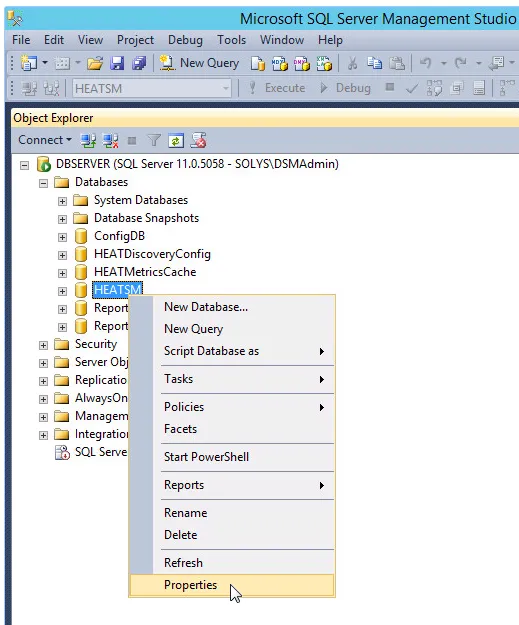
- In the Object Explorer area, under Databases, right-click HEATSM and choose Properties from the drop-down list.
Selecting Properties
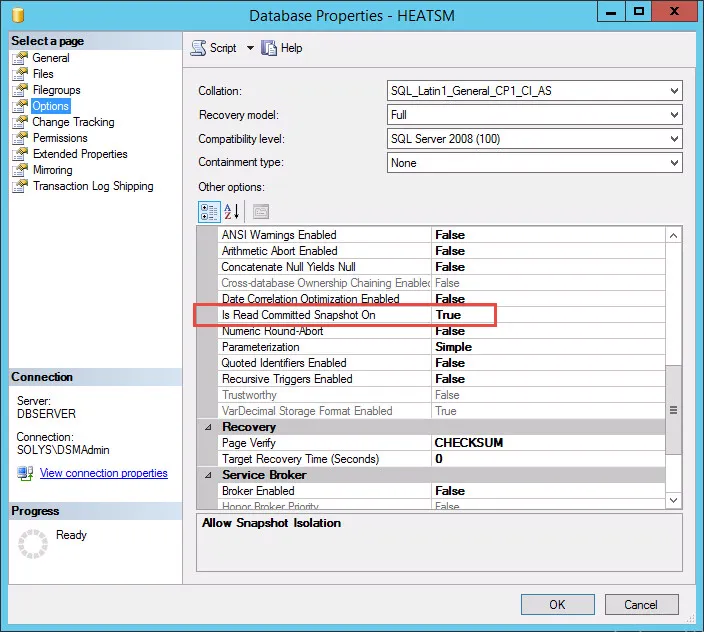
- In the Database Properties dialog box, under Select a page, choose Options.
- In the Other list, scroll down to Is Read Committed Snapshot On.
- If the value is "False", change it to "True" and click OK.
- If the value is "True", click Cancel.
Database Properties
- Click OK.