Create a Service Request
8 min
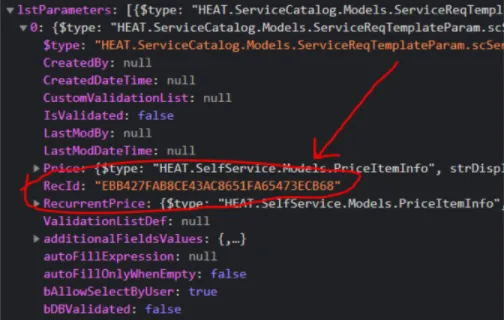
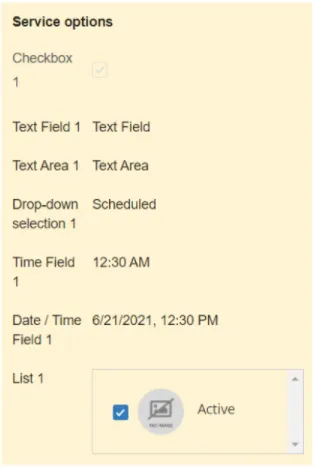
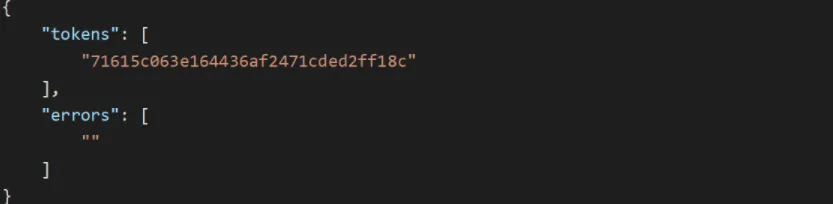
you can create service requests using rest api base url https //{tenant url}/api/rest/servicerequest/new create a service request example here is an example to create a service request url https //{tenant url}/api/rest/servicerequest/new \<font color="#ffffff">method\</font> post header name authorization jwt token/session key/rest api key \<font color="#ffffff">request payload\</font> click to view the request payload { "attachmentstodelete" \[], "attachmentstoupload" \[], "parameters" {}, "delayedfulfill" false, "formname" "servicereq responsiveanalyst defaultlayout", "savereqstate" false, "servicereqdata" { "subject" "sr from restapi", "symptom" "test02" }, "strcustomerlocation" "west", "struserid" "2f851094bfe5437c97d19871d1c539c7", "subscriptionid" "0c1780f4ec814cb2b8e045325d8cfb66", "localoffset" 330 } for details on how to fetch the values for these fields, see field values docid\ a 8gvjgmsxmp4lbywrz04 and parameters docid\ a 8gvjgmsxmp4lbywrz04 all the fields shown in this example are mandatory, the api will return an error if any of the field is missing however, the value for attachmentstodelete will be blank when executing create service request api \<font color="#ffffff">status code\</font> 200 \<font color="#ffffff">response payload\</font> click to view the response payload { "issuccess" true, "errortext" "", "servicerequests" \[ { "bnew" true, "strsubscriptionrecid" "0c1780f4ec814cb2b8e045325d8cfb66", "strrequestrecid" "6730c50f527a481a81ffe15d7d60725f", "strissuerecid" null, "strrequestnum" "10288", "strname" "minimalsr", "strstatus" null, "strstatusid" null, "strservice" null, "strserviceid" null, "strdetails" null, "parametertemplateparameterids" {}, "dateapproved" null, "datecancelled" null, "datecompleted" null } ], "invalidservicerequests" {} } field values how to fetch the values of the fields used for executing the create service request api is detailed below strcustomerlocation and struserid to fetch the value for strcustomerlocation and struserid , execute the api https //{tenant url}/api/odata/businessobject/frs compositecontract contacts?$filter=networkusername eq '{your user name}' from the response that you get the value for employee location will be your strcustomerlocation value and the value for recid will be your struserid value subscriptionid to fetch the value for subscriptionid , execute the api https //{tenant url}/api/rest/template/\<user recid>/ all this will give you all the published templates in service catalog from the response that you get the value for strsubscriptionid will be your subscriptionid value localoffset the value for localoffset is the difference in minutes from the coordinated universal time for a particular place for example, if your location is india, your gmt/utc is +5 30 hours which is 330 minutes, therefore, the localoffset value for your location is 330 field recid to fetch the recid for a field, execute the api https //{tenant url}/api/rest/servicerequest/packagedata/subscriptionid/strcustomerlocation from the response, look for lstparamcategories/lstparameters and expand it all fields will have a recid , expand the field to view it's recid field recid parameters the base structure of the parameter is "parameters" { // {parameter name} "par {parameter recid}" "value", } example "parameters" { // checkbox "par {parameter recid}" "true", // text field "par {parameter recid}" "text field", // text area "par {parameter recid}" "text area", // drop down "par {parameter recid}" "scheduled", "par {parameter recid} recid" "{field recid of scheduled}", // time field "par {parameter recid}" "{system generated time}", // datetime field "par {parameter recid}" "{system generated time}", // pick list "par {parameter recid}" "active", "par {parameter recid} recid" "{field recid of active}" } sample service request with parameters drop down lists/pick lists and attachments work differently from other parameters for details, see drop down and pick list and attachments drop down and pick list in case of drop down and pick list you will need the value's recid, to fetch it execute the following api get /api/rest/servicerequest/ /validationlist use postman or a similar app instead of browser and set the content type as application/json example execute get /api/rest/servicerequest/ 6b5a00312e00430aaf8769d1a27326c6/validationlist the response contains the rec ids of all values for example, the recid of the value alex is "026221d7927f4104810abf14672fcc3" use it for the parameter xyz as given below "parameters" { "par a72d69af2a9b420f874ba8a5a293ef17" "alex", "par a72d69af2a9b420f874ba8a5a293ef17 recid" "026221d7927f4104810abf14672fcc3" } attachments to upload attachments in service request, you will need the attachment's token to fetch the token execute the following api post api/rest/attachment/newsr use postman or a similar app instead of browser and set the request body as form data copy the token from the response sample response containing token using the token in the service request attachmentstoupload \[\["{token id}", "\<attachment file name"]] unsuccessful responses empty request body scenario trying to create a service request with empty request body header name authorization sessionkey \<font color="#ffffff">code\</font> ism 4000 description invalid request payload message { "message body cannot be empty " } \<font color="#ffffff">http status code\</font> 400 invalid request body scenario trying to create a service request with invalid request body header name authorization sessionkey \<font color="#ffffff">code\</font> ism 4000 description invalid request payload message \[ "invalid business object " ], \<font color="#ffffff">http status code\</font> 400 missing required fields scenario trying to create a service request with missing mandatory fields header name authorization sessionkey \<font color="#ffffff">code\</font> ism 4000 description invalid request payload message \[ "required field parameters is missing" ] \<font color="#ffffff">http status code\</font> 400 invalid response scenario when the application fails to save when trying to create a service request header name authorization sessionkey \<font color="#ffffff">code\</font> ism 5000 description internal server error message \[ "the server encountered an internal error please retry the request " ], \<font color="#ffffff">http status code\</font> 500