
Working with Release Packages
A release package contains information about all of the configuration items (for example, documentation, test plans, services, and so on) associated with a change and links to the release that is deploying the change.
Typically, a Change Manager may have already linked to a release, or created a request for release.
In the following illustration, the change record is linked to a standalone release, which contains all of the configuration items associated with the change. The release is, in turn, linked to a release package which inherits all of the configuration items that are included in the change.
Relationship between Change, Release, and Release Package for a Standalone Release
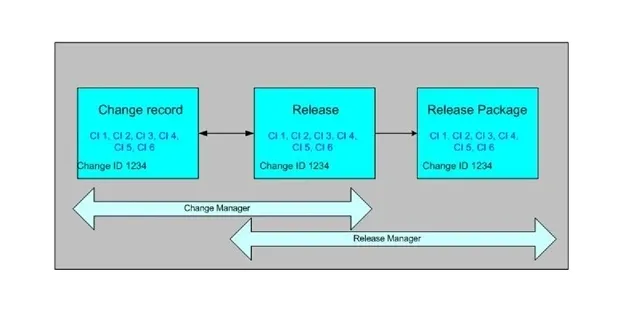
The Release Manager can decide to stagger the change between multiple releases (for example, master and phase releases) by creating multiple release packages for a single change. For example, a change that involves a major software upgrade can be staggered among master and phase releases, each consisting of a release package that contains the configuration items and services that are affected at each phase of the release.
Depending on the type of change and its scope, a release may or may not have a release package. A single change record can have one or more release packages indirectly associated with it from the releases. For example, if the change involves updating specific software on all the employees machines, the change might be rolled out in phases by location or by organization. In such an instance, release packages are created for each phase of the release.
In the following illustration, the change record is linked to multiple releases. Each release is in turn linked to a different release package. The Release Manager links only those configuration items to the release record and release package that will be included in the actual release.
Relationship between Change, Release, and Release Package for Phased Releases
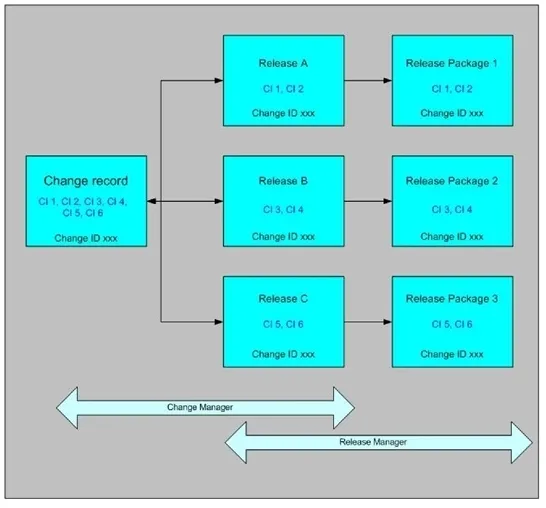
Depending on the type of change and its scope, a release may or may not have a release package. A single change record can have one or more releases associated with it. For example, if the change involves updating specific software on all the employees machines, you may want to roll out the change in phases by location or by organization, and you can create releases for each phase.
Creating a Release Package for a Release
When you are creating a release package from the release, the release ID is already linked to the release package.
- Sign in to Neurons for ITSM as a Release Manager.
- Open the Release workspace.
- Open the release record for which to create a release package.
- From the Release Package tab, select New. The New Release Package window opens.
- Enter information into the fields.
Field Name | Description |
|---|---|
Name | A title for this release package. |
Description | A description of the release package. |
Status | The release status: Pending: If you need to do identify more items for the release package or you are still working on it. Implemented: The release package is ready. |
Team | The team responsible for the package. |
Owner | The package owner. |
Change | Optional. The change record ID to be implemented and linked to this release package. |
Release | The release ID is automatically entered. |
- Click Save.
- Repeat to add other release packages to the release.
Adding Configuration Items to a Release Package
After you create a release package for a release and associate a change to it, link those configuration items that are part of the release package to the release package record.
- Sign in to Neurons for ITSM as a Release Manager.
- Open the Release Package workspace. The list of release packages is displayed.
- Open a release package. The Release Package form opens.
- From the CI tab, select Link.
- Select the appropriate configuration item record and click Select.
- Repeat to add configuration item records to the release package.
- Click Save.