
Viewing the License Usage Report
Do the following to track the licenses being used in the application.
- From the Configuration Console, click Build > Reports to open the Reports workspace. The application displays a list of reports.
- Select the License Usage report. The report appears in a new window showing the data from the time the report was last run.
- In the Parameter Information section, enter the following:
Field | Description |
|---|---|
From Date | The date and time to start the report. |
To Date | The date and time to end the report. |
On Frequency | The license usage frequency. |
- Click View Report. The application displays the license usage report.
Sample License Usage Report
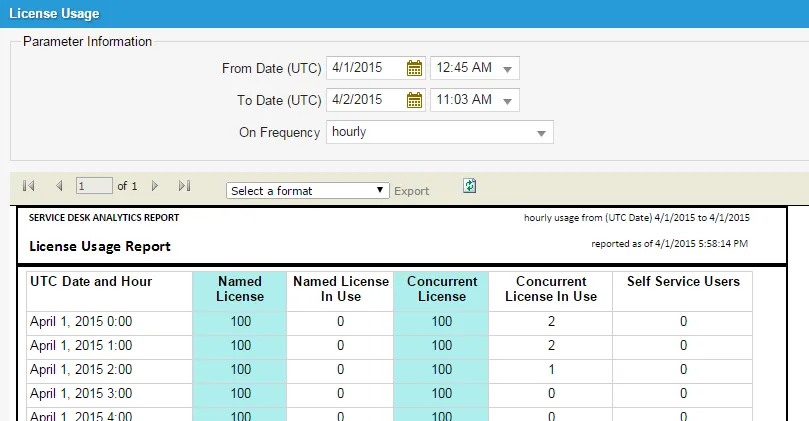
The License Usage report contains the following information:
Column | Description |
|---|---|
UTC Date and Hour | The date and time of usage. |
Named License | The number of named licenses available. Named license users can open multiple sessions using the same login information. |
Named License In Use | The number of named licenses being used. |
Concurrent License | The number of concurrent licenses available. |
Concurrent License In Use | The number of concurrent licenses being used. |
Self Service Users | The number of licenses for the Self-Service Portal that are being used. This is tracked when a user logs into the Self-Service Portal. |