
Configure and Administer
...
Configuring the Self Service M...
Translating the Self Service UI elements
1 min
You can translate the UI elements in the Self Service Mobile portal using the Literals workspace from the Configuration console.
To translate:
- Log in Neurons for ITSM as an Administrator.
- Open the Configuration console > navigate to Build > Self Service > Literals.
- To translate an existing UI element, double-click a record from the list view.
- Or create a new one by clicking New Self Service Literals option.
- Enter the text in the Literal text box and click Save.
- Click the
 icon and enter the translated text for the respective language.
- Click Save.
- Repeat this for as many UI elements in the Self Service Mobile portal as you want.
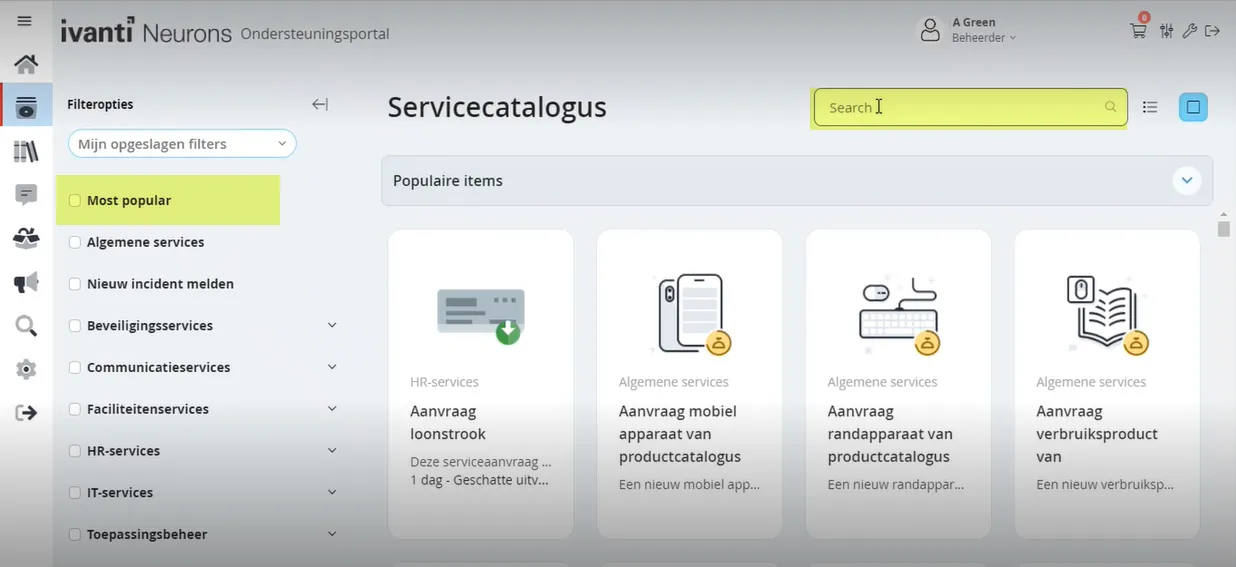
Self Service Mobile screen before translating
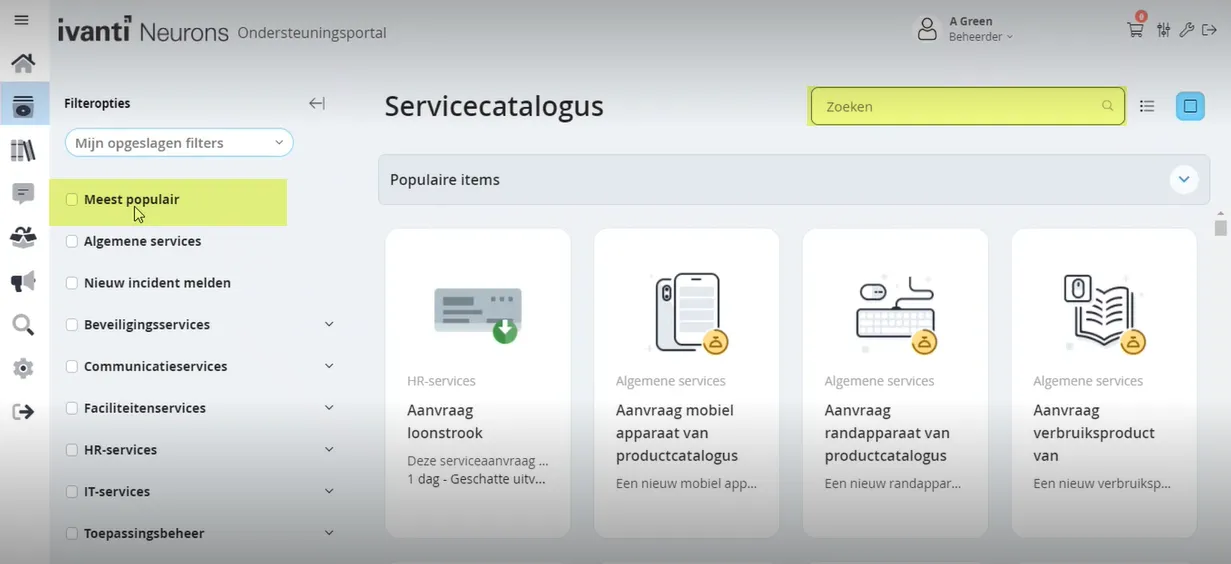
Self Service Mobile screen after translating
- User Reviews
- 1 star or better
- 145 characters
- 2 stars or better
- 3 stars or better
- 4 stars or better
- 5 stars
- Actions
- Active Workspaces
- Actual value was
- Add Attachment
- Add Document
- Add Note
- Add a Card Title before you proceed
- Add a Filter
- Add a Role before you proceed
- Add a new card
- Add a sub-title before you proceed
- Add to Favorites
- Aggregate By
- Alerts
- Align Card with Role
- All
- All Categories
- All Dates
- All Types
- All categories
- Angle up
- Announcement
- Announcements
- Answer
- Any Rating
- Application Settings
- Apply
- Approve
- Approve/Deny Required
- Approved.
- Are you sure you want to change language to """"?"
- Are you sure you want to change role to """"?
- Are you sure you want to log out now?
- Are you sure you want to remove all parts?
- Are you sure you want to remove block?
- Are you sure you want to remove cart item?
- Are you sure you want to remove draft?
- Are you sure you want to revert changes?
- Are you sure you want to save changes?
- Are you sure you want to submit the cart?
- Array index is out of bounds
- Asc
- Ascending
- Attachments
- Attachments:
- Auto Save
- Average
- Back to My Items
- Best Rating
- Cancel
- Cancel issue """"?
- Cancellation
- Cannot set executor after it has become active.
- Can't add note.
- Can't approve.
- Can't convert Heat.DataModel.Currency to
- Can't create currency from ʼʼ, ʼʼ.
- Can't deny
- Can't find draft with recId
- Can't find item with recId
- Can't find request with recId
- Can't load form
- Cart
- Cart Submitted
- Cart Can't contain more than 20 items
- Cart has been submitted
- Category
- Chain broken
- Change Card Button Color
- Change Card Title
- Change Header Image
- Change Image
- Change Sub-title
- Change Tagline
- Change feedback
- Chat with support
- Clear
- Close
- Close dialog
- Collapse panel
- Configuration Saved
- Configuration reverted
- Configuration saved
- Confirm
- Confirm Password
- Confirmation
- Created By
- Created On
- Default
- Default Template
- Delete
- Delete attachment
- Delete attachment """"?
- Denied
- Deny
- Desc
- Descending
- Description N.A
- Description: NA
- Desktop
- Details
- Digg
- Do you really want to leave current chat session?
- Do you want to proceed with deleting this card?
- Download
- Download from Cloud
- Draft saved
- Drafts
- Edit
- Edit saved Service Request
- Edit saved for submit Service Request
- Edit submitted Service Request
- Enter Edit Mode
- Enter new password
- Enter old password
- Error
- Error loading Draft id=
- Error loading Service Request id=
- Error occurred
- Error while deleting cart item
- Error while deleting draft
- Error while submitting files. See your console
- Errors while saving form
- Est
- Estimate
- Estimated
- Estimated Delivery
- Estimated Fulfillment
- Exactly what I was looking for
- Exit Edit Mode
- Expand
- Expand panel
- FAQ
- Fairly useful article
- Favorites
- Favorites limit exceeded
- File is already in the list
- Filter
- Filter ID
- Filter Options
- Following file(s) has an invalid entension
- Form Submitted
- Header
- Home
- Home Page
- Home page is not configured
- How can we help you
- How can we help you today?
- ID
- Image have to be less than 250 Kb
- Image have to be less than 400x400 pixels
- Incomplete Form
- Internal error
- Items per page Keywords
- Knowledge
- Knowledge Articles
- Knowledge Base
- Knowledge article
- Landscape
- Language
- Launch AdminUI
- Layout Settings
- Loading form...
- Loading...
- Location arrow
- Log Out
- Logo
- Logout
- Match the header background color or logo according to Accessibility and Visibility concerns
- Maximum files size will be exceeded with this file
- Mobile Self Service UI does not support this command
- Modified BY
- Modified On
- Modified date - Ascending
- Modified date - Descending
- Most Helpful
- Most Reviewed
- Most Viewed
- Most popular
- My Items
- My Saved Filters
- N.A
- NA
- NOTE : Below form is shown in compatibility mode. UI components may be displayed incorrectly in some devices
- New Password
- New password should be equal to confirm password
- No
- No Announcements available
- No Service Requests logged
- No saved drafts
- Not useful article
- Notes
- Nothing found
- Notification Corner
- Old Password
- On
- Open Alerts Workspace
- Open Announcements Workspace
- Open External Offering
- Open FAQ Workspace
- Open Home Workspace
- Open In New Window
- Open Knowledge Base Workspace
- Open My Items Workspace
- Open Notification Corner
- Open Search Workspace
- Open Service Catalog Workspace
- Open Settings Workspace
- Open in Object Workspace Tab
- Opens External Offering without redirect to Service Cartalog
- Options
- Order By Order Date
- Org Unit
- Parts
- Password changed successfully
- Password is invalid
- Password must be at least characters long
- Personal Settings
- Phone
- Please fill in the password fields
- Please make sure Org Unit and Role information are filled
- Please wait
- Popular Items
- Portrait
- Power off
- Preview
- Profile Photo
- Profile picture changed successfully
- Progress
- Query
- Question
- REQUEST
- Rate this article
- Rating
- Reason
- Recurrent
- Redirect URL for Logo
- Refresh
- Registered
- Related Articles
- Remove
- Remove All
- Remove from Favorites
- Reply
- Request
- Request "" (#)"" has been created
- Request #
- Return to Service Catalog
- Retype new password
- Revert
- Revert Changes
- Review & Submit
- Right
- Role
- Roles
- SAVE
- Safari
- Save
- Save for Later
- Saved Search
- Saving draft...
- Saving...
- Search
- Security Settings
- See your console for additional info.
- Select
- Select All Select Role
- Select Search
- Select a file of type *.jpg, *.jpeg, *.png, *.gif or *.bmp"
- Select a search to deleteSelf Service Workspace
- Service Catalog
- Service Request
- Service Request Progress
- Service options
- Service request template
- Services Catalog
- Settings
- Severity
- Shopping cart
- Show
- Show More
- Somewhat useful
- Sort
- Sort By
- Sort Dir.
- Sort asc
- Sort by
- Sort desc
- Starting chat...
- Status
- Submit
- Submit cart
- Submitting form...
- Submitting...
- Table
- Tablet
- Template Settings
- Template created
- Template removed
- Template saved
- There are currently no items to display
- There are no items to display
- There are unsaved changes in workspace """".
- There is no data to display
- This type of external offering is not implemented yet
- Title
- Top 10 popular Request forms
- Total
- Total Price
- Type Unable to connect chat server right now
- Undo
- Unsupported Business Object or you do not have access, please login to appropriate role to view this item
- Update Password
- Upload
- Upload File
- Upload Photo
- Upload only an image smaller than 1 Mb in size
- Uploaded
- Uploading
- Urgency
- Use .svg, .png or .jpg format
- Use image files only and of types .svg, .png or .jpg
- Users
- Very useful article
- View Alert
- View Announcement
- View Created Request
- View FAQ
- View Knowledge Base by RecId
- View My Item by RecId View My Items
- View filtered My Items list by Filter Id
- View my Items List Was this article helpful?
- Welcome to What do you want to do next?
- Yearly
- Yes
- You have not saved your changes, do you want to still exit without saving?
- You were logged out. Would you like to continue working?
- Your cart is empty
- You're trying to upload incorrect image file!
- added to favorites
- ago
- day
- days has incorrect value
- hour
- hours
- marked as favorite
- minute
- minutes
- month removed from favorites
- sec
- un-marked as favorite
- week
- weeks
- year
- years