
Translating the Self Service Action Templates
1 min
The Self Service templates in the Actions Center of the Incident workspace are available for users in the Self-Service Portal to use.
You can edit any of the English field values and provide corresponding values in the supported languages.
- From the Configuration Console, click Build > Automation Tools > Quick Actions to open the Actions Manager workspace. The list of business objects that have actions appears.
- Click Add/Edit for the Incident business object. The application displays the Action Designer selection popup.
- Select Classic Action Designer.
- Click the Your Actions tab.
- Select SelfService Templates > Software Request. The application displays the Software Request action template.
Notice that the Publish to action for all Self Service templates are set for Self Service users and service owners.
- Click Edit.
- Click Edit translations.
Actions Edit Mode
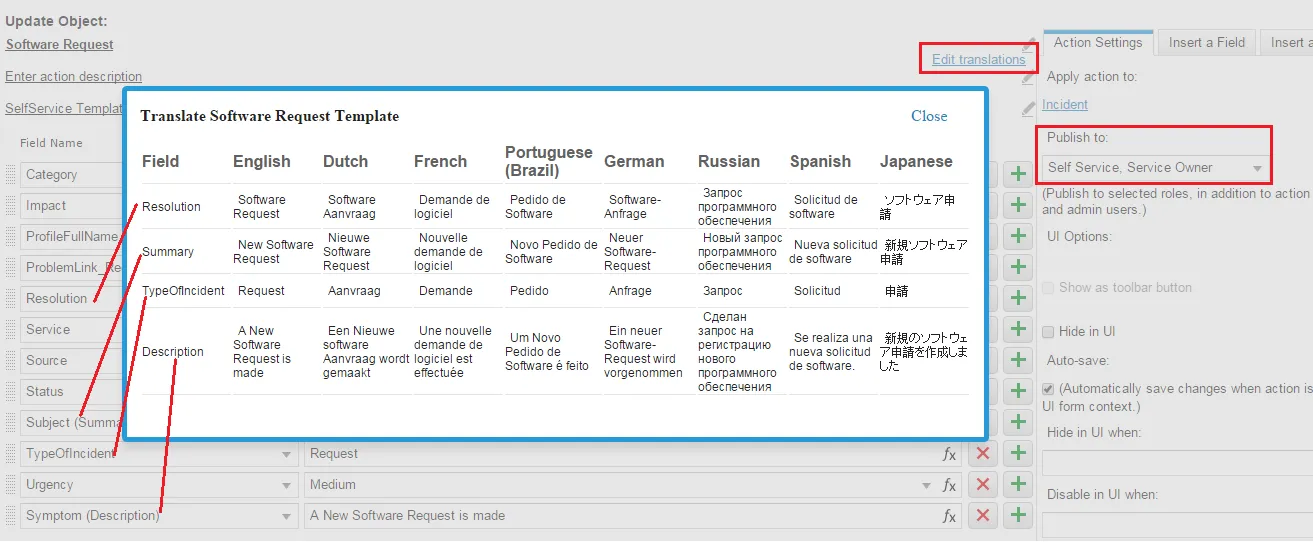
- Enter the translated text corresponding to the English field values for the language to configure. These fields contain the translated values when the application shows in the set language.
- Close the translation window.
- Click Save.