
Service Allocation
Service allocation shows subscribed services reserved for an organization from the dependent service point-of-view, and is automatically calculated based on the schedule called Service Allocation Calculation Daily Schedule.
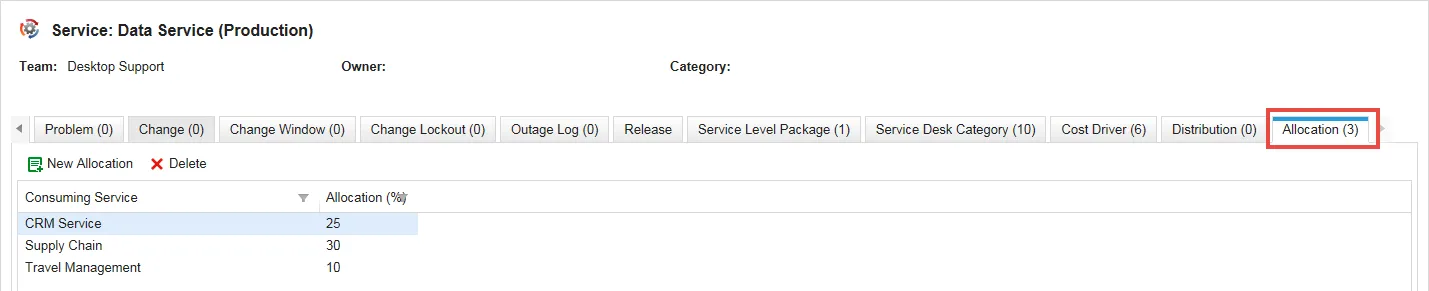
For example, data service might allocate 25% of its total services to the CRM service. The allocation appears in the Data Service record under the Allocation tab, and the distribution appears in the CRM service record under the Distribution tab. See About Distribution.
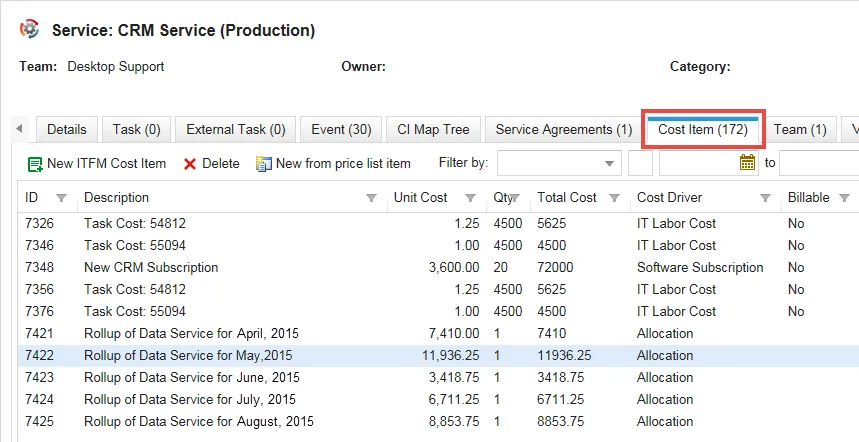
This cost is automatically calculated each month for the CRM service. The schedule gathers information daily, but provides data at the end of the month. You can allocate the service cost to one or more organizations.
Viewing Allocations
- Log into the Service Desk console.
- Open the CI Service workspace. The list of services is displayed.
- Scroll right and click the Allocation tab.
Data Service Allocation - 25% of Costs are Allocated to CRM Service
CRM Service Costs - 25% of Data Service Costs for May (11,936.25) are Charged to CRM Service
Establishing Service Allocation
You can set the percentage of services consumed for each service provided. You can allocate multiple services. When the Service Allocation Calculation Daily Schedule is run, the total is listed under the Cost Item tab of the dependent service. The schedule is run daily (hence the name), but only the monthly totals appear under the tab.
- Log into the Service Desk console.
- Open the CI Service workspace.
- Open the service record for which to set allocations.
- From the Allocation tab, click New Allocation. The New ITFM Recurring Service Subscription dialog box opens.
- Enter information into the fields.
Field | Description |
|---|---|
Status | The status of the allocated service. Only the active status is used in cost calculations. |
Consuming Service | The name of the consuming service. |
Supporting Service | This value is automatically entered corresponding to the service record you are in, but you can change this if needed. |
Allocation (%) | A whole number for the percent of use the consuming service provides to the supporting service. The corresponding distribution amount appears under the receiving service record under the Distribution tab. |
Default Cost Driver | The default cost driver for this service. |
Notes | A description for this transaction. |
- Click Save. The window closes.
- Repeat this process for additional consuming services.
- Click Save.
Setting the Service Allocation Calculation Daily Schedule
This schedule is not set by default, to prevent it from running for users who do not need it.
- Log into the Service Desk console.
- Open the Schedule Entry workspace.
- Click New Daily Schedule. The form appears.
Service Allocation Calculation Daily Schedule
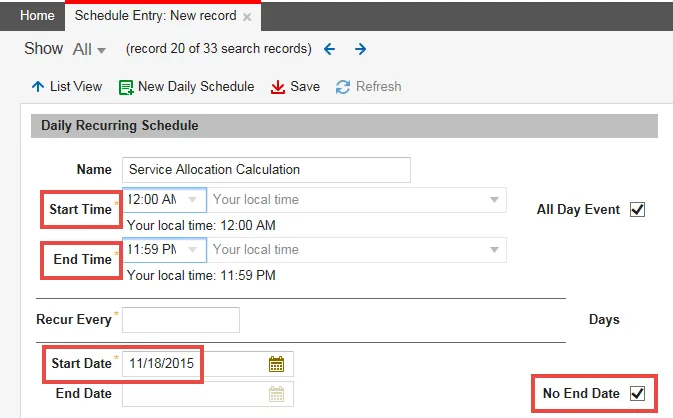
- Enter information into the fields.
Field | Description |
|---|---|
Name | A name for this schedule. |
Start Time End Time | The times for the schedule to start and end each day. |
Start Date | The date for the schedule to begin. |
No End Date | Specifies whether to continuously run this schedule. By default, this option is not checked to prevent the schedule from running for users not needing it. |
You can modify other fields as needed, or leave them as set.
- Click Save.