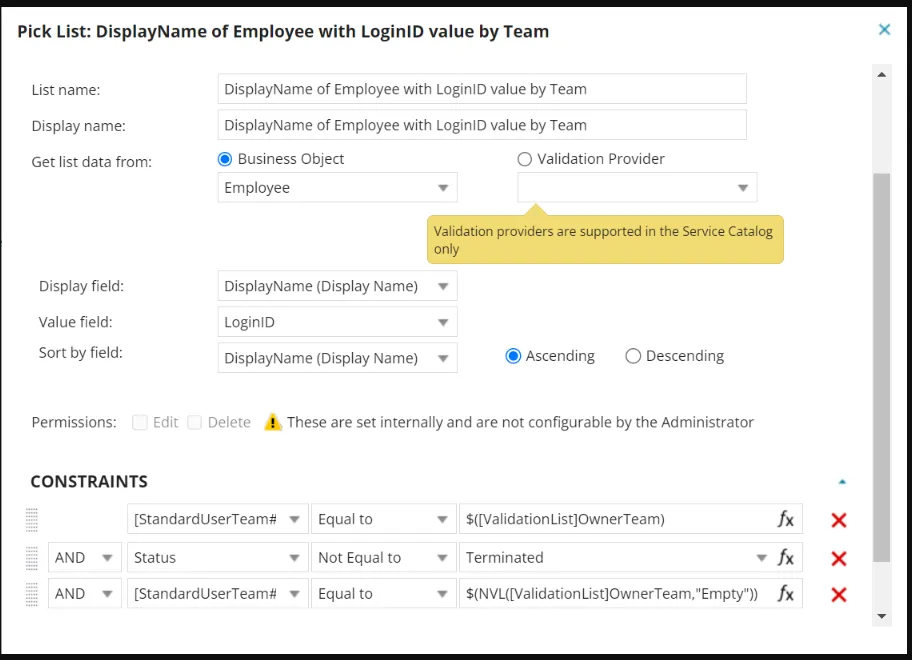
Null Check for Picklist to Prevent DB Timeout
A common cause of database timeouts is the creation of records like Incidents, Service Requests, Changes, or Tasks, where the Display Name (Owner) is limited by the Field Name (OwnerTeam) in the system.
This issue arises when the Picklist: DisplayName of Employee with LoginID value by Team is used. If the Team value is missing or null, the system may experience delays, resulting in a timeout during the record creation process.
To fix this issue, the Picklist configuration must be updated to include a null check for the Field Name (OwnerTeam). This ensures that the system handles missing or empty values, preventing performance issues and avoiding database timeouts when the query is executed.
The updated configuration should align with the Out-of-the-Box (OOTB) setup, which already incorporates this null check to prevent timeouts.
Steps to update the Picklist configuration:
- Open Configuration Console and select Picklists.
- Locate the Picklist titled DisplayName of Employee with LoginID value by Team and Click to edit.
- Add the following constraint to check for null values in the OwnerTeam field:
- [StandardUserTeam#.Rev2]Team = $(NVL([ValidationList]OwnerTeam, "Empty"))
- Save the Picklist. Null check for Picklist