
Managing Change Request Approvals
Before sending a change request for approval, review whether the type of change requires approval from reviewers other than you. See About Change Request Approvals.
After you review the change request and add the necessary information to it, update the change request status to pending approval to trigger the change approval workflow (if approval is required for the type of change).
Default approvals are configured based on the type of change requested. Each change type has an associated change approval board (CAB, ECAB, or management committee).
The following default approvals are defined:
Type of Change | First Approver | Second Approver | Third Approver |
|---|---|---|---|
Minor and Standard | Change Manager | Not required | Not required |
Significant | Change Manager | CAB | Not required |
Major | Change Manager | CAB | Management committee |
Emergency | Change Manager | ECAB | Not required |
Minor and standard changes do not require an approval process. Change Managers can set the status of these type of change requests to pending approval and bypass the approval process.
For changes other than standard, the approval process is triggered when the change status is set to pending approval, as shown in the following screen:
Default Workflow for Change Approvals
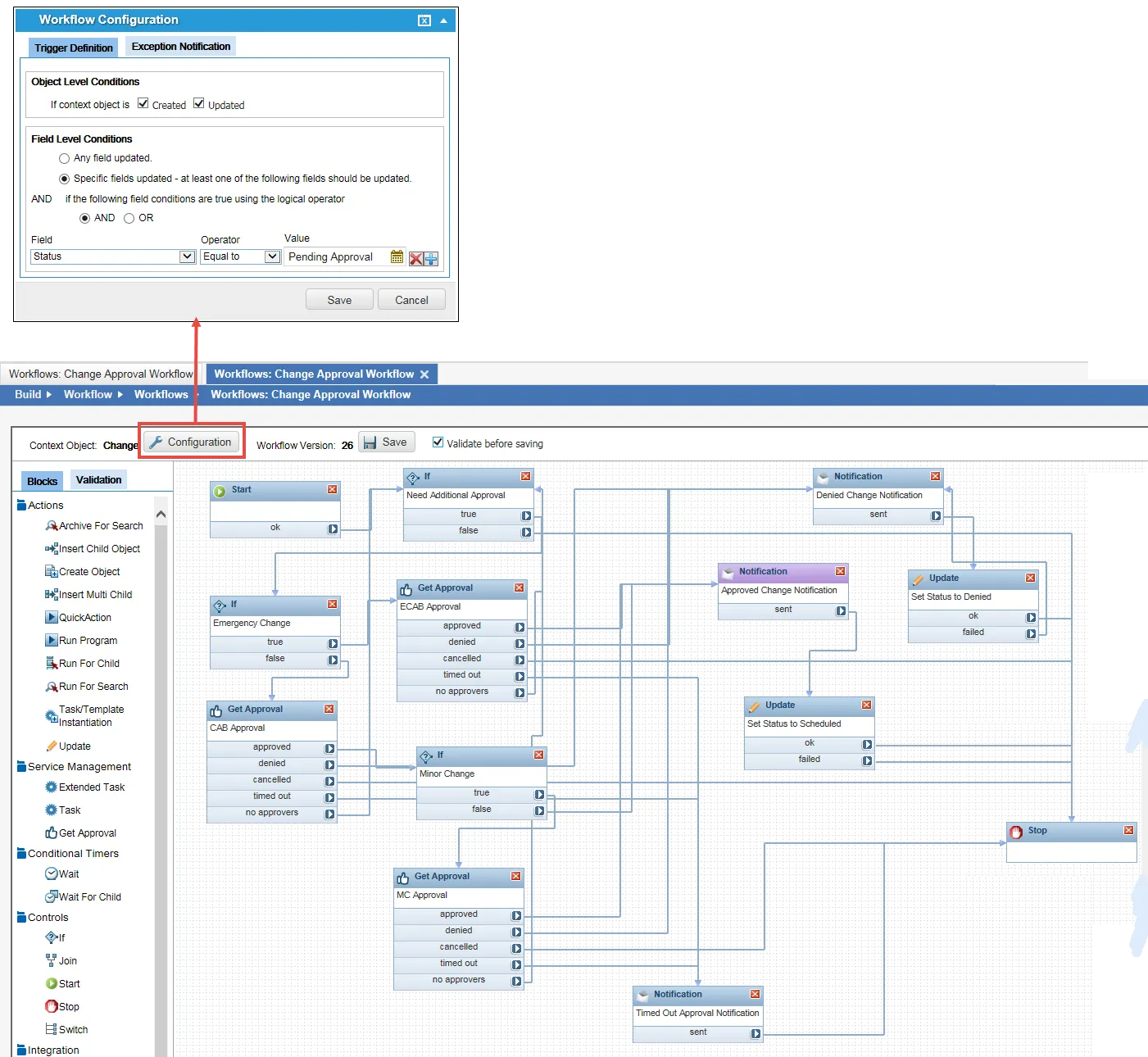
Change Managers configure the approval members for each approval group. When a change request status is updated to pending approval, notification emails are sent to each member of the approval group associated with the change request.
Change Managers can also set up an ad-hoc approver for a specific change request.
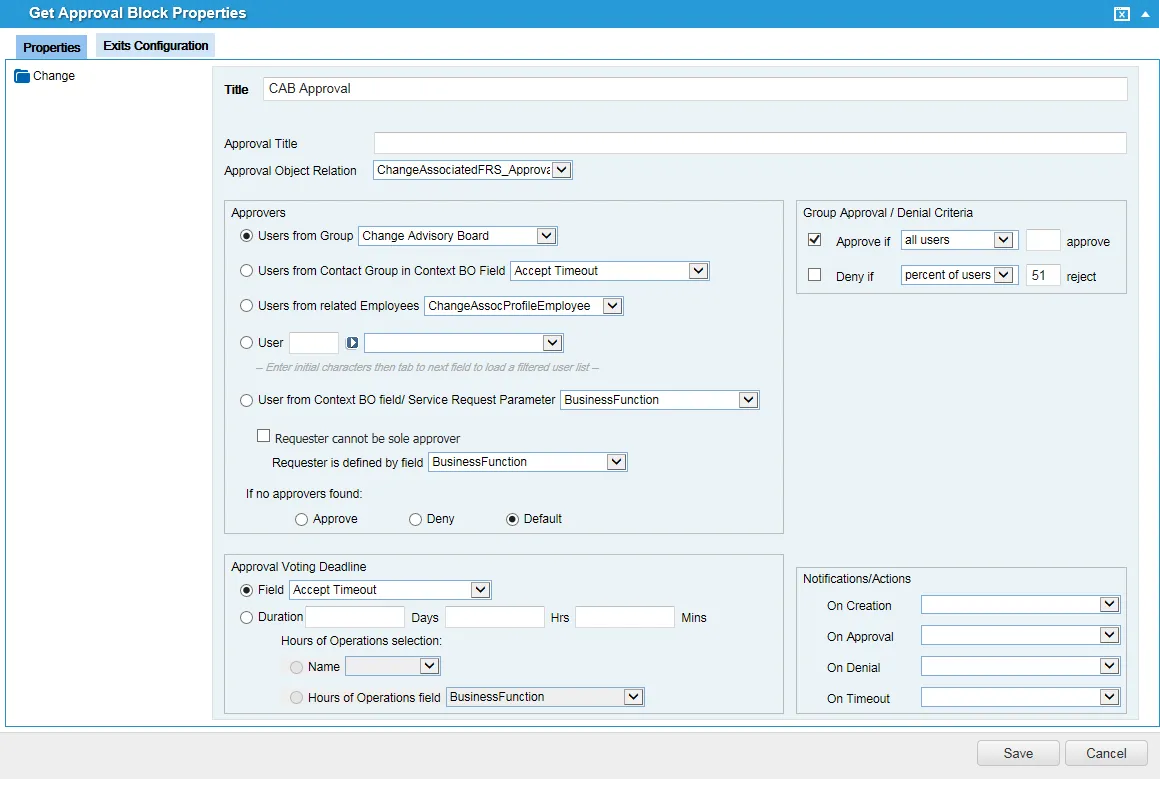
Depending on how the approval is configured, some types of change requests might require a vote of approved from all the approvers while other types of change requests might require only a fifty-one percent approval vote. Approval blocks can also be set up to get approval from a group or from a user.
In the following example, the change request is approved only if all the approvers approve the change request as defined under the Approval/Denial Criteria options:
Approval Properties for a Significant Change
When the approval process has triggered, you can view the Workflow Instance tab of the change request record to keep track of where the approval is in the workflow.
Approving a Change Request
- Log in to Neurons for ITSM as a Change Manager.
- Open a change request record.
- Ensure that all the information is complete and accurate.
- Send the change request for approval by changing the status of the change request to pending approval. When you change the status to "Pending", the application assumes that the Change Manager will approve the change request and automatically puts your user name into the Approved By field.
- Click Save. The Approvals tab appears.
The application notifies the change requester that the change request is now in pending approval status and sends a change request approval notification to the approvers associated with the change request. See About Change Request Approvals.
For significant, major, and emergency changes, the appropriate workflow is triggered and a record is created in the Workflow Instance tab of the change request record.
About Overriding Approvals
In certain circumstances, if pending approvals for change requests need to be removed, approved, or denied, Administrators can approve, deny, or cancel the approval. Examples of when this can happen are if the assigned user is no longer an approver or member of the CAB, if the approval is stagnant, or if the change request is no longer valid. Administrators see buttons to override the vote that other users do not.
The buttons do not appear if the assigned owner has already approved or denied the change. The available choices are:
Icon | Usage |
|---|---|
 | Allows an administrator to approve the request (if the approval is still pending). |
 | Allows an administrator to deny the request (if the approval is still pending). |
 | Allows an administrator to cancel the request (if the approval is still pending). |
Tracking Approval Votes for a Change Request
When a change request is in the pending approval state, the change request approvers vote on the implementation of the change. To track the overall approval process and track the acceptance of the change request by each reviewer, do the following:
- Log in to Neurons for ITSM as a Change Manager.
- Open the Approval Vote Tracking workspace. The list of change request approvals is displayed.
- Group the change request approvals by name to view the votes according to the change request record.
- Double-click the change request approval record to view. The voting status is displayed.
- Click Go to to open the original change request record.
- Select the Approval tab to view all votes on this change request record.