
Invoke for Child Workflow Block
The Invoke for Child workflow block invokes a workflow created for a child business object. The exit ports allow for paths contingent upon the workflow being started, completed, and failing.
Invoke for Child Workflow Block Properties
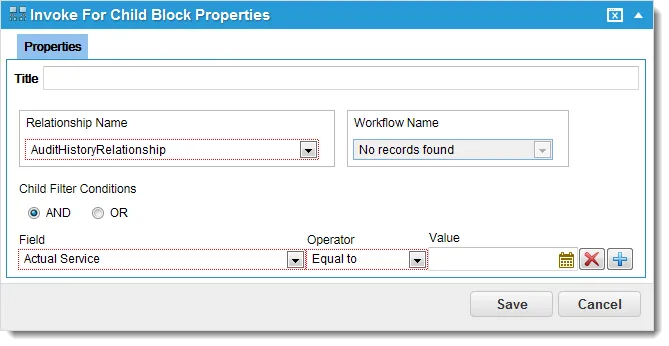
Exit Ports
Exit Port | Description |
|---|---|
OK | Continue to the next block. |
Properties
Property | Description |
|---|---|
Title | A unique name for the workflow block. |
Relationship Name | A valid relationship defined for the child object in a relationship. Choose from the drop-down list. |
Workflow Name | An existing workflow to invoke. Choose from the drop-down list. |
Child Filter Conditions | |
AND / OR | A child filter condition. |
Field | An operand. Choose from the drop-down list. |
Operator | An additional operator to apply. Choose from the drop-down list. Equal to: The value in Field matches the value in Criteria. Not Equal to: The value in Field does not match the value in Criteria. Begin with: The value in Field starts with the value in Criteria. Contains: The value in Field contains the string value in Criteria. Does Not Contain: The value in Field does not contain the string value in Criteria. Is Empty: Field does not contain any values. Is Not Empty: Field contains something (is not empty). |
Value | A value. Select from the drop-down list. |
Actions
Button | Action |
|---|---|
 | Adds an expression to the workflow block. |
 | Removes an expression from the list. |
Save | Commits your settings. |
Cancel | Exits without saving. |