
Defining the Loading Message
1 min
By default, when a tenant logs in and the application loads, a message appears, such as the following:
Loading Message
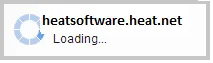
The loading message shows the login URL of the tenant.
You can change the message label by defining the global constant ApplicationDisplayName.
- From the Configuration Console, click Build > Global Constants to open the Global Constants workspace.
- If the ApplicationDisplayName constant does not appear, create it. Refer to Working with Global Constants.
- Enter the text value to appear.
- Click Save. The new label automatically replaces the tenant URL.