
Configuring Ivanti Voice Integration
To enable a Start IPCM Voice Activity quick action, you must first configure Neurons for ITSM to connect to Ivanti Voice.
On-Premise Configuration
Contact your Ivanti representative for information on implementing this feature. See More Information for contact details.
Hybrid Configuration
- From the Configuration Console, click Extend > Voice Integration > Hybrid Configuration to display a list of hybrid connections.
- Double-click the connection to use. The system displays the IPCM Integration page.
- Enter information into the fields.
IPCM Hybrid Configuration Page
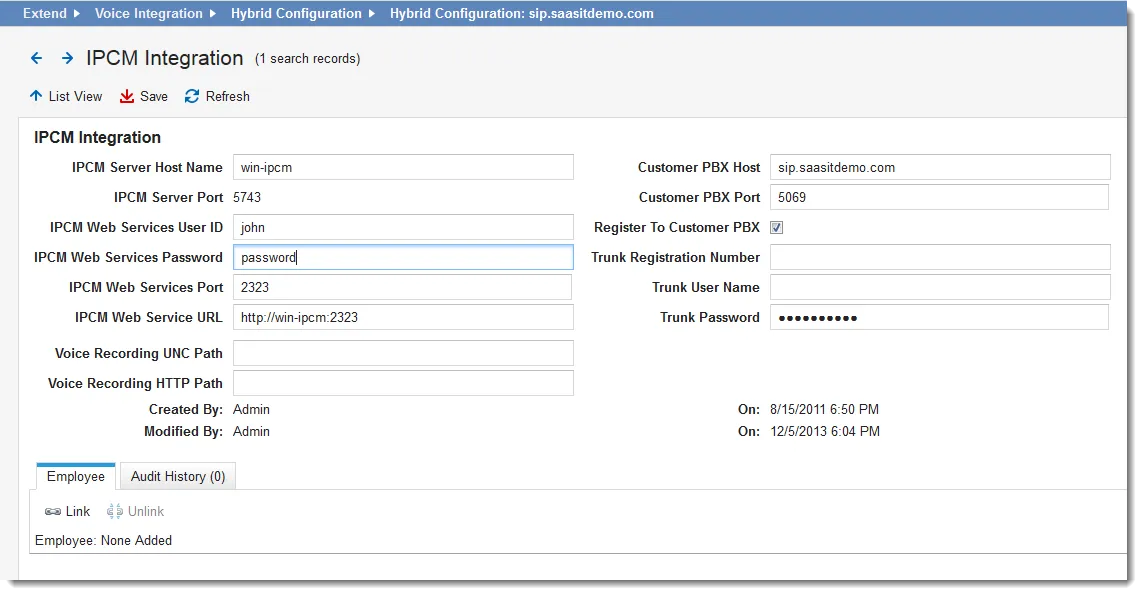
Field | Description |
|---|---|
IPCM Server Host Name | A domain name or IP address that can be resolved from the Neurons for ITSM server. |
IPCM Server Port | The port number is set to 5743 by default. |
IPCM Web Services User ID | A valid user ID configured in Ivanti Voice. No specific role is required. |
IPCM Web Services Password | A valid password for the user ID configured in Ivanti Voice. No specific role is required. |
IPCM Web Services Port | Set to match the web services port set in the Ivanti Voice management portal (System Configuration > Voice Server > Advanced Configuration > App Server). This is set to 2323 by default. |
IPCM Web Service URL | The URL to the Ivanti Voice web service. |
Voice Recording UNC Path | The UNC path to the voice recording application. |
Voice Recording HTTP Path | The HTTP path to the voice recording application. |
Customer PBX Host | The customer PBX host. |
Customer PBX Port | The customer PBX port. |
Register to Customer PBX | Registers the connection to the customer PBX. |
Trunk Registration Number | The trunk registration number. |
Trunk User Name | A valid user name for the trunk. |
Trunk Password | A valid password for the trunk user. |
- Under the Employee tab, click Link to link employees to this connection.
- Click Save.
You can now define the Start IPCM Voice Activity quick action. See Start Ivanti Voice Activity Action.