
Using the System Configuration Wizard
The System Configuration Wizard provides an interface in which you can perform various configuration tasks for the initial setup of Neurons for ITSM.
Starting the System Configuration Wizard Manually
The System Configuration Wizard starts automatically after you finish installing Neurons for ITSM.
You can also start the System Configuration Wizard manually after your system is configured. See Changing Feature Settings by Running the System Configuration Wizard.
Navigating the System Configuration Wizard
The System Configuration Wizard contains the areas shown in System Configuration Wizard Areas.
System Configuration Wizard Areas
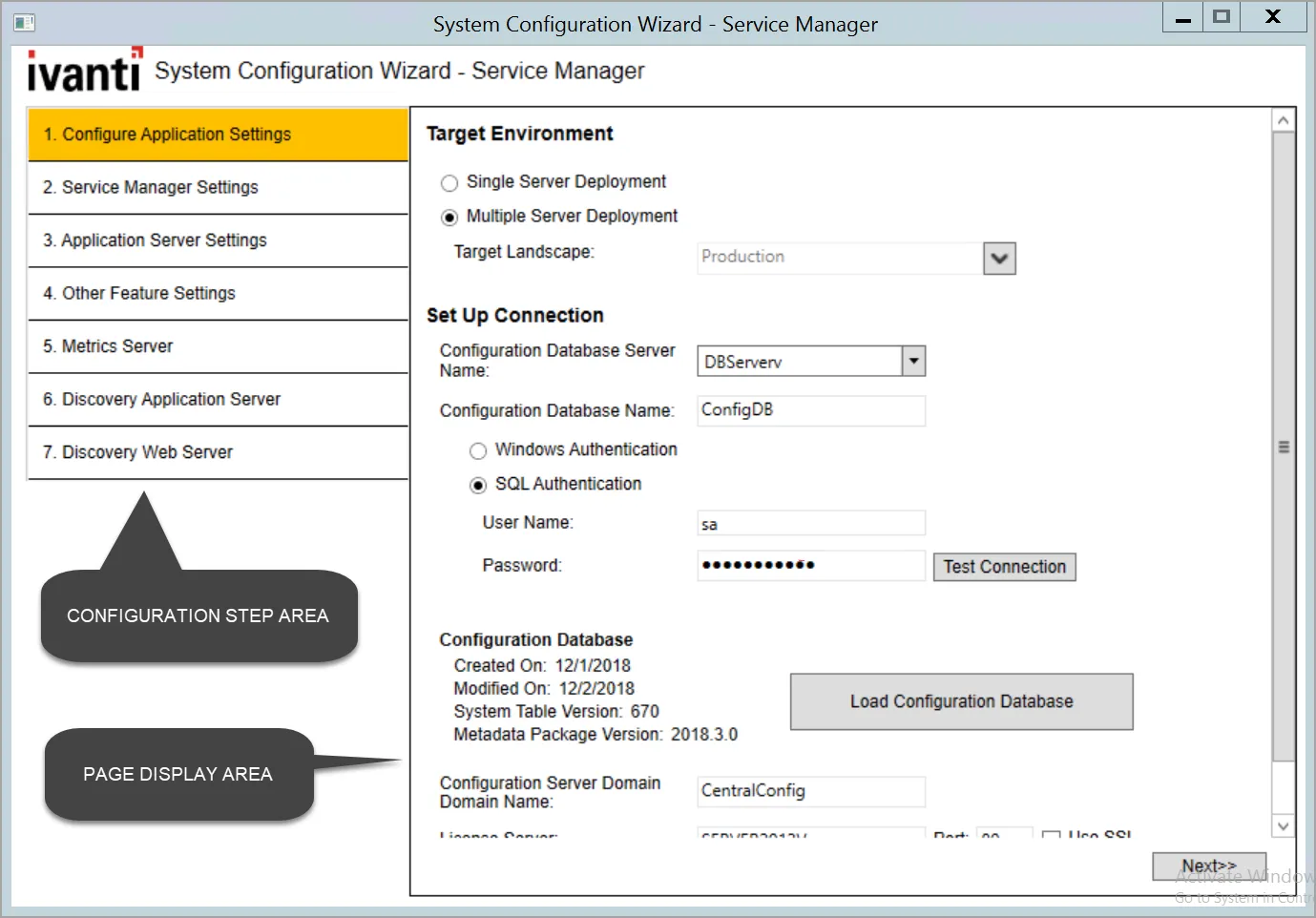
- In the configuration step area, the page that you are currently working on is highlighted in yellow.
- After you complete a page and click Next, the system places a green check mark next to the completed page name to show that it has been completed.
The configuration step area is not a navigation pane. You cannot go to a page by clicking it in the configuration step area. Instead, click the Next and Previous buttons to move through the pages sequentially.
- The page display area shows the wizard page itself, including the fields and controls that you set the various parameters.
- Chat Configuration installs Redis version 6.2 re-distributable which requires internet access while configuring the System Configuration Wizard.
- The default behavior of the System Configuration Wizard with respect to SSL check boxes have changed from non-SSL to SSL. For non-SSL based installation these check boxes need to be cleared.
- As part of the security fix, the System Configuration Wizard requires host name with domain (Fully Qualified Domain Name). For more information, refer to the Configuring the Application Server Settings section in the Installation and Deployment guide.
Actions to Perform in Each Page
The System Configuration Wizard page numbers can change depending on the features you choose to install.
Unless otherwise noted, the settings that you specify in each wizard page are stored in the Configuration Database.
Configuration Application Settings page:
- Specify the name of the configuration database and the authentication method that is used by all supported web applications when connecting to the configuration database.
- Create or recreate the configuration database.
- If you use Windows Integrated Security for the configuration database, specify the Windows domain credentials for the service account.
Service Manager Settings page:
- Specify the name and authentication method for the server where the Neurons for ITSM application database resides.
- Load the demo database on a server other than the server where the Neurons for ITSM application database resides. This option allows you to review the demo database while the Neurons for ITSM application database continues to run in its current configuration.
- Specify the application name, attachment location, client authorization key, and the type of name to use when accessing the application.
Application Server Settings page:
- Specify the location of the configuration server and the host name.
- Specify if you will use this server for surveys or the reporting feature.
- If you use Windows Integrated Security for the Neurons for ITSM application server, specify the Windows domain credentials for the service account.
Other Feature Settings page:
- Specify the log file and temporary file locations on the configuration server.
- Specify different server hosts and whether to use SSL for the Neurons for ITSM application server.
- Specify the inbound web server information.
Metrics Server page:
- Specify the locations for the log file and the Neurons for ITSM configuration server.
- Map applications to the metrics server.
Microsoft SSRS Configuration page:
- Appears when you install the reporting feature.
- Specify information about the Microsoft SQL Server database for the reporting feature.
Reporting Service Configuration page:
- Appears when you install the reporting feature.
- Specify information about the Neurons for ITSM report database for the reporting feature.
Discovery Application Server page:
- Specify information about the configuration of the Discovery application server.
Discovery Web Server page:
- Specify information about the configuration of the Discovery web server.
- Upgrade the configuration database and the Neurons for ITSM application database.
Upgrade System page:
- Appears when you upgrade to a newer release of Neurons for ITSM.
- Upgrade the configuration database and the Neurons for ITSM application database.