Central Config API Authentication
7 min
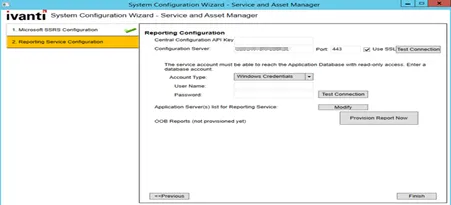
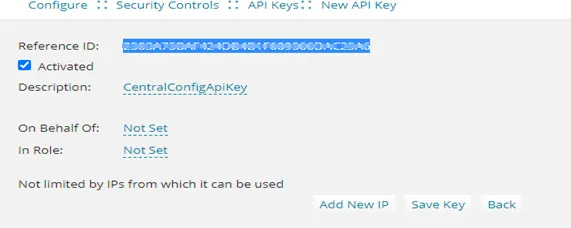
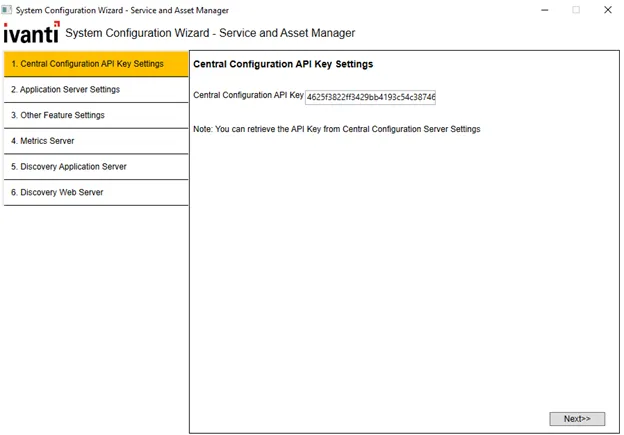
apis in the central config can be accessed only by known users by authenticating the api call the api header will pass the api key which will be authenticated and passed by the central config server this prevents un authorised users from accessing the apis install/upgrade ivanti service manager system configuration wizard on installing or upgrading the service manager system configuration wizard, the api key is auto generated in the central config db this key is used to to authenticate the api calls to the central config server however, the following should be monitored while installing/upgrading verify the webconfig file once the installation/upgradation is complete, verify the webconfig file has the following in the config section \<section name="centralconfigapikey" type="system configuration namevaluesectionhandler" /> in the new protected section \<centralconfigapikey> \<add key="centralconfigapikey" value="" /> \</centralconfigapikey> verify the appsettings json file once the installation/upgradation is complete, verify that the appsettings json file has the following "central config api key" "caefxxxx8c847d5xxxx698d8xxxxxx" update for teams bot service if you have installed teams bot service, update the centralconfigapikey value in appsetting file from c \inetpub\teambotservice/appsettings json get the centralconfigapikey from the central config db table (frs data api key) updates if service manager system configuration wizard and service manager reporting wizard are installed on different machines if the service manager system configuration wizard and service manager reporting wizard are installed on different machines, update the centralconfig api key when installing the reporting wizard as shown in the below image get the centralconfigapikey from the central config db table (frs data api key) updating the centralconfigapikey in case you wish to update/change the centralconfigapikey, do so by following the below steps stop all services that are referencing the centralconfig log in to service manager with admin credentials and open the configuration console select security controls > centralcofigapikeygroup and note down the description delete the existing centralconfigapikey and recreate a new key inside the centralconfigapikeygroup as shown in the below image once the key is created in the centralconfig tenants, re run the system configuration wizard to update the webconfig and appconfig files restart your machine the centralconfigapikey should be unique, duplicate/multiple keys will break the feature disabling the centralconfig api key feature once the installation/upgradation is complete, verify the centralconfig appsettings json file has property “disableapikeyvalidation” ”false” which need to be change to “true” as “disableapikeyvalidation” ”true” log in to the application with admin credentials and open the configuration console select security controls > api key and delete the centralconfigapikey ensure you delete and not de activate to disable impacted webconfig file list appdomains configuration files appserver web config workflow workflowservice exe config escalation escalationservice exe config email emailwindowsserviceapp exe config bulkupload kmbulkuploadtool exe config integrationserver integrationservicehost exe config systemconfigwizard serverconfigurationwizard exe config release tool releasetool exe config frsloggingservice frsloggingservice exe config metric heat metricsserver exe config message queue messagequeueservicehost exe config license service licenseserverwindowsservice exe config report provisioning reportserver\reportprovisioning exe config neurons appsettings teams bot service appsettings dynamicwebservices web config opsconsole web config frssurvey web config frssurveyproxy web config im imserver\imservices\assetprocessor\web config im imserver\imservices\discoprocessor\web config im imserver\imservices\discoutils\web config im imserver\imservices\imreadonlydataservice\web config im imserver\imservices\taskprocessor\web config im imserver\webservices\clienttransportprocessor\web config reports c \program files\microsoft sql server\msrs12 mssqlserver\reporting services \reportserver\web config impacted appsettings json file of the appdomain appdomain ccf appserver emailservice escalationservice frssurvey frssurveyproxy inboundwebservice integrationserver kmimporttool licensemanager loggingservice messagequeue metricsserver opsconsole releasetool systemconfigurationwizard workflowservice reportserver imserver imservices assetprocessor discoprocessor discoutils imreadonlydataservice ivanticlouddataprocessor taskprocessor webservices agenttaskws custom installation of scw when customers try to install the configuration server in one machine and other components in another machine, user has to copy the central config api key from configuration server and update the key in the central configuration settings page as show in the following image sample image of custom installation of scw