
Known Issues
Release Version 2025.4
Bug ID: 1742513
Issue | IIS (W3SVC) Service Stop fails with PowerShell error during SCW configuration |
|---|---|
Expected Result | IIS restarts successfully without throwing an error and Powershell window to close automatically. |
Actual Result | IIS World Wide Web Publishing Service (W3SVC) fails to stop and does not restart during SCW configuration. Also, throws a PowerShell error. 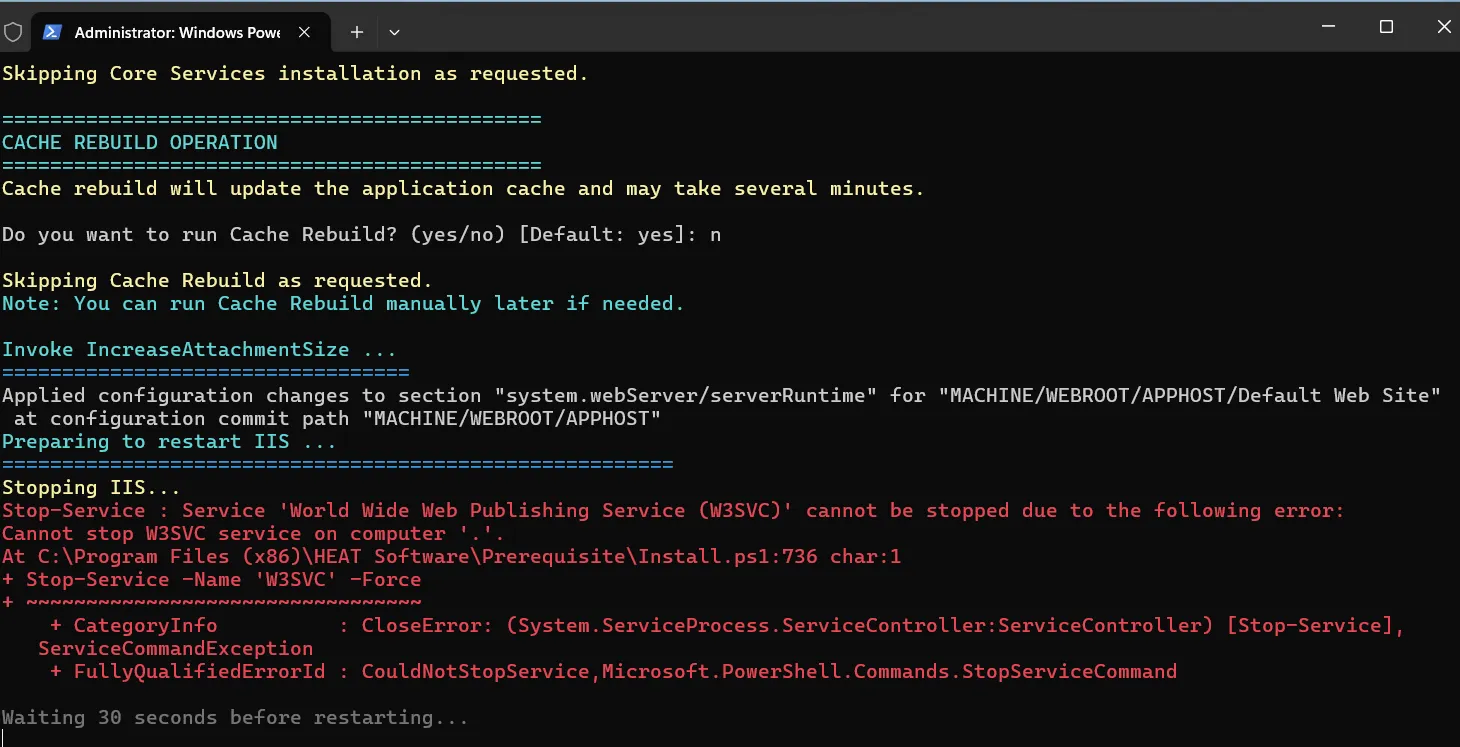 |
Workaround | Manually restart the IIS (W3SVC) Service from the Windows Server settings or control panel. |
Release Version 2025.3
Bug ID: 1674149
Issue | You cannot access the Service Catalog business object under the Service Owner role if you are not using the English (United States) locale. If you have changed your locale to another and try to access any request under Service Catalog, you might receive an error stating: Access denied to table Frs_def_self_service_literals#. This issue is occurred because the Object Permissions are not set properly for the Frs_def_self_service_literals business object. |
|---|---|
Expected Result | For any locale, you should be able to access any request under the Service Catalog business object. |
Actual Result | For non-English (United States) locales, you can't access some of the requests under the Service Catalog business object. |
Workaround |
|
Release Version 2025.2
No known issues in this release.
Release Version 2024.3
No known issues in this release.
Release Version 2024.2
No known issues in this release.
Release Version 2023.4
Bug ID: 1369214
Issue | When using HTTP - unable to create incident due to console errors while creating an issue in Self Service Mobile UI V3. |
|---|---|
Workaround | Use HTTPS. |
Bug ID: 1369214
Issue | Inbound web service request fails with null reference object error and the message is stuck in Dispatched state. |
|---|---|
Workaround | Verify and update the dispatch method name for the type Web Service Handler to HandleWebServiceMessage. 5. Login to Config DB of the on-premise environment. 6. Open the Message Queue Handler Workspace. 7. Open the handler name Web Service Handler. 8. Update the Dispatch method name to HandleWebServiceMessage. 9. Restart the Ivanti Message Queue Service. In case the Dispatch Name is HandleMessage, then incoming web service will not work. |
Release Version 2023.3
No known issues in this release.
Release Version 2023.2
Issue | Whenever Asset Processor displays the message "SQL Error 245: Data Access Error. Conversion failed". |
|---|---|
Workaround | Under CI Business Object select the field PercentFreeDiskspace and set Precision as 2 and save. Run the device sync again for failed Asset Processor. |
Release Version 2023.1
Bug: 1041094:
Issue | ICDP web.release.configfile has 2 endpoints which has the same contract name and binding configuration. Due to this the files generated by SCW for OnPrem has 2 nodes with incorrect addresses that causes software messages to timeout. |
|---|---|
Details |
|
Expected Result | The status message in the Integration queue is displayed as Timed out. |
Actual Result | The status message in the Integration queue should be displayed as Completed |
Workaround | Remove the redundant entry that includes the actual hostname and update the "localhost" entry in the web.config file to specify the port number as 7200. |
Release Version 2022.3
No known issues in this release.
Release Version 2022.2
No known issues in this release.
Release Version 2022.1
Bug: 923520:
Issue | When the Archive Mailbox Name has uppercase text, the email services do not work. |
|---|---|
Details |
or
|
Expected Result | Email services should work. |
Actual Result | Email Service do not work. |
Workaround | Enter only lowercase letter in the Archive Mailbox Name field. |
Bug: 923520:
Issue | Email services do not work for IMAP4 Protocol when the Action To Perform On Processing Success and Action To Perform On Processing Error options are set to Move to Folder. |
|---|---|
Details |
or
|
Expected Result | Email services should work. |
Actual Result | Email Service do not work. |
Workaround | Delete the Inbox settings record and create a new one. Ensure the following options are set to Delete:
|
Bug: 923520:
Issue | Email services do not work when the Action To Perform On Processing Success and Action To Perform On Processing Error options are changed from Move to Folder to Delete without deleting the data in the Archive Mailbox Name field. |
|---|---|
Details |
or
|
Expected Result | Email services should work. |
Actual Result | Email Service do not work. |
Workaround | Before changing the following options to Delete, ensure to delete the data from the Archive Mailbox Name field.
|
Release Version 2021.4
No known issues in this release.
Release Version 2021.3
No known issues in this release.
Release Version - 2021.2
Following known issue is in Ivanti Neurons for ITSM 2021.2 release:
- Bug 845546: When upgrading from 2021.1 to 2021.2, the application throws an error.
- Bug 811955: Request Offerings do not display in alphabetical order when the Global Constant EnableUKEnglishLocalization is set to True.
Issue Details
- Bug: 845546:
- Bug: 811955:
Issue | Request Offerings do not display in alphabetical order when the Global Constant EnableUKEnglishLocalization is set to True. |
|---|---|
Details |
|
Actual Result | The recently edited offering is on the top of the list. |
Expected Result | The Request Offerings should still be displayed in alphabetical order. |
Release Version - 2021.1
Following known issue is in Ivanti Neurons for ITSM 2021.1 release:
Bug 822605: - Provisioning report on SSRS 2019 for custom authentication throws a 401 unauthorized error.
Issue Details
Bug: 822605:
Issue | Provisioning report on SSRS 2019 for custom authentication throws a 401 unauthorized error. |
|---|---|
Details | Steps:
|
Actual Result | The application throws a 401 error. |
Expected Result | Report provision should be successful. |
Workaround | Stop and start the Report Server Configuration Manager (SSRS) and provision the report again. |
Release Version - 2020.4
Following known issue is in Ivanti Neurons for ITSM 2020.4 release:
Bug 774221: - Enabling chat fails.
Issue Details
Bug: 774221:
Issue | Enabling chat fails. |
|---|---|
Details | Enabling chat fails with the error message - "Unable to register in chat" or "Login prompted". |
Expected Result | Chat feature should be enabled without any errors. |
Workaround | Review the Redis configuration inside AppServer directory of the installation and restart the Redis service. |
Release Version - 2020.3
Following known issue is in Ivanti Neurons for ITSM 2020.3 release:
Bug 739326 - When trying to install Ivanti Service and Asset Manager, the installer automatically closes without installing upon clicking the Install button.
Issue Details
Bug: 739326
Issue | When trying to install Ivanti Service and Asset Manager, the installer automatically closes without installing upon clicking the Install button. |
|---|---|
Details |
|
Actual Result | The installer closes automatically. |
Expected Result | The product should be installed. |
Workaround | Run the installer again. |
Release Version - 2020.2
Following is the list of known issues in Ivanti Neurons for ITSM 2020.2 release:
- Bug 697328 - After session timeout clicking on received notification it redirects to Home page of SSM user in Android and iOS device.
- Bug 700504 - Enable Biometric Authentication checkbox is not displaying in Android device which has Face ID.
- Bug 701732 - While renewing session using password, it throws time stamp exception in Android device.
- Bug 702094 - Navigating to Ivanti Cloud Workspace throws an error.
- Bug 703679 - TRANSLATION-Japanese-Administrator-Chat Configuration-"Seconds" is mistranslated as "2nd".
- Bug 711161 - While upgrading from 2020.1, SCW throws an error if the value for Privileged User is set as 1 under Concurrent User section.
Issue Details
- Bug: 697328
Issue | After session timeout clicking on received notification it redirects to Home page of SSM user in Android and iOS device. |
|---|---|
Details | Prerequisite:
|
Actual Result | After successful login it redirects to Home page of SSM user. |
Expected Result | After successful login it should redirect to Notification Corner. |
Workaround | After landing on the home page, user can click on the bell icon on top right to navigate to notification corner to view notification. |
- Bug: 700504
Issue | Enable Biometric Authentication checkbox is not displaying in Android device which has Face ID. |
|---|---|
Actual Result | Prerequisite:
|
Expected Result | Enable Biometric Authentication checkbox is not displayed to the user. |
Actual Result | Enable Biometric Authentication checkbox should be displayed to the user. |
Workaround | Use Phone PIN to login or enable fingerprint authentication on your mobile device. |
- Bug: 701732
Issue | While renewing session using password, it throws time stamp exception in Android device. |
|---|---|
Actual Result | Prerequisite:
|
Expected Result | It throws time stamp exception. |
Actual Result | It should login successfully to ISM mobile app. |
Workaround | Close the app, relaunch and login again. |
- Bug: 702094
Issue | Navigating to Ivanti Cloud Workspace throws an error. |
|---|---|
Actual Result | Note: This workspace newly added in 2020.2 and was not present in previous releases.
|
Expected Result | Workspace doesn’t load and displays error. |
Actual Result | Workspace should load without any error. |
Workaround | No workaround available. |
- Bug: 703679
Issue | TRANSLATION-Japanese-Administrator-Chat Configuration-"Seconds" is mistranslated as "2nd". |
|---|---|
Actual Result |
|
Expected Result | "Seconds" is translated as 2nd in time. |
Actual Result | Seconds should be properly translated. |
Workaround | No workaround available. |
- Bug: 711161
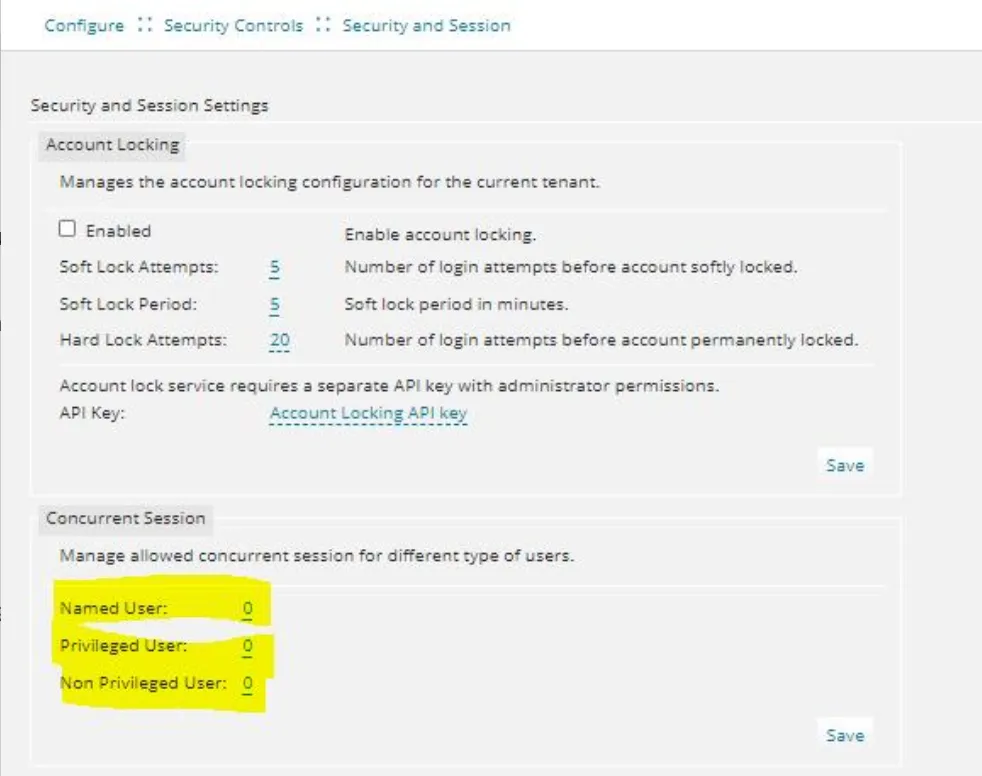
Issue | While upgrading from 2020.1, SCW throws an error if the value for Privileged User is set as 1 under Concurrent User section. |
|---|---|
Workaround |
 |
Release Version - 2020.1
Following is the list of known issues in Ivanti Neurons for ITSM 2020.1 release:
- Bug 670687 - ISM SSO: Session renew fails for OpenID and SAML OKTA for Android device.
- Bug 670665 - ISM SSO: After session timeout user is redirected to different browser while default authentication is activated if user don't want to work in Android device.
- Bug 648276 - Software Asset creation has intermittent issues.
- Bug 671029 - Username and roles are not visible as the text is in white color by default.
- Bug 431449 - On-premise : Installation of Metric server for the first time fails.
- Bug 678308 - On-premise: Unable to Login to Tenant once SCW completed for ITAM/IxM/ISM clean windows authentication.
- Bug 676494 - Default value of Request Offering text field set to Current User Function (Primary Phone) is not reflecting in Service Catalog.
Issue Details
- Bug: 670687
Issue | ISM SSO: Session renew fails for OpenID and SAML OKTA for Android device. |
|---|---|
Details | Prerequisite:
|
Actual Result | The same message "You were logged out. Would you like to continue working?" is displayed. |
Expected Result | The session should renew without any error. |
Workaround | No workaround available. |
- Bug: 670665
Issue | ISM SSO: After session timeout user is redirected to different browser while default authentication is activated if user don't want to work in Android device. |
|---|---|
Actual Result | On timeout of your session, if you select No button for the "You were logged out. Would you like to continue working?" the application redirects to different browser and opens default authentication login page in different browser and application continues loading in Android Mobile App. |
Expected Result | The application should logout the user session from the Android app. |
Workaround | No workaround available. |
- Bug: 670661
Issue | ISM SSO: After session timeout while renewing the session, application opens default external authentication login page in different browser in iOS device. |
|---|---|
Actual Result | Scenario 1: When Yes button is clicked for the timeout session message, default authentication provider login page opens in different browser and in mobile app ISM keeps loading. Scenario 2: On clicking the external authentication hyperlink, the external authentication login page is opened in different browser instead of opening within the mobile app. |
Expected Result | The application should open in the ISM app. |
Workaround | No workaround available. |
- Bug: 636223
Issue | Ivanti cloud transfer: Blank record is getting created in Hardware workspace for device. |
|---|---|
Workaround | No workaround is available. |
- Bug: 648276
Issue | Software Asset creation has intermittent issues. For example, when a software is installed on different system, after sometime the same software asset is created twice. |
|---|---|
Workaround | No workaround is available. |
- Bug: 671029
Issue | Username and roles are not visible as the text is in white color by default. |
|---|---|
Details |
|
Actual Result | The username and role are not visible as the text is in white color. |
Expected Result | The logged in username and role should be visible. |
Workaround | Navigate to the Configuration console > Style Editor and change the role text’s color to black. |
- Bug: 431449
Issue | On-premise - Installation of Metric server for the first time fails with db connection error. 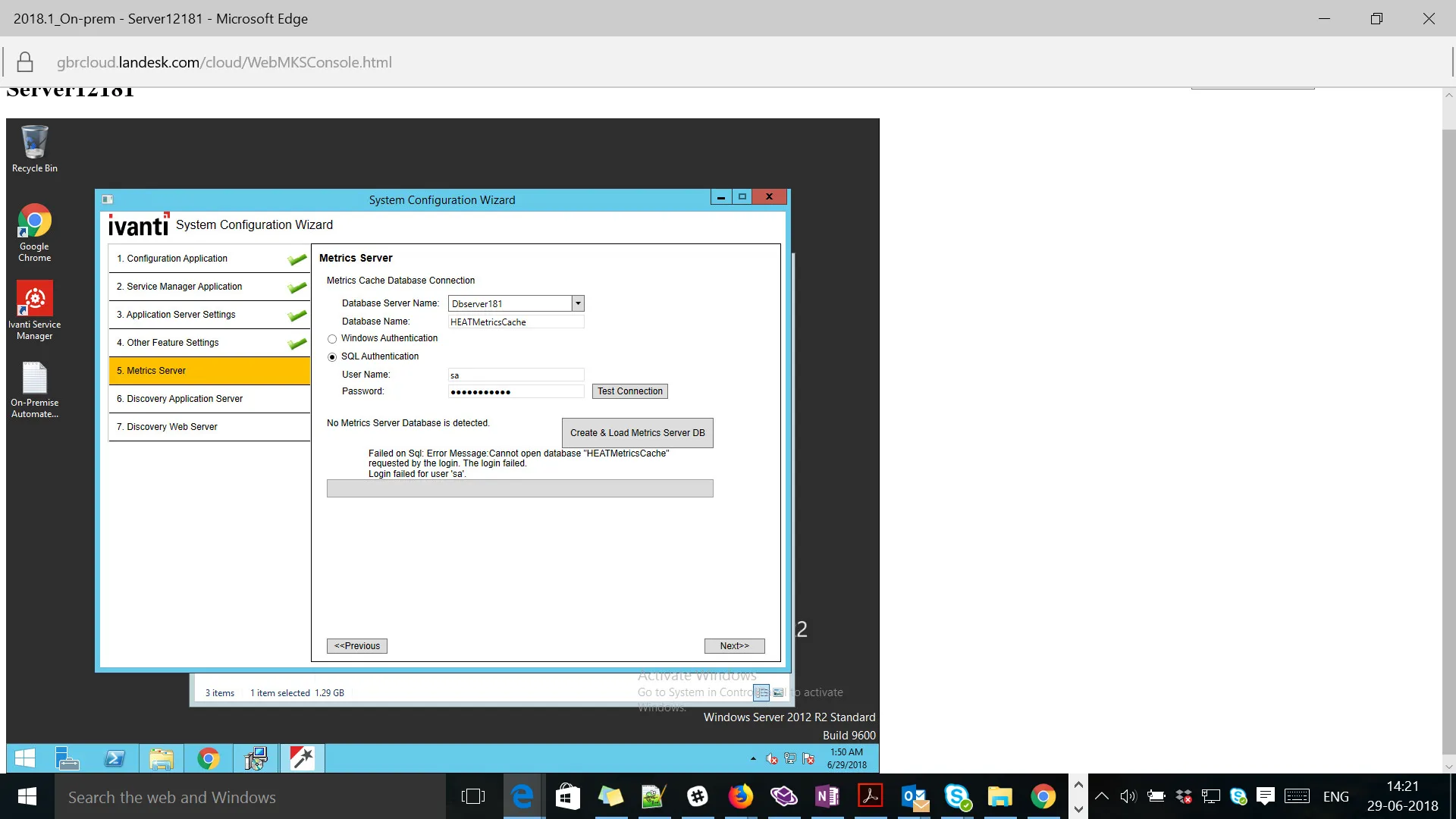 Steps:
|
|---|---|
Actual Results | The application fails to create the Metric Server database after the "Create" action though the db test connection is successful. |
Expected Results | The application should create the Metrix Server database. |
Workaround | Recreate works fine. |
- Bug: 678308
Issue | On-premise: Unable to Login to Tenant once SCW completed for ITAM/IxM/ISM clean windows authentication. Steps:
|
|---|---|
Actual Results | The application throws an error. |
Workaround | Re-run the SCW and try to login. |
- Bug: 676494
Issue | Default value of Request Offering text field set to Current User Function (Primary Phone) is not reflecting in Service Catalog. Prerequisite:
|
|---|---|
Actual Results | Current User Phone number is not displayed in the service catalog. |
Workaround | This is specific to 2019.1.0 OOTB onwards. No workaround available. |
Release Version - 2019.3.1
Following is the list of known issues in Ivanti Neurons for ITSM 2019.3 release:
- Bug 636223 - Ivanti cloud transfer: Blank record is getting created in Hardware workspace for device.
- Bug 648276 - Software Asset creation has intermittent issues.
Issue Details
- Bug: 636223
Issue | Ivanti cloud transfer: Blank record is getting created in Hardware workspace for device. |
|---|---|
Workaround | No workaround is available. |
- Bug: 648276
Issue | Software Asset creation has intermittent issues. For example, when a software is installed on different system, after some time the same software asset is created twice. |
|---|---|
Workaround | No workaround is available. |
Release Version - 2019.3
Following is the list of known issues in Ivanti Neurons for ITSM 2019.3 release:
- Bug 616198 - Heat Mobile app may crash when iOS is upgraded from version 12.3.1 to 13.1.
- Bug 610706 - Post 2019.2 upgrade, Audit History is not updated based on the relationship link for FRS_Approval business object.
- Bug 615685 - Ivanti Cloud (UNO) Login App V1 & V2 integration does not work on ISM tenant which has Pre-MCT database.
- Bug 620323 - Duplicate entries for workflow and task on creating a service request from a backup database.
- Bug 635269 - IP Whitelisting shows "Invalid IP" for all FRSHeat integration API requests when session key from "Authenticate User" is used.
- Bug 644185 - The application throws an error when trying to link new and edit existing records in Telemetry Logging Configuration tab in config db tenant.
- Bug 70551 - Embedding content using iFrame in HTML UI Control is not working as expected.
- Bug 518404 - Request Offering is not getting created in the tenant, when imported via the Release Tool patch file.
- Bug 632194 - IP whitelisting - Integration trusted host is not allowing any IP to send/receive request, when the load balancer IP is configured.
Issue Details
- Bug: 616198
Issue | After upgrading iOS version from 12.3.1 to 13.1, some users may experience crashing of the Heat Mobile app. |
|---|---|
Workaround | Un-install and re-install the Heat Mobile app. |
- Bug: 610706
Issue | Post 2019.2 upgrade, Audit History is not updated based on the relationship link for FRS_Approval business object. |
|---|---|
Actual Results |
|
Expected Results | A link to the Approval record should be added in the Audit History. |
- Bug: 615685
Issue | Ivanti Cloud (UNO) Login App V1 & V2 integration does not work on ISM tenant which has Pre-MCT database. |
|---|---|
Workaround | Upgrade the pre-MCT tenant using MCT migration tool before performing IvantiCloud (UNO) Integration. |
- Bug: 620323
Issue | Duplicate entries for workflow and task on creating a service request from a backup database. |
|---|---|
Workaround | Note: The issue is re-producible when you restore the 2019.3 OOTB database from any existing tenant. You need to run a clean up script to remove the unwanted entries from specific table so that no duplicate workflow is triggered. Run the below query in the restored tenant database and "isvisble=0" condition is mandatory. Make sure the workflow service is stopped before running this script and start after running. "select * from Frs_def_businessrules where isvisible = 0" |
- Bug: 635269
Issue | IP Whitelisting shows "Invalid IP" for all FRSHeat integration API requests when session key from "Authenticate User" is used. |
|---|---|
Workaround | Use the SID (from ISM application > Developer Tools) to authenticate API requests. |
- Bug: 644185
Issue | The application throws an error when trying to link new and edit existing records in Telemetry Logging Configuration tab in config db tenant. |
|---|---|
Actual Results |
|
Expected Results | The selected service record should be linked to the Telemetry Logging Configuration. |
Workaround | Go to the Telemetry Logging Configuration workspace, add new service records or existing records here. The updated services will be visible in the Telemetry Logging Configuration tab of the tenant page which you can now link. |
- Bug: 70551
Issue | Embedding content using iFrame in HTML UI Control is not working as expected. |
|---|
- Bug: 518404
Issue | Request Offering is not getting created in the tenant, when imported via the Release Tool patch file. |
|---|
- Bug: 632194
Issue | IP whitelisting - Integration trusted host is not allowing any IP to send/receive request, when the load balancer IP is configured. |
|---|
Release Version - 2019.2
There are no known issues in Ivanti Neurons for ITSM 2019.2 release.
Release Version - 2019.1 and earlier
Given below is the list of known issues in Ivanti Neurons for ITSM 2019.1 and earlier releases.
- Bug 476581 - Configuration fails if the App server cache does not have trusted host information of database server.
- Bug 492307 - On-premise - Re-branding is pending in the ITAM application as it still refers to "Ivanti Service Manager".
- Bug 492520 - SSRS configuration with custom authentication and domain credentials may throw the 1326 error sometimes.
- Bug 492643 - Ops console is not re-branded for Ivanti, it still shows HEAT brand names.
- Bug 333924 - Configure OpenIDConnect Auth Provider for MS Azure AD.
- Bug 341934 - [Request for Information] Report: Distribution option "Download".
- Bug 505677 - Multiple records are displayed on the home page search for a single request.
- Bug 502699 - SSRS configuration fails while trying to add the provision report in SCW.
- Bug 504840 - There is a browser compatibility issue for Self Service Mobile, in the UI price list/ Cost panel showing Zero(0).
- Bug 383101 - Japanese characters are shown as ? in the FRS_SurveyAnswer.
- Bug 359153 - Logout from the Self Service Mobile UI takes users to the ISM login instead of the Auth provider login.
- Bug 508376 - "FrontRange Solution" installer certificate is not trusted by Microsoft anymore.
- Bug 519086 - Upgrading 2019.1 directly from 2018.1.1 does not work.
- Bug 522220 - Unable to create new CI due to the Asset Processor Configuration.
- Bug 525479 - Login page not loading by throwing Timestamp Error while Internal Services user is disabled.
- Bug 522214 - Config db/tenant db metadata version field left blank during upgrade/install.
- Bug 431449 - On-premise : Installation of Metric server for the first time fails.
- Bug 526262 - Upgraded ISM 2018.3.1 to 2019.1 and post upgrade accessing the below workspaces as LicenseManager role throws exception.
- Bug 485595 - The Sting "Self" is UNLOC shown under Self Service User - My Items > Benefits Package Claim.
- Bug 235039 - The Service Request Review and Submit page displays the incorrect employee details if the login IDs are similar.
- Bug 533210 - 2019.1 premise installer seems to silently exit or crash after installing one of the pre-req modules.
- Bug 576301 - Errors on Form and Grid for BO AuthenticationPrincipal when upgrading from 2018.3.1 to 2019.1.0 premise.
Issue Details
Bug: 476581
Issue | Configuration fails if App server cache does not have trusted host information of database server 1. Install or upgrade ISM application to latest build version of 2018.1.1 2. Install or upgrade the reporting service 3. Provision the report as part of configuration Use Custom Authentication method for SSRS configuration and SQL authentication for database connection type. 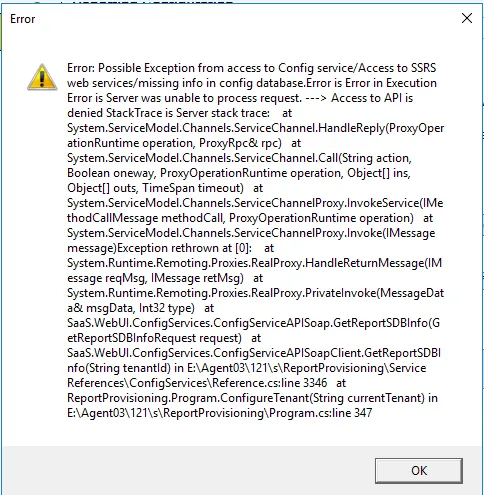 |
|---|---|
Workaround | There is a timing issue on provisioning. If the application cache is not rebuilt after updating the Trusted Host Entry in the config database (central config webapp), then provisioning of reports will fail as post config calls fails (Exception to access config service). Hence, it is advised to make sure Trusted Host Address are already added in the config database and IIS is reset (or wait for 15 mins to rebuild cache). |
Bug 492307
Issue | On-premise - Re-branding is pending in the ITAM application as it still refers to "Ivanti Service Manager". Steps to reproduce Install ITAM application and check the product version and other branding-related information. |
|---|---|
Actual Results |
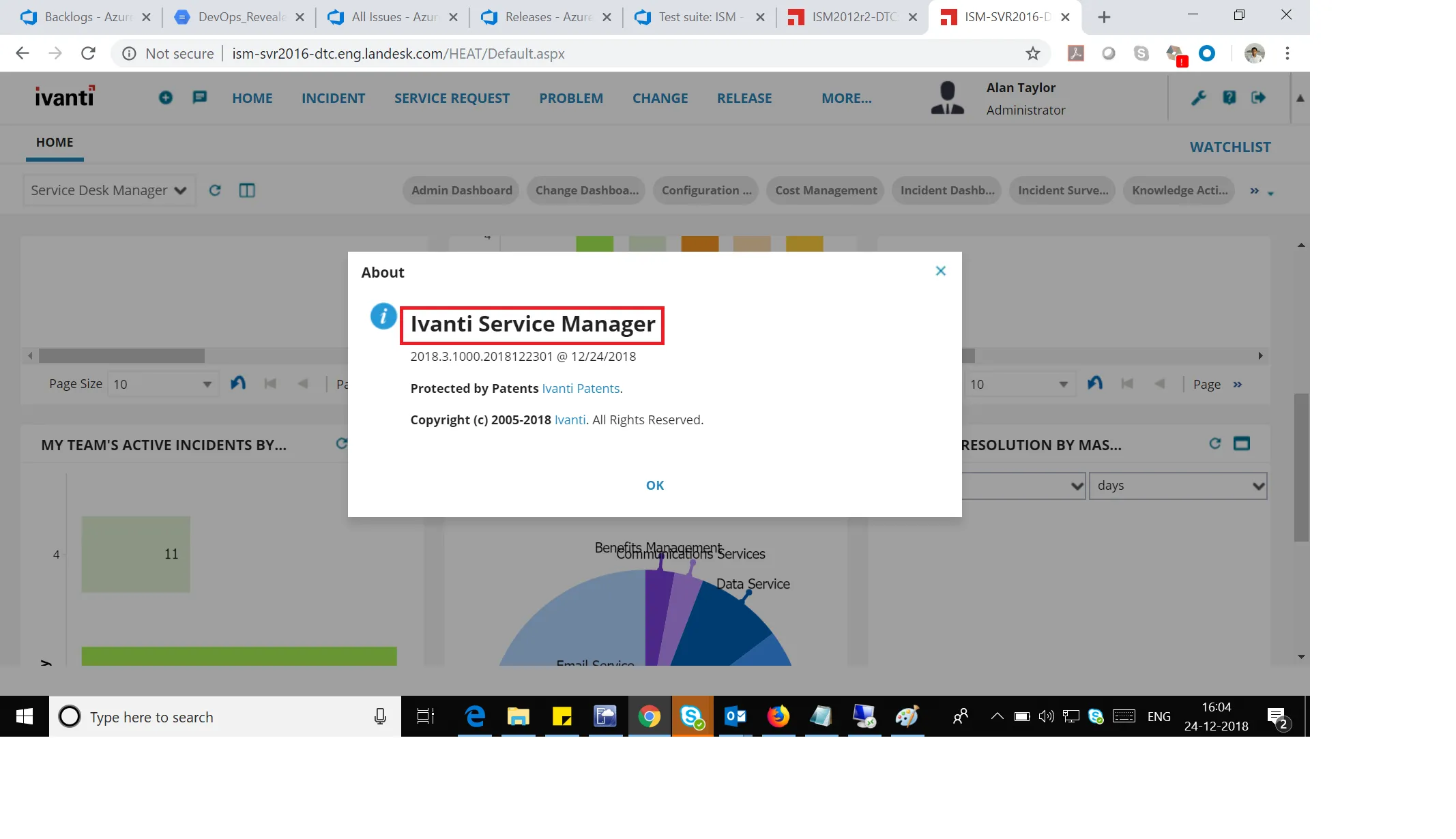 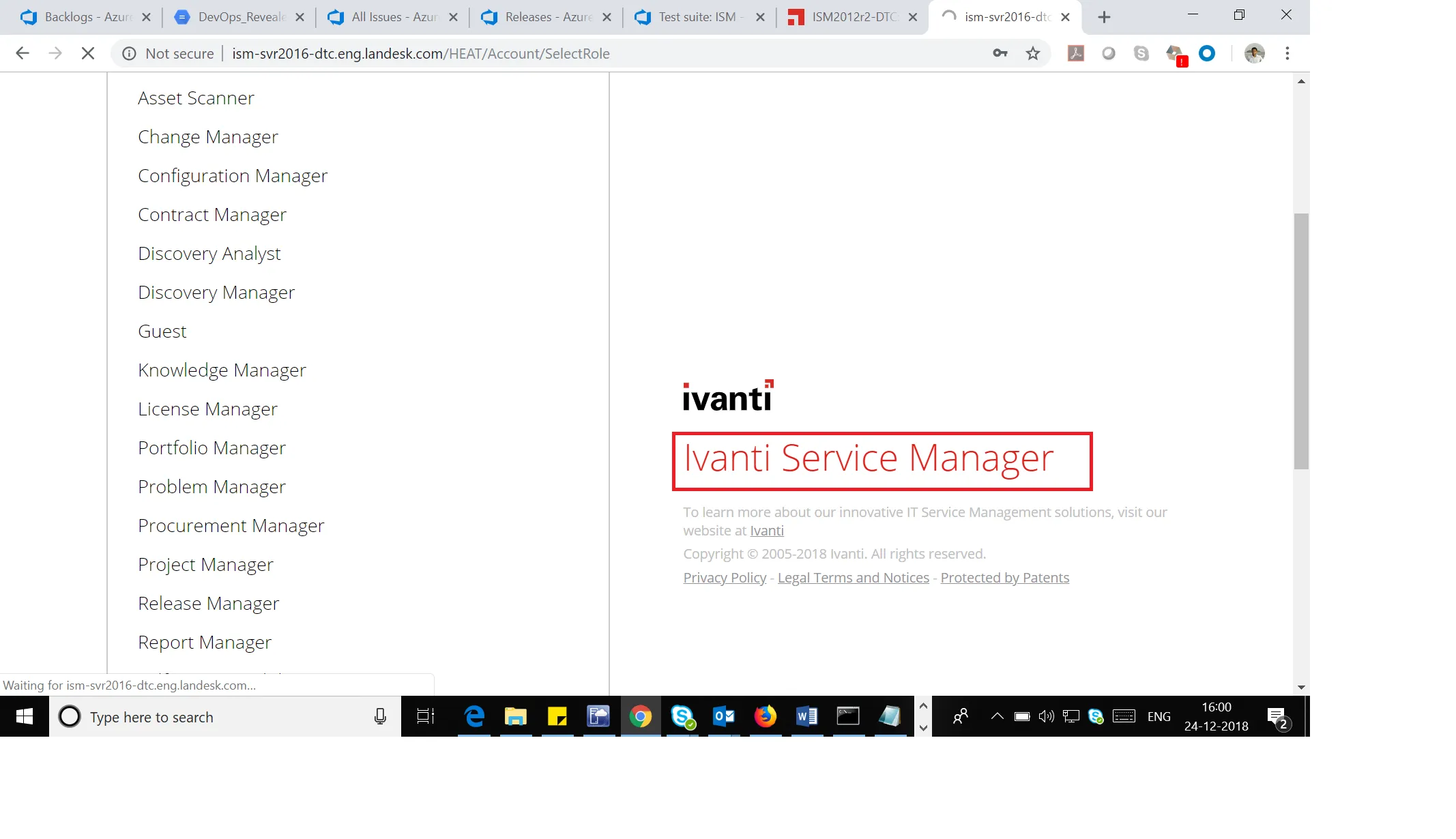 |
Expected Results | Currently, the 2018.3.1 on-premise version is built on top of the ISM platform and continues to refer ISM in many places. This needs to be fixed. |
Workaround | No application functionality should be lost. |
Bug 492520
Issue | SSRS configuration with Custom Authentication may fail sometimes if the domain user credentials provided is working. You will see the 1326 error. Steps to reproduce Configure SSRS with Custom Authentication with Domain credentials. |
|---|---|
Actual Results | SSRS configuration with Custom Authentication is shown below: 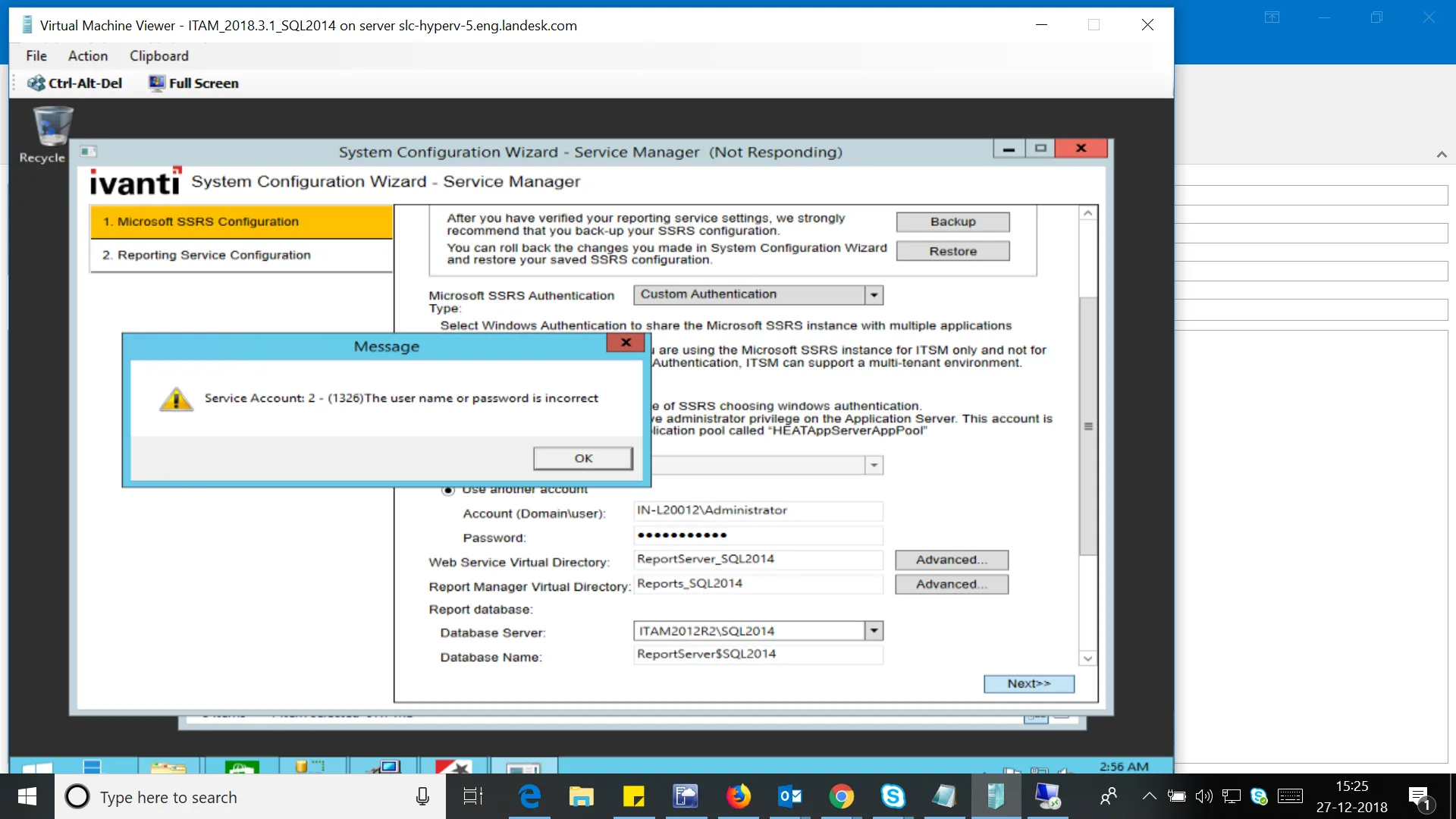 |
Expected Results | Provided domain credentials should work and users should be able to proceed. |
Workaround | Use Custom authentication with the User in-built account type "Network Service" to proceed. 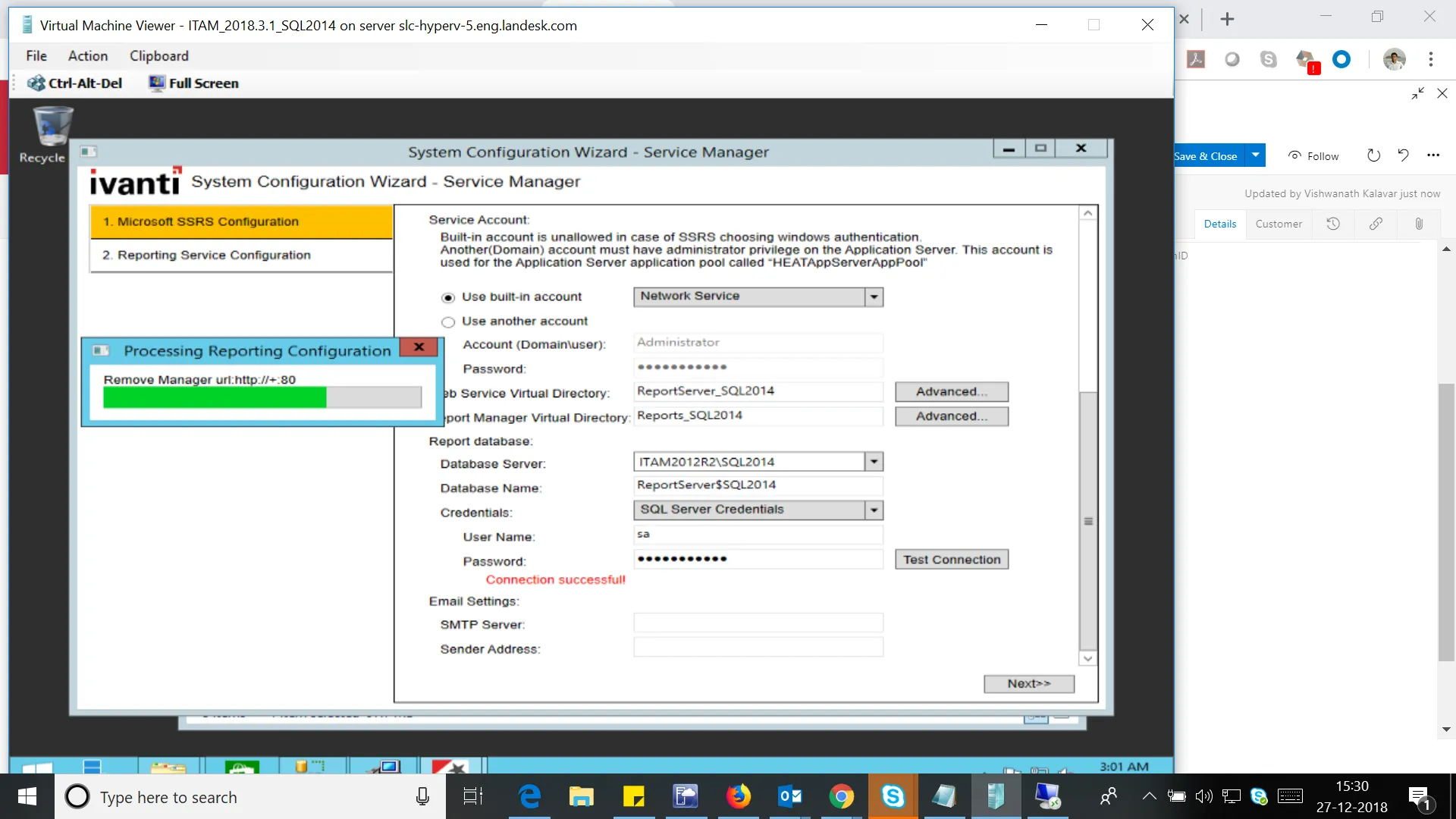 |
Bug 492643
Issue | 2018.3.1 ops console is not re-branded for Ivanti, it still shows HEAT brand names. Steps to reproduce Login to ops console by accessing the following path: http://10.16.228.14/OpsConsole/User |
|---|---|
Actual Results | 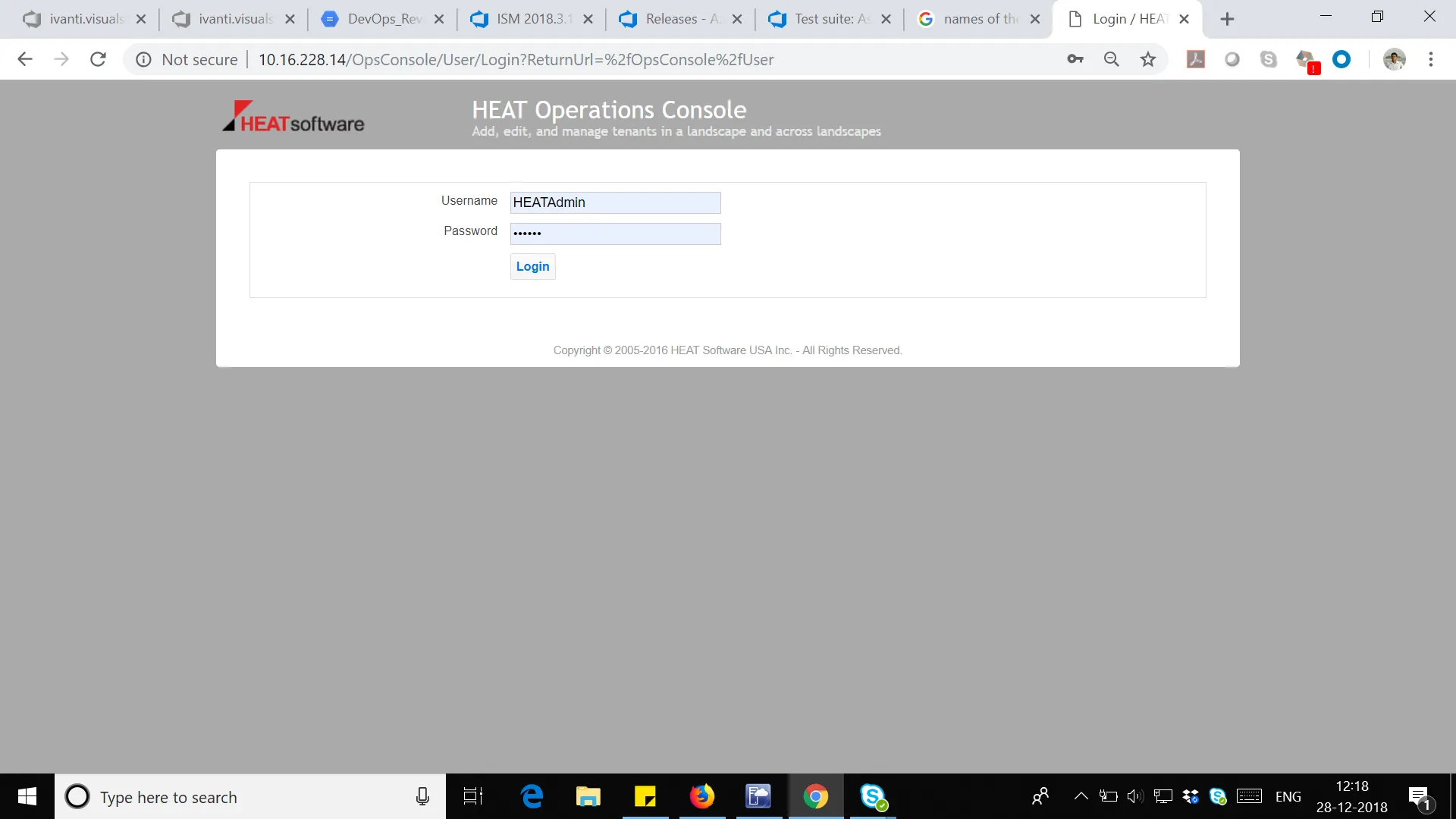 |
Bug 333924
Issue | When configuring OpenIDConnect Authentication Provider for MS Azure AD and making "Test Authentication", he follwoing message appears: "Use Sub as external login as e-mail is not available at this step." Azure AD does not return "email" claim in response and there is no "email" in "Extracted JWT token". Instead of returning email in "email" claim, Azure returns an email in "upn" claim: {"typ":"JWT", "alg":"RS256", "x5t":"z44wMdHu8wKsumrbfaK98qxs5YI", "kid":"z44wMdHu8wKsumrbfaK98qxs5YI"}.{"aud":"022c4d20-1d56-4a73-a421-86b2b423f344", "iss":"https://sts.windows.net/23afecaf-6440-44aa-a6f2-b6e38bd02ba9/", "iat":1517385849, "nbf":1517385849, "exp":1517389749, "aio":"Y2NgYGi+6xjp02/t1/erTNy+LKVPa8dC4+/TP3xennmSm1+8+z4A", "amr":["pwd"], "family_name":"Sandyrov", "given_name":"Andrej", "ipaddr":"88.119.194.198", "name":"Andrej Sandyrov", "oid":"83f1b61f-1e77-4ce5-85ad-c76bed5a1247", "onprem_sid":"S-1-5-21-1293440551-2949271503-1314497110-1132", "sub":"qX_OE8OkmVyYRXYI7chX4qqSWPyCQLVRl8CU_YtYOY8", "tid":"23afecaf-6440-44aa-a6f2-b6e38bd02ba9", "unique_name":"[email protected]", "upn":"[email protected]", "uti":"ZmsLjPCsLEqe3Kbp8qkDAA", "ver":"1.0"} The following errors occur: User not found for external login qX_OE8OkmVyYRXYI7chX4qqSWPyCQLVRl8CU_YtYOY8. Try to use auto-provisioning ... Value is missing for 'email' System.ArgumentException: Value is missing for 'email' ?? at HEAT.Authentication.Sso.Oidc.OidcResultHandler.GetDictStringValue(IDictionary`2 dict, String ... Authentication failed unexpected error |
|---|---|
Actual Results | Configuration to install Ivanti SM handler to use "upn" instead of "email. |
Bug 341934
Issue | When choosing the "Download" option in Distribution Information of the report from the homepage dashboard or report list, download is not happening. |
|---|---|
Expected Results | Reports should be downloaded from homepage dashboard or report list. |
Bug 505677
Issue | In self-service mobile, when searching with the string "optional software" in the home page search box, multiple records that are displayed for a single record and the request offerings are in the "Design" state. Steps to reproduce 1. Log in to ISM in the "Self Service Mobile" role. 2. On the home page, search for "optional software".  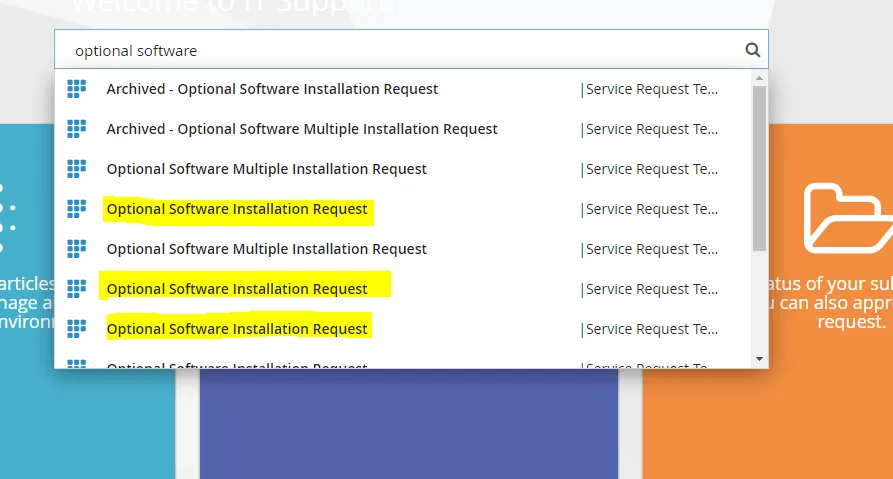 |
|---|---|
Actual Results | The system displays multiple records for a single request that is in design state. |
Expected Results | A single record should get displayed for a single request that are in the "Published" state. |
Bug 502699
Issue | SSRS configuration fails while trying to add the Provision report in SCW. Steps to reproduce 1. Configure the Reporting service configuration. 2. Click on "Provision report now". 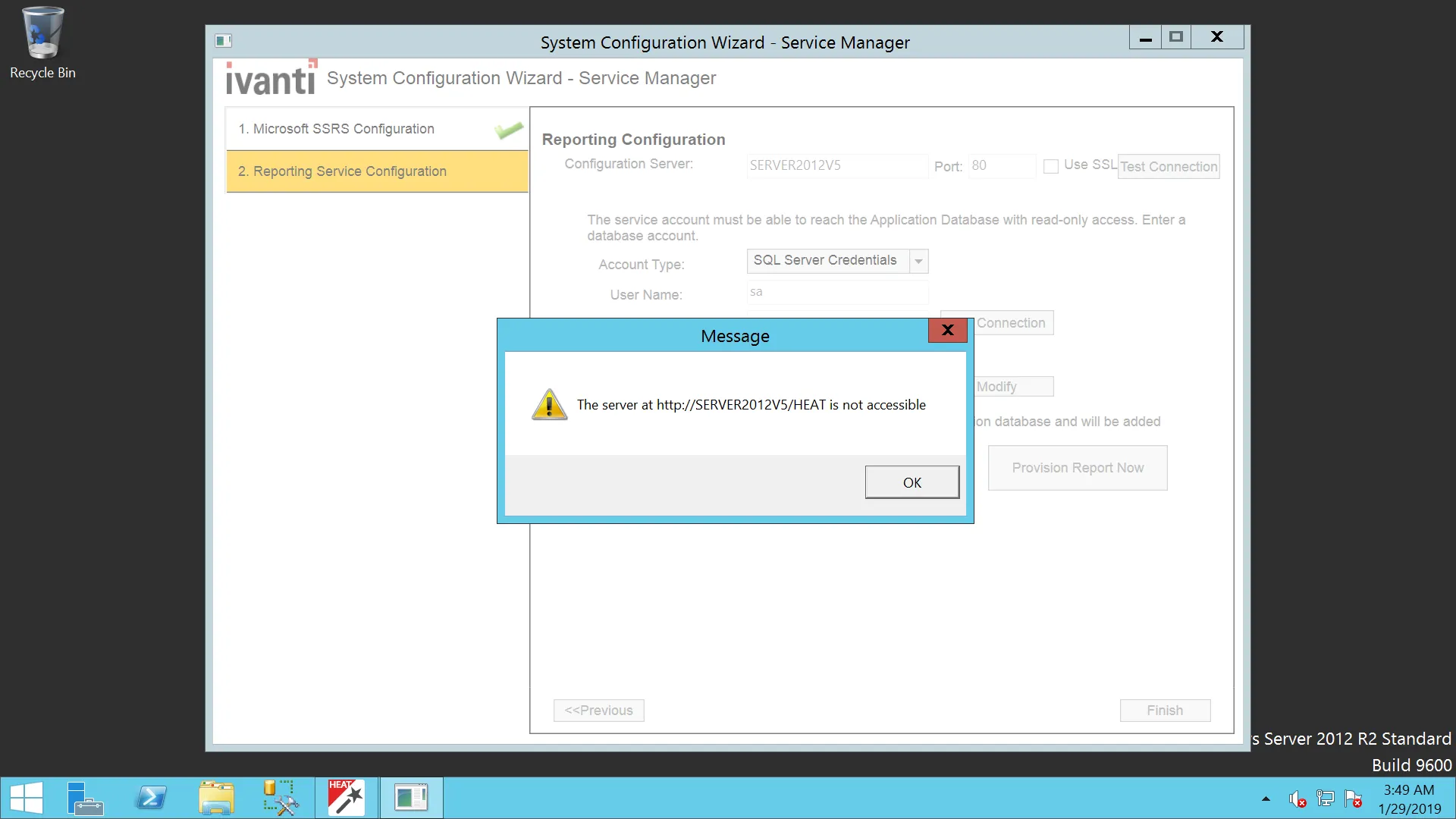 |
|---|---|
Actual Results | Error message appears as shown above. |
Expected Results | There should be no error and the URL should be accessible. |
Bug 504840
Issue | There is a browser compatibility issue (in Firefox and Microsoft Edge) for Self Service Mobile, in the UI price list/ Cost panel showing Zero(0). If a user selects an item, for example, Desktop, which is $595 when he submits the request, the cost panel shows $0. Hence, the severity must be kept to 2. In addition, customer bugs (which are linked) are getting blocked and hence, the priority should be set to 2. Steps to reproduce
|
|---|---|
Actual Results | The Cost panel shows zero even if the product is selected. 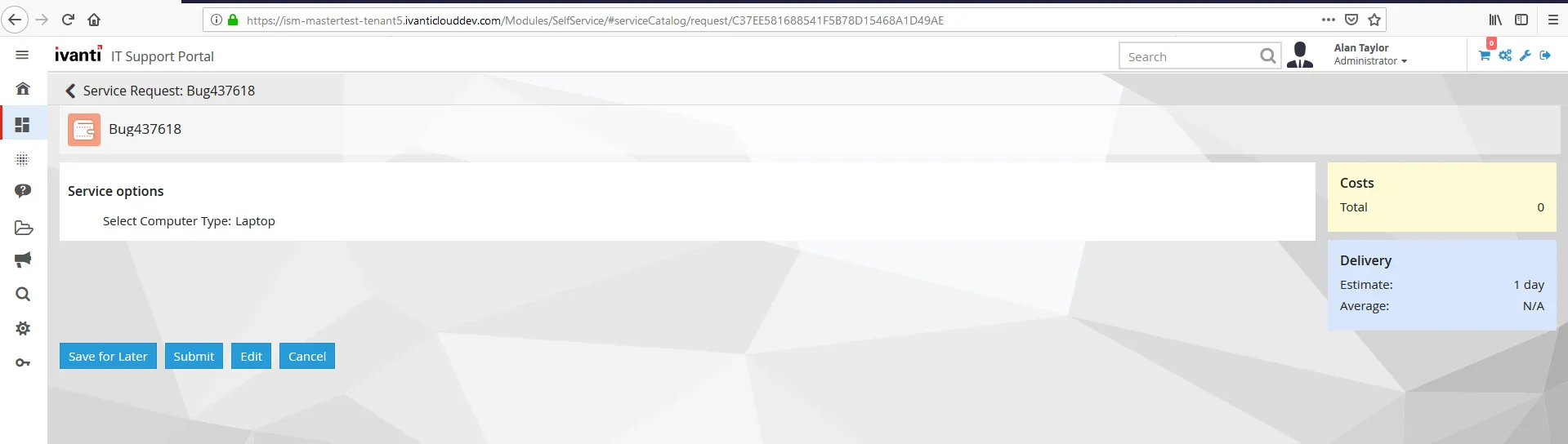 This is working fine in Chrome, but not working in Firefox and Microsoft Edge. |
Expected Results | The Cost panel should display the correct value for the selected type. |
Bug 383101
Issue | Japanese characters are shown as ? in the FRS_SurveyAnswer Steps to reproduce This error can be replicated in Demo 2017.3.1 and 2018.1 tenant: https://tenant-dev2.saasitpilot.com/.
|
|---|---|
Actual Results | Error: Unhanded system exception: The given key was not present in the dictionary. |
Expected Results | Possibility to set this field to be unicode text. |
Bug 359153
Issue | Logout from the Self Service Mobile UI takes users to the ISM login instead of the Auth provider login. Steps to reproduce
|
|---|---|
Actual Results | Users are taken back to the ISM login page for only Self Service Mobile role. |
Expected Results | Users should be taken back to the SAML login page. |
Bug 508376
Issue | The certificate issued for installer is "FrontRange Solution" and Publisher name is "Ivanti Inc." since the last couple of releases. The Windows certificate trust store never questioned the authenticity of the certificate earlier. However, somehow it is prompting the certificate trust question now on Windows OS like 2016, 2012 etc. Steps to reproduce
|
|---|---|
Actual Results | 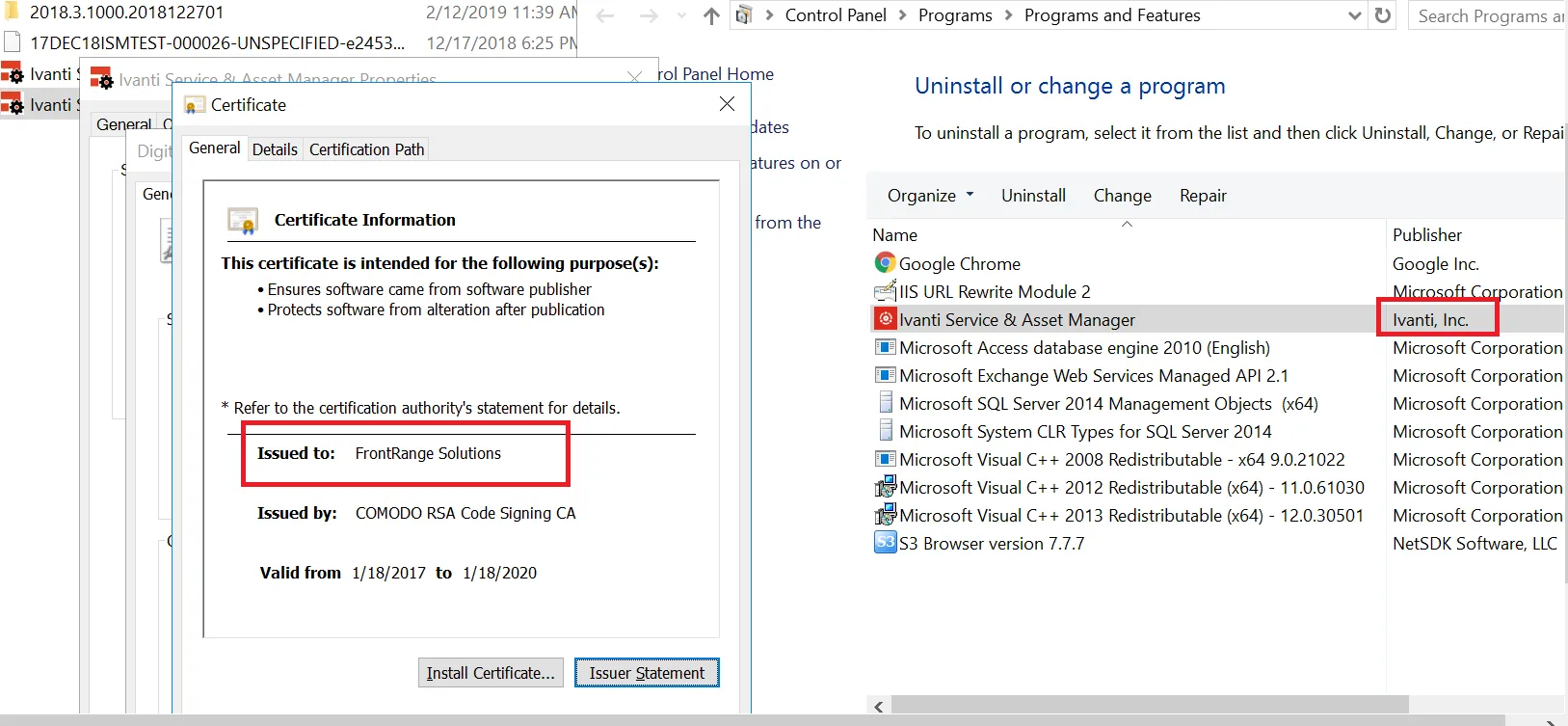 |
Expected Results | Issue a new certificate to installer with "Ivanti Inc." |
Workaround | Accept the certificate to add to MS trust store. |
Bug 519086
Issue | If a user tries to directly upgrade from 2018.1.1 to 2019.1.0 or the latest version, the upgrade will fail. This is because SCW fails to launch the post installer update due to the missing registry key for ProductType. This entry should be retained during the upgrade, which is currently not working. 2018.1.1 build: 2018.1.1000.2018103001 @ 10/29/2018 2019.1.1 build: 2019.1.1000.2019030701 The supported upgrade paths for 2018.1.1 to 2019.1.0 application version must be 2018.1.1 > 2018.3.1 > 2019.1.0. Steps to reproduce
|
|---|---|
Actual Results | 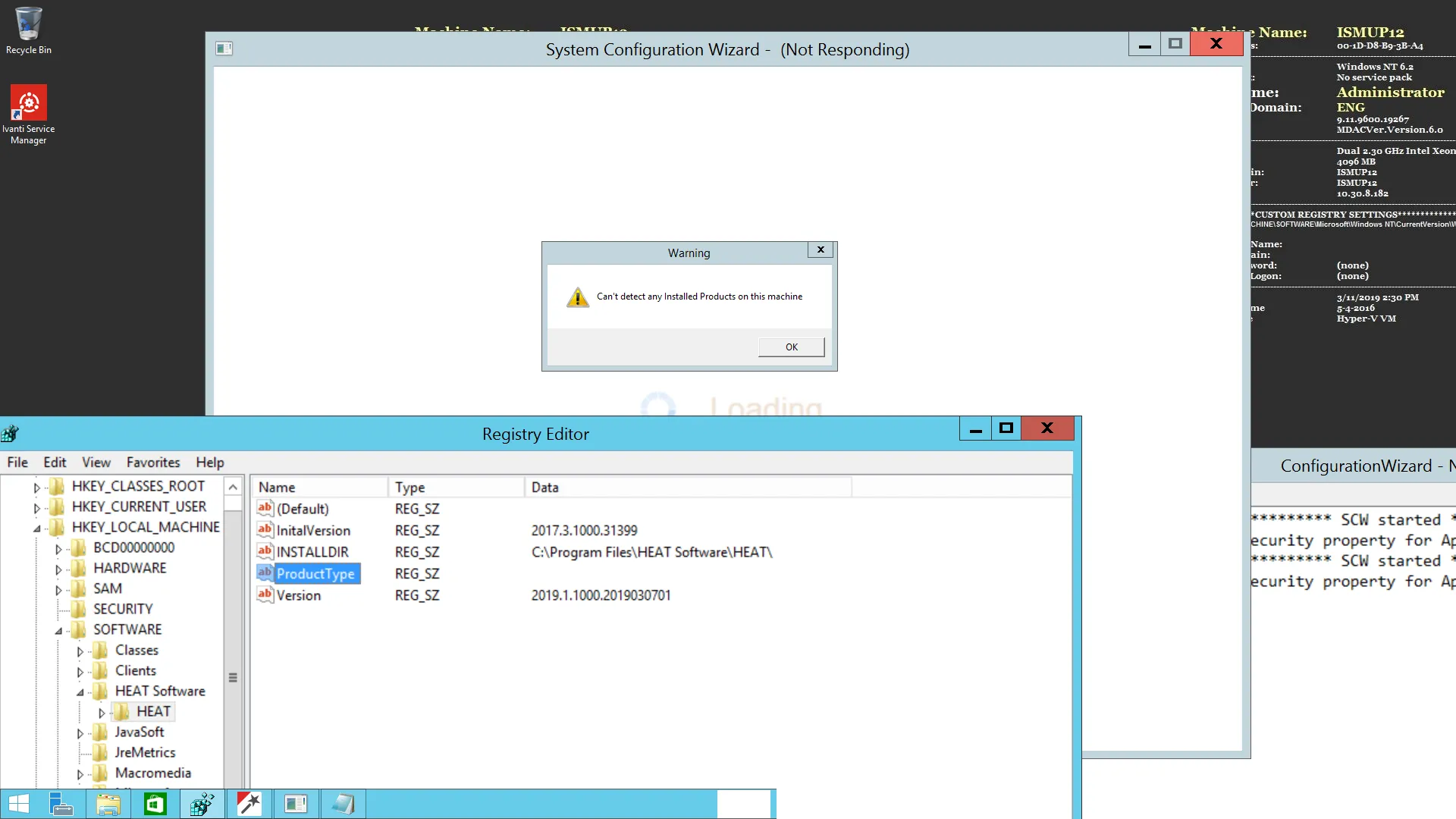 |
Expected Results | The product reg key must be created during an upgrade and SCW should launch without any error. |
Bug 522220
Issue | Unable to create new CI due to the Asset Processor Configuration. After installing the GatewayDC(Discovery), Gateway CI is not getting generated and getting error message as "Unable to create new CI due to the Asset Processor configuration". This is can be found only on OOTB(IxM) on 2019.1 Builds Onwards. Steps to reproduce
|
|---|---|
Actual Results | Gateway is not getting created in under Gateway workSpace and Highlighted Error will comes in Message Queue Journal. 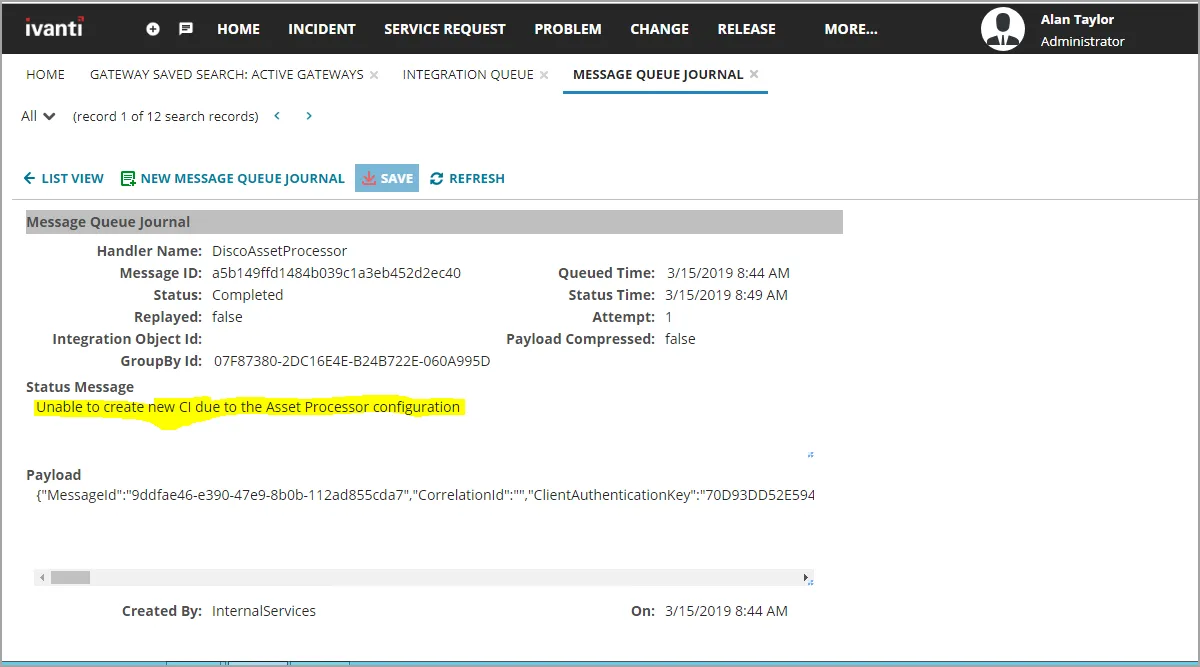 |
Expected Results | - |
Bug 525479
Issue | When Internal Services user is disabled in a tenant, then login page is not loading by throwing timestamp error. It is a regression issue as the 2018.3.1 environment login page is loading successfully if an Internal Services user is disabled. After 2019.1 deployment to FFT and NVD PLT landscapes where few customers login page is not loading by throwing the Timestamp Error. On Analyzing, ops team found Login "Internal Services" were disabled in those tenants. After enabling the login, they were able to login to the Tenant without any issues. Steps to reproduce
|
|---|---|
Actual Results | The system is throwing the Timestamp error while loading the login page.  |
Expected Results | After disabling "Internal Services" user, login page should be loaded properly without throwing any timestamp error. |
Workaround | To work properly, we need to enable the "Internal Services" user. |
Bug 522214
Issue | After installation or upgrade of ISM/AM/IXM application, the metaRevision field is not updated. Regression: NO as it is observed in 2018.3.1 or an earlier version. Steps to reproduce
|
|---|---|
Actual Results | 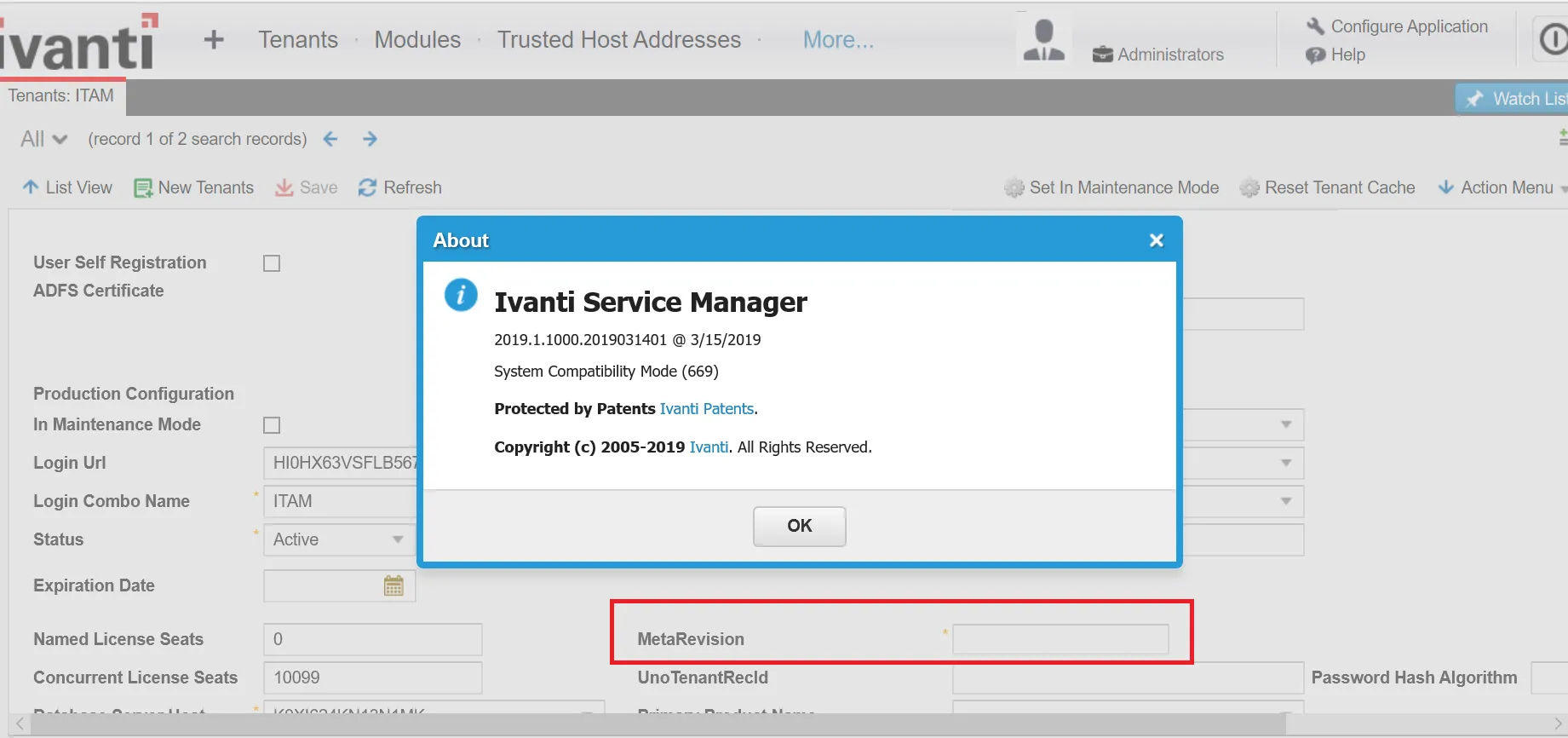 |
Expected Results | MetaRevision should be updated or should retain the old value (in case of no system table upgrade) as it is a mandatory field. |
Workaround | User should manually enter "670" in this field and save it. This is a workaround only for 2019.1. |
Bug 431449
Issue | Version: 2018.1.1 On-premise OS: Windows 2016 SP1 & IIS version 10.0.14393.0 Installation of Metric server for the first time fails with db connection error, however subsequent attempt of "recreate" works fine. Steps to reproduce
|
|---|---|
Actual Results | The application fails to create the Metric Server database after the "Create" action though the db test connection is successful. However, subsequent attempt on "recreate' works fine. |
Expected Results | - |
Bug 526262
Issue | Upgraded ISM 2018.3.1 to 2019.1.0 and post upgrade accessing the below workspaces as LicenseManager role throws exception. Steps to reproduce Upgrade ISM 2018.3.1 to 2019.1.0. |
|---|---|
Actual Results | LicenseManager home page fails to load. Accessing the Software Inventory, Software Product, Software Family and other workspaces as a LicenseManager throws error in UI. 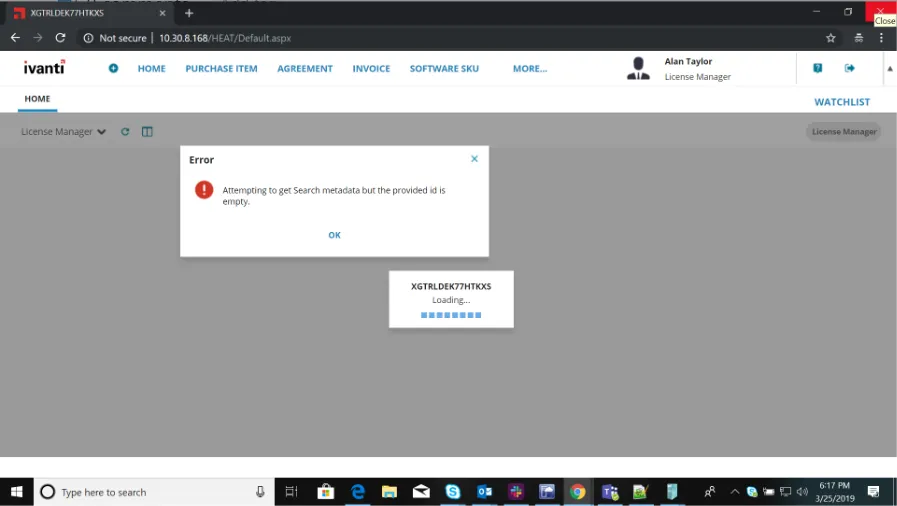 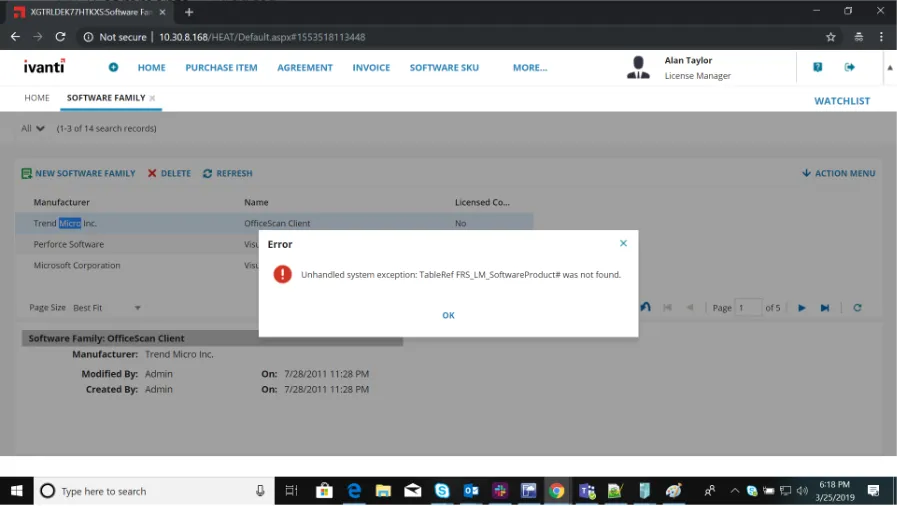 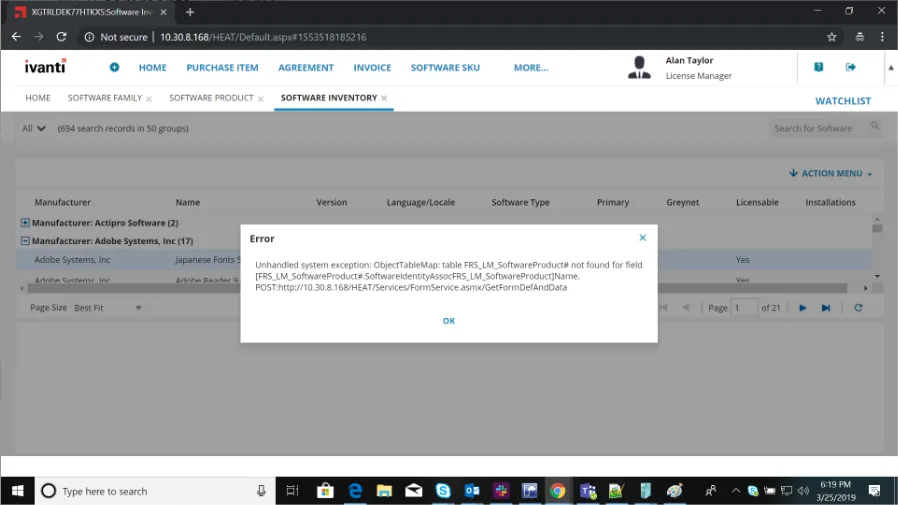 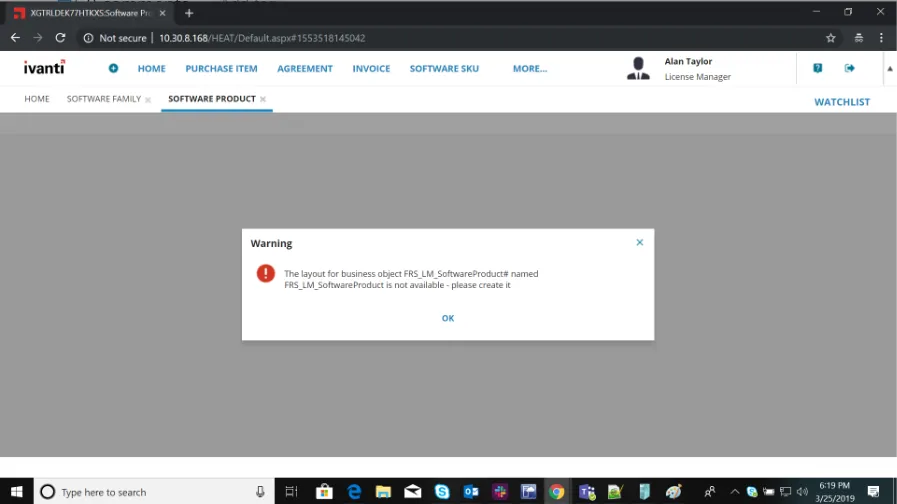 |
Expected Results | The above mentioned modules should not be exposed to LicenseManager role. |
Bug 485595
Issue | The Sting "Self" is UNLOC shown under Self Service User - My Items > Benefits Package Claim. Steps to reproduce
|
|---|---|
Actual Results | The Sting "Self" is UNLOC shown under Self Service User - My Items > Benefits Package Claim. |
Expected Results | The UNLOC string should translated as "自我". |
Bug 235039
Issue | Upgraded ISM 2018.3.1 to 2019.1.0 and post upgrade accessing the below workspaces as LicenseManager role throws exception. Steps to reproduce Upgrade ISM 2018.3.1 to 2019.1.0. |
|---|---|
Actual Results | LicenseManager home page fails to load. Accessing the Software Inventory, Software Product, Software Family and other workspaces as a LicenseManager throws error in UI. |
Expected Results | The above mentioned modules should not be exposed to LicenseManager role. |
Bug 533210
Issue | 2019.1 premise installer seems to silently exit or crash after installing one of the pre-req modules. Steps to reproduce
|
|---|---|
Actual Results | Just after the VC 2013 redist x64 finishes the installing process, the installer exits silently. |
Expected Results | Installer should progress normally. |
Workaround | Re-run the installer EXE. |
Bug 576301
Issue | During Update System on Update Application Database in SCW, the system receives a notification that it was updated with visible errors. Example: Patch 'AuthenticationPrincipal' has 5 error(s) Error during metadata commit operation for seq = 12482: System.Exception: Nom de colonne non valide : 'GlobalId'. |
|---|---|
Workaround | If a customer receives the error for GlobalID and/or AuthenticationPrincipal, then:
|