
Before You Begin Migrating Data
The Four Ways to Migrate Data
Before you begin migrating data, it is very important that you understand the different ways there are to migrate data. There are four ways that you can migrate data:
- Enabling the Ivanti Service Manager development project and applying a package. With a package, you can migrate a very specific set of configuration changes. For example, you can add service request data to a package and migrate it. See Appendix C: Using the ISM Development Project to Migrate Data.
- Enabling the Ivanti Service Manager development project and using the push link. With this method, you can migrate master data, but not configuration data (because that is moved using packages). See Appendix C: Using the ISM Development Project to Migrate Data.
- Disabling the Ivanti Service Manager development project and using Simple Mode. With Simple Mode, you can only copy service request data and escalation schedules. When you use Simple Mode, you copy all of the configuration data from instance of a tenant to another. See How to Use Simple Mode to Migrate Data.
- Disabling the Ivanti Service Manager development project and using Advanced Mode. With Advanced Mode, you can choose which items to copy, such as all business objects but not workflows. However, you cannot specify which business objects (or whichever item you migrate). You can choose the type of items to migrate but not the specific items within that type. With Advanced Mode, you can also specify if you want to migrate master data, which you can use to copy the contents of a business object. See Using Advanced Mode to Migrate Data.
We plan to remove Simple Mode and Advanced Mode in an upcoming release. The Ivanti Service Manager development project will then be the only data migration method available. This is because Simple Mode and Advanced Mode only migrate the difference in data between the source and the target, and do not take into account the sequence of the data changes between the two systems. |
|---|
This document includes information about migrating data using all of the methods listed above. However, we highly recommend that you enable and use the Ivanti Service Manager development project, and therefore, this document focuses on those processes.
About Data Migration
The process of migrating data can be defined as moving information from the production instance of the tenant to the staging instance of the tenant, and then optionally moving information from the staging instance of the tenant to the UAT instance of the tenant, and then finally moving information back to the production instance of the tenant (from either the staging or UAT instance of the tenant).
There are two scenarios:
- Production instance --> staging instance --> UAT instance --> production instance.
- Production instance --> staging instance --> production instance.
The migration process has three parts:
- Migrating data from the production instance of the tenant to the staging instance of the tenant. This process is described in Creating the First Staging or UAT Instance of the Tenant from the Production Instance of the Tenant.
- Migrating data from the staging instance of the tenant to the UAT instance of the tenant. Although this step is optional, we recommend it. This step is made up of two parts:
a. Migrating the metadata from the staging instance of the tenant to the UAT instance of the tenant. This process is described in Appendix B: Migrating Data from One Tenant Instance to Another Using Simple Mode or Advanced Mode.
b. Migrating the transactional data from the production instance of the tenant to the UAT instance of the tenant. This is the same process as Creating the First Staging or UAT Instance of the Tenant from the Production Instance of the Tenant.
- Migrating data from the UAT instance of the tenant to the production instance of the tenant (if you migrated from the staging instance to the UAT) or migrating data from the staging tenant to the production tenant (if you did not migrate data to the UAT tenant). This process is described in Appendix B: Migrating Data from One Tenant Instance to Another Using Simple Mode or Advanced Mode.
Conceptual Information: Migration Process Overview
There are two scenarios when you perform the migration process:
- When the customer initially purchases and provisions their system. When you initially purchase and provision your system. See About Initially Provisioning the Production Instance of the Tenant.
- When the database changes. See About Migrating Data After Creating the Initial Production Instance of the Tenant.
About Initially Provisioning the Production Instance of the Tenant
Overview of Initially Provisioning the Production Instance of the Tenant
Adding a Tenant shows the process for migrating data from the initial production instance of the tenant (version 0.0) to the staging instance of the tenant, and then optionally from the staging instance of the tenant to the UAT instance of the tenant, and then from the staging (or UAT) instance of the tenant back to the production instance of the tenant. This process establishes the first production instance of the tenant (version 1.0). See Overview of the Initial Production Instance of the Tenant Creation Process for information about the numbered steps shown in Adding a Tenant.
Adding a Tenant
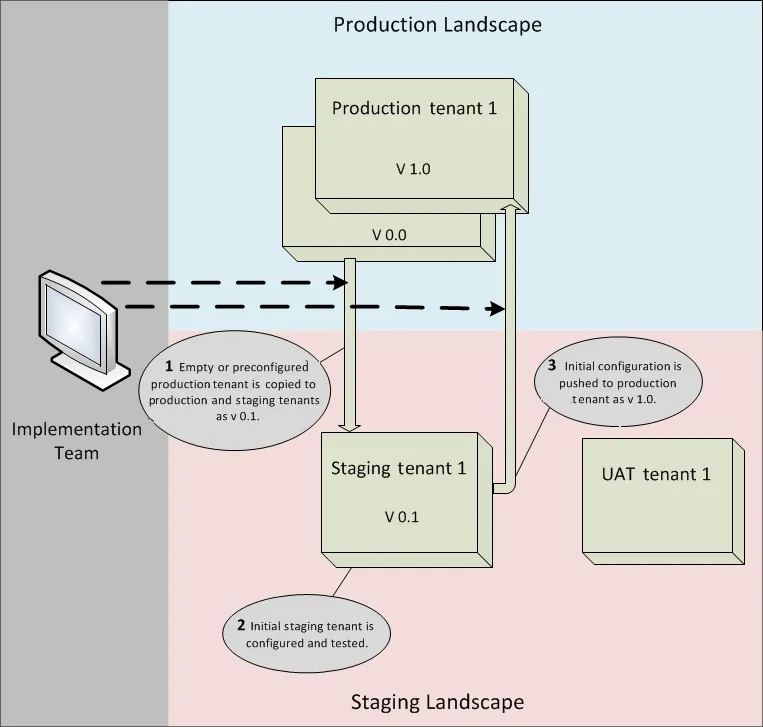
Things to note in Adding a Tenant:
- The version numbers used in this example are for reference only. The software residing on a tenant does not actually have the version numbers shown here.
- Version 0.0 of the production tenant represents the starting state of the production tenant immediately after it was created. This version (or instance) typically does not contain any transactional (customer) data. You can preconfigure the metadata by either using a customer template, or if no template is available, in a way that provides a default user interface look and feel. Examples of templates are a retail business template and a high tech template.
- When creating the initial version (or instance) of the production tenant (version 1.0), the system usually bypasses the UAT instance of the tenant because there is no baseline configuration to use as a reference for regression testing.
You do not make changes to configuration data and metadata directly in a running database on the production instance of the tenant. Instead, you copy the database to the staging instance of the tenant and makes the changes there. The production instance of the tenant remains unlocked throughout the provisioning and configuration process so that you can update the production instance of the tenant with minimal overhead. The system locks the production instance of the tenant for the first time after you verify the production readiness of the production instance of the tenant.
Overview of the Initial Production Instance of the Tenant Creation Process
The following sections provide a high-level description of the initial production instance of the tenant creation process.
Before Starting the Migration
- Determine the customer's system requirements to help you design the initial production instance of the tenant (version 0.0).
- Determine your system requirements to help you design the initial production instance of the tenant (version 0.0).
Step 1a: Creating the Initial Production Instance of the Tenant (Version 0.0)
- Create the initial production instance of the tenant, called version 0.0. This initial production instance of the tenant contains basic help desk and other functionality based on industry standards and preliminary requirements. Version 0.0 is used as a starting point for additional configuration.
- The process for creating the initial production instance of the tenant is described in How to Create a New Tenant.
- Send an email to the customer with the credentials for and a link to the initial production instance of the tenant (version 0.0).
Step 1b: Creating the Initial Staging Instance of the Tenant (Version 0.1)
- Move the initial production instance of the tenant (version 0.0) to the staging instance of the tenant. The version on the staging instance of the tenant is renamed version 0.1.
- The process for moving the initial production instance of the tenant to the staging instance of the tenant is described in Appendix B: Migrating Data from One Tenant Instance to Another Using Simple Mode or Advanced Mode.
- Timing: This activity typically takes 5 days.
Step 2: Updating the Data on the Staging Instance of the Tenant (Version 0.1)
- Edit the metadata (and optionally configuration data) in version 0.1 on the staging instance of the tenant to meet your requirements.
- Ask the customer to validate the configuration on the staging instance of the tenant.
- Validate the updated configuration on the staging instance of the tenant.
- Timing: This activity typically takes from two to twelve weeks.
Step 3: Pushing the Data from the Staging Instance of the Tenant (Version 0.1) to the Production Instance of the Tenant (Version 1.0)
- Remove any sample and test data that had been temporarily added to the staging instance of the tenant.
- Push the version 0.1 metadata and configuration data from the staging instance of the tenant to the production instance of the tenant, where it becomes the first fully functional release, called version 1.0.
- The process for moving the staging instance of the tenant to the production instance of the tenant is described in Appendix B: Migrating Data from One Tenant Instance to Another Using Simple Mode or Advanced Mode.
- Ask the customer to verify that the production instance of the tenant configuration (version 1.0) is ready to "go live."
- Verify that the production instance of the tenant configuration (version 1.0) is ready to "go live."
- Lock the production instance of the tenant, either after you receive the "go live" readiness confirmation or 10 days after the "go live" date if you do not receive any confirmation.
- Timing: This activity typically takes from two to eight weeks.
About Migrating Data After Creating the Initial Production Instance of the Tenant
Requirements Before Migrating Data from the Staging or UAT Instance of the Tenant to the Production Instance of the Tenant
Ensure that you have completed the following requirements before you migrate data from the staging or UAT instance of the tenant to the production instance of the tenant:
- Verify that the logs for the staging or UAT instance of the tenant are free of all configuration-related errors. There cannot be any logs for quick actions, workflow, email, and so on, and there cannot be any “object reference not set to an instance of an object” errors.
- Ensure that all customer-related integration details (such as emails, LDAP, and VPN) have been documented and provided to the implementation team. Complete the information in the tab called Email and Integration and attach any associated documentation to the service request.
- Ensure that the implementation team completes the spreadsheet that lists the data to be cleared from the staging instance of the tenant before migrating the data to the production instance of the tenant. This might include details such as “truncate the following tables", "delete ... when...", and so on. Update the standard objects spreadsheet.
- Complete a spreadsheet that lists the data to be cleared from the staging instance of the tenant before migrating the data to the production instance of the tenant. This might include details such as “truncate the following tables", "delete ... when...", and so on. Update the standard objects spreadsheet.
- Ensure that a service request contains the required go-live date. This does not guarantee the go-live date, but gives information about when it is planned. The implementation team plans and communicates this to the Solution/Implementation Manager.
- Provide a complete list of custom or updated reports. Export the RDL for all reports and attach it to the service request.
Overview of the Data Migration Process
Data Migration Process shows the steps that occur during a major update to a functioning production tenant instance (in this example, from version 1.0 to version 2.0).
Data Migration Process
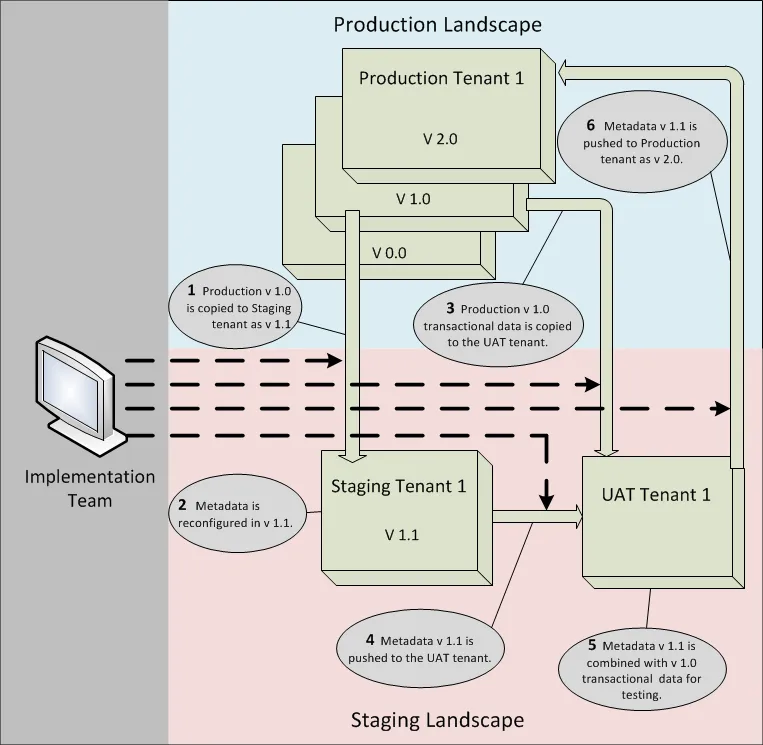
Note the following:
- The version numbers used in Data Migration Process are for reference only. The software residing on a tenant does not actually have the version numbers shown here.
- Version 1.0 of the production tenant instance represents a functional, running production tenant instance whose configuration remains unchanged until step 6 below.
Data Migration Process Overview
This section describes the actions that occur when data is migrated to the production instance of a tenant.
Before Starting the Migration
- Work with the customer to create a comprehensive project plan describing the requested changes, change verification testing, project team contact information, schedule constraints, and other relevant information.
- Create a comprehensive project plan describing the requested changes, change verification testing, project team contact information, schedule constraints, and other relevant information.
Step 1
- Copy version 1.0 of the production instance of the tenant in its entirety (that is, master data, metadata, configuration data, and transactional data) to the staging instance of the tenant. The copied version on the staging instance of the tenant is renamed version 1.1.
- Disable all email configurations (@customer.mx.domain) for the production instance of the tenant in the staging instance of the tenant, and enable the staging instance of the tenant email configuration (@tenantname-stg.saasit.com).
- Lock the production instance of the tenant. The production instance of the tenant cannot be reconfigured until approved configuration changes are applied in step 6. While the production instance of the tenant is locked, no one can make changes that will affect the migration process or be overwritten by the new configuration.
- Shrink the data on the production instance of the tenant to 5GB or less.
- The staging instance of the tenant is considered current and active.
- Timing: This step usually takes five days.
Step 2
- Edit the metadata (and optionally the configuration data) in version 1.1 to meet the customer's requirements.
- Edit the metadata (and optionally the configuration data) in version 1.1 to meet your requirements.
- Record the configuration details in a change register.
- Timing: This step typically takes three weeks. It takes two weeks to prepare and migrate the configuration from the staging instance of the tenant to the UAT instance of the tenant, and one week within the UAT instance of the tenant for final testing.
Step 3
- Copy the transactional data (that is, customer data records) from the version 1.0 production instance of the tenant to the UAT instance of the tenant and if necessary shrink the data to less than 5 GB.
- Use the transactional data to test the metadata and configuration data updates in step 5. Version 1.0 metadata and other configuration data from the production instance of the tenant is not copied to the UAT instance of the tenant.
- Timing: This step typically takes three days.
Step 4
- Ask the customer to approve the metadata push from the staging instance of the tenant to the UAT instance of the tenant. If the customer does not approve it, send the approval request again. If the customer does not approve the request a second time, work with the customer to resolve any issues.
- Review and approve the metadata push from the staging instance of the tenant to the UAT instance of the tenant.
- Send the customer a tenant instance configuration migration template to complete, which provides details about exactly what data should be migrated.
- Complete a tenant instance configuration migration template, which provides details about exactly what data should be migrated.
- Review the migration template.
- Push version 1.1 of the metadata and configuration data to the UAT instance of the tenant. Only migrate the items included in the template. This is a full metadata migration from the source to the target; that is, this is not a delta metadata migration.
- Lock the UAT instance of the tenant, making it read-only and under change control.
- Timing: This step typically takes at least one week.
Step 5
- Ask the customer to perform acceptance testing on the UAT instance of the tenant using version 1.1 metadata and configuration data combined with version 1.0 transactional data. The customer performs the tests based on documented use cases to ensure that the configuration is "go-live" ready.
- Perform acceptance testing on the UAT instance of the tenant using version 1.1 metadata and configuration data combined with version 1.0 transactional data. Performs tests based on documented use cases to ensure that the configuration is "go-live" ready.
- The customer verifies that the UAT instance of the tenant configuration and logs are "go-live" ready. Do not update the production instance of the tenant if the UAT instance of the tenant is not "go-live" ready based on predefined requirements.
- Verify that the UAT instance of the tenant configuration and logs are "go-live" ready. Do not update the production instance of the tenant if the UAT instance of the tenant is not "go-live" ready based on predefined requirements.
- All logs on the UAT instance of the tenant must be clear of any configuration-related failures. For example, there should be no logs reporting failures in workflows, quick actions, email, object references not set to instances of objects, and so on.
- You must approve all configurations. The customer must provide documentation describing integration details and attach it to the service request.
- Documentation must include the completed migration template, updated clean-up scripts (if necessary), descriptions of all configuration changes and additions, and test cases that the implementation team can use to verify tenant behavior.
- We recommend that you create documentation such as a completed migration template, updated clean-up scripts (if necessary), descriptions of all configuration changes and additions, and test cases. You can use this information to verify tenant behavior.
- The customer approves the configuration push from the UAT instance of the tenant to the production instance of the tenant. If the customer does not approve the configuration, resend the approval request. If the customer does not approve the configuration the second time, work with the customer to resolve issues and validate the changes.
- Approve the configuration push from the UAT instance of the tenant to the production instance of the tenant.
- Timing: Testing on the UAT instance of the tenant typically takes two days.
Step 6
- After the customer has approved the migration and submitted the clean-up scripts, remove any sample and test data that had been temporarily added to the staging instance of the tenant and then migrated to the UAT instance of the tenant.
- After you have approved the migration and submitted the clean-up scripts, remove any sample and test data that had been temporarily added to the staging instance of the tenant and then migrated to the UAT instance of the tenant.
- Push the UAT instance of the tenant configuration (that is, the version 1.1 metadata and configuration data) to the production instance of the tenant. This is a full metadata migration from the source to the target; that is, it is not a delta metadata migration.
- Timing: Because this step could result in a brief outage of the production instance of the tenant, we recommend that you schedule it to occur during a maintenance window (usually on a Friday or weekend), unless the customer requests otherwise.
Afterward
- The customer verifies that the production instance of the tenant is go-live ready.
- Verify that the production instance of the tenant is go-live ready.
- Request approval for the production instance of the tenant to go live. If the customer does not approve the request, work with them to resolve any issues and approve the production tenant.
- Place the UAT instance of the tenant in maintenance mode. It is no longer available to the customer.
- Place the UAT instance of the tenant in maintenance mode. It is no longer available to you.
- Lock the production instance of the tenant.
- Copy the configuration for the new production instance of the tenant to the staging instance of the tenant while the staging instance of the tenant is still locked.
- Unlock the staging instance of the tenant. From now on, the customer cannot use the staging instance of the tenant for further configuration without refreshing the production instance of the tenant. Refresh the staging instance of the tenant from the production instance of the tenant periodically to ensure that both tenant instances remain synchronized. The customer can use the staging instance of the tenant for testing and debugging purposes.
- Unlock the staging instance of the tenant. From now on, you cannot use the staging instance of the tenant for further configuration without refreshing the production instance of the tenant. Refresh the staging instance of the tenant from the production instance of the tenant periodically to ensure that both tenant instances remain synchronized. You can use the staging instance of the tenant for testing and debugging purposes.
- Timing: This activity typically takes three business days.
If a Step Fails
Step 4: If the metadata and configuration data migration from the staging instance of the tenant to the UAT instance of the tenant in step 4 fails, work with the customer to do the following:
- Obtain a corrected patch on the staging instance of the tenant.
- Re-initiate the process of migrating the metadata and configuration data from the staging instance of the tenant to the UAT instance of the tenant.
Step 6: If the metadata and configuration data migration from the UAT instance of the tenant to the production instance of the tenant in step 6 fails:
- Roll back the changes (that is, the backup copy is restored).
- Reinitiate the process of migrating the metadata and configuration data from the staging instance of the tenant to the UAT instance of the tenant.