
Port Requirements
Ensure that ports are configured correctly so that all Neurons for ITSM components open correctly.
For All Deployments
For all deployments, we recommend that you open the following ports:
Port | Service |
|---|---|
53 | For Active Directory. Select the UDP (for DNS) or TCP protocol. |
139 or 445 | For deploying agents to other computers. Select the UDP (for DNS) or TCP protocol. |
443 | For sending surveys. However, port HTTPS 7075 is supported until further notice. |
1433 | For the SQL server. |
2323 | Neurons for ITSM Voice web services port: Set to match the web services port set in the Ivanti Service Manager Voice management portal. |
5743 | For the Neurons for ITSM Voice server. |
5986 | For WinRM to receive remote commands. |
8097 | The default proxy port. Used unless defined in the endpoint address. For example, http://company/users:8113. |
7200 | For the message queue. |
61000 | The public TCP port of the Neurons for ITSM Voice message server service. |
62000 | The public TCP port of the Neurons for ITSM Voice reset password service. |
6379 | For the Redis Enterprise Software. |
1213 | For Integration Service. |
For Deployments With All Components Installed on One Host
Port Configuration shows the port requirements for a deployment where all Neurons for ITSM components are installed on one host.
Fig.1. Port Configuration
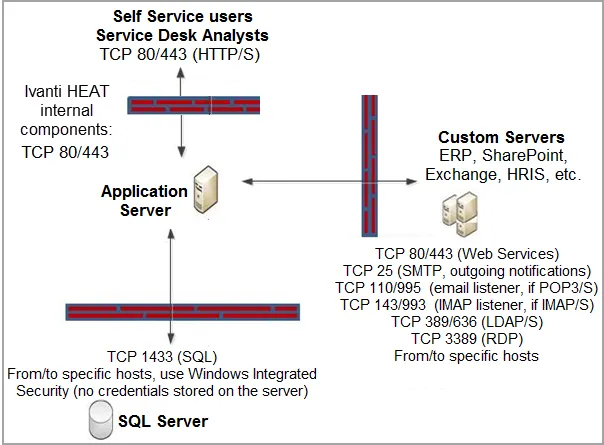
The ports to open are as follows:
- Self Service users and Service Desk Analysts:
- TCP 80/443 (HTTP/HTTPS)
- Neurons for ITSM application server (Neurons for ITSM internal components):
- TCP 80/443
- Custom servers (ERP, SharePoint, Exchange, HRIS, and so on):
- TCP 80/443 (web services)
- TCP 25 (SMTP, outgoing notifications)
- TCP 110/995 (Email listener if POP3/S is used)
- TCP 143/993 (IMAP listener, if IMAP/S is used)
- TCP 389/636 (LDAP/S)
- TCP 3389 (RDP)
- Microsoft SQL Server:
- TCP 1433 (SQL)
To and from specific hosts, use Windows Integrated Security. No credentials are stored on the server.
The outbound port may not be the same as the inbound port. The outbound is determined by your environment.
For Deployments with the Web Server Installed on a Different Host
If your deployment has the Neurons for ITSM web server outside of the firewall, ensure that the following ports are also open:
- TCP 80/443
- TCP 25 (SMTP, outgoing notifications)
- TCP 1433 (SQL)
- TCP 54327 (License)
- TCP 389/636 (LDAP/S)
For Deployments that Include Discovery
For additional information about the Discovery requirements, see the Neurons for ITSM online help and look for the topic called "Standard Gateway System Prerequisites". See "Related Documentation" for information on accessing the Neurons for ITSM documentation.
About the Discovery Servers
The Discovery components reside on two servers: the Discovery web server and the Discovery application server. You can view the components that are deployed to each server from Microsoft IIS.
- The AgentTaskWs and ClientTransportProcessor components reside on the Discovery web server.
- The MessageSender, AssetProcessor, DiscoProcessor, and TaskProcessor components reside on the Discovery application server.
All communication from the gateway or client agent goes to the AgentTaskWs and ClientTransportProcessor components (on the Discovery web server), and those components then relay the messages or requests to the corresponding components on the Discovery application server.
Commands sent to the AgentTaskWs component are relayed to the TaskProcessor component via Net.TCP on port 7100.
Asset and Discovery data sent to the ClientTransportProcessor component is forwarded to the message sender via Net.TCP on port 5000. The message sender component then queues the message on one of the processor queues depending on the message type; you do not need to open a particular port for this.
Port Information
If your deployment includes Discovery, ensure that the following ports are also open for the
Discovery application server:
- TCP 8080
- TCP 5000
- TCP 8382
- TCP 7100
For Deployments with Remote Control
To use the remote control feature without the plugin (using HTML5), port 11438 must be opened. For more information about the remote control feature, see the Neurons for ITSM online help. (See "Related Documentation" for information about accessing the Neurons for ITSM documentation, including the online help.)