
FRSHEATIntegration Web Service URL
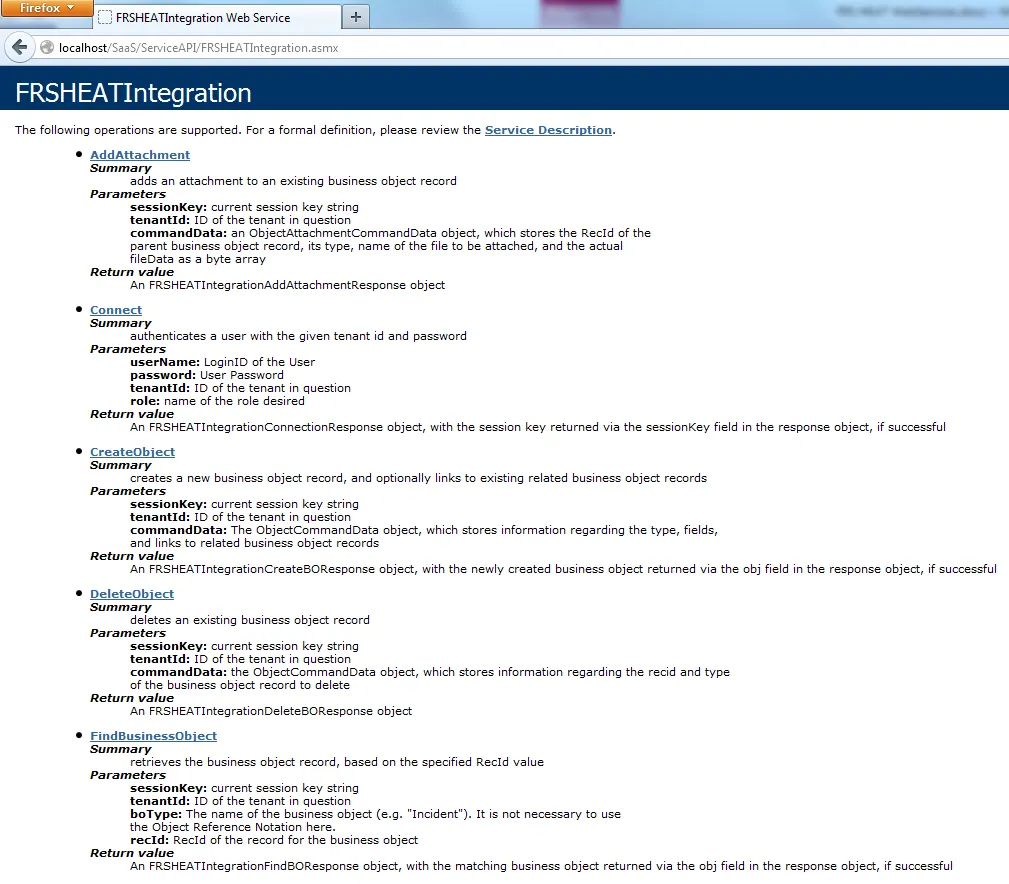
The FRSHEATIntegration Web Service can be accessed at a link similar to the example shown below:
https://<TenantName>/ServiceAPI/FRSHEATIntegration.asmx
Replace <TenantName> with the hostname corresponding to your particular tenant.
Notice when accessing the above URL, information is provided for the available Web Methods.
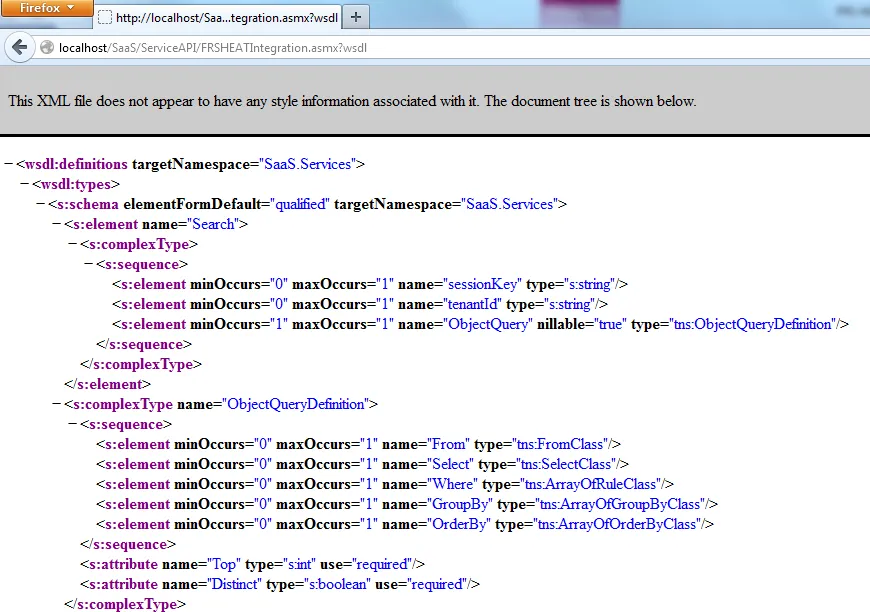
The corresponding WSDL file can be accessed at by adding “?wsdl” at the end of the previous URL, as seen in the example link shown below:https://<TenantName>/ServiceAPI/FRSHEATIntegration.asmx?wsdl
Establishing the Connection and Role Selection
Before an application can access a Web Service API on the SaaS platform, it has to be properly authenticated and authorized, with respect to the tenant. This is achieved by first invoking the Connect() WebMethod, before performing any subsequent Web Service operations.
Connect
The Connect WebMethod is responsible for performing both the authentication and authorization operations, to ensure that the Web Service user is properly authenticated, and belongs to the specified role.
Request syntax:
FRSHEATIntegrationConnectionResponse Connect(string userName, string password, string tenantId, string role)
Parameters:
userName: loginId for which the session is to be created. The loginId is searched against LoginID column in the Profile.Employee business object (Profile table).
password: user password. Either internal or external (Active Directory) password can be used, depending on the Employee record configuration.
tenantId: tenant for which the session is to be created. The tenant ID is matched against the “TenantURL” field, in the Tenants business object in the ConfigDB database. The tenant record must be in “Active” state in order for authentication to succeed.
role: the role that the indicated user will be logging in as.
Return Value:
An FRSHEATIntegrationConnectionResponse object, defined as follows:
public class FRSHEATIntegrationConnectionResponse
{
public string connectionStatus;
public string sessionKey;
public string exceptionReason;
}
The FRSHEATIntegrationConnectionResponse class comprises the following fields:
- connectionStatus – this field provides a Status value indicating the state of the Connection. A full description of the available Status values is provided in the table below.
- sessionKey – the sessionKey which needs to be used in all subsequent Web Service operations. This field will only be populated when the connectionStatus has a value of “Success”, otherwise the value will be null.
- exceptionReason – if there is an exception thrown in the course of running the Connect WebMethod, the exception information will be captured in this field.
If the Connect WebMethod operation completes successfully, the sessionKey will be stored in the corresponding member in the FRSHEATIntegrationConnectionResponse object.
However, if there is an error encountered during the Connect operation (either during the authentication or authorization phases), a SOAP Exception will be thrown by the server, and the Web Services Client will be required to handle the exception accordingly.
The following table lists the possible kinds of exceptions which can be encountered, while executing the Connect WebMethod.
SOAP Exception | Explanation |
|---|---|
AccessDenied | Either the specified username does not exist in the tenant, or the password provided is invalid for the username. Double-check the credentials passed into the Connect Web Method, to ensure that they are specified properly. |
TenantNotFound | Either the specified TenantURL cannot be found, or that the tenant is not currently in “Active” status. Double-check the TenantURL to ensure that it is the correct URL for accessing the tenant. If the TenantURL is correct, please double check with FRS Operations regarding the status of the given Tenant. |
TenantInMaintenance | The specified Tenant is currently in maintenance mode. Confirm whether the Tenant is in maintenance mode, and double-check with FRS Operations, as to when the tenant will be set back to Active status. |
InvalidRole | Either the specified Role definition is not available in the tenant, or that the user is not currently associated with the specified role. Confirm whether the Role actually does exist in the tenant, and that the user does belong to the given role. |
SessionExpired | The SessionKey refers to a session which has since expired. This typically occurs when the API operation uses the SessionKey from an earlier Connect webmethod call, and the session has expired due to inactivity. Whenever this occurs, it is necessary to execute the Connect webmethod call again, so that a new sessionkey can be obtained, for performing any further actions. This will be explained in the next section. |
Important Note: For all subsequent WebMethods described in this document, the user may run into authentication / authorization errors, when reusing the same sessionKey value – the Web Services client will need to account for the possibility of connection failures, while exercising the remaining WebMethods described in this document.
Example
FRSHEATIntegration frSvc = new FRSHEATIntegration();
FRSHEATIntegrationConnectionResponse connectresponse = frSvc.Connect(username, password, tenantId, role);
if (connectresponse.connectionStatus == "Success")
{
...
}
Handling Session Expirations
After making the initial call to the Connect WebMethod to obtain the sessionkey, typically Web Service Clients would reuse the same sessionKey value for invoking all subsequent WebMethod operations, such as Search, UpdateObject, etc.
If the Web Services Client remains idle for a period of time, which exceeds the session timeout value that has been set for the tenant, the session will expire - the sessionkey that was obtained earlier will no longer be valid.
Once the session has expired, if the client tries to use the expired sessionkey for any subsequent operation (such as Search), a SOAP Exception will be returned by the server, alerting the client that the session has indeed expired.
By throwing the explicit SOAP Exception back to the client, the client can then use standard exception handling techniques, for calling the Connect WebMethod again, to obtain a brand new sessionkey, which can then be used in subsequent operations.
For .NET-based web services clients, the reference to the FRSHEATIntegration API can be established using either a Web Reference or a Service Reference – the code to handle the SOAP exception differs slightly based on the type of reference.
The following code sample illustrates how this can be achieved, if the Web Services Client is defined using a Web Reference to the FRSHEATIntegration API:
ObjectQueryDefinition query = new ObjectQueryDefinition();
query.Select = new SelectClass();
FieldClass[] incidentFieldObjects = new FieldClass[] {
new FieldClass()
{
Name = "IncidentNumber",
Type = "Text"
},
new FieldClass()
{
Name = "Service",
Type = "Text"
}
};
query.Select.Fields = incidentFieldObjects;
query.From = new FromClass();
query.From.Object = "Incident";
query.Where = new RuleClass[] {
new RuleClass()
{
Join = "AND",
Condition = "=",
Field = "IncidentNumber",
Value = "10001"
}
};
FRSHEATIntegrationSearchResponse searchResponse = null;
try
{
searchResponse = frSvc.Search(authSessionKey, tenantId, query);
}
catch (SoapException soapException)
{
if (soapException.Actor == "SessionExpired")
{
connectresponse = frSvc.Connect(username, password, tenantId, role);
if (connectresponse.connectionStatus == "Success")
{
authSessionKey = connectresponse.sessionKey;
searchResponse = frSvc.Search(connectresponse.sessionKey, tenantId, query);
}
}
}
if (searchResponse != null && searchResponse.status == "Success")
{
WebServiceBusinessObject[][] incidentList = searchResponse.objList;
foreach (WebServiceBusinessObject[] incidentOuterList in incidentList)
{
foreach (WebServiceBusinessObject incident in incidentOuterList)
{
Console.WriteLine("Incident matches the selection criteria", incident.FieldValues[0].Value);
}
}
}
In particular, note the following code fragment:
try
{
searchResponse = frSvc.Search(authSessionKey, tenantId, query);
}
catch (SoapException soapException)
{
if (soapException.Actor == "SessionExpired")
{
connectresponse = frSvc.Connect(username, password, tenantId, role);
if (connectresponse.connectionStatus == "Success")
{
authSessionKey = connectresponse.sessionKey;
searchResponse = frSvc.Search(authSessionKey, tenantId, query);
}
}
}
Notice that the Search WebMethod operation is wrapped inside the try-catch block.
If the SOAP Exception occurs corresponding to the session expiration, the Actor property in the SoapException can be inspected, to determine whether the connection error is due to the session timeout.
If the exception is due to the session timeout, it then goes ahead and invokes the Connect WebMethod again, to obtain a brand new sessionkey.
Assuming that authSessionKey is a globally accessible string, it is now updated to the sessionkey property of the connectresponse object, and the Search WebMethod can be successfully run the second time.
The following code sample now illustrates how this can be achieved, if the Web Services Client is defined using a Service Reference to the FRSHEATIntegration API:
ObjectQueryDefinition query = new ObjectQueryDefinition();
query.Select = new SelectClass();
FieldClass[] incidentFieldObjects = new FieldClass[] {
new FieldClass()
{
Name = "IncidentNumber",
Type = "Text"
},
new FieldClass()
{
Name = "Service",
Type = "Text"
}
};
query.Select.Fields = incidentFieldObjects;
query.From = new FromClass();
query.From.Object = "Incident";
query.Where = new RuleClass[] {
new RuleClass()
{
Join = "AND",
Condition = "=",
Field = "IncidentNumber",
Value = "10001"
}
};
FRSHEATIntegrationSearchResponse searchResponse = null;
try
{
searchResponse = frSvc.Search(authSessionKey, tenantId, query);
}
catch (FaultException faultException)
{
MessageFault messageFault = faultException.CreateMessageFault();
if (messageFault.Actor == "SessionExpired")
{
connectresponse = frSvc.Connect(username, password, tenantId, role);
if (connectresponse.connectionStatus == "Success")
{
authSessionKey = connectresponse.sessionKey;
searchResponse = frSvc.Search(connectresponse.sessionKey, tenantId, query);
}
}
}
if (searchResponse != null && searchResponse.status == "Success")
{
WebServiceBusinessObject[][] incidentList = searchResponse.objList;
foreach (WebServiceBusinessObject[] incidentOuterList in incidentList)
{
foreach (WebServiceBusinessObject incident in incidentOuterList)
{
Console.WriteLine("Incident matches the selection criteria", incident.FieldValues[0].Value);
}
}
}
In particular, note the following code fragment:
try
{
searchResponse = frSvc.Search(authSessionKey, tenantId, query);
}
catch (FaultException faultException)
{
MessageFault messageFault = faultException.CreateMessageFault();
if (messageFault.Actor == "SessionExpired")
{
connectresponse = frSvc.Connect(username, password, tenantId, role);
if (connectresponse.connectionStatus == "Success")
{
authSessionKey = connectresponse.sessionKey;
searchResponse = frSvc.Search(connectresponse.sessionKey, tenantId, query);
}
}
}
Again, notice that the Search WebMethod operation is wrapped inside the try-catch block.
However, for Service References, the exception that is caught is now a FaultException, and not the SOAP exception (as was the case with the earlier Web Reference).
Here, once the faultException is caught, it is first necessary to obtain the MessageFault from it.
From the MessageFault, the Actor property can then be the Actor property can then be inspected, to determine whether the connection error is due to the session timeout.
The reconnect logic is then the same as the case for Web Reference based clients, as explained earlier.
The above example illustrates how to properly handle session expirations. The same technique can be used for handling any other kinds of exceptions, such as AccessDenied, InvalidRole, etc.
For example, for the “AccessDenied” exception, the Web Services client might log the error locally to a log file, or send an email to the administrator, alerting that the username / password is not valid, when used in the client.
GetRolesForUser
This Web Method retrieves a list of roles, which are available to the current Web Service user.
The response object returned from this WebMethod, contains a field which stores an array of Roles which are associated with the Profile.Employee record of the current user.
Request Syntax:
FRSHEATIntegrationGetRolesResponse GetRolesForUser(string sessionKey, string tenantId)
NameDisplayPair[] GetRolesForUser(string sessionKey, string tenantId, string userName)
Parameters:
- sessionKey: Key received in the earlier Connect request.
- tenantid: ID of the tenant in question.
Return Value:
An FRSHEATIntegrationGetRolesResponse object, defined as follows:
public class FRSHEATIntegrationGetRolesResponse
{
public string status { get; set; }
public List<NameDisplayPair> roleList { get; set; }
public string exceptionReason { get; set; }
}
The FRSHEATIntegrationGetRolesResponse class is comprises the following fields:
- Status – this field provides a Status value, indicating whether the WebMethod was able to successfully retrieve the list of roles for the current user. Assuming the sessionKey (returned from the previous Connect WebMethod call) is valid, this field should return a value of “Success” under most circumstances.
- roleList – contains an array of NameDisplayPair objects. Each NameDisplayPair entry corresponds to a role which the current user belongs to. For each NameDisplayPair record in the array, the Name property returns the name of the role, whereas the DisplayName property returns the DisplayName of the role.
- exceptionReason – if there is an exception thrown in the course of running the GetRolesForUser WebMethod, the exception information will be captured in this field.
Example
FRSHEATIntegrationGetRolesResponse getRolesResponse = frSvc.GetRolesForUser(authSessionKey, tenantId);
NameDisplayPair[] rolePairList = null;
if (getRolesResponse.status == "Success")
{
rolePairList = getRolesResponse.roleList;
Console.WriteLine("The current user belongs to the following roles:");
foreach (NameDisplayPair rolePair in rolePairList)
{
Console.WriteLine("\tRole: => DisplayName: \"\"", rolePair.Name, rolePair.DisplayName);
}
}