
Adding Features and Changing Settings
Adding and Deleting Features
Adding features to or deleting features from an existing Neurons for ITSM system is much easier than upgrading the system.
If you have an Enterprise Production Deployment, your action might apply to just one, some, or all of the servers, depending on the features that you are adding or deleting.
To add servers to your deployment, follow the instructions under Installing the Neurons for ITSM System
To add features or delete features, do the following:
- Access the installation folder on the Ivanti Software product CD or zip file and run IvantiServiceManager.exe. Right-click and select Run as Administrator to ensure proper installation.
The installer checks for the prerequisite software components. If any of those components is not installed, the system prompts you to install them now.
- Select Install at prompt. Installation of the prerequisite software can take several minutes.
- If you are prompted to restart the system, select Yes. The system displays the Welcome dialog box.
- Click Next. The system displays the Program Maintenance dialog box.
- Choose Modify and click Next. The system displays the Custom Setup dialog box.
Custom Setup Dialog Box
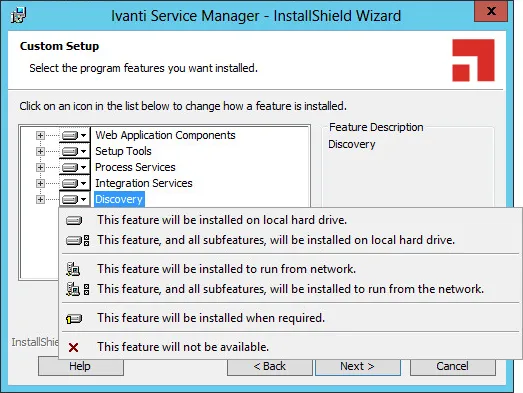
- Click the down arrow on each feature and make your selection.
Adding features requires more hard-drive space. If there is not enough space on your hard drive, the installer displays a message.
- Click Next and then click Install.
The Neurons for ITSM installation begins. The system displays a status dialog box showing the installation progress of each component over the next few minutes.
- If you cancel the installation at any time, click Finish to close the installer.
When the components are installed, the system automatically launches the System Configuration Wizard.
- Go to Configuring Neurons for ITSM for instructions about using the System Configuration Wizard.
Changing Feature Settings by Running the System Configuration Wizard
To change settings without adding or deleting features, you do not need the Ivanti Software product CD or zip file.
- In the Start menu, click the down arrow to see the Apps menu, and then click System Configuration Wizard.
You must click Run as administrator when you start the System Configuration Wizard manually.
- Go to Configuring Neurons for ITSM for instructions about using the System Configuration Wizard.