
Understanding the Search Results
As mentioned above, the return value of the Search Web Method is a list of list of WebServiceBusinessobject objects (i.e. a two dimensional array).
The previous section provided a simple search example, where the records are returned against a single business object (e.g. “Incident”).
When performing searches against the current object and related objects, it is important to note that each item in the two-dimensional array represents the matching parent - child combination.
The best way to understand the format of the search results is to consider the following four search scenarios, with the above point in mind:
Scenario 1: Perform a search against a single business object, which returns an exact match
Assume the search is defined against a single business object (e.g. Incident), and the search result returns 1 exact record.
Here, objList[0][0] contains the matching Incident record.
Consider the following code sample:
ObjectQueryDefinition query = new ObjectQueryDefinition();
FieldClass[] fieldObjects = new FieldClass[] {
new FieldClass()
{
Name = "IncidentNumber",
Type = "Text"
},
new FieldClass()
{
Name = "Status",
Type = "Text"
}
};
query.Select = new SelectClass();
query.Select.Fields = fieldObjects;
query.From = new FromClass();
query.From.Object = "Incident";
query.Where = new RuleClass[] {
new RuleClass()
{
Field = "IncidentNumber",
Condition = "=",
Value = "10001"
}
};
FRSHEATIntegrationSearchResponse searchResponse = frSvc.Search(authSessionKey, tenantId, query);
if (searchResponse.status == "Success")
{
WebServiceBusinessObject[][] objList = searchResponse.objList;
foreach (WebServiceBusinessObject[] objOuterList in objList)
{
foreach (WebServiceBusinessObject obj in objOuterList)
{
WebServiceFieldValue[] objFieldList = obj.FieldValues;
Console.WriteLine(" with \"\" matches the selection criteria", obj.BusinessObjectName, objFieldList[0].Name, objFieldList[0].Value);
}
}
}
}
Here we are searching specifically for Incident 10001 in the tenant. Assuming the record exists in the tenant, it will be available via objList[0][0].

Scenario 2: Perform a search against a single business object, which returns several matches
Assume the search is defined against a single business object (e.g. “Incident”), and the search result returns n matching records.
In this case, the matching records can be accessed from objList[0][0] through objList[n-1][0].
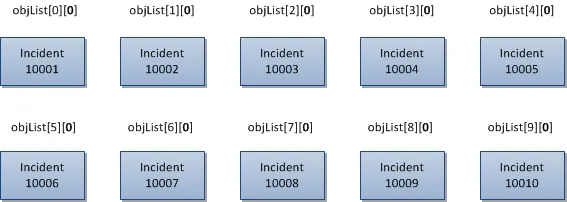
For example, assume the search returns 10 Incident records – the Incident records can be accessed from objList[0][0] through objList[9][0].
Here, the first index in the two-dimensional array changes, but the second index remains at 0.
Consider the following code sample:
ObjectQueryDefinition query = new ObjectQueryDefinition();
FieldClass[] fieldObjects = new FieldClass[] {
new FieldClass()
{
Name = "IncidentNumber",
Type = "Text"
},
new FieldClass()
{
Name = "Status",
Type = "Text"
}
};
query.Select = new SelectClass();
query.Select.Fields = fieldObjects;
query.From = new FromClass();
query.From.Object = "Incident";
query.Where = new RuleClass[] {
new RuleClass()
{
Field = "IncidentNumber",
Condition = "<=",
Value = "10010"
}
};
query.OrderBy = new OrderByClass[] {
new OrderByClass()
{
Name = "IncidentNumber",
Direction = "ASC"
}
};
FRSHEATIntegrationSearchResponse searchResponse = frSvc.Search(authSessionKey, tenantId, query);
if (searchResponse.status == "Success")
{
WebServiceBusinessObject[][] objList = searchResponse.objList;
foreach (WebServiceBusinessObject[] objOuterList in objList)
{
foreach (WebServiceBusinessObject obj in objOuterList)
{
WebServiceFieldValue[] objFieldList = obj.FieldValues;
Console.WriteLine(" with \"\" matches the selection criteria", obj.BusinessObjectName, objFieldList[0].Name, objFieldList[0].Value);
}
}
}
}
Compared to the code from scenario 1, only the following has been updated:
query.Where = new RuleClass[] {
new RuleClass()
{
Field = "IncidentNumber",
Condition = "<=",
Value = "10010"
}
};
Here, we are searching for Incident records where the IncidentNumber is less than or equal to 10010.
Assuming that the tenant has Incident records starting from 10001 through 10010, Incident 10001 can be accessed via objList[0][0], Incident 10002 can be accessed via objList[1][0], up to Incident 10010 which can be accessed via objList[9][0].
The following diagram illustrates how each of the items in the collection can be accessed individually, via the two dimensional array of search results.
Since there are no child objects to be searched against, all of the items can be accessed using objList[n][0].
Scenario 3: Perform a search against a single business object and its related child objects, which returns one exact match for the parent object
Assume we are searching for Incidents with matching Journal.Email records.
Assume that the search returns with one matching Incident record, which contains four related Journal.Email records.
When performing searches against the current object and related objects, it is important to note that each item in the two-dimensional array represents the matching parent / child combination.
In this scenario, since there is only one matching parent Incident record, the search results will contain the same parent record four times, one for each matching Journal.Email record.
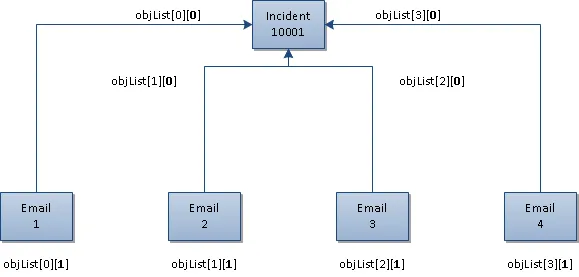
So the parent Incident record can be accessed using either objList[0][0], objList[1][0], objList[2][0], or objList[3][0]. Here, the first index value varies, and the second index value will be 0 (to denote the main object).
Each individual matching Journal.Email child record can be accessed using objList[0][1], objList[1][1], objList[2][1], and objList[3][1]. Here, the first index value varies (to correspond to each matching Journal.Email record), and the second index will be 1 (to denote the first child object).
Consider the following code sample:
ObjectQueryDefinition query = new ObjectQueryDefinition();
FieldClass[] fieldObjects = new FieldClass[] {
new FieldClass()
{
Name = "IncidentNumber",
Type = "Text"
},
new FieldClass()
{
Name = "Journal.Subject",
Type = "Text"
}
};
query.Select = new SelectClass();
query.Select.Fields = fieldObjects;
query.From = new FromClass();
query.From.Object = "Incident";
query.From.Links = new FromLinkClass[] {
new FromLinkClass {
Relation = "",
Object = "Journal#Email"
}
};
query.Where = new RuleClass[] {
new RuleClass()
{
Field = "IncidentNumber",
Condition = "=",
Value = "10001"
},
new RuleClass()
{
Field = "Journal.Category",
Condition = "=",
Value = "Incoming Email"
},
};
query.OrderBy = new OrderByClass[] {
new OrderByClass()
{
Name = "IncidentNumber",
Direction = "ASC"
},
new OrderByClass()
{
Name = "Journal.Subject",
Direction = "ASC"
}
};
FRSHEATIntegrationSearchResponse searchResponse = frSvc.Search(authSessionKey, tenantId, query);
if (searchResponse.status == "Success")
{
WebServiceBusinessObject[][] objList = searchResponse.objList;
foreach (WebServiceBusinessObject[] objOuterList in objList)
{
foreach (WebServiceBusinessObject obj in objOuterList)
{
WebServiceFieldValue[] objFieldList = obj.FieldValues;
Console.WriteLine(" with matches the selection criteria", obj.BusinessObjectName, objFieldList[0].Name, objFieldList[0].Value);
}
}
}
Here, we are searching for Incident records where the IncidentNumber is equal to 10001, and has associated Journal.Email records with Category of “Incoming Email” (i.e. emails attached to the Incident record, via the email listener).
Because the search needs to consider not only the top level object (i.e. “Incident”), but also the related “Journal.Email” records, additional lines of code needs to be written.
First off, the FromLinkClass needs to be specified:
query.From.Links = new FromLinkClass[] {
new FromLinkClass {
Relation = "",
Object = "Journal#Email"
}
};
Here, we create a new instance of the FromLinkClass, which designates the relationship from Incident to Journal.Email.
The existing “IncidentContainsJournal” relationship (which points to the Journal base object) can be used to associate the Incident with the child Journal records.
Because the relationship has no value specified for the internal reference name parameter, the Relation value is left as an empty string, in the Relation member above.
The actual object to be searched against (in this case, Journal.Email) needs to be specified above in the Object member.
With the Links property specified for the FromClass, the fields from the related business object can be accessed. For example, besides accessing the IncidentNumber field of the Incident, the Subject of the Journal.Email can be accessed:
FieldClass[] fieldObjects = new FieldClass[] {
new FieldClass()
{
Name = "IncidentNumber",
Type = "Text"
},
new FieldClass()
{
Name = "Journal.Subject",
Type = "Text"
}
};
Notice that to reference the Subject field in the Journal.Email business object, the field name needs to be specified as “Journal.Subject”.
Similarly, to specify the rule condition using fields in the Journal.Email business object (e.g. “Category”), the field name needs to be specified as “Journal.Category”:
query.Where = new RuleClass[] {
new RuleClass()
{
Field = "IncidentNumber",
Condition = "=",
Value = "10001"
},
new RuleClass()
{
Field = "Journal.Category",
Condition = "=",
Value = "Incoming Email"
},
};
So in the example scenario, assume that Incident 10001 exists in the tenant, with four Journal.Emails attached to it, with subject values of “Email 1”, “Email 2”, “Email 3”, and “Email 4”.
Running the above sample code yields the following results in the console window:
Incident with IncidentNumber "10001" matches the selection criteria
Journal.Email with Journal.Subject "Email 1" matches the selection criteria
Incident with IncidentNumber "10001" matches the selection criteria
Journal.Email with Journal.Subject "Email 2" matches the selection criteria
Incident with IncidentNumber "10001" matches the selection criteria
Journal.Email with Journal.Subject "Email 3" matches the selection criteria
Incident with IncidentNumber "10001" matches the selection criteria
Journal.Email with Journal.Subject "Email 4" matches the selection criteria
As mentioned in the previous sections, the results are returned for each parent / child combination. Because the four Journal.Email records are associated with the same Incident record (Incident 10001), this same Incident record will show up four times, once for each Journal.Email child record associated with it.
The following diagram illustrates how each of the items in the parent / child combination can be accessed individually, via the two dimensional array of search results.
Scenario 4: Perform a search against a single business object and its related child objects, which returns several matches for the parent object
Assume we are searching for Incidents with matching Journal.Email records.
Assume that the search returns with two matching Incident records, which contains six related Journal.Email records – four for the first Incident record (e.g. Incident 10001), and two for the second Incident record (e.g. Incident 10008).
As before, recall that when performing searches against the current object and related objects, it is important to note that each item in the two-dimensional array represents the matching parent / child combination.
In this scenario, since there are two matching parent Incident records, and six related Journal.Email records, the search results will return six results.
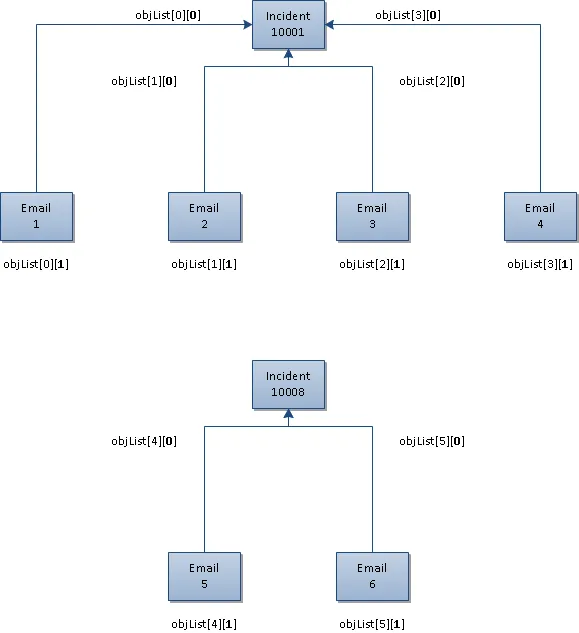
The first Incident record will show up using either objList[0][0], objList[1][0], objList[2][0], and objList[3][0], and its corresponding Journal.Email records will show up via objList[0][1], objList[1][1], objList[2][1], and objList[3][1].
The second Incident record will show up using either objList[4][0] and objList[5][0], and its corresponding Journal.Email records will show up via objList[4][1] and objList[5][1].
Consider the following code sample:
ObjectQueryDefinition query = new ObjectQueryDefinition();
FieldClass[] fieldObjects = new FieldClass[] {
new FieldClass()
{
Name = "IncidentNumber",
Type = "Text"
},
new FieldClass()
{
Name = "Journal.Subject",
Type = "Text"
}
};
query.Select = new SelectClass();
query.Select.Fields = fieldObjects;
query.From = new FromClass();
query.From.Object = "Incident";
query.From.Links = new FromLinkClass[] {
new FromLinkClass {
Relation = "",
Object = "Journal#Email"
}
};
query.Where = new RuleClass[] {
new RuleClass()
{
Field = "IncidentNumber",
Condition = "<=",
Value = "10010"
},
new RuleClass()
{
Field = "Journal.Category",
Condition = "=",
Value = "Incoming Email"
},
};
query.OrderBy = new OrderByClass[] {
new OrderByClass()
{
Name = "IncidentNumber",
Direction = "ASC"
},
new OrderByClass()
{
Name = "Journal.Subject",
Direction = "ASC"
}
};
FRSHEATIntegrationSearchResponse searchResponse = frSvc.Search(authSessionKey, tenantId, query);
if (searchResponse.status == "Success")
{
WebServiceBusinessObject[][] objList = searchResponse.objList;
foreach (WebServiceBusinessObject[] objOuterList in objList)
{
foreach (WebServiceBusinessObject obj in objOuterList)
{
WebServiceFieldValue[] objFieldList = obj.FieldValues;
Console.WriteLine(" with matches the selection criteria", obj.BusinessObjectName, objFieldList[0].Name, objFieldList[0].Value);
}
}
}
Compared to the code from scenario 3, only the following has been updated:
query.Where = new RuleClass[] {
new RuleClass()
{
Field = "IncidentNumber",
Condition = "<=",
Value = "10010"
}
};
Here, we are searching for Incident records where the IncidentNumber is less than or equal to 10010, and has associated Journal.Email records with Category of “Incoming Email” (i.e. emails attached to the Incident record, via the email listener).
So in the example scenario, assume that Incident 10001 exists in the tenant, with four Journal.Emails attached to it, with subject values of “Email 1”, “Email 2”, “Email 3”, and “Email 4”.
Assume that Incident 10008 also exists in the tenant, with two Journal.Email records attached to it, with subject values of “Email 5” and “Email 6”.
Running the above sample code yields the following results in the console window:
Incident with IncidentNumber "10001" matches the selection criteria
Journal.Email with Journal.Subject "Email 1" matches the selection criteria
Incident with IncidentNumber "10001" matches the selection criteria
Journal.Email with Journal.Subject "Email 2" matches the selection criteria
Incident with IncidentNumber "10001" matches the selection criteria
Journal.Email with Journal.Subject "Email 3" matches the selection criteria
Incident with IncidentNumber "10001" matches the selection criteria
Journal.Email with Journal.Subject "Email 4" matches the selection criteria
Incident with IncidentNumber "10008" matches the selection criteria
Journal.Email with Journal.Subject "Email 5" matches the selection criteria
Incident with IncidentNumber "10008" matches the selection criteria
Journal.Email with Journal.Subject "Email 6" matches the selection criteria
As mentioned in the previous sections, the results are returned for each parent / child combination.
Because there are four Journal.Email records associated with Incident 10001, this same Incident record will show up four times, once for each of the four Journal.Email child records associated with it.
Afterwards, there are two Journal.Email records associated with Incident 10008, so this same Incident will show up two times, once for each of the two Journal.Email child records associated with it.
In total, there are six such parent / child combinations, so there are twelve object records returned (six for the Incident, and six for the distinct Journal.Email records).
The following diagram illustrates how each of the items in the parent / child combination can be accessed individually, via the two dimensional array of search results.
Grouping the Rule Criteria
The previous section describes how to search for records based on the current business object (e.g. “Incident”) and its related child business objects (e.g. “Journal.Email”).
The earlier examples describe how to formulate queries such as the following:
Retrieve all Incident records with IncidentNumber less than 10010, containing related Journal.Email records with Category of “Incoming Email”
The Search WebMethod is actually flexible enough to express searches through the grouping of the rule criteria.
For example, the Search WebMethod allows one to express queries such as the following:
Retrieve all Incident records with IncidentNumber less than 10010, containing related Journal.Email records where
(The Category of the Journal.Email is “Incoming Email”
OR
The Subject of the Journal.Email is “Urgent Request”)
The above search allows the user to search for Incidents containing Journal.Email records, either if the Journal.Email has a Category of “Incoming Email” (i.e. it was created via the Email Listener), OR the Subject of the Journal.Email has a subject line of “Urgent Request” regardless if the email has a Category of “Incoming Email” or “Outgoing Email”.
To express the above search, consider the following code sample:
ObjectQueryDefinition query = new ObjectQueryDefinition();
FieldClass[] fieldObjects = new FieldClass[] {
new FieldClass()
{
Name = "IncidentNumber",
Type = "Text"
},
new FieldClass()
{
Name = "Journal.Category",
Type = "Text"
}
};
query.Select = new SelectClass();
query.Select.Fields = fieldObjects;
query.From = new FromClass();
query.From.Object = "Incident";
query.From.Links = new FromLinkClass[] {
new FromLinkClass
{
Relation = "",
Object = "Journal#Email"
}
};
query.Where = new RuleClass[] {
new RuleClass
{
Join = "AND",
Field = "IncidentNumber",
Condition = "<=",
Value = "10010"
},
new RuleClass
{
Rules = new RuleClass[] {
new RuleClass
{
Field = "Journal.Category",
Condition = "=",
Value = "Outgoing Email"
},
new RuleClass
{
Join = "OR",
Field = "Journal.Subject",
Condition = "=",
Value = "Urgent Request"
}
}
}
};
FRSHEATIntegrationSearchResponse searchResponse = frSvc.Search(authSessionKey, tenantId, query);
if (searchResponse.status == "Success")
{
WebServiceBusinessObject[][] objList = searchResponse.objList;
foreach (WebServiceBusinessObject[] objOuterList in objList)
{
foreach (WebServiceBusinessObject obj in objOuterList)
{
WebServiceFieldValue[] objFieldList = obj.FieldValues;
Console.WriteLine(" with \"\" matches the selection criteria", obj.BusinessObjectName, objFieldList[0].Name, objFieldList[0].Value);
}
}
}
This code sample is a variation of the samples from the earlier section, with several important differences.
In particular, notice the update to the Where property for the ObjectQueryDefinition object:
query.Where = new RuleClass[] {
new RuleClass
{
Join = "AND",
Field = "IncidentNumber",
Condition = "<=",
Value = "10010"
},
new RuleClass
{
Rules = new RuleClass[] {
new RuleClass
{
Field = "Journal.Category",
Condition = "=",
Value = "Outgoing Email"
},
new RuleClass
{
Join = "OR",
Field = "Journal.Subject",
Condition = "=",
Value = "Urgent Request"
}
}
}
};
At the top level are two RuleClass objects – one for expression the condition to search for Incident records with IncidentNumber less than or equal to 10010, as illustrated in the previous sections:
new RuleClass
{
Join = "AND",
Field = "IncidentNumber",
Condition = "<=",
Value = "10010"
},
The second RuleClass is used solely to populate the Rules member variable of the RuleClass:
new RuleClass
{
Rules = new RuleClass[] {
...
...
...
}
}
So inside the second RuleClass, another RuleClass array is being instantiated with two inner RuleClasses:
new RuleClass
{
Field = "Journal.Category",
Condition = "=",
Value = "Outgoing Email"
},
new RuleClass
{
Join = "OR",
Field = "Journal.Subject",
Condition = "=",
Value = "Urgent Request"
}
So the inner RuleClass array essentially allows one to express the following portion of the search:
Retrieve the related Journal.Email records where either
(The Category of the Journal.Email is “Incoming Email”
OR
The Subject of the Journal.Email is “Urgent Request”)
To express the following related query:
Retrieve the related Journal.Email records where either
(The Category of the Journal.Email is “Incoming Email”
AND
The Subject of the Journal.Email is “Urgent Request”)
the Join member variable needs to be changed from “OR” to “AND”, as follows:
new RuleClass
{
Field = "Journal.Category",
Condition = "=",
Value = "Outgoing Email"
},
new RuleClass
{
Join = "AND",
Field = "Journal.Subject",
Condition = "=",
Value = "Urgent Request"
}
With the above example, it can be seen how Rules can be grouped together, by populating the Rules member variable of the RuleClass object.
That is, the RuleClass uses composition to allow RuleClasses to be arbitrarily grouped together, using AND or OR operators via the Join property.
Full Text Searching
Besides regular SQL-style searches, the Search WebMethod also supports performing full text searches against a business object (e.g. search for records containing the terms “Email Down”, against the full text catalog of the Incident object).
The RuleClass contains a member called ConditionType, which is of type SearchConditionType - an enumeration with two permissible values:
- ByField - 0 (regular SQL search)
- ByText - 1 (full text SQL search)
public enum SearchConditionType
{
ByField = 0,
ByText = 1
}
Regular searches are performed by setting SearchConditionType to ByField – this is the default mode for searching, so it is not necessary to have this explicitly set during the RuleClass instantiation.
To perform full text searches, it is necessary to explicitly set the ConditionType of the RuleClass to ByText:
new RuleClass()
{
Join = "AND",
Condition = "=",
ConditionType = SearchConditionType.ByText,
Value = "Email Down"
}
Notice in particular, that the Field member (which was present in the earlier Search examples) is not specified in the RuleClass – since the search is now performed against the full text catalog (by virtue of the ConditionType value of ByText), it is an error to also specify Field member in the RuleClass.
The following code sample illustrates how to search for Incident records with the matching terms “Email Down”:
ObjectQueryDefinition query = new ObjectQueryDefinition();
query.Select = new SelectClass();
// Retrieve just the IncidentNumber field value from the Incident,
// when invoking the search
FieldClass[] incidentFieldObjects = new FieldClass[] {
new FieldClass()
{
Name = "IncidentNumber",
Type = "Text"
},
new FieldClass()
{
Name = "Service",
Type = "Text"
}
};
query.Select.Fields = incidentFieldObjects;
query.From = new FromClass();
query.From.Object = "Incident";
query.Where = new RuleClass[] {
new RuleClass()
{
Join = "AND",
Condition = "=",
ConditionType = SearchConditionType.ByText,
Value = "Email Down"
},
};
FRSHEATIntegrationSearchResponse searchResponse = frSvc.Search(authSessionKey, tenantId, query);
if (searchResponse.status == "Success")
{
WebServiceBusinessObject[][] incidentList = searchResponse.objList;
foreach (WebServiceBusinessObject[] incidentOuterList in incidentList)
{
foreach (WebServiceBusinessObject incident in incidentOuterList)
{
// Since we are just retrieving one field in the selection criteria
// (i.e. IncidentNumber), this corresponds to
// incident.FieldValues[0].Value when retrieving the results
Console.WriteLine("Incident matches the selection criteria", incident.FieldValues[0].Value);
}
}
}
Formal Description of the Classes used by the Search WebMethod
From the previous sections, it can be seen that in order to execute the Search WebMethod properly, objects from several classes need to created and populated accordingly, before the web method is called.
Now that the earlier sections have presented several example use cases, this section will formally describe the various classes in greater detail.
ObjectQueryDefinition
The ObjectQueryDefinition class is defined as follows:
class ObjectQueryDefinition
{
int Top;
bool Distinct;
FromClass From;
SelectClass Select;
List<RuleClass> Where;
List<OrderByClass> OrderBy;
}
From the class definition, it can be seen that the ObjectQueryDefinition is used to model the various portions of a typical SQL SELECT statement, specifically:
- FROM clause
Class FromClass
- SELECT clause
Class SelectClass
- WHERE clause
Class RuleClass (implemented as a list)
- ORDER BY clause
Class OrderByClass (implemented as a list)
With the exception of RuleClass (used to model the WHERE clause in the SQL SELECT statement), the other classes are named according to the corresponding clause in the SQL SELECT statement.
Besides these classes, notice that there is also an integer member variable called “Top” – this can be used to constrain the number of records being returned by the Search (e.g. return the first 1000 matching results).
There is also a boolean member variable called “Distinct” – this can be used to return the distinct results, to eliminate the repeated values in the search results.
The following sections will describe the various component classes, which are used to model the respective clauses in the SELECT statement.
FromClass
The FromClass class is used to model the FROM clause in a typical SQL SELECT statement, and is defined as follows:
class FromClass
{
string Object;
List<FromLinkClass> Links;
}
The Object member variable needs to be populated with the name of the business object to search against:
query.From = new FromClass();
query.From.Object = "Incident";
If the saved search needs to be performed relative to specific child objects, the Links member variable also needs to be populated, using a List of FromLinkClass objects:
class FromLinkClass
{
string Relation;
string Object;
}
The FromLinkClass contains two member variables:
- The “Relation” member variable specifies the name of the Internal Reference Name of the relationship between the parent and child object
For example, for the “IncidentContainsJournal” relationship, the internal reference name of the relationship is blank – so to use this relationship, populate the Object member variable with the name of the child business object, and leave the Relation member variable as an empty string
- The “Object” member variable specifies the name of the child business object (e.g. “Journal#Email”)
From the earlier code samples, recall that to search for the Journal.Email records related to the current business object, the Links member variable of the FromClass needs to be populated as follows:
query.From.Links = new FromLinkClass[] {
new FromLinkClass {
Relation = "",
Object = "Journal#Email"
}
};
SelectClass
The SelectClass class is used to model the SELECT clause in a typical SQL SELECT statement, and is defined as follows:
class SelectClass
{
bool All;
List<FieldClass> Fields;
}
To select all the fields in the business object, create a new SelectClass object, and set the “All” member variable of the object to true:
query.Select = new SelectClass();
query.Select.All = true;
Note that if the Search is against the main business object (e.g. “Incident”) and its related child business objects (e.g. “Journal.Email”), setting the “All” member variable to true will return all the fields in the main business object, and all the fields in the child business object.
To restrict the set of fields to be returned by the Search web method, create a new List of FieldClass objects, and initialize it with FieldClass objects, corresponding to the fields of interest.
From the earlier code samples, recall that to return the IncidentNumber field of the Incident business object, and the Category field of the child Journal.Email object, the following statements are used:
FieldClass[] fieldObjects = new FieldClass[] {
new FieldClass()
{
Name = "IncidentNumber",
Type = "Text"
},
new FieldClass()
{
Name = "Journal.Category",
Type = "Text"
}
};
query.Select = new SelectClass();
query.Select.Fields = fieldObjects;
In particular, for fields from the main business object, the names of the fields can be provided as is, whereas for fields in the child business objects, the name of the field needs to be prefixed with the name of the child business object in the relationship.
So for example, if the “IncidentContainsJournal” relationship is used, the relationship is defined against the Incident and Journal (base) object, the Category field should be specified as “Journal.Category”.
RuleClass
The RuleClass class is used to model the WHERE clause in a typical SQL SELECT statement, and is defined as follows:
class RuleClass
{
string Join;
string Condition;
SearchConditionType ConditionType;
string Field;
string Value;
List<RuleClass> Rules;
}
The Field member variable is used to designate the name of the field, and the Value member variable specifies the value corresponding to the field.
In particular, for fields from the main business object, the names of the fields can be provided as is, whereas for fields in the child business objects, the name of the field needs to be prefixed with the name of the child business object in the relationship.
So for example, if the “IncidentContainsJournal” relationship is used, the relationship is defined against the Incident and Journal (base) object, the Category field should be specified as “Journal.Category”.
For example, the following statement can be used to search for Incident records with a Priority value equal to 1, where the Category value of the related Journal.Email records is equal to “Incoming Email”:
query.Where = new RuleClass[] {
new RuleClass()
{
Join = "AND",
Condition = "=",
Field = "Priority",
Value = "1"
},
new RuleClass()
{
Join = "AND",
Condition = "=",
Field = "Journal.Category",
Value = "Incoming Email"
}
};
The Join property can contain a value of either “AND” / “OR”, for specifying how the RuleClass objects are to be related to one another.
The Condition member variable specifies the comparison operator used for relating the Field and the specified Value.
The allowable values for the Condition member variable include the following:
Operator | Meaning |
|---|---|
= | Equal to |
!= | Not Equal to |
> | Greater than |
< | Less than |
>= | Greater than or Equal |
<= | Less than or Equal |
For grouping the rule criteria together, notice that within the RuleClass class, there is a member variable called Rules, which can optionally hold a list of RuleClass objects.
The Rules member variable can therefore be used to group related RuleClass objects together, by composing the RuleClass objects.
Recall from the earlier “Grouping the Rule Criteria” section, the following code example:
query.Where = new RuleClass[] {
new RuleClass
{
Join = "AND",
Field = "IncidentNumber",
Condition = "<=",
Value = "10010"
},
new RuleClass
{
Rules = new RuleClass[] {
new RuleClass
{
Field = "Journal.Category",
Condition = "=",
Value = "Outgoing Email"
},
new RuleClass
{
Join = "OR",
Field = "Journal.Subject",
Condition = "=",
Value = "Urgent Request"
}
}
}
};
From the above example, it can be seen that inside the second RuleClass at the top level, the Rules member variable is being initialized with another, inner List of RuleClass objects, where the criteria for Journal.Email is being expressed.
As explained in the earlier “Full Text Searching” section, normal SQL-style searches are performed, where the ConditionType is set to the enumeration value of SearchConditionType.ByField – this is the default mode for searches, and does not need to be explicitly specified in the RuleClass instantiation.
To support full text searches, set the ConditionType to the enumeration value of SearchConditionType.ByText, and do not include the Field member, when instantiating the RuleClass.
OrderByClass
The OrderByClass class is used to model the Order By clause in a typical SQL SELECT statement, and is defined as follows:
class OrderByClass
{
public string Name;
public string Direction;
}
Here, the Name member variable is used to specify the field to be ordered against, and the Direction member variable specifies whether the records should be specified in ascending or descending order, using the values of “ASC” or “DESC”, respectively.
For example, from the earlier code samples, assume that the search returns the Incident and related Journal.Email records.
If the Incident records should be sorted in ascending order based on the IncidentNumber, and the related Journal.Subject records should be sorted in ascending order based on Subject, the following code can be used for this:
query.OrderBy = new OrderByClass[] {
new OrderByClass()
{
Name = "IncidentNumber",
Direction = "ASC"
},
new OrderByClass()
{
Name = "Journal.Subject",
Direction = "ASC"
}
};
Record Operations
CreateObject
This WebMethod creates a new instance of a single Business Object, and may also establish relationships with other objects. Runs initialization rules first, then applies the supplied values to the fields and invokes auto-fill, calculated, save and business rules in the same way, if the object was being created interactively via UI. Validation rules are also executed and they might prevent the saving operation, if the resulting object field values do not pass the validation.
Fields are initialized in the order provided.
Request Syntax:
FRSHEATIntegrationCreateBOResponse CreateObject(string sessionKey, string tenantId, ObjectCommandData commandData)
Parameters:
- sessionKey: Key received in the earlier Connect request
- tenantId: tenant for which the key is authenticated.
- commandData: a structure containing information about the creation request:
public class ObjectCommandData
{
public string ObjectId;
public string ObjectType;
public List<ObjectCommandDataFieldValue> Fields;
public List<LinkEntry> LinkToExistent;
}
- ObjectId: recid of the object to be created
- ObjectType: type of the object to be created
- FieldValues: a list of name-value pairs, containing the field names and new values for the fields of the business object that should be populated.
- LinkToExistent: references the LinkEntry class, which controls whether relationships between this object and other objects should be established.
public class LinkEntry
{
public string Action;
public string Relation;
public string RelatedObjectType;
public string RelationshipName;
public string RelatedObjectId;
public List<SearchCondition> SearchCriteria;
}
The following are the field members of the LinkEntry class:
- Action: either “link” or “unlink” – determines whether this object is to be linked with the other objects or unlinked. Only “link” is meaningful in CreateObject operation
- Relation: the relationship tag (shown as Internal Reference Name in Admin UI) for the relationship type to be established.
- RelationshipName: the relationship name (shown as display name in Admin UI) for the relationship type to be established
- RelatedObjectType: the type of the business object in an object reference notation to be linked with
- RelatedObjectId: the recId of the business object to be linked or unlinked. Optional, either RelatedObjectId or SearchCriteria must be provided.
- SearchCriteria: a list of structures defining search criteria for matching objects that have to be linked with this object.
public class SearchCondition
{
public string ObjectId;
public string ObjectDisplay;
public string JoinRule;
public string Condition;
public SearchConditionType ConditionType;
public string FieldName;
public string FieldDisplay;
public string FieldAlias;
public string FieldType;
public string FieldValue;
public string FieldValueDisplay;
public string FieldValueBehavior;
public string FieldStartValue;
public string FieldEndValue;
public List<SearchCondition> SubQuery;
}
- ObjectId: recId of the object to match
- ObjectDisplay: No definition present
- JoinRule: determines how individual search criteria combine together. Possible values are “and” and “or”
- Condition: how the field value should be matched. Possible values:
= Equal to
!= Not Equal to
> Greater than
< Less than
>= Greater or Equal
<= Less or Equal
-> Begin with
{} Contains
!{} Does Not Contain
0 Is Empty
!0 Is Not Empty
() In List
!() Not In list
>< In range
- ConditionType: controls how text fields are searched. Possible values: 0 – use regular SQL field search (SQL like, contains clauses) 1 – use fulltext SQL field search
- FieldName: field name
- FieldValue: field value
- FieldValueBehavior: either “single” or “list”
- FieldStartValue: start value for “In range” condition only
- FieldEndValue: end value for “In range” condition only
Return Value:
An FRSHEATIntegrationCreateBOResponse object, defined as follows:
public class FRSHEATIntegrationCreateBOResponse
{
public string status { get; set; }
public string exceptionReason { get; set; }
public string recId { get; set; }
public WebServiceBusinessObject obj { get; set; }
}
The FRSHEATIntegrationCreateBOResponse class comprises the following fields:
- status – this field provides a Status value indicating whether the operation was successful. A full description of the available Status values is provided in the table below.
- exceptionReason – if there is an exception thrown in the course of running the WebMethod, the exception information will be captured in this field.
- recId – the RecId of the newly created record, assuming the status of the Web Method is “Success”
- obj – assuming the business object record can be created successfully, this field returns the record as a WebServiceBusinessObject object
The following table lists the available status values, and describes how to interpret them.
Status | Explanation |
|---|---|
Success | The business object can be successfully created. The RecId of the newly created record can be accessed via the recId field of the response object, and the obj field references the newly created WebServiceBusinessObject |
Error | The business object cannot be successfully created – the recId and obj fields will be null, and the exception will be stored in the exceptionReason field. One typical error is the Table not found exception, which occurs when the specified business object does not exist in the tenant. Double-check to make sure that the name of the business object is spelled properly (e.g. “Incident”, “Profile.Employee”, etc.) The other common error encountered, is when the specified field does not exist for the business object – here, the error message would be of the form: ObjectTableMap: field <FieldName> is not found in table <Business Object># Double-check to make sure that the field name is spelle d correctly, and is actually defined for the given business object. A third common error is to specify a value for a field, which does not exist in the associated validation list – in such cases, the following exception would be encountered: <BusinessObject>.<Field>:`<FieldValue>` is not in the validation list |
To specify date/time values, the string value should be specified using ISO 8601 format, and the value itself should be relative to UTC.
So the date/time value can be specified in one of the following two ways:
yyyy-mm-dd hh:mm
or
yyyy-mm-ddThh:mm
Either a space character or “T” character can be used to separate between the date and time values.
The following are two examples of specifying a date/time value of March 26th, 2013, 18:38 UTC, relative to the above two formats:
2013-03-26 18:38
2013-03-26T18:38
Example:
The following example will first create a brand new Change record with specific field values, then locate an existing CI.Computer record, by means of the Search() WebMethod, and will link the two records together, by means of the CreateObject() WebMethod.
ObjectCommandData data = new ObjectCommandData();
data.ObjectType = "Change#";
List<ObjectCommandDataFieldValue> dataFields = new List<ObjectCommandDataFieldValue>();
Dictionary<string, object> fields = new Dictionary<string, object>();
fields["RequestorLink"] = "FB884D18F7B746A0992880F2DFFE749C";
fields["Subject"] = "Need to swap out the hard disk";
fields["Description"] = "The hard drive just crashed - need to replace with a new drive from the vendor";
fields["Status"] = "Logged";
fields["TypeOfChange"] = "Major";
fields["OwnerTeam"] = "Operations";
fields["Owner"] = "Admin";
fields["Impact"] = "Medium";
fields["Urgency"] = "Medium";
fields["CABVoteExpirationDateTime"] = "2013-03-26 18:38:30";
foreach (string key in fields.Keys)
{
dataFields.Add(new ObjectCommandDataFieldValue()
{
Name = key,
Value = fields[key].ToString()
});
}
data.Fields = dataFields.ToArray();
// Here we will identify a CI.Computer record, to link to the
// new Change record
// For this example, we will attempt to locate the CI.Computer record
// with the name of "APAC-DEPOT-SERV01", and retrieve its RecId
ObjectQueryDefinition ciQuery = new ObjectQueryDefinition();
// Just retrieve only the RecId field for the CI.Computer record
FieldClass[] ciFieldObjects = new FieldClass[] {
new FieldClass()
{
Name = "RecId",
Type = "Text"
}
};
ciQuery.Select = new SelectClass();
ciQuery.Select.Fields = ciFieldObjects;
ciQuery.From = new FromClass();
// Search for the record against the CI.Computer member object
ciQuery.From.Object = "CI.Computer";
ciQuery.Where = new RuleClass[]
{
// Provide the criteria to search for the CI.Computer
// Here, we will search for the CI.Computer by its Name
new RuleClass()
{
Condition = "=",
Field = "Name",
Value = "APAC-DEPOT-SERV01"
}
};
// Pass in the ObjectQueryDefinition for the query
FRSHEATIntegrationSearchResponse searchResponse = frSvc.Search(authSessionKey, tenantId, ciQuery);
WebServiceBusinessObject[][] cilist = searchResponse.objList;
// Assuming that the CI record is uniquely identified by its Name, and
// because the above query does not join with other tables, we should be
// able to locate the CI record, by accessing cilist[0][0], in the
// list of list of WebServiceBusinessObjects
WebServiceBusinessObject ci = cilist[0][0];
string ciRecId = ci.RecID;
// Define the LinkEntry record, to link the new Change record to the CI
// record, by means of the RecId of the Change (i.e. ciRecId), as
// determined above
data.LinkToExistent = new LinkEntry[]
{
new LinkEntry()
{
Action = "Link",
Relation = "",
RelatedObjectType = "CI#",
RelatedObjectId = ciRecId
}
};
// If the record creation succeeds, the result variable will store the
// RecId of the new Change record, otherwise it will be null
FRSHEATIntegrationCreateBOResponse result = frSvc.CreateObject(authSessionKey, tenantId, data);
if (result.status == "Success")
{
Console.WriteLine("A new Change record is created with RecId of ", result.recId);
}
The next example will create a new Profile.Employee record, and link the user to the respective roles and teams.
Notice in particular, that the password value is specified in plain text – it will be automatically converted to the internal hashed value, upon save of the record.
ObjectCommandData data = new ObjectCommandData();
data.ObjectType = "Profile#Employee";
List<ObjectCommandDataFieldValue> dataFields = new List<ObjectCommandDataFieldValue>();
Dictionary<string, object> fields = new Dictionary<string, object>();
fields["Status"] = "Active";
fields["FirstName"] = "Brian";
fields["LastName"] = "Wilson";
fields["LoginID"] = "BWilson";
fields["IsInternalAuth"] = true;
// Notice when setting the password for the Employee, that the plain text
// password is specified here - it will be converted to the hashed value
// upon save of the record
fields["InternalAuthPasswd"] = "Manage1t";
fields["PrimaryEmail"] = "[email protected]";
fields["Phone1"] = "14158665309";
// RecId for the "Admin" user, to serve as the Manager for the new Employee
fields["ManagerLink"] = "FB884D18F7B746A0992880F2DFFE749C";
// RecId for the "GMI" Org Unit, for the OrgUnit of the new Employee
fields["OrgUnitLink"] = "4A05123D660F408997A4FEE714DAD111";
fields["Team"] = "IT";
fields["Department"] = "Operations";
fields["Title"] = "Administrator";
foreach (string key in fields.Keys)
{
dataFields.Add(new ObjectCommandDataFieldValue()
{
Name = key,
Value = fields[key].ToString()
});
}
data.Fields = dataFields.ToArray();
data.LinkToExistent = new LinkEntry[]
{
// First we link the new Employee to the "SelfService" and
// "ServiceDeskAnalyst" roles by RecID
// The internal reference name for the relationship between
// Profile.Employee and Frs_def_role is empty, so we leave
// the Relation attribute in the LinkEntry empty in this case
// Link to "SelfService" role
new LinkEntry()
{
Action = "Link",
Relation = "",
RelatedObjectType = "Frs_def_role#",
RelatedObjectId = "0a4724d8478b451abea3fb44d33db1b6"
},
// Link to "ServiceDeskAnalyst" role
new LinkEntry()
{
Action = "Link",
Relation = "",
RelatedObjectType = "Frs_def_role#",
RelatedObjectId = "06d780f5d7d34119be0d1bc8fc997947"
},
// We then link the new Employee to the "IT" and "HR" teams
// The internal reference name for the relationship between
// Profile.Employee and StandardUserTeam is "Rev2", so we
// specify this in the Relation attribute in the LinkEntry
// Link to the "IT" team
new LinkEntry()
{
Action = "Link",
Relation = "Rev2",
RelatedObjectType = "StandardUserTeam#",
RelatedObjectId = "10F60157A4F34A4F9DDB140E2328C7A6"
},
// Link to the "HR" team
new LinkEntry()
{
Action = "Link",
Relation = "Rev2",
RelatedObjectType = "StandardUserTeam#",
RelatedObjectId = "1FF47B9EDA3049CC92458CE3249BA349"
}
};
FRSHEATIntegrationCreateBOResponse result = frSvc.CreateObject(authSessionKey, tenantId, data);
if (result.status == "Success")
{
Console.WriteLine("A new Employee record is created with recId of ", result.recId);
}
UpdateObject
This WebMethod updates a single object by changing its field values, and may also establish or break relationships with other objects. Note that the auto-fill, calculated, save and business rules run during the update and they may trigger additional field changes. Validation rules are also executed and they might block the update operation if the resulting object field values do not pass the validation.
The order of operations is preserved during the update.
Request Syntax:
FRSHEATIntegrationUpdateBOResponse UpdateObject(string sessionKey, string tenantId, ObjectCommandData commandData)
Parameters:
- sessionKey: Key received in the earlier Connect request
- tenantId: tenant for which the key is authenticated.
- commandData: see description of ObjectCommandData in CreateObject request
Return Value:
An FRSHEATIntegrationUpdateBOResponse object, defined as follows:
public class FRSHEATIntegrationUpdateBOResponse
{
public string status { get; set; }
public string exceptionReason { get; set; }
public string recId { get; set; }
public WebServiceBusinessObject obj { get; set; }
}
The FRSHEATIntegrationUpdateBOResponse class comprises the following fields:
- status – this field provides a Status value indicating whether the operation was successful. A full description of the available Status values is provided in the table below.
- exceptionReason – if there is an exception thrown in the course of running the WebMethod, the exception information will be captured in this field.
- recId – the RecId of the updated record, assuming the status of the Web Method is “Success”
- obj – assuming the business object record can be updated successfully, this field returns the updated record as an WebServiceBusinessObject object
The following table lists the available status values, and describes how to interpret them.
Status | Explanation |
|---|---|
Success | The business object can be successfully updated. The RecId of the updated record can be accessed via the recId field of the response object, and the obj field references the updated WebServiceBusinessObject |
Error | The business object cannot be successfully updated – the recId and obj fields will be null, and the exception will be stored in the exceptionReason field. One typical error is the Table not found exception, which occurs when the specified business object does not exist in the tenant. Double-check to make sure that the name of the business object is spelled properly (e.g. “Incident”, “Profile.Employee”, etc.) The other common error encountered, is when the specified field does not exist for the business object – here, the error message would be of the form: ObjectTableMap: field <FieldName> is not found in table <Business Object># Double-check to make sure that the field name is spelled correctly, and is actually defined for the given business object. A third common error is to specify a value for a field, which does not exist in the associated validation list – in such cases, the following exception would be encountered: <BusinessObject>.<Field>:`<FieldValue>` is not in the validation list |
To specify date/time values, the string value should be specified using ISO 8601 format, and the value itself should be relative to UTC.
So the date/time value can be specified in one of the following two ways:
yyyy-mm-dd hh:mm
or
yyyy-mm-ddThh:mm
Either a space character or “T” character can be used to separate between the date and time values.
The following are two examples of specifying a date/time value of March 26th, 2013, 18:38 UTC, relative to the above two formats:
2013-03-26 18:38
2013-03-26T18:38
Example:
The following example will locate an existing Change record and CI.Computer record, by means of the Search() WebMethod, and will link the two records together, by means of the UpdateObject() WebMethod.
// First, locate the Change record to update, using the ChangeNumber
// (e.g. Change 21)
ObjectQueryDefinition changeQuery = new ObjectQueryDefinition();
// Just retrieve only the RecId field for the Change record
FieldClass[] changeFieldObjects = new FieldClass[] {
new FieldClass()
{
Name = "RecId",
Type = "Text"
}
};
changeQuery.Select = new SelectClass();
changeQuery.Select.Fields = changeFieldObjects;
changeQuery.From = new FromClass();
// Search for the record against the Change object
changeQuery.From.Object = "Change";
changeQuery.Where = new RuleClass[] {
new RuleClass()
{
// Provide the criteria to search for the Change
// Here, we will search for the Change by its ChangeNumber
Condition = "=",
Field = "ChangeNumber",
Value = "21"
}
};
// Pass in the ObjectQueryDefinition for the query
FRSHEATIntegrationSearchResponse changeSearchResponse = frSvc.Search(authSessionKey, tenantId, changeQuery);
WebServiceBusinessObject[][] changeList = changeSearchResponse.objList;
// Assuming that the Change record is uniquely identified by the
// ChangeNumber, and because the above query does not join with other
// tables, we should be able to locate the Change record, by accessing
// changeList[0][0], in the list of list of WebServiceBusinessObjects
WebServiceBusinessObject change = changeList[0][0];
string changeRecId = change.RecID;
// Now locate the CI.Computer record, to link with the existing Change
// Here we will attempt to locate the CI.Computer record with
// the name of "APAC-DEPOT-SERV01" and retrieve its RecId
ObjectQueryDefinition ciQuery = new ObjectQueryDefinition();
// Just retrieve only the RecId field of the CI for the matching result
FieldClass[] ciFieldObjects = new FieldClass[] {
new FieldClass()
{
Name = "RecId",
Type = "Text"
}
};
ciQuery.Select = new SelectClass();
ciQuery.Select.Fields = ciFieldObjects;
ciQuery.From = new FromClass();
// Search for the record against the CI.Computer member object
ciQuery.From.Object = "CI.Computer";
ciQuery.Where = new RuleClass[]
{
// Search for the CI.Computer by its Name
new RuleClass()
{
Condition = "=",
Field = "Name",
Value = "EMEA-EXCH-SERV01"
}
};
// Pass in the ObjectQueryDefinition for the query
FRSHEATIntegrationSearchResponse ciSearchResponse = frSvc.Search(authSessionKey, tenantId, ciQuery);
WebServiceBusinessObject[][] cilist = ciSearchResponse.objList;
// Assuming that the CI record is uniquely identified by Name, and
// because the above query does not join with other tables, we should
// be able to locate the CI record, by accessing cilist[0][0], in the
// list of list of WebServiceBusinessObjects
WebServiceBusinessObject ci = cilist[0][0];
// Since we are only retrieving the RecId field for CI, it will appear
// as the first item in the list of Fields, i.e. ci.FieldValues[0]
string ciRecId = (string)ci.FieldValues[0].Value;
// At this point, we now have the RecId of the Change and CI records,
// and can proceed with the update
// For the ObjectCommandData, use the changeRecId value that was
// determined above, for looking up the record to update
ObjectCommandData data = new ObjectCommandData();
data.ObjectType = "Change#";
data.ObjectId = changeRecId;
List<ObjectCommandDataFieldValue> dataFields = new List<ObjectCommandDataFieldValue>();
Dictionary<string, object> fields = new Dictionary<string, object>();
// To demonstrate that the existing field value can be updated, set the
// Urgency of the existing Change record to "High"
fields["Urgency"] = "Medium";
// Update the CABVoteExpirationDateTime to a specific date/time value
fields["CABVoteExpirationDateTime"] = "2013-03-26 18:38:30";
foreach (string key in fields.Keys)
{
dataFields.Add(new ObjectCommandDataFieldValue()
{
Name = key,
Value = fields[key].ToString()
});
}
data.Fields = dataFields.ToArray();
data.LinkToExistent = new LinkEntry[]
{
new LinkEntry()
{
Action = "Link",
Relation = "",
RelatedObjectType = "CI#",
RelatedObjectId = ciRecId
}
};
FRSHEATIntegrationUpdateBOResponse response = frSvc.UpdateObject(authSessionKey, tenantId, data);
if (response.exceptionReason != null)
{
Console.WriteLine("Encountered the following error while updating the record: ", response.exceptionReason);
}
DeleteObject
Deletes the specified business object record.
Request Syntax:
FRSHEATIntegrationDeleteBOResponse DeleteObject(string sessionKey, string tenantId, ObjectCommandData commandData)
Parameters:
- sessionKey: Key received in the earlier Connect request
- tenantId: tenant for which the key is authenticated.
- commandData: see description of ObjectCommandData in CreateObject request
Return Value:
An FRSHEATIntegrationDeleteBOResponse object, defined as follows:
public class FRSHEATIntegrationDeleteBOResponse
{
public string status { get; set; }
public string exceptionReason { get; set; }
}
The FRSHEATIntegrationDeleteBOResponse class comprises the following fields:
- status – this field provides a Status value indicating whether the operation was successful. A full description of the available Status values is provided in the table below.
- exceptionReason – if there is an exception thrown in the course of running the WebMethod, the exception information will be captured in this field.
The following table lists the available status values, and describes how to interpret them.
Status | Explanation |
|---|---|
Success | The business object record can be successfully deleted. Note that a value of Success is returned, either if the record is successfully deleted from the tenant, or that the indicated record cannot be found in the tenant. |
Error | An error has occurred, in the process of deleting the indicated record from the system. Typically the error can occur if the specified business object does not exist in the system – here, the error message would be: definition for business object <BusinessObject># was not found In such cases, please ensure that the specified business object exists in the tenant. |
Example:
The following example will delete the Incident record with the provided RecID value.
ObjectCommandData data = new ObjectCommandData();
data.ObjectType = "Incident#";
data.ObjectId = "96F889A8CE6E4F9C8B3A99852F788670";
FRSHEATIntegrationDeleteBOResponse response = frSvc.DeleteObject(authSessionKey, tenantId, data);
if (response.status != "Success")
{
Console.WriteLine("Ran into the following error when deleting the record: " + response.exceptionReason);
}
Attachments
AddAttachment
This WebMethod adds an attachment to the specified business object record.
Request syntax:
FRSHEATIntegrationAddAttachmentResponse AddAttachment(string sessionKey, string tenantId, ObjectAttachmentCommandData commandData)
Parameters:
- sessionKey: Key received in the earlier Connect request
- tenantId: tenant for which the key is authenticated.
- commandData: structure containing information about the attachment:
public class ObjectAttachmentCommandData
{
public string ObjectId;
public string ObjectType;
public string fileName;
public Byte[] fileData;
}
- ObjectId: Record ID of the new attachment.
- ObjectType: Type of the main Business Object to which this attachment is attached in the object reference notation.
- Filename: Name of the file.
- fileData: Actual file bytes.
Return Value:
An FRSHEATIntegrationAddAttachmentResponse object, defined as follows:
public class FRSHEATIntegrationAddAttachmentResponse
{
public string status { get; set; }
public string exceptionReason { get; set; }
}
The FRSHEATIntegrationAddAttachmentResponse class comprises the following fields:
- status – this field provides a Status value indicating whether the operation was successful. A full description of the available Status values is provided in the table below.
- exceptionReason – if there is an exception thrown in the course of running the WebMethod, the exception information will be captured in this field.
The following table lists the available status values, and describes how to interpret them.
Status | Explanation |
|---|---|
Success | The attachment can be successfully added to the business object record. |
Error | The attachment cannot be successfully added to the business object record, and the exception information is stored in the exceptionReason field in the response object. One typical reason for the error, is when the attachment has a file extension which has been disallowed for the given tenant – here, the error message would be of the form: The file that is uploaded is a restricted file extension. Please contact your System Administrator for a list of allowed file extensions for upload. Another common reason for the error is when the business object record cannot be successfully found – here, the error message would be of the form: Attachment upload finished unsuccessfully. A third reason for the error occurs when the specified business object does not exist in the tenant – here, the error message would be of the form: definition for business object <Business Object># was not found |
Example:
The following example reads in a sample image from the user’s local filesystem, and attaches the file to the indicated Incident record.
const string fileName = "C:\\Temp\\sample.jpg";
using (FileStream fs = new FileStream(fileName, FileMode.Open, FileAccess.Read))
{
using (BinaryReader r = new BinaryReader(fs))
{
byte[] AttachmentData = new byte[fs.Length];
for (int i = 0; i < fs.Length; i++)
{
AttachmentData[i] = r.ReadByte();
}
ObjectAttachmentCommandData data = new ObjectAttachmentCommandData()
{
ObjectId = "9981FBEBAA8B4EE2820364505855ABC2",
ObjectType = "Incident#",
fileName = "sample.png",
fileData = AttachmentData
};
FRSHEATIntegrationAddAttachmentResponse response = frSvc.AddAttachment(authSessionKey, tenantId, data);
if (response.status != "Success")
{
Console.WriteLine("Encountered the following error while adding the attachment to the record: " + response.exceptionReason);
}
}
}
ReadAttachment
This WebMethod is used for reading out the data of a specific Attachment record, identified by its RecId value.
Request syntax:
FRSHEATIntegrationReadAttachmentResponse ReadAttachment(string sessionKey, string tenantId, ObjectAttachmentCommandData commandData)
Parameters:
- sessionKey: Key received in the earlier Connect request
- tenantId: tenant for which the key is authenticated.
- commandData: structure containing information about the attachment: public class ObjectAttachmentCommandData { public string ObjectId; }
- ObjectId: Record ID of the new attachment.
Return Value:
An FRSHEATIntegrationReadAttachmentResponse object, defined as follows:
public class FRSHEATIntegrationReadAttachmentResponse
{
public string status { get; set; }
public string exceptionReason { get; set; }
public byte[] attachmentData { get; set; }
}
The FRSHEATIntegrationReadAttachmentResponse class comprises the following fields:
- status – this field provides a Status value indicating whether the operation was successful. A full description of the available Status values is provided in the table below.
- exceptionReason – if there is an exception thrown in the course of running the WebMethod, the exception information will be captured in this field.
- attachmentData - a byte array, containing the contents of the specified Attachment
The following table lists the available status values, and describes how to interpret them.
Status | Explanation |
|---|---|
Success | The specified attachment record can be successfully retrieved from the tenant, and the data is returned via the attachmentData byte array field in the response object. |
NotFound | The specified attachment record cannot be located in the tenant. Double-check the records in the Attachment business object, to confirm that the desired Attachment record does in fact exist. |
Error | An unforeseen error was encountered during the retrieval of the attachment record from the tenant, and the exception information is stored in the exceptionReason field in the response object. Under most circumstances, the attachment retrieval should result in either a Status of “Success” or “NotFound”. |
Example:
byte[] AttachmentData;
const string fileName = "C:\\Temp\\test.png";
ObjectAttachmentCommandData data = new ObjectAttachmentCommandData()
{
ObjectId = "94069732037142E7BF3D81DB02128289", // RecId of the Attachment record
};
FRSHEATIntegrationReadAttachmentResponse response = frSvc.ReadAttachment(authSessionKey, tenantId, data);
if (response.status == "Success")
{
AttachmentData = response.attachmentData;
if (AttachmentData != null)
{
using (FileStream fs = new FileStream(fileName, FileMode.Create))
{
using (BinaryWriter w = new BinaryWriter(fs))
{
for (int i = 0; i < AttachmentData.Length; i++)
{
w.Write(AttachmentData[i]);
}
}
}
}
}
else if (response.status == "NotFound")
{
Console.WriteLine("The attachment record with the specified RecId, cannot be located in the tenant");
}
else
{
Console.WriteLine("Encountered the following error while reading the attachment from the record: " + response.exceptionReason);
}
Important Note: For .NET based Web Service clients, the application may run into the following error when retrieving large attachments, via the Web Service:
CommunicationException occurred: The maximum message size quota for incoming messages (65536) has been exceeded. To increase the quota, use the MaxReceivedMessageSize property on the appropriate binding element.
Here, the .NET client application which consumes the web service, needs to be configured so that the “MaxReceivedMessageSize” and “MaxBufferSize” attributes are set sufficiently large in the App.config file, to accommodate the large attachment sizes; e.g.
<binding name="IPCMServiceSoap" closeTimeout="00:01:00" openTimeout="00:01:00"
receiveTimeout="00🕙00" sendTimeout="00:01:00" allowCookies="false"
bypassProxyOnLocal="false" hostNameComparisonMode="StrongWildcard"
maxBufferSize="65536" maxBufferPoolSize="524288" maxReceivedMessageSize="65536"
messageEncoding="Text" textEncoding="utf-8" transferMode="Buffered"
useDefaultWebProxy="true">
...
</binding>
Please note that the size values above are represented in bytes.
Metadata access
You can import an existing set of Business Objects into the FRS HEAT tenant using the Business Object Uploader tool. The tool communicates with the FRS SaaS application server using public web services to facilitate user logins, population of data-entry forms and the upload of Business Object data.
The workflow in the Business Object Uploader is as follows:
- Log into an instance. Load the list of all allowable Business Objects. Select a business object, Load the metadata for the selected object. Complete the data for the fields being imported, if needed. Submit new object to system
When designing your API, to know what objects you can create, you need to obtain a list of allowed objects (GetAllAllowedObjectNames)
To know what fields you want to submit to the create object call, you need to obtain the metadata (GetSchemaForObject).
In some cases, you may want to upload objects even with “special” fields visible (like RecID) (GetAllSchemaForObject).
GetSchemaForObject
Retrieves an XML version of the metadata behind a Business Object. In the process, it screens out properties not appropriate for end user consumption, such as the RecID
Request syntax:
string GetSchemaForObject(string sessionKey, string tenantId, string objectName)
Parameters:
- sessionKey: Key received in the earlier Connect request
- tenantId: Tenant for which the key is authenticated.
- objectName: Name of the business object, in object reference notation (e.g. "Incident#")
Return Value:
A string value representing the schema for the given business object, which is represented in XML.
Example:
string schemaDoc = frSvc.GetSchemaForObject(authSessionKey, tenantId, "Incident#");
GetAllSchemaForObject
Retrieves an XML version of the metadata behind an object, including all fields such as RecId.
Request syntax:
string GetAllSchemaForObject(string sessionKey, string tenantId, string objectName)
Parameters:
- sessionKey: Key received in the earlier Connect request
- tenantId: Tenant for which the key is authenticated.
- objectName: Name of the business object, in object reference notation (e.g. "Incident#")
Return Value:
A string value representing the schema for the given business object, which is represented in XML.
Example:
string schemaDoc = frSvc.GetSchemaForObject(authSessionKey, tenantId, "Incident#");
GetAllAllowedObjectNames
Retrieves a list of all business objects.
Request syntax:
List<string> GetAllAllowedObjectNames(string sessionKey, string tenantId);
Parameters:
- sessionKey: Key received in the earlier Connect request
- tenantId: Tenant for which the key is authenticated.
Return Value:
An array of strings, where each item corresponds to the name of the business object.
Example:
string[] boNameArray = frSvc.GetAllAllowedObjectNames(authSessionKey, tenantId);