
Troubleshooting - Installation and Deployment
If there are problems with your installation or deployment, refer to this topic.
This topic does contain a long list of problems and its solutions which may be difficult to go through, it is recommended you search using relevant keywords to get to the right problem/resolution faster
Status: TenantNotFound
Possible Cause
The tenant specified is invalid.
Solution
Ensure that the tenant URL and tenant ID are valid.
Possible Cause
Invalid user name or password is provided.
Solution
Ensure that the user name and password are valid.
Possible Cause
No administrator rights.
Solution
Ensure administrator credentials exist. See About Roles.
Possible Cause
Did not connect to the Neurons for ITSM application server using HTTPS.
Solution
Configure the Neurons for ITSM application server to use SSL. See Optional SSL Configuration. Enter the URL for the Neurons for ITSM application server that is configured to use SSL.
Possible Cause
The database version is not up to date.
Solution
If the system table upgrade fails, review the log files and fix any metadata issues. Then upgrade the system table.
Possible Cause
The web.config file parameter "RequireTenantIdInURL" value is set to true.
Solution
- Go to C:\Program Files\HEAT Software\HEAT\AppServer\ and open the web.config file.
- Search for the parameter "RequireTenantIdInURL" and change its value to false.
- Save and close the web.config file.
Possible Cause
During the upgrade, the system updated the connection strings for the landscape with the incorrect name for the data source.
Solution
In the Operations Console, edit each landscape to update the data source to the correct database server name. See Upgrading Neurons for ITSM from an Earlier Release for more information on how to do this.
Possible Cause
By default, the upgrade tool is set to wait for one hour for a response from the Neurons for ITSM application server. This message indicates that the Neurons for ITSM application server is still applying the patch or package. The patch can be completed at any time.
Solution
Check the status of the upgrade tool later by looking at the patch log in the Configuration Database.
Possible Cause
- The backup location is not set in the configuration database.
- The backup failed to execute because of permissions issues.
Solution
Ensure the backup location is set the correct permissions are set.
Possible Cause
This indicates a serious problem in business object metadata and is a synchronization schema error. The system cannot synchronize the database schema change with the business object definition. If you get this error, the system usually stops upgrading the metadata.
Solution
If this happens in the production environment, restore the database from a backup that was made before the upgrade. Then contact Ivanti support so that they can look into the error.
Possible Cause
Part of the database is corrupt.
Solution
Contact Ivanti Software support. They may suggest to restore the database from a backup that was made before the upgrade.
Possible Cause
Part of the database is corrupt.
Solution
Contact Ivanti Software support. They may suggest that to restore the database from a backup that was made before the upgrade.
Possible Cause
An embedded Microsoft SQL statement is corrupt.
Solution
Review the Microsoft SQL statements.
Possible Cause
There is a problem updating the metadata and the system did not update the business object.
Solution
Review the business object to make sure it was updated.
Error Message – Form
Error during metadata update operation. MetadataType: Form, ID: Task.WorkOrder System.Exception: Update key not found: key = Details at SaaS.StandardizedMetadata.MetadataExtensions.Patch(XElement element, XElement differences) in c:\depot\Eng\SaaS\main\Platform\StandardizedMetadata\MetadataExtensions.cs:line 1377 at SaaS.StandardizedMetadata.MetadataExtensions.Patch(XElement element, XElement differences) in c:\depot\Eng\SaaS\main\Platform\StandardizedMetadata\MetadataExtensions.cs:line 1359 at DataLayer.MetadataPatch.ApplyGroupedActions(IMetadataProvider provider, ISessionContext sessionContext, IEnumerable`1 definitionGroup) in c:\depot\Eng\SaaS\main\Platform\AppServer\MetadataServices\MetadataPatch.cs:line 1016.
Error Message – Dashboard
Error during metadata update operation. MetadataType: Dashboard, ID: 8e2cce05-c593-4545-bf4d-5f719a9bd5a5 System.Exception: Update key not found: key = OLA Target Compliance ( e94a602f-959e-4cf1-9c07-be4d5eb0da68 ) at SaaS.StandardizedMetadata.MetadataExtensions.Patch(XElement element, XElement differences) in c:\depot\Eng\SaaS\main\Platform\StandardizedMetadata\MetadataExtensions.cs:line 1377 at SaaS.StandardizedMetadata.MetadataExtensions.Patch(XElement element, XElement differences) in c:\depot\Eng\SaaS\main\Platform\StandardizedMetadata\MetadataExtensions.cs:line 1359 at DataLayer.MetadataPatch.ApplyGroupedActions(IMetadataProvider provider, ISessionContext sessionContext, IEnumerable`1 definitionGroup) in c:\depot\Eng\SaaS\main\Platform\AppServer\MetadataServices\MetadataPatch.cs:line 1016
Error Message – Validation Data
Error during metadata update operation. MetadataType: ValidationData, ID: Justification# System.Exception: Update key not found: key = Justification#_culture#pt-BR at SaaS.StandardizedMetadata.MetadataExtensions.Patch(XElement element, XElement differences) in c:\depot\Eng\SaaS\main\Platform\StandardizedMetadata\MetadataExtensions.cs:line 1377 at SaaS.StandardizedMetadata.MetadataExtensions.Patch(XElement element, XElement differences) in c:\depot\Eng\SaaS\main\Platform\StandardizedMetadata\MetadataExtensions.cs:line 1359 at SaaS.StandardizedMetadata.MetadataExtensions.Patch(XElement element, XElement differences) in c:\depot\Eng\SaaS\main\Platform\StandardizedMetadata\MetadataExtensions.cs:line 1359 at DataLayer.MetadataPatch.ApplyGroupedActions(IMetadataProvider provider, ISessionContext sessionContext, IEnumerable`1 definitionGroup) in c:\depot\Eng\SaaS\main\Platform\AppServer\MetadataServices\MetadataPatch.cs:line 1016
Error Message – Rule
Error during metadata update operation. MetadataType: Rule, ID: Incident# System.Collections.Generic.KeyNotFoundException: The given key was not present in the dictionary. at System.Collections.Generic.Dictionary`2.get_Item(TKey key) at SaaS.StandardizedMetadata.MetadataExtensions.Patch(XElement element, XElement differences) in c:\depot\Eng\SaaS\main\Platform\StandardizedMetadata\MetadataExtensions.cs:line 1386 at SaaS.StandardizedMetadata.MetadataExtensions.Patch(XElement element, XElement differences) in c:\depot\Eng\SaaS\main\Platform\StandardizedMetadata\MetadataExtensions.cs:line 1359 at DataLayer.MetadataPatch.ApplyGroupedActions(IMetadataProvider provider, ISessionContext sessionContext, IEnumerable`1 definitionGroup) in c:\depot\Eng\SaaS\main\Platform\AppServer\MetadataServices\MetadataPatch.cs:line 1016
Possible Cause
There is a problem updating the metadata.
Solution
No action.
Possible Cause
There is a problem updating the workflows.
Solution
No action.
Possible Causes
- Service Center Configuration Manager (SCCM) service is stuck in starting mode.
- Using a domain account for running all Neurons for ITSM services but the domain account has insufficient rights.
Solution
Use the local system account and restart Neurons for ITSM.
Possible Cause
In multi-server environments, each Neurons for ITSM web server must meet the system requirements.
Solution
Refer to the System Requirements and Compatibility Matrix for Neurons for ITSM for more information.
Possible Cause
The Neurons for ITSM reporting server cannot use the symmetric key to access the data from the report server database.
Solution
- Click OK, but do not close the System Configuration Wizard.
- Start the Reporting Services Configuration Manager and connect to your Microsoft SRSS instance.
- Select Encryption Keys from the list in the left panel.
- Click Delete and then click Yes at the confirmation message.
- Return to the wizard and click Provision Report Now.
Possible Cause
Browser does not have, or does not support, Adobe Flash.
Solution
- Install Adobe Flash. Go to https://get.adobe.com/flashplayer/.
- If your current browser does not support Adobe Flash, upgrade the browser.
Possible Cause
The Chrome ClickOnce extension is not installed.
Solution
Install the ClickOnce extension for Chrome. Navigate to https://chrome.google.com/webstore/detail/eeifaoomkminpbeebjdmdojbhmagnncl# and download the extension.
Possible Cause
The Firefox Microsoft .NET framework assistant extension is not installed.
Solution
Install the Microsoft .NET framework assistant extension. Navigate to https://addons.mozilla.org/en-US/firefox/addon/9449 to download the extension.
Possible Cause
Scripting is disabled.
Solution
Set properties in Internet Explorer as follows:
- Go to the Tools > Internet Options > Security > Custom level page.
- Set the following options to enable:
- Run ActiveX controls and plug-ins
- File download
- Scripting > Active scripting
Possible Cause
The Neurons for ITSM is not set to be a trusted site.
Solution
Set properties in Internet Explorer as follows:
- Go to the Tools > Internet Options > Security page.
- Highlight Trusted sites and click Sites.
- Click Add.
Internet Explorer displays this message: You cannot login to the system now. Please contact your administrator. Additional information is available in the logs.
Possible Cause
Internet Explorer does not accept cookies if the host name of the DNS server or the server NetBIOS names contain an underscore '_'.
Solution
- Change the host name of the DNS server or its NetBIOS names so they no longer contain an underscore '_'
- Use a Chrome or Firefox browser.
Possible Cause
Using the Microsoft Windows operating system when using integrated components.
Solution
Change to the Microsoft Windows operating system. Refer to the System Requirements and Compatibility Matrix for Neurons for ITSM for more information.
Possible Cause
There is a known limitation in the 2018.3.1 release with respect to FedRamp requirements related to the URL redirect configuration.
Solution
To resolve this, there is a need to update an entry in the web.config file. Set the parameter highlighted below to ‘false’ and restart IIS. Once the process is completed, try to access Configuration Database.
</rule>
<rule name="HTTP to HTTPS redirect" stopProcessing="true">
<match url="(.*)">
</match>
<conditions>
<add input="" pattern="^localhost$" negate="true">
</add>
<add input="" pattern="off" ignoreCase="true">
</add>
</conditions>
<action type="Redirect" url="https:///{R:1}" redirectType="Permanent">
</action>
</rule>
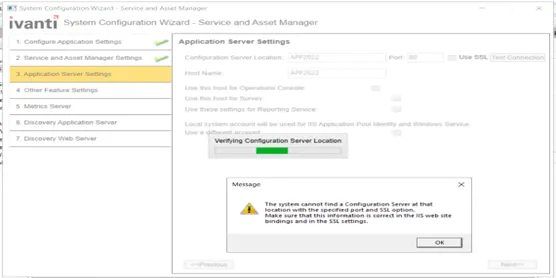
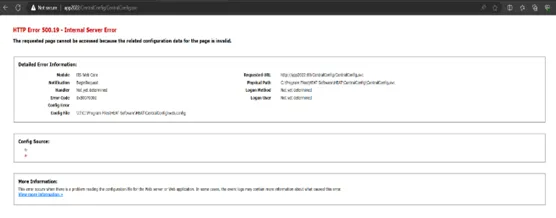
Possible Cause
ErrorCode - 0x8007000d - URL Rewrite or IIS Hosting Bundle is not installed correctly.
Solution
- Open IIS.
- Browse CentralConfig from Default Websites.

Check CCF Url - http(s)://<TenantID>/CentralConfig/CentralConfig.svc. For example, http://app2022/CentralConfig/CentralConfig.svc.
- If it is not accessible check error code in the browser - 0x8007000d.
- Restart IIS and check if the CentralConfig URL is accessible.
- If the CentralConfig is URL not accessible – install the IIS Hosting bundle and the Restart IIS.
- Check the CentralConfig endpoint - http(s)://<TenantID>/CentralConfig/CentralConfig.svc.
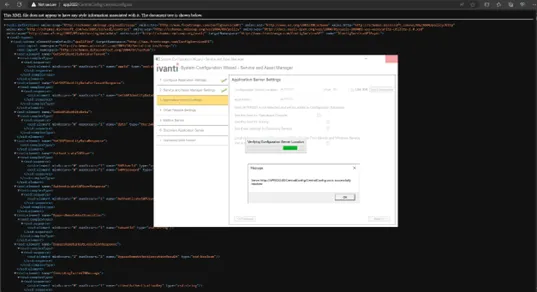
- If the CentralConfig is accessible, continue with the SCW setup.
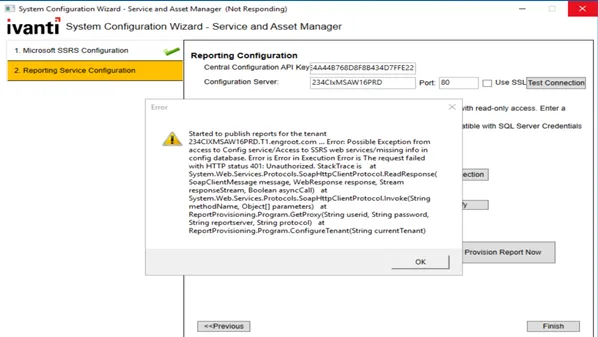
Possible Cause
The SSRS report service is not reachable by SCW.
Solution
Check if the SSRS report configuration is reachable. After confirming, restart the SCW configuration.
Steps:
- Open the Report Server Configuration Manager.
- Start the SSRS and provide correct configuration details.
- Recheck the ReportProvisioning.
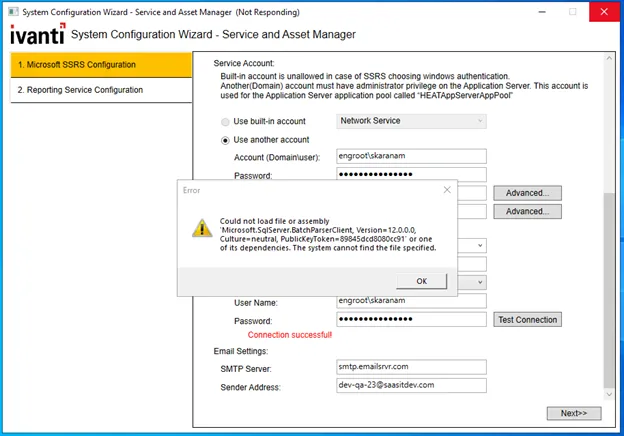
Possible Cause
If the assembly or its dependencies is not present in the VM.
Resolution
- Install the Pre-Requisite installer given with the installation guide.
or
- Download and install the following packages manually:
- Install and check Report Server SCW setup.
Resolution
Run the cache rebuild manually. Refer to Installing Cache Rebuild.
Resolution
- Take a backup of the existing file to ensure the configuration is preserved.
- After installation is completed, redo the updates to the WIS web.config as per the original configuration document, mainly pointing the AssertionConsumerHandlerUrls to the right addresses.
Resolution
As part of 2023.4 integration service is running as a separate service, hosted on port 1213 by default.
- If value for Integration Service Server is 80, change it to 1213.
- If the value for https port is 443, change it to something else.
- Ensure to have a separate port and not the same as other appdomains.
Resolution
- Run the following query:
SELECT * FROM .[dbo].[Frs_LS_LicenseServerLandscape]"select * from Landscape"Run both the above queries from the config tenant.
- Ensure that the value in ConfigServiceUrl field is valid (check if the service definition loads when adding it in a browser). If not, update it to a valid central config url, for example, http://domainname/Centralconfig/CentralConfig.svc .
If using OpsConsole, follow the resolution below:
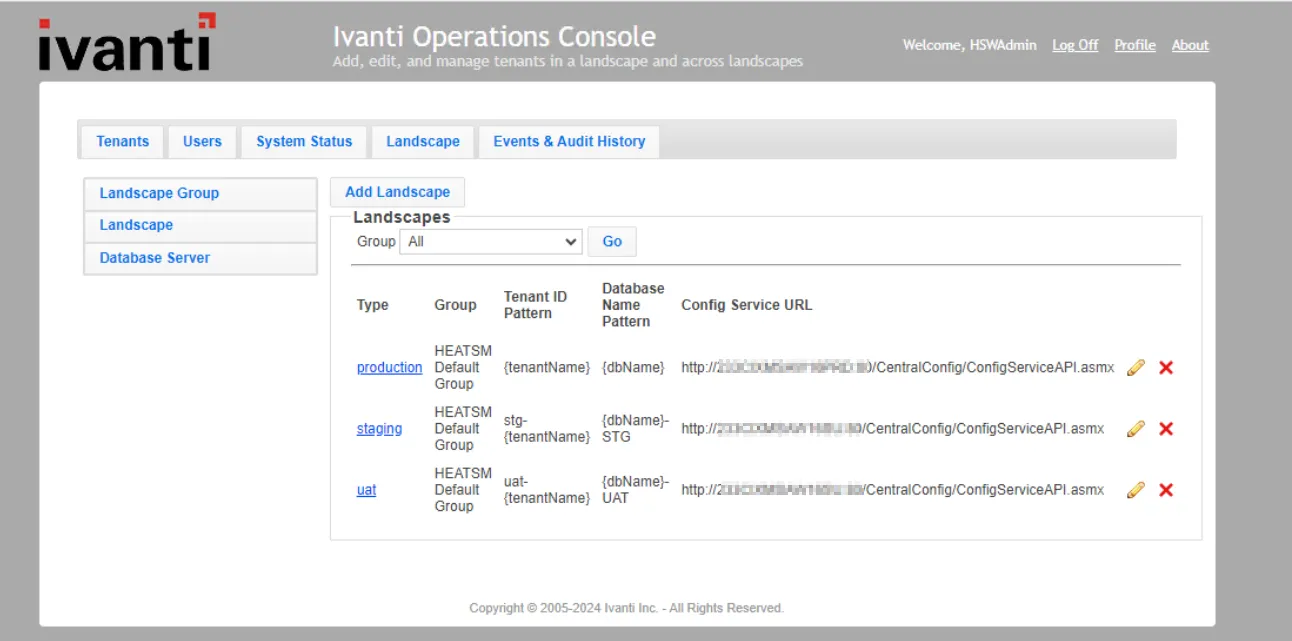
- Check the landscape configuration from the DB or through ops console. If it is similar as shown the image below, that is if it has - /ConfigServiceAPI.asmx at the end, update those specific landscapes to have /Centralconfig/CentralConfig.svc route instead.
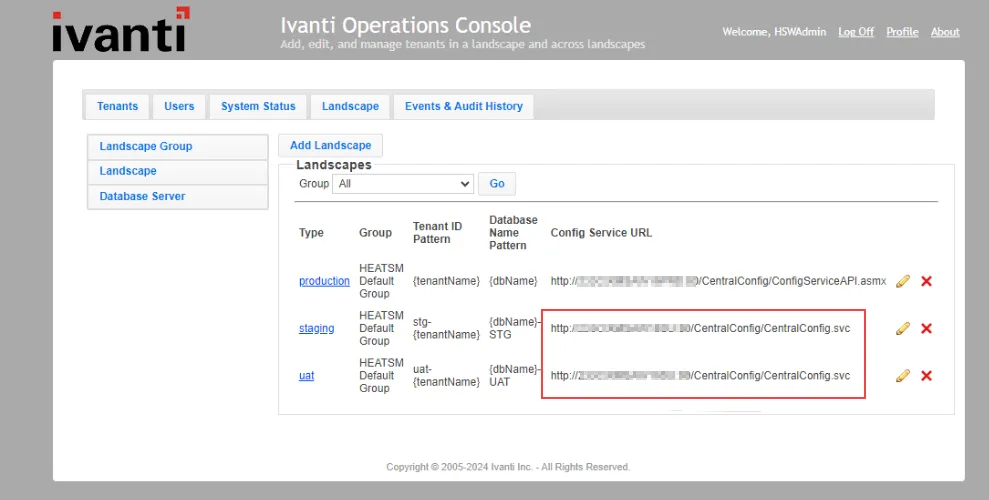
After update, the landscape configuration should be as shown the below image:
- Restart IIS and login into both AppServer and LicenseManager.
The CentralConfig.svc file should only be present only on the landscapes where the upgrade is executed from.
Resolution
The central-config-api-key should be the same in all appdomains appsettings.json file and in Frs_data_api_key table in the ConfigDB.
Update the central-config-api-key in the respective appdomains appsettings.json file.
Resolution
Refer to ActionServices Troubleshooting topic.
Survey not opening - getting a 404 error when trying to open survey from incident or email.
Resolution
Open the Survey Information workspace from Config tenant.
Update URL in the Host Name field by removing “/Public” and “.aspx” as shown in the image below:
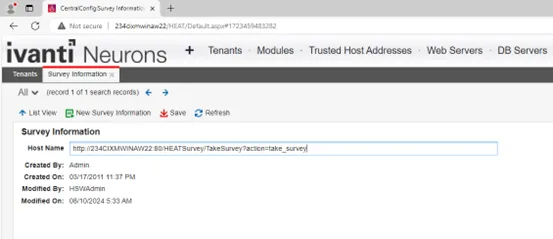
From {http/https}:///HEATSurvey/Public/TakeSurvey.aspx?action=take_survey to {http/https}:///HEATSurvey/TakeSurvey?action=take_survey
If the survey url opens from the machine where the application is hosted but not from other machines, make sure the {hostname} parameter has the fully qualified domain name instead of the machine name.