
Installing Neurons for ITSM Reporting Feature
About Microsoft SSRS
The Neurons for ITSM reporting feature requires that the 64-bit version of Microsoft SQL Server and Microsoft SQL Server Reporting Services (SSRS) are installed and running on the Neurons for ITSM database server. The reporting feature does not support the 32-bit version of Microsoft SQL Server and Microsoft SQL Server Reporting Services (SSRS).
Checking if Microsoft SSRS is Installed
To verify that Microsoft SSRS is installed on your system, do the following:
- Open the Microsoft Windows Services dialog box and look for an entry called SQL Server Reporting Services.
Windows Services Dialog Box
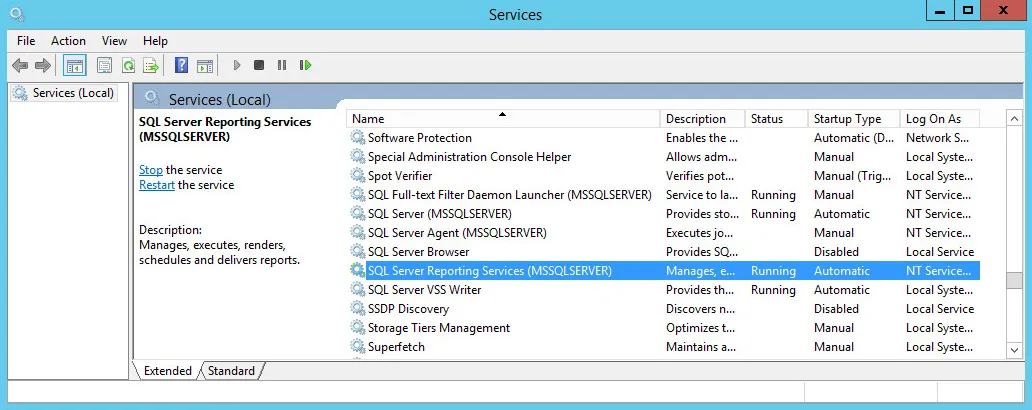
The name in parentheses is the Microsoft SSRS instance name. See Windows Services Dialog Box. During the reporting feature configuration, you must enter this instance name.
The instance name cannot contain any special characters, such as \ , : ; ... and so on. The instance names can contain $ and _. See https://support.microsoft.com/en-us/help/2282743/fix-the-special-characters-are-displayed-incorrectly-in-a-textbox-cont.
If the names of the current Microsoft SSRS instances have special characters, you must install an additional Microsoft SSRS instance with an instance name free of special characters.
- Choose the appropriate action:
- If Microsoft SSRS is already installed and the instance name (the name in parentheses) has no special characters ( -, _, #, and so on), make sure that:
- The value in the Status column is set to Running.
- The value in the Startup Type column is set to either Automatic or Automatic (Delayed Start).
- If Microsoft SSRS is already installed but the instance name has special characters ( -, _, #, and so on), use the Microsoft SQL Server Installation Center to add a new Microsoft SSRS instance with an instance name free of special characters.
- If Microsoft SSRS is not installed, use the Microsoft SQL Server Installation Center to add a Microsoft SSRS component to an existing Microsoft SQL installation.
Installing Microsoft SSRS
Microsoft SQL Server Reporting Services (SSRS) is an optional installation feature of Microsoft SQL Server. It is a server-based, report-generating software system.
The Microsoft SSRS feature is disabled by default. This section describes how to enable and configure the Microsoft SSRS feature of Microsoft SQL Server.
- During Microsoft SQL Server installation, in the Feature Selection page of the Microsoft SQL Server setup wizard, check Reporting Services - Native.
Checking Reporting Services - Native
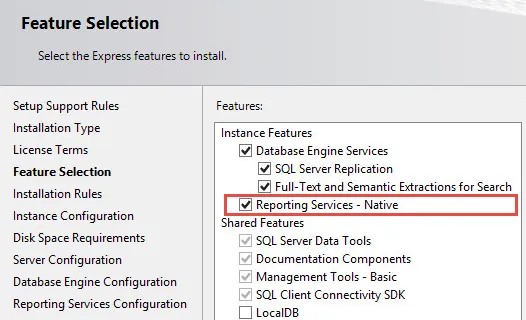
- As you work your way through the Microsoft SQL Server setup wizard, verify that Reporting Services - Native is part of the server configuration.
- When the installation is complete, go back to Windows Services and verify that Microsoft SQL Server Reporting Services is present. See Checking Reporting Services - Native.
With Microsoft SSRS present and running, the database server is ready for you to install and configure Neurons for ITSM.