Full Text Search
The full-text search feature of Microsoft SQL Server is a specialized indexing and querying service for character-based data in Microsoft SQL Server database tables.
By default, the application database is configured to index these incident fields:
- Owner
- ProfileFullName
- Resolution
- Subject
- Symptom
The full-text search feature is disabled by default.
Enabling the Full-Text Search Feature
This section describes how to enable and configure the full-text search feature of Microsoft SQL Server.
- During Microsoft SQL Server installation, in the Feature Selection page of the Microsoft SQL Server setup wizard, check Full-Text and Semantic Extractions for Search.
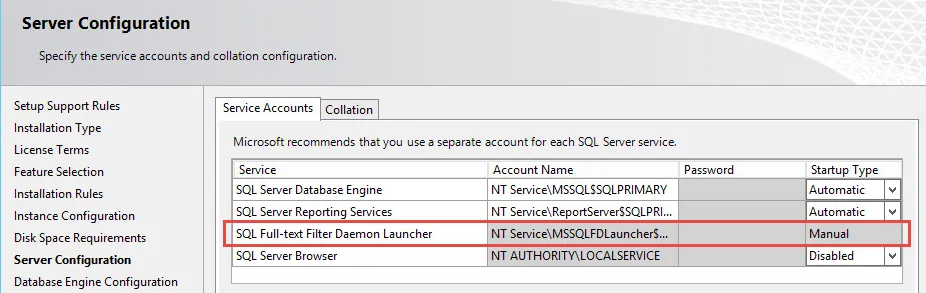
- In the Server Configuration page of the Microsoft SQL Server setup wizard, ensure that the Microsoft SQL Full-text Filter Daemon Launcher is configured with the local service account.
Server Configuration
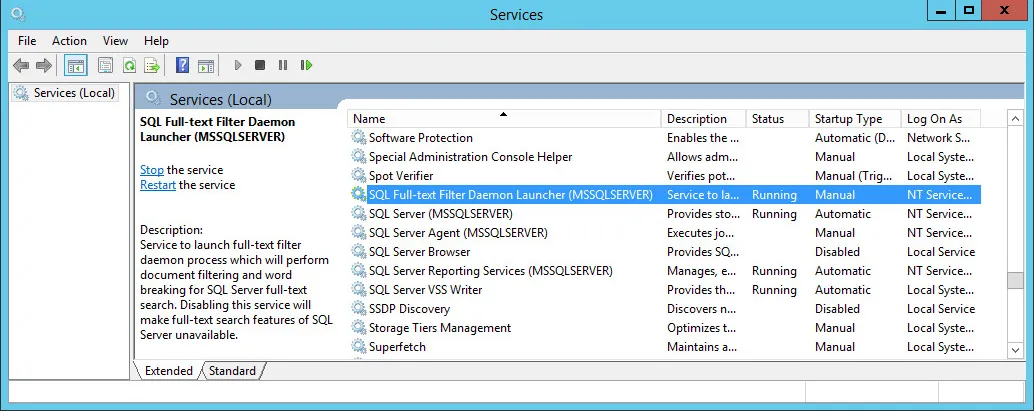
- In the Services panel for the system, ensure that the status for SQL Full-text Filter Daemon Launcher says Running.
Services Dialog Box
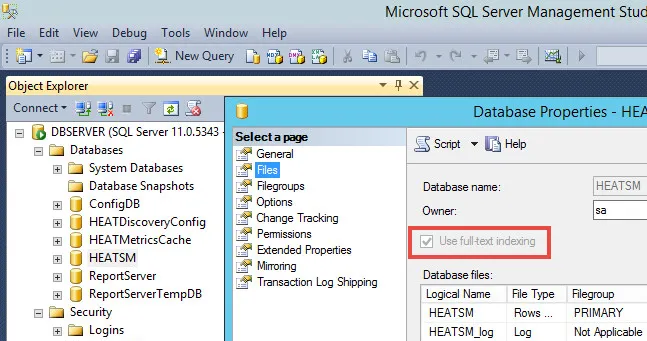
- Verify that full-text search is configured in Microsoft SQL Server Management Studio by doing the following:
a. Open the Files page from the Database Properties dialog box.
b. Ensure that Use full-text indexing is checked.
c. If it is not checked, verify that the full-text search services are running as described in In the Services panel for the system, ensure that the status for SQL Full-text Filter Daemon Launcher says Running.
Checking the Use Full-Text Indexing Option