
Scheduling Power Tasks
When you initiate a task from a machine group or from a Favorite, or when you initiate a Wake-on-LAN request, the Agentless Operation dialog is displayed. You can use the dialog to schedule the power task immediately or at some point in the future.
Make sure the proper credentials are available for all machines involved in the scheduled task.
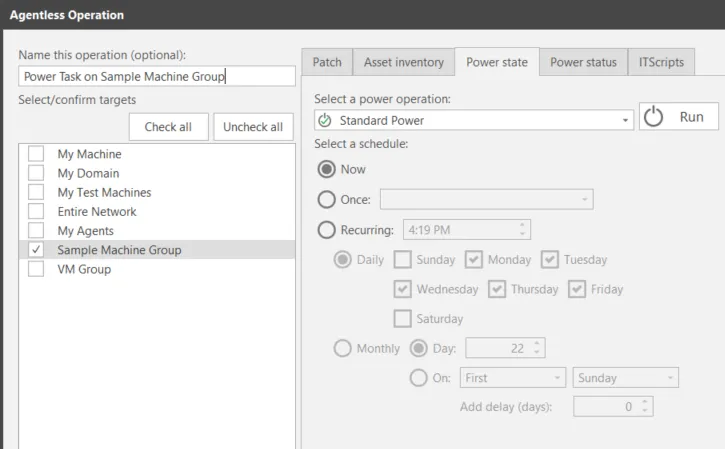
Field | Description |
|---|---|
Name this operation (optional) | Enables you to provide a unique name for the operation. By default the name of the machine group or favorite used to initiate the operation will be used. The name is displayed in the Results pane. |
Select/confirm targets | This list is a reminder of the machine group(s) that will be affected by the operation. If the wrong group is listed, click Cancel and re-initiate the operation using the correct group. |
Select a power operation | Enables you to select the power state template you want to use when performing the operation. |
Select a schedule | There are three scheduling options:
|
When the desired options are selected, click Scan now or Run (if Now is selected) or Schedule (if Once or Recurring is selected).
- Scan now/Run: The operation is initiated immediately and the Operations Monitor is displayed.
- Schedule: The operation is scheduled on the target machine.