
Performing Actions on Machine Groups
Right-Click Menu
You can right-click on any machine group in the navigation pane and perform a number of different actions.
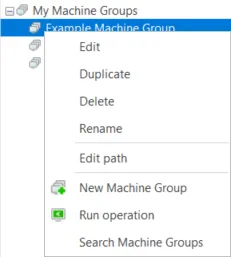
Action | Description |
|---|---|
Edit | Enables you to edit the selected machine group. |
Duplicate | Makes a copy of the selected machine group. Type a name for the new group and then click Save. |
Delete | Deletes the selected machine group. |
Rename | Enables you to rename the selected machine group. |
Edit path | Enables you to change the folder path of the selected group. Doing so will relocate the machine group to a different folder in the My Machine Groups list in the navigation pane. For more details, see Organizing Machine Groups. |
New Machine Group | Enables you to create a new machine group. See Creating a New Machine Group for more details. |
Run operation | Enables you to initiate a patch, asset, power or ITScripts operation on the machine group. |
Search Machine Groups | Enables you to search for alphanumeric characters in any of your existing machine groups. See Searching Machine Groups for details. |