
Deployment Template: Post-Deploy Reboot Tab
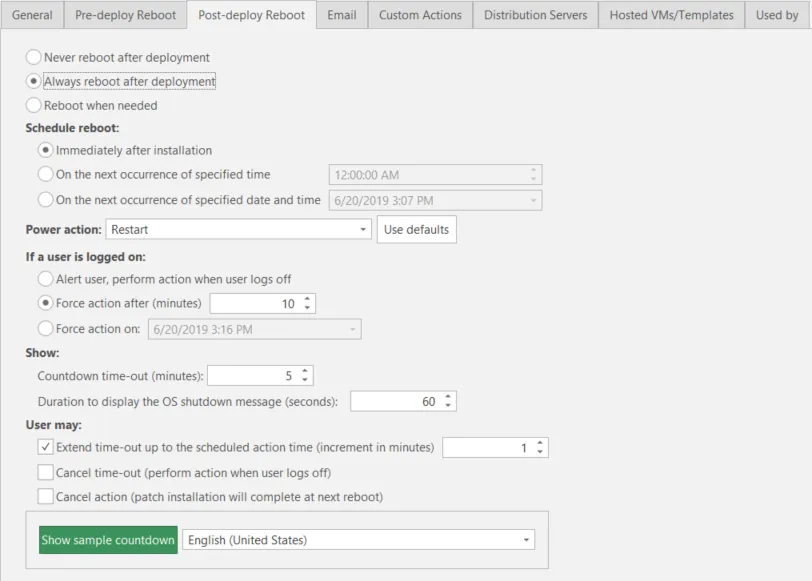
Field | Description |
|---|---|
Never reboot after deployment | This SafeReboot capability specifies that it is unnecessary to reboot each machine after the patches are deployed. The remaining options on this tab will be disabled. As a rule, you should only enable this option when you are deploying patches that you know do not require a reboot. |
Always reboot after deployment | This SafeReboot capability specifies that each machine should be reboot after the patches are deployed. This is the safest option when deploying patches as most patches require a reboot in order to complete, but there may be times when machines are rebooted unnecessarily. |
Reboot when needed | This SafeReboot capability specifies that Security Controls will determine whether or not a reboot of each machine is required. |
Schedule reboot | If you elect to reboot the machines, you can specify when the reboot should occur. You can:
If a target machine is rebooted before a scheduled reboot occurs, the scheduled reboot is no longer necessary and will be cancelled. |
Power action | You can specify what state you want to leave the machines after the reboot.
For more information about the power management capabilities of Security Controls, see Power Management Overview. |
Use defaults | This button is tied to the Restart and power action box. When you click Use defaults, all remaining options on the dialog will be changed to the values recommended for use with the currently selected Restart and power action. |
If a user is logged on | If you elect to restart the machines, you can specify the amount of warning that a logged-on user with an active session will receive. You can also choose the degree of control the user will have over the restart process. The options do not apply to inactive sessions such as locked machines or disconnected RDP sessions. You can:
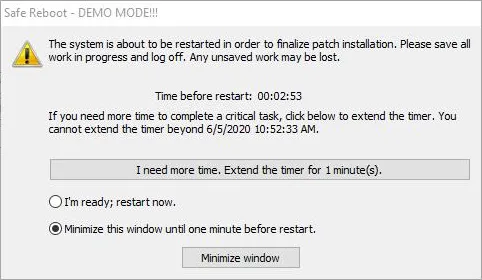 Select the duration to display the standard Windows shutdown message when the shutdown sequence is initiated.
|