
Deployment Information Tab
When creating a custom patch, two major tabs are used in the right-hand pane. This topic describes the options contained on the Deployment Information tab.
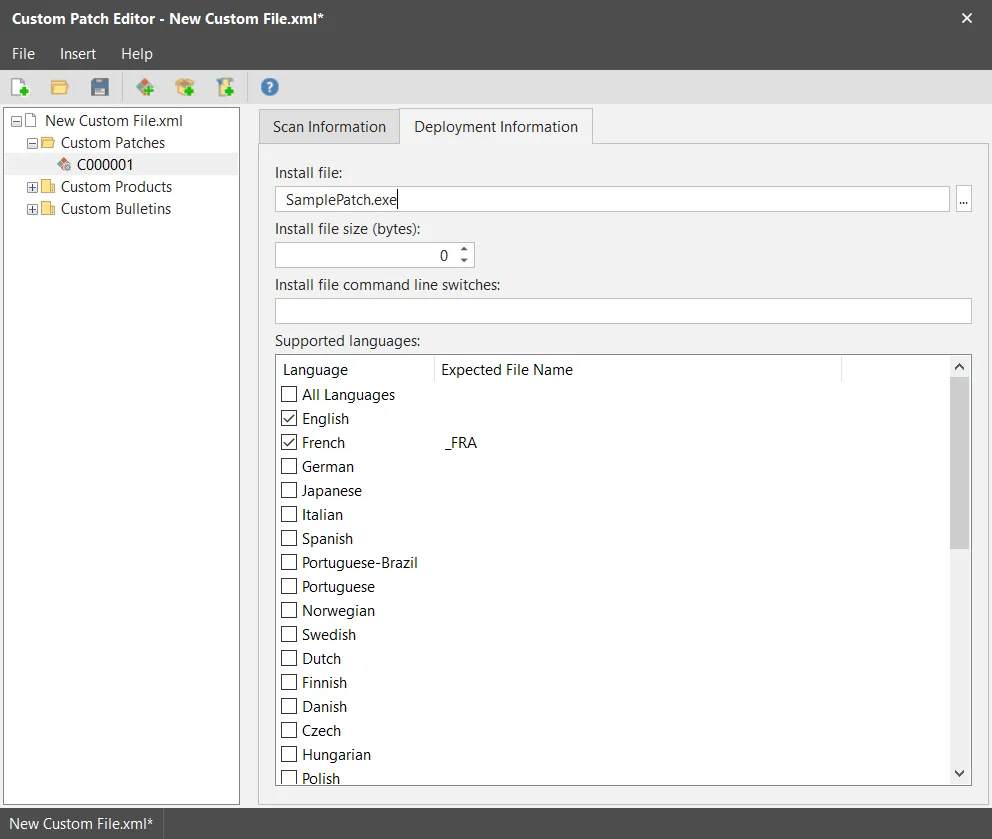
Field | Description |
|---|---|
Patch Install File | Batch files (.bat and .cmd file formats) are not supported by the custom patch process and must not be used as a patch install file. This is the patch file that will be used when the conditions specified on the Scan Information tab are met. Specify just the file name here and not the full path name to the patch install file. This file is typically supplied by the vendor of the product you are patching. You can use the browse button to locate and select this file. Doing so will automatically populate the Patch Install File Size box. IMPORTANT! The actual file used in the patch process may have several different names and you must manually copy the files to every location the patch file is expected to reside, including the console and possibly one or more distribution servers. See the description of the Patch Supported Languages option for more information. |
Patch Install File Size (bytes) | Specifies the size of the patch install file. This box is automatically filled in when you use the Browse button to select the Patch Install File. Providing the file size enables the program to accurately determine the progress during the installation process. |
Patch Install File Command Line Switches | Specify any command line switches you want to use during the installation of the patch. For example, you might want a silent install (/quiet), you might want to dictate that the target machines are not restarted (/norestart), etc. |
Patch Supported Languages | Enable the check boxes for the operating system languages you want to support with this custom patch. There are two reasons for doing this:
|
When complete, save and then validate the XML file (see Saving and Validating Your Changes).