
Managing Financial Roles and Financial Tab
Overview
The Financial Owners workspace allows you assign, view, and manage financial responsibility for assets, ensuring accurate reporting, budgeting, and accountability.
Financial owner role defines who holds financial responsibility for an asset throughout its lifecycle. It determines how the system records, depreciates, and reports asset related costs.
Key areas that Financial Owners impact are:
- Financial reporting - The system reports asset costs and depreciation under the financial owner’s cost center and organizational hierarchy.
- Depreciation - The system calculates depreciation at the asset level and applies the expense to the cost center associated with the financial owner.
- Cost allocation - Capital and operational costs, such as purchase price, freight, and maintenance, flow to the assigned financial owner through the Organizational Unit.
This procedure explains how to access the Finance tab, assign Financial Owners, manage Purchase Orders, and maintain accurate financial data for assets in Neurons for ITAM.
Configuring Financial Owners Allocations
- On homepage, click More, and then select Financial owners
The Financial Owners window appears.
- To create new financial owner, select New.
- Enter the details in Organizational Unit and click Save to create new financial owner.
- To edit the existing financial owner:
- Select the required Organizational Unit, edit the details and click Save.
Managing Organizational Units
Organizational Units (OUs) can be structured hierarchically (Parent OU and Child OU). You can assign different Financial Owners or allocation percentages at each level.
- Expand or collapse OU nodes to view External, Internal, or Unassigned Configuration Items (CIs).
- Select an OU to view or modify its allocation details.
The following table shows the field displayed in Organizational Units window.
Field | Description |
|---|---|
Name | The name of the Organizational Unit. |
Owner | The designated Financial Owner. Select a value from the dropdown. |
IT Overhead Allocation (%) | The percentage of IT costs allocated to this OU. |
Parent OU | The parent Organizational Unit, if applicable. |
Customer ID | Internal or external customer identifier. |
Vanity URL | Optional friendly URL for easier access. |
Deleted | Select this check box to mark the OU as deleted. Use with caution. |
Additional Tabs
Each Organizational Unit record includes the following tabs:
- Child OUs - View or add subordinate Organizational Units.
- Assets - View assets linked to this OU.
- Employees - View employees associated with this OU.
- Consumable Transactions - Manage related consumables or financial transactions.
Audit information
Each record displays the following audit details:
- Created By/On – The user who created the record and the date of creation.
- Modified By/On – The user who last modified the record and the date of modification.
Assigning Finance Owner
- Open the Hardware Assets workspace.
- Use Search icon and open the required asset.
- In the Asset record, select Finance tab.
The Finance window appears
- In the tab, select search icon in Financial Owner text field.
- Select the required financial owner from the folder and click Select.
- In the Finance tab, the following field appears, enter the required details:
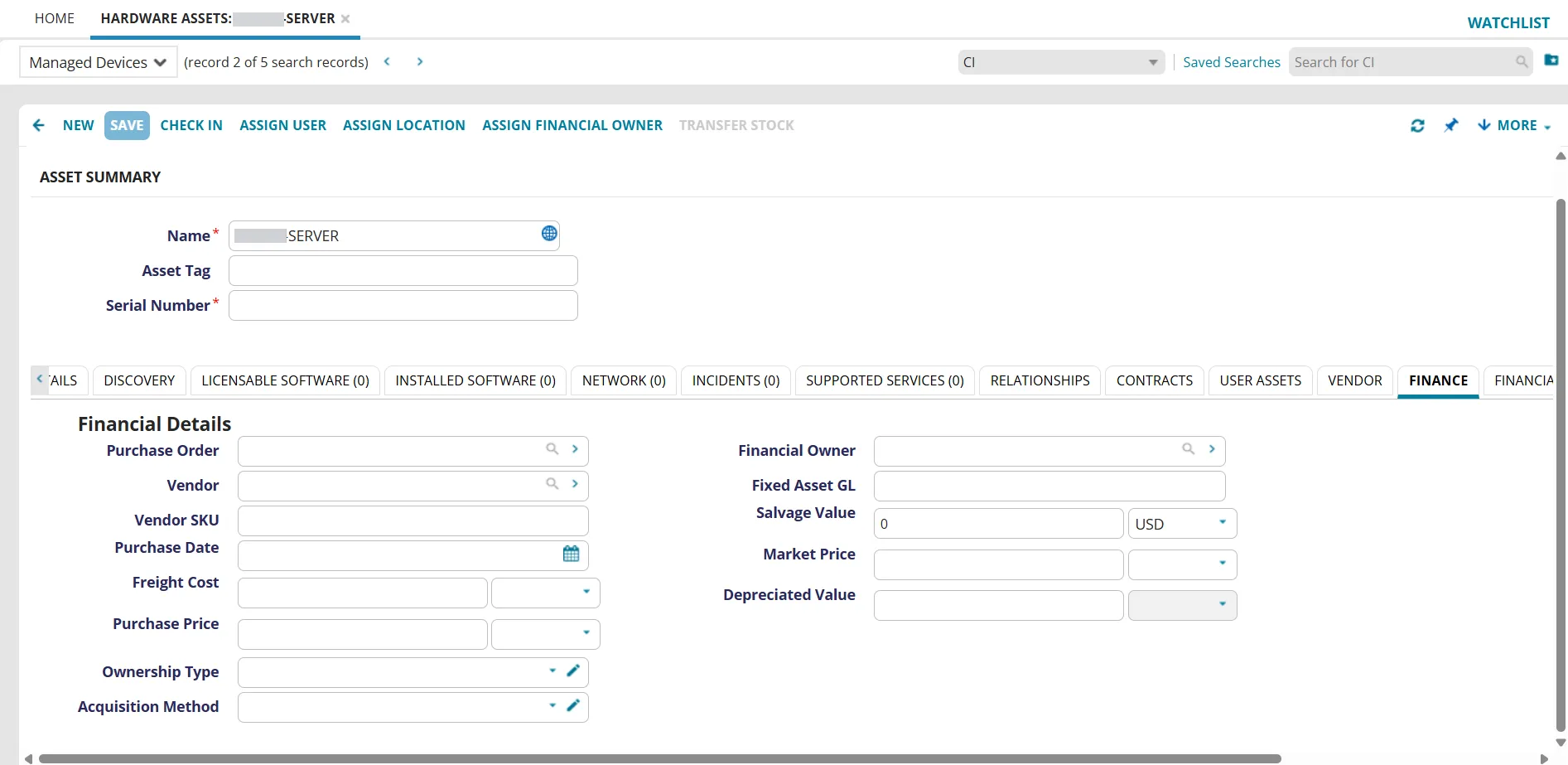
- Purchase Order - Linked PO number. Select the search icon and select the PO, ihe field auto-populates if available.
- Vendor - Supplier name. Search for or enter the vendor name.
- Vendor SKU - Supplier stock keeping unit.
- Purchase Date - Asset purchase date. Select the date using the calendar icon.
- Freight Cost - Shipping or delivery charges. Enter the amount in the text field and select the currency from the dropdown.
- Purchase Price - Cost of the asset. Enter the amount in the text field and select the currency from the dropdown.
- Ownership Type - Type of ownership for the asset. Available options: Full ownership, Part ownership, Lease, or Other.
- Acquisition Method - Procurement method (for example, Purchase Order, Off the Shelf, Company Merger).
- Financial Owner - Assigned cost center or responsible owner.
- Fixed Asset GL - General ledger reference.
- Salvage Value - Residual value at the end of the asset lifecycle. Enter the amount in the text field and select the currency from the dropdown.
- Market Price - Current estimated market value. Enter the amount in the text field and select the currency from the dropdown.
- Depreciated Value - Accounting value after depreciation. Enter the amount in the text field and select the currency from the dropdown.
- In the Asset window, click Save.