
Asset lifecycle Work flow
This procedure defines the asset lifecycle, which includes requesting assets, fulfilling requests from stock or through procurement, creating configuration items (CIs), assigning assets to users, and tracking assets across inventory and asset management workspaces.
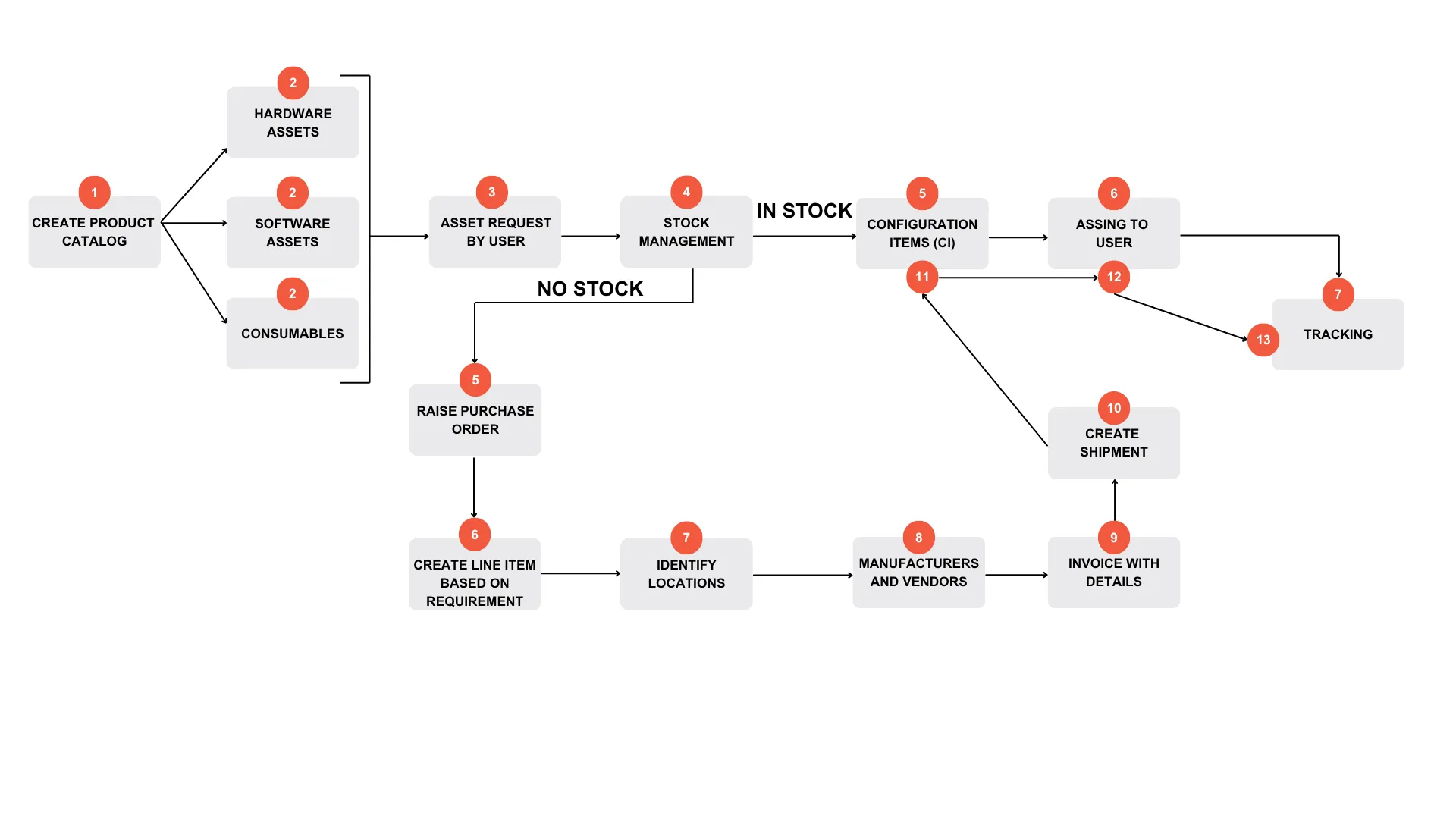
- Create Product Catalog
Administrators create and maintain catalog items.
- On the ITAM home page, go to Product Catalog workspace.
- Click New and select item type (bundle, hardware, software, consumable). For more information, see To create a new catalog item.
- Create Assets
- On the Product Catalog workspace, create and categorize assets into:
- Hardware - Open Hardware Assets workspace, click New → Select asset type. Enter Name, Serial Number, Status and then click Save. For more information, see To create a new asset record.
- Software - Open Software Assets workspace and click New. Enter mandatory details such as Manufacturer. For more information, see Software assets.
- Consumables - Open Hardware Assets workspace → New → New Consumable. For more information, see To create a new consumable record.
- Asset Request by User
Users can request assets by ITAM portal using self service roles or Asset mobile role. For more information, see Asset requests.
- Stock Management
Administrators verify inventory availability. Open Stock Management workspace and check asset availability. For more information, see to check an asset into a storage space.
- If the asset is available in stock, continue with step 11 configuration items (CI).
- If the assets are out of stock continue with step 5.
- Raise Purchase Order
Administrator can initiate procurement and create purchase order for out of stock assets. Open Purchase Orders workspace, and click New. Enter required details. For more information, see Create and manage purchase order.
- Create Line Item
Administrator can create line item in purchase order to add the required assets such as hardware, software, or consumables. For more information, see Create and manage purchase order.
- Identify Locations
When the ordered assets arrive, you can manage their delivery and storage from the Assets tab on the Purchase Order, Invoice, or Shipment workspace as needed. To take deliveries for existing location, see To take delivery of an asset. To create a new location with a storage space, see Locations and storage spaces.
- Manufacturers and Vendor
Administrators manage vendor associations. Select and associate Vendor with purchase order. Link contracts and contract line items. Validate vendor-item relationship. For more information, see Integrating with CDW.
- Invoice with details
You can associate one or more invoices with a purchase order to help you to track the invoices from your vendor and highlight any differences between the total cost from all of the invoices and the expected cost that was recorded on the purchase order. Open the required purchase order, and click the Invoices tab. For more information, see To add an invoice to a purchase order.
- Create Shipment
You can associate one or more shipments with an invoice. Shipments enable you to specify a destination location and storage space for the shipment. Open the Invoices workspace. Under the Shipments tab, click New Shipment. For more information, see To add a shipment to an invoice.
- Create Configuration Items (CI)
After receiving assets. Create CI based on asset type: hardware or software. For more information, see Configuration Item Workflow.
- Assign to User
Administrators assign assets to users or locations. Open asset record, select Assign User or Assign Location. For more information, see Configuration Item Workflow.
- Tracking Assets
Administrators track assets throughout their lifecycle:
- Movement across locations
- Assignment changes
- Status updates (in use, in stock, disposal)
For more information, see Assets Tracking.