
Raising Events from TrafficScript or Java Extensions
You can raise an event from within a TrafficScript rule or a Java Extension. The appropriate event handlers are run asynchronously, in the background, and the TrafficScript rule or Java Extension does not block.
To raise an event, use the event.emit( event_name, event_message ) function (TrafficScript) or the emitEvent( event_name, event_message ) function (Java).
To invoke an action based on an event raised using event.emit() or emitEvent(), create an Event Type that includes Custom Events. You can choose to match all custom events, or just specific events:
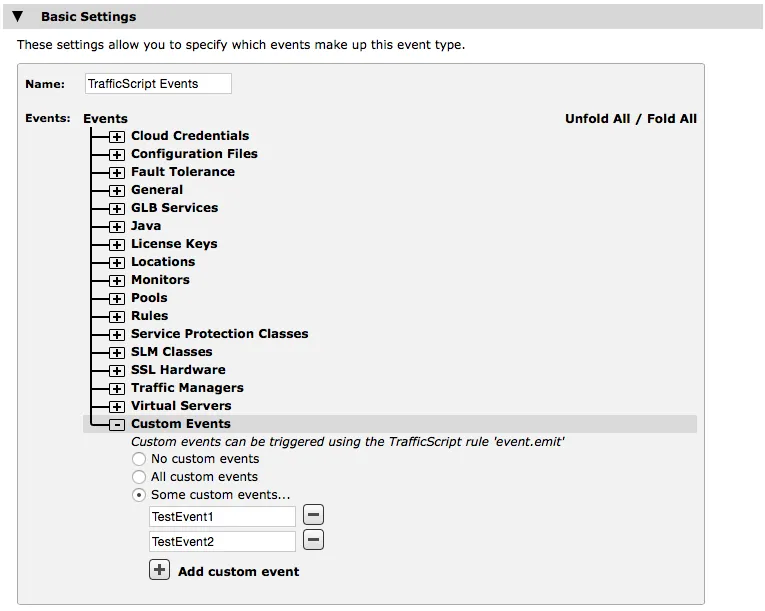
The names of the specific events in the Event Type should match the name used when the event was raised in the TrafficScript rule:
# raise an event named "TestEvent1", to be caught by an Event
# Type containing a custom event called "TestEvent1".

event.emit( "TestEvent1", "The request was ".$url );
Example
A simple intrusion detection system used to ban all remote clients that attempt to access a privileged URL:
# A TrafficScript rule that detects unauthorized
# accesses and raises an event.

$path = http.getPath();

if( string.StartsWith( $path, "/secure/admin" ) ) {
   $ip = request.getRemoteIP();
   if( !string.ipMaskMatch( $ip, "10.0.0.0/8" ) ) {
      event.emit( "UnauthorizedIP", "IP: ".$ip );
   }
}
To use this example, create an Event Type that contains the custom event named “UnauthorizedIP”, and an event handler based on that Event Type.
The event handler could then invoke a custom program action that updates the intrusion detection rules to ban connections from that IP:
#!/usr/bin/perl –w

# An Action script to process event messages raised by
# the above TrafficScript rule.

my $logLine = $ARGV[1] or exit;

$logLine =~ /IP:([\d]+\.[\d]+\.[\d]+\.[\d]+)/;
my $ip = $1;

open OUT, ">>/tmp/events.log" or die $!;
print OUT "The bad IP was $ip\n";
close OUT;

# reconfigure upstream firewall, or the
# Virtual Traffic Manager’s banned IP list to ban access
# from $ip