
DNS Cache in the Virtual Traffic Manager
The Virtual Traffic Manager (vTM) caches DNS resolutions for hostname-based pool nodes and virtual servers to reduce the number of DNS queries sent to authoritative DNS servers and improve name resolution performance.
When a hostname-based node or virtual server is resolved, the resolved IP address is stored in the internal DNS cache. The cache lifetime is controlled by the dns!min_ttl and dns!max_ttl settings, allowing you to define how long entries remain valid regardless of the DNS server's advertised Time to Live (TTL) value.
Using DNS caching helps improve performance in environments with large numbers of hostname-based pool nodes, virtual servers, or Global Load Balancing (GLB) locations by reducing DNS query traffic and providing consistent resolution behavior.
The vTM will not start if dns!max_ttl is configured with a value lower than dns!min_ttl (when dns!min_ttl is non-zero) or lower than dns!negative_expiry. Ensure that dns!min_ttl ≤ dns!max_ttl before applying configuration changes.
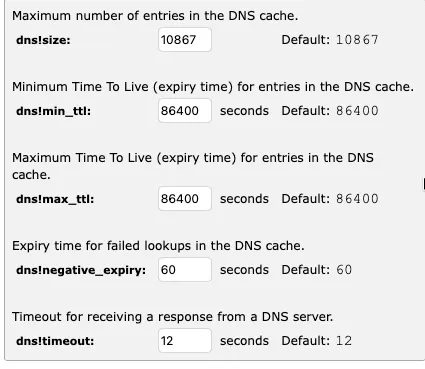
Configure DNS Cache Settings
- Navigate to System > Global Settings > DNS.
- Configure dns!size to specify the maximum number of entries stored in the DNS cache. The default value is 10867.
- Configure dns!min_ttl to specify the minimum time, in seconds, that a resolved DNS entry remains cached before it is re-resolved. The default value is 86400 seconds.
- Configure dns!max_ttl to specify the maximum time, in seconds, that a DNS entry remains cached. This setting limits the effective cache duration when the DNS server advertises a longer TTL. The default value is 86400 seconds. A value of 0 indicates no maximum limit.
- Configure dns!negative_expiry to specify how long, in seconds, failed DNS lookups are cached before another resolution attempt is made. The default value is 60 seconds.
- Configure dns!timeout to specify the length of time, in seconds, that the vTM waits for a response from a DNS server before considering the lookup failed. The default value is 12 seconds.
- Save your changes.
DNS cache TTL settings apply only when appliance!dnscache is disabled (OVF deployments only). In software deployments, DNS caching is managed by the operating system and must be disabled at the OS level. Entries configured using dns!hostsfirst bypass DNS caching entirely.