
If getting an Entrust derived credential is enabled
1 min
If you enabled getting an Entrust derived credential in the System Manager, device users will see Request Derived Credential when they receive their registration PIN for a device. Before using the registration PIN to register Ivanti Mobile@Work to Ivanti EPMM, the device user should request a derived credential.
Figure: Request derived credentials
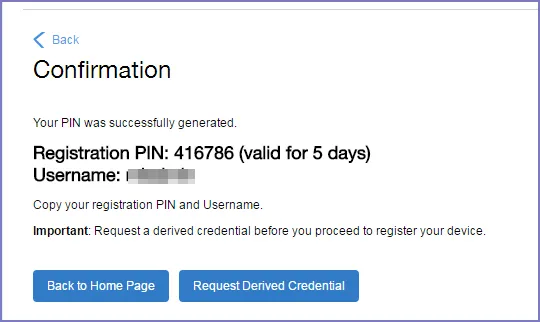
Registration PIN received, now Request Derived Credential dialog box
To get a derived credential:
- Select Request Derived Credential. The user is directed to the Entrust IdentityGuard self-service module URL that you specified in the System Manager.
- The user interacts with the Entrust self-service portal to get a derived credential, including naming the derived credential. The Entrust self-service portal provides a Derived Mobile Smart Credential Activation Password. Important: The user must record this password for later use in activating the derived credential.
- After recording the password, the user follows directions to indicate he is done. The user is directed back to the user portal. A brief message indicates whether getting the derived credential was successful. If it was successful, Request Derived Credential is disabled.
The user then does the following:
- Use Ivanti Mobile@Work to register the device to Ivanti EPMM.
- Use the PIV-D Entrust app on the device to activate the derived credential.