Enterprise Production Deployment
Customers supporting large user populations of 100 or more are primarily concerned with availability and load management rather than with minimizing hardware expense. Customers with more than 100 users should use this setup as a baseline and then add the equivalent amount of hardware for each additional 100 users. The enterprise production deployment architecture splits Service and Asset Manager into:
•Front-end web servers
•Back-end processing servers
The back-end servers handle workflow, email processing, license allocation, inventory management, and so on. This architecture also separates the production environment from development and testing.
There are two key advantages of separating development and testing from production:
•Any issues created during the development cycle do not affect production users.
•You can perform upgrade testing on the development and testing servers before upgrading the production servers.
Optionally, you can install your development and test landscapes onto separate physical servers.
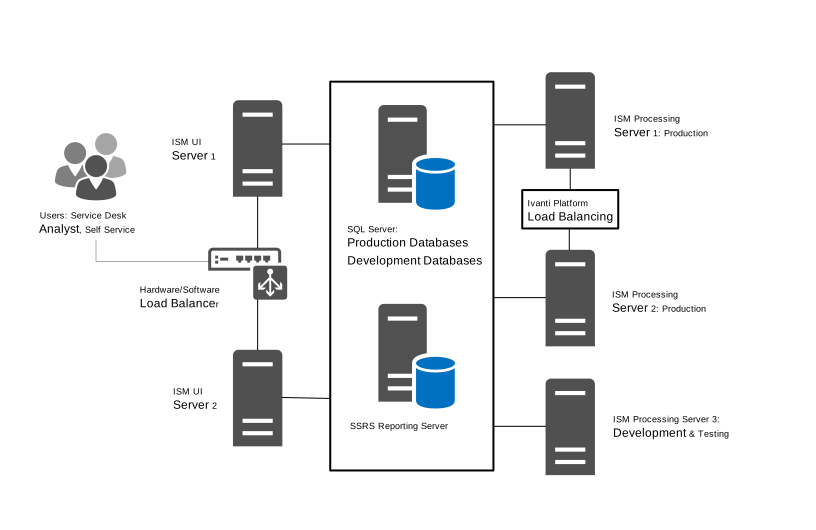
Example of Service and Asset Manager in an Enterprise Deployment
Hardware Requirements for the Enterprise Production Deployment
Web Servers
The following are the hardware requirements for the Service and Asset Manager web servers:
•Two virtual servers
•Outside the firewall
•Load balanced
•4 CPU
•16 GB memory
•200 GB hard drive
Processing Servers (Production)
The following are the hardware requirements for the Service and Asset Manager processing servers used for the production landscape:
• Two virtual servers
•Inside the firewall
•Load balanced
•4 CPU
•16 GB memory
•200 GB hard drive
Processing Servers (Development and Testing)
The following are the hardware requirements for the Service and Asset Manager processing server used for the development (staging) and testing (UAT) landscapes:
• One physical or virtual server
•2 CPU
•4 GB memory
•200 GB hard drive
Microsoft SQL Server Requirements
Microsoft SQL Server is the database server for the deployment. Depending on your needs, you may have multiple database servers. The following are the requirements for the Microsoft SQL server where the databases reside:
• One physical server
•Microsoft SQL Server -
•Microsoft SQL Server 2012 including Management Studio
•Microsoft SQL Server 2012 SP2 including Management Studio
•Microsoft SQL Server 2014
•Microsoft SQL Server 2016
•Microsoft SQL Server 2017
•Microsoft SQL Server 2019
•Inside the firewall
•8 CPU
•24 GB memory
•1 TB hard drive
Customers may experience an error when Always On Availability is configured on the database server. Ivanti Service Manager currently does not support Always On Availability. For more details, see Ivanti Community.
Microsoft SSRS Reporting Server
The reporting feature requires that Microsoft SQL Server Reporting Services (SSRS) be installed and running on the database server that hosts the Service and Asset Manager reporting feature.
Microsoft SSRS can be installed on the Microsoft SQL server or on a separate Microsoft SSRS server, depending on your preference. We recommend a separate installation in the following situations:
• Multi-tenant environments, including managed service providers and enterprises with multiple Ivanti Service Manager tenants.
•The Microsoft SQL database is used also for applications other than Service and Asset Manager.
•Installations where the database server must remain online, because upgrading Microsoft SSRS often requires a reboot.
The following are the requirements for the Microsoft SQL Server Reporting Services (SSRS) reporting server:
• One physical server
•Microsoft SQL Server Release 2016
•Inside the firewall
•8 CPU
•24 GB memory
•1 TB hard drive
Hardware Requirements when Adding Additional Users
For each additional 100 users, add this to architecture:
•Two additional Service and Asset Manager web servers.
•Two additional Service and Asset Manager processing servers.
System load determines the actual number of servers to add. You can add the web and processing servers on demand.
In most cases, you do not need to add more development (staging) or testing (UAT) servers.
High Availability and Load Balancing
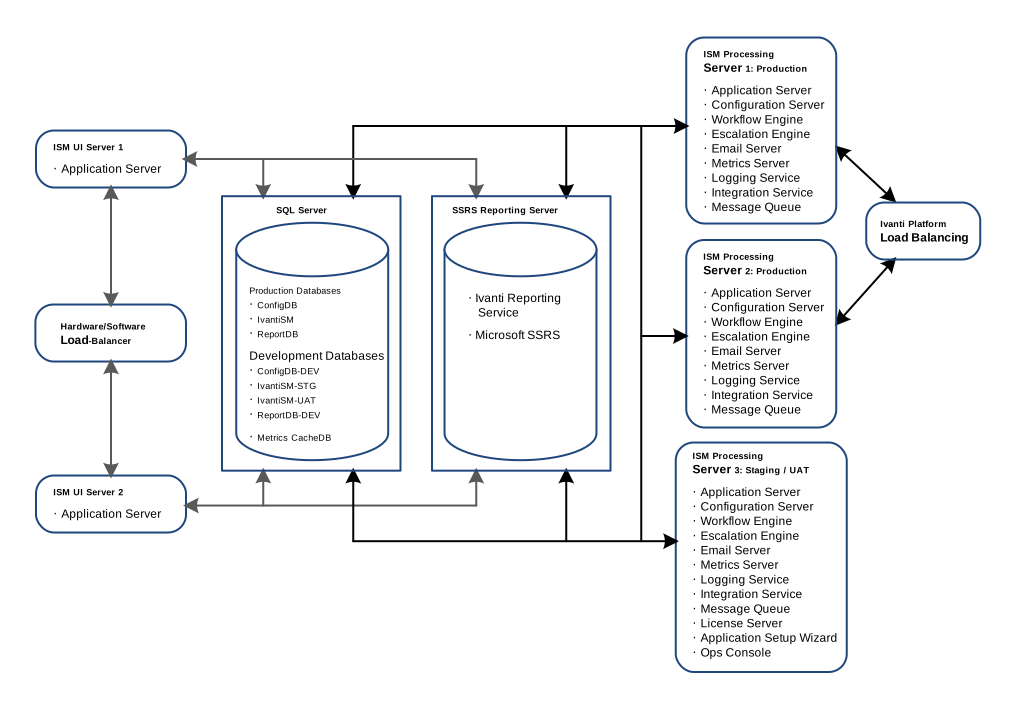
You can achieve high availability through physical load balancing or by load balancing handled within Service and Asset Manager. For example, in the configuration shown in Example of Service and Asset Manager in an Enterprise Deployment. The Ivanti Service Manager components are connected to one or more load-balanced servers. In this example:
•The Service and Asset Manager web servers, which contain Service and Asset Manager components that are user-facing, all connect to a physical load-balancing server.
•The Service and Asset Manager process servers, which contain Service and Asset Manager components that are not user-facing, do not connect to a physical load-balancing server, but instead use a built-in load balancer. The escalation engine, workflow engine, and email server have built-in load-balancing mechanisms.
•The Service and Asset Manager web servers and process servers all connect to the same Ivanti Service Manager application database and configuration database. High availability for the Service and Asset Manager databases is achieved through a cluster.
Communication within the system, such as between an Service and Asset Manager process server and an Service and Asset Manager web server, does not require SSL. However, external communication can use SSL.
By default, the Use SSL checkbox in all instances will be selected for new customers. New customers must provide the fully qualified domain name for the server location in the SSL certificate field. However, the Use SSL checkbox is not selected by default for the existing customer, and they have to select Use SSL if needed and provide the domain name. For more details on the SSL Certificate, see Optional SSL Configuration.
When using a hardware load balancer, turn on session persistence so that connections from the web browsers always get directed to the same web server.
About Installing the Service and Asset Manager for the Enterprise Production Deployment
Service and Asset Manager Components and Databases in an Enterprise Deployment shows a diagram of the recommended locations of the various Service and Asset Manager components.
Service and Asset Manager Components and Databases in an Enterprise Deployment