Minimum Production Deployment
About the Minimum Production Deployment
Customers with 10 or fewer users often want to minimize their hardware investment. With the minimum production deployment architecture, you install all Service and Asset Manager components, except for the Service and Asset Manager databases, onto a single server. We recommend that you install the Service and Asset Manager databases onto a separate Microsoft SQL server.
Example of Service and Asset Manager and Databases on Separate Servers
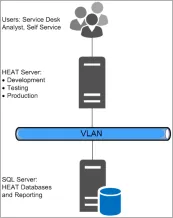
In this deployment, all three landscapes (development [staging], testing [UAT], and production) run on the same server. As a result:
•Any issues created during the development cycle might affect production users.
•You cannot perform preupgrade testing.
Hardware Requirements for the Minimum Production Deployment
The following are the hardware requirements for the Service and Asset Manager server:
• One server, either physical or virtual
•2 CPU
•4 GB memory
•200 GB hard drive
The following are the hardware requirements for the Microsoft SQL server where the databases reside:
• One server (we recommend a physical server)
•2 CPU
•8 GB memory
•1 TB hard drive
About Installing the Service and Asset Manager Components for the Minimum Production Deployment
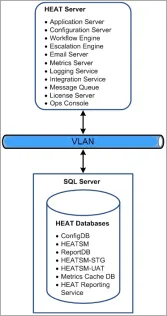
Service and Asset Manager Components and Databases on Separate Servers shows a diagram of the recommended locations of the various Service and Asset Manager software components in this deployment.
Service and Asset Manager Components and Databases on Separate Servers