
About Logging into the Configuration Database
0 min
To use the Service and Asset Manager configuration database (called ConfigDB), you must log in first. Only administrators can log into the ConfigDB.
By default, the system displays a drop-down menu allowing you to choose either ConfigDB (the Service and Asset Manager configuration database) or ISM (the Service and Asset Manager application database).
Logging in to the ConfigDB
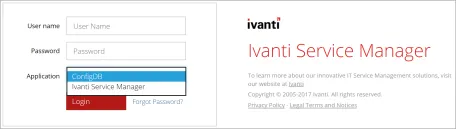
If you do not see the Application drop-down menu, you must configure Service and Asset Manager to show it. For instructions on doing this, see the "Logging into Service and Asset Manager" section of the Installation and Deployment Guide for Service and Asset Manager .