Security Enterprise Production Deployment
About the Security Enterprise Production Deployment
This deployment is based on the Enterprise Production Deployment w ith a DMZ added to provide security where users log in from outside of the company network.
We recommend the following DMZ configurations:
•DMZ with Service and Asset Manager web servers
•DMZ with reverse proxy servers
The DMZ is configured for authenticated access. When web servers are in the DMZ, each user must enter his user name and password to log into Service and Asset Manager. This architecture involves the additional cost of setting up and maintaining two firewalls.
Where you implement reverse proxy servers, you can add another layer of access authentication. This architecture involves the additional cost of setting up and maintaining two reverse proxy servers and a load balancer.
About Using a DMZ with Web Servers
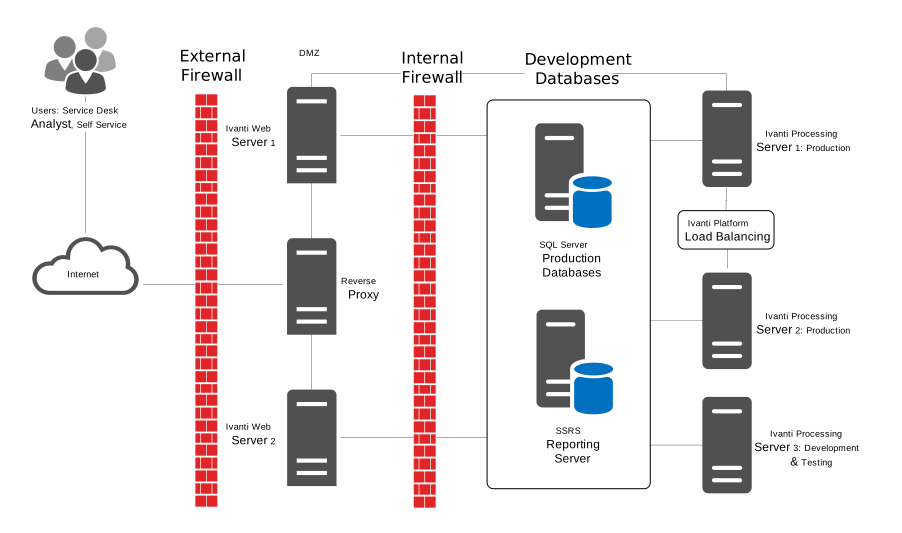
This option offers a greater level of security than placing your Service and Asset Manager web servers outside of a single company firewall. Placing a second firewall between the Internet and the web servers forms a semi-trusted network that prevents external access to your Service and Asset Manager process servers and databases.
We recommend that you harden the Service and Asset Manager web servers by taking the following actions:
•Disabling all unnecessary services
•Running necessary services with the lowest possible privileges
•Requiring strong passwords
•Locking an account after a certain number of login failures
•Deleting or disabling unnecessary user accounts, such as the guest user account
•Renaming or changing the description of the administrator account
•Installing the latest security updates and patches on the server
•Enabling security logging and checking the logs frequently
The same Service and Asset Manager components are installed on the web servers when they are located in the DMZ as when they are located outside of the company firewall. See About Installing the Service and Asset Manager for the Enterprise Production Deployment.
Example of an Enterprise Deployment with Service and Asset Manager Web Servers in the DMZ
About Using a DMZ with Reverse Proxy Servers
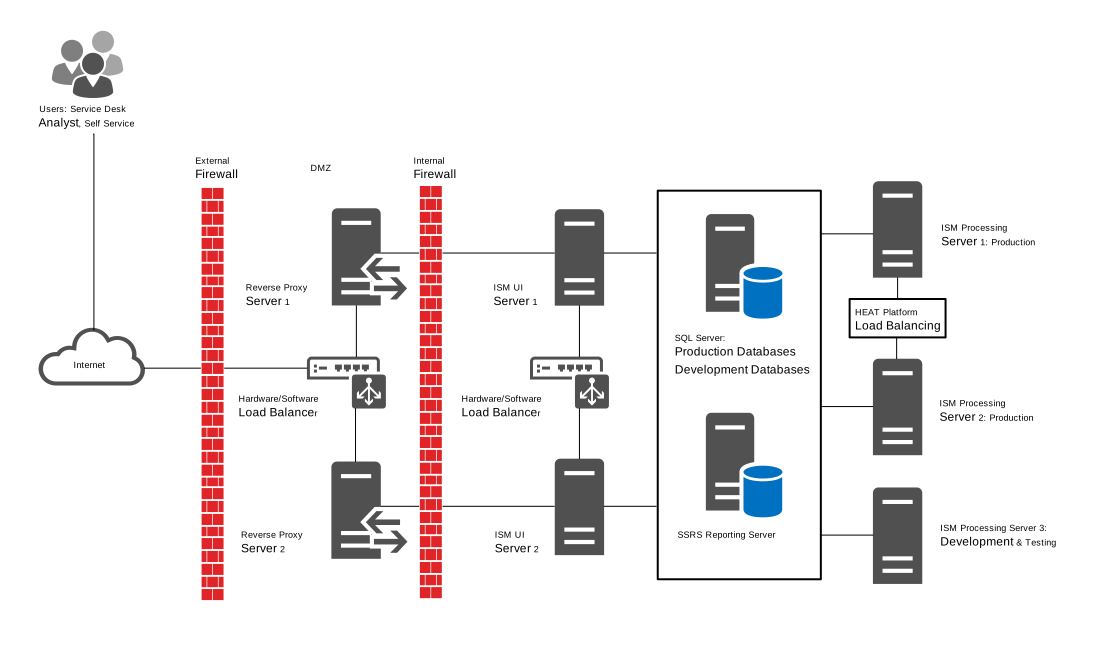
This option offers the greatest level of security by placing your web servers inside the company firewall. By placing reverse proxy servers in the DMZ, you prevent direct user login to the Service and Asset Manager web servers.
In addition, by locating the web servers on the same network as the process servers and databases, you achieve a true three-tier architecture.
The same Service and Asset Manager components are installed on the web servers when they are located inside the firewalls as when the servers are located outside.
This architecture involves the additional costs of servers to host the reverse-proxy service, as well as setting up and maintaining a second firewall. See About Installing the Service and Asset Manager for the Enterprise Production Deployment.
Example of an Enterprise Deployment with Service and Asset Manager Reverse Proxy Servers in the DMZ