
Preparing for Windows device support
This section describes how to prepare for Windows device support, (Windows Mobile 8.1 and Window 10 devices). This section includes:
Windows device support requirements
The following table lists the requirements for Windows device support.
Table: Requirements for Windows devices
Requirements | Required | Optional |
|---|---|---|
Publicly trusted certificate for registration (Portal certificate) | X | |
Autodiscovery: If autodiscovery is not set up, the registration process requires the device user to enter the Ivanti Sentry server address, that is, the FQDN for your Ivanti Sentry | | X |
DNS A record | X | |
SAN: Includes portal and enterpriseenrollment. YourCompanyDomainName.com | X | |
Setting up autodiscovery
Autodiscovery allows Windows devices to seamlessly register with Ivanti EPMM and Ivanti Sentry. The following set up is required for using autodiscovery with Windows devices:
- Create DNS A record to point to Ivanti EPMM and Ivanti Sentry.
- Obtain a TLS/SSL SAN certificate from a trusted Certificate Authority (CA)
Create DNS A record
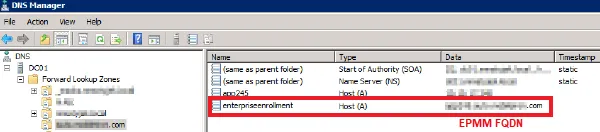
Create a DNS A record that refers DNS requests for enterpriseenrollment.YourCompanyDomainName.com to the Ivanti EPMM IP address.
YourCompanyDomainName must match the domain of the email addresses used for registering with Ivanti EPMM.
Figure: Enterprise enrollment
Obtain a TLS/SSL SAN certificate
For Windows devices, a Subject Alternative Name (SAN) TLS/SSL certificate from a trusted Certificate Authority (CA), such as Verisign or GoDaddy, is required. If you use a self-signed (localCA) certificate, device enrollment will fail.
- The TLS/SSL certificate provides trusted and secured connection without certificate warnings.
- A SAN certificate, also known as a multi-domain certificate or a unified communication certificate, is valid for two or more hosts. The SAN certificate must cover the Ivanti EPMM hostname and enterpriseenrollment.YourCompany-Domain name.com.
Connecting to the Windows Store
You can set up recommended apps that device users can download from the Ivanti Apps@Work app. For Windows devices, your firewall must allow connections to the following hosts:
Table: Windows host connections your firewall must allow
Purpose | Host connection |
|---|---|
Windows 10 app store search | |
Windows 10 VPN for Cisco AnyConnect | |
Windows Phone 8 App store detail URL | |
Windows Phone 8 app store icon URL |
See External and Internet rules for which ports to open.